1. Pengenalan
This user manual provides comprehensive instructions for the setup, operation, and maintenance of your FULLJA 17-inch Dual-WiFi Digital Picture Frame. This device allows you to instantly share photos and videos with loved ones from anywhere using the VPhoto app or email, supporting both 2.4 GHz and 5 GHz Wi-Fi networks. With its large display, ample storage, and versatile features, it is designed to preserve and display your precious memories with ease.
2. Maklumat Keselamatan
Please read all safety instructions carefully before using the device to ensure proper operation and to prevent damage or injury. Keep this manual for future reference.
- Jangan dedahkan peranti kepada air atau kelembapan berlebihan.
- Elakkan meletakkan peranti berhampiran sumber haba seperti radiator, daftar haba, dapur atau peralatan lain (termasuk amppenghidup) yang menghasilkan haba.
- Gunakan hanya penyesuai kuasa yang dibekalkan bersama peranti.
- Jangan sekat sebarang bukaan pengudaraan. Pasang mengikut arahan pengilang.
- Lindungi kord kuasa daripada berjalan atau tersepit, terutamanya pada palam, bekas kemudahan dan tempat ia keluar dari peranti.
- Cabut plag peranti semasa ribut petir atau apabila tidak digunakan untuk jangka masa yang lama.
- Rujuk semua servis kepada kakitangan perkhidmatan yang berkelayakan. Servis diperlukan apabila peranti telah rosak dalam apa jua cara, seperti kord bekalan kuasa atau palam rosak, cecair telah tertumpah atau objek telah jatuh ke dalam peranti, peranti telah terdedah kepada hujan atau lembapan, tidak beroperasi seperti biasa , atau telah digugurkan.
- Bersihkan hanya dengan kain kering.
3. Kandungan Pakej
Sahkan bahawa semua item terdapat dalam pakej:
- 1x FULLJA 17-inch Digital Picture Frame
- 1x Manual Pengguna
- 1x Penyesuai Kuasa
- 1x Bracket (for stand)
- 1x Alat Kawalan Jauh
- 1x Micro USB Cable

Image: FULLJA Brand Logo
This image displays the official FULLJA brand logo, typically found on product packaging and documentation.

Image: FULLJA 17-inch Digital Picture Frame
This image shows the 17-inch FULLJA Digital Picture Frame in a vertical orientation, resting on a surface.
4. Produk Lebihview
4.1. Komponen dan Kawalan
Familiarize yourself with the various parts of your digital picture frame:
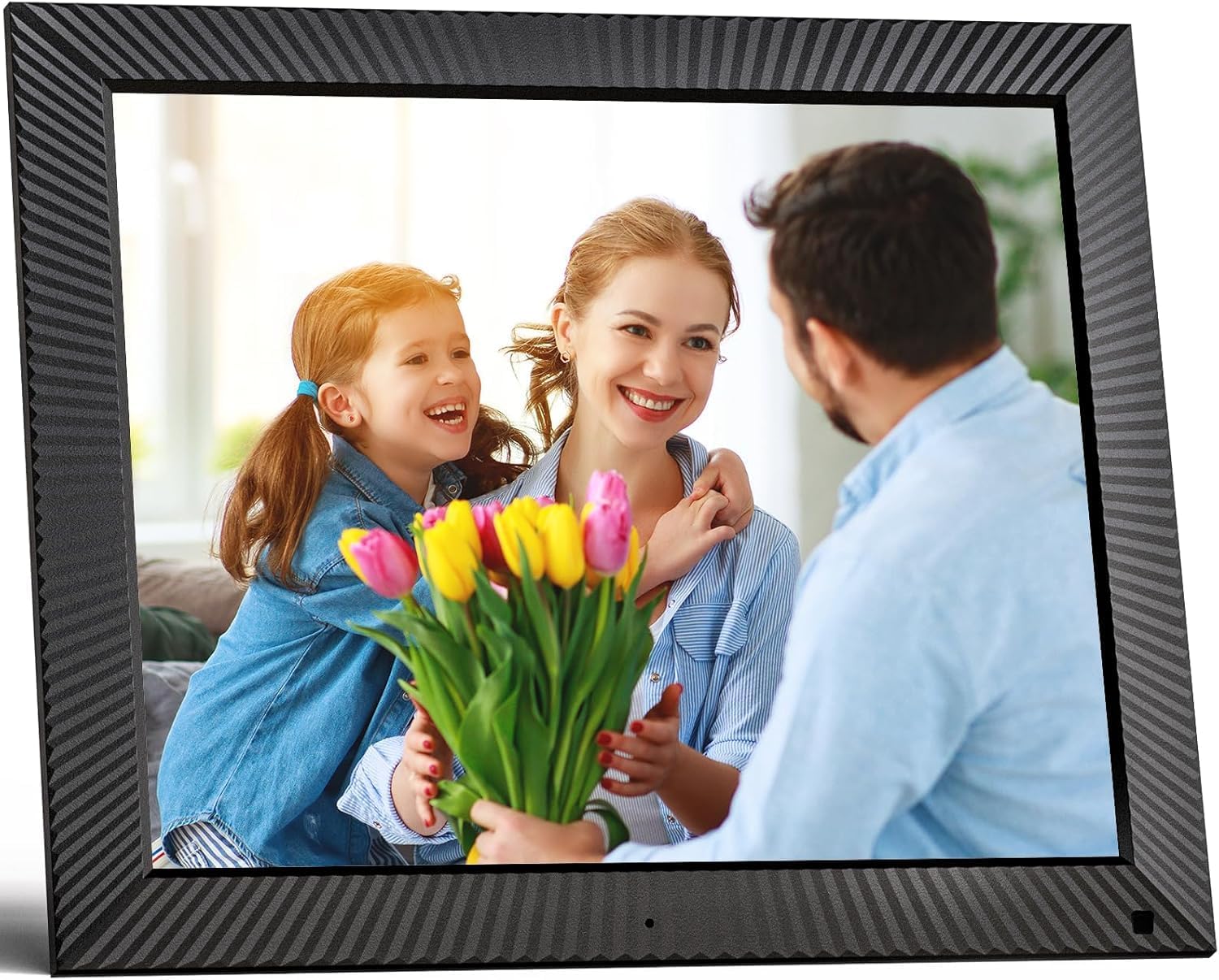
Imej: Depan view of the FULLJA 17-inch Digital Picture Frame
This image displays the front of the digital picture frame, showcasing its large screen with a family photo displayed. The frame has a textured black border.

Image: Features of the FULLJA 17-inch Digital Picture Frame
This image highlights key features of the 17-inch digital picture frame, including its touch screen, HD 1280x1024 pixel resolution, 4:3 aspect ratio, and remote control functionality. It shows the frame in both landscape and portrait orientations, with a view of the back panel and stand.
- Skrin Paparan: 17-inch IPS display with 1280x1024 resolution. Touch-enabled for direct interaction.
- Butang Kuasa: Located on the back or side, used to turn the frame on/off or put it into standby.
- Port USB: For connecting USB sticks to transfer photos/videos.
- Slot Kad TF: For inserting TF (MicroSD) cards (up to 64GB) to expand storage or transfer media.
- Port USB Mikro: For connecting to a computer for data transfer or firmware updates.
- Input Kuasa DC: Untuk menyambungkan penyesuai kuasa.
- Penderia Gerakan: Detects presence to automatically turn the screen on/off, saving energy.
- Pembesar Suara Terbina dalam: For audio playback with videos or background music.
- Wall Mount Holes: VESA compatible holes on the back for wall mounting.
- Stand Bracket: Attachable bracket for desktop placement in portrait or landscape orientation.
4.2. Alat Kawalan Jauh
The included remote control provides convenient access to various functions without touching the screen.
- Kuasa: Turn the frame on/off.
- Menu/Tetapan: Access the main menu and settings.
- Butang Navigasi (Atas/Bawah/Kiri/Kanan): Navigasi melalui menu dan pilihan.
- OK/Masukkan: Sahkan pilihan.
- Belakang/Keluar: Kembali ke skrin sebelumnya atau keluar dari menu.
- Jilid +/-: Laraskan kelantangan audio.
- Main/Jeda: Kawal main balik media.
- Seterusnya/Sebelumnya: Skip to the next or previous photo/video.
5. Persediaan
5.1. Kuasa Awal Hidup
- Unpack the digital picture frame and all accessories.
- Attach the stand bracket to the back of the frame if you intend to place it on a desk or shelf. Ensure it is securely fastened.
- Connect the power adapter to the DC power input port on the frame, then plug the adapter into a wall outlet.
- The frame will automatically power on or you may need to press the power button.
- Follow the on-screen prompts to select your language and time zone.
5.2. Menyambung ke Wi-Fi
A Wi-Fi connection is essential for sharing photos via the app or email.
- Dari menu utama, navigasi ke tetapan.
- Pilih Wi-Fi.
- The frame will scan for available networks. Select your desired 2.4 GHz or 5 GHz network from the list.
- Masukkan kata laluan Wi-Fi anda menggunakan papan kekunci pada skrin.
- Ketik Sambung. Once connected, a Wi-Fi icon will appear on the screen.

Image: Digital Picture Frame with Wi-Fi Sharing
This image illustrates the capability of the digital picture frame to share photos and videos wirelessly via Wi-Fi. It shows the frame displaying a family photo, with a smartphone in the foreground indicating app-based sharing.
5.3. Installing the VPhoto App
The VPhoto app is available for both iOS and Android devices and is the primary method for sharing content remotely.
- Cari untuk "VPhoto" in the Apple App Store (for iOS) or Google Play Store (for Android).
- Muat turun dan pasang aplikasi pada telefon pintar atau tablet anda.
- Open the VPhoto app and create an account or log in.
- To connect your frame, go to the tetapan menu on your digital picture frame and find the unique binding code.
- In the VPhoto app, select Tambah Peranti and enter the binding code displayed on your frame.
- Once connected, you can start sending photos and videos to your frame. Up to 30 app accounts can be bound to one frame.

Image: Sharing Options for Digital Picture Frame
This image demonstrates the various ways to share content with the digital picture frame, including the free VPhoto app for iOS and Android, unlimited cloud storage with 32GB built-in, and the ability to invite multiple family members to share. It shows the frame displaying a photo and a smartphone screen with the VPhoto app interface.
6. Arahan Operasi
6.1. Menghantar Foto dan Video
There are multiple ways to send media to your FULLJA digital picture frame:
- Melalui Aplikasi VPhoto: Open the VPhoto app, select the photos/videos you wish to send (up to 50 at a time), choose your connected frame, and tap send.
- Melalui E-mel: Each frame has a unique email address. You can send photos and short videos as attachments to this email address. The frame will automatically receive and display them.
- Via USB Stick/TF Card: Insert a USB stick or TF card into the respective port. Navigate to the Folder Foto or Video section on the frame, select the external storage, and copy files to the internal memory if desired.

Image: Digital Picture Frame with 32GB Internal Storage
This image highlights the frame's built-in 32GB internal storage, capable of storing approximately 80,000+ photos. The main frame displays a photo of a mother and child, surrounded by smaller circular images representing the vast number of memories that can be stored.
6.2. Fungsi Asas
- Slideshow Playback: Photos and videos will automatically play in a slideshow. You can adjust the display interval and transition effects in the settings.
- Photo/Video Browsing: Tap the screen or use the remote to manually browse through your media.
- Kawalan Kelantangan: Adjust the volume for videos or background music using the touch screen controls or the remote.
- Auto Putar: The frame automatically adjusts the display orientation (portrait or landscape) based on how it is positioned.
6.3. Fungsi Lanjutan
- Penderia Gerakan: Enable this feature in settings to have the frame automatically turn on when motion is detected and off when no motion is detected for a set period, saving energy.
- Auto Screen On/Off: Set specific times for the frame to automatically turn on and off daily.
- Jam & Kalendar: Access the built-in clock and calendar functions from the main menu.
- penggera: Tetapkan penggera untuk peringatan.
- Skrin Pisah: Display multiple photos simultaneously (check settings for layout options).
- Kapsyen Teks: Add captions to your photos via the VPhoto app.
- Main Balik Muzik: Play background music during slideshows (ensure music files are on the frame's internal storage or connected USB/TF card).

Image: Digital Picture Frame with Function Icons
This image showcases the multi-functional capabilities of the digital picture frame, including Wi-Fi connectivity, weather display, clock, calendar, photo and video playback, music, and slideshow features. Two frames are shown, one on a wall and one on a cabinet, with icons representing these functions below.
7. Penyelenggaraan
7.1. Cleaning the Frame
- Always unplug the frame before cleaning.
- Gunakan kain lembut, kering dan tidak berbulu untuk mengelap skrin dan bingkai dengan lembut.
- For stubborn smudges on the screen, lightly dampen the cloth with water or a screen-cleaning solution (specifically designed for electronics) and wipe carefully. Do not spray liquid directly onto the screen.
- Avoid using abrasive cleaners, waxes, or solvents as they may damage the surface.
7.2. Kemas Kini Perisian
Periodically check for software updates in the frame's settings menu to ensure optimal performance and access to new features. Updates are typically downloaded and installed over Wi-Fi.
7.3. Pengurusan Storan
While the frame has 32GB of internal storage and unlimited cloud storage, you may occasionally want to manage local files:
- Akses ke Folder Foto or File Pengurus in the settings to view, delete, or organize stored media.
- Anda boleh memindahkan files to/from a USB stick or TF card to manage internal storage.
8. Penyelesaian masalah
If you encounter issues with your digital picture frame, refer to the following common problems and solutions:
| Masalah | Kemungkinan Punca / Penyelesaian |
|---|---|
| Bingkai tidak dihidupkan. |
|
| Tidak dapat menyambung ke Wi-Fi. |
|
| Foto/Video tidak muncul pada bingkai. |
|
| Screen freezes or is unresponsive. |
|
| Sensor gerakan tidak berfungsi. |
|
9. Spesifikasi
| Ciri | Perincian |
|---|---|
| Nombor Model | B0CCVBSM87 |
| Jenama | FULLJA |
| Saiz Skrin | 17 Inci |
| Resolusi Paparan | 1280 x 1024 piksel (IPS) |
| Nisbah Aspek | 4:3 |
| Storan Dalaman | 32GB |
| Sokongan Storan Luaran | USB stick, TF card (MicroSD) up to 64GB |
| Kesambungan Wi-Fi | 2.4 GHz / 5 GHz Dual-Band |
| Kaedah Kawalan | Touch Screen, Remote Control, VPhoto App |
| Penderia Pergerakan | ya |
| Auto Putar | ya |
| Boleh Dipasang di Dinding | ya |
| Dimensi Produk | 29.67 x 43.51 x 2.51 cm |
| Berat Produk | 2.52 kg |
| warna | Hitam |
10. Waranti dan Sokongan
10.1. Waranti Terhad
The FULLJA 17-inch Dual-WiFi Digital Picture Frame comes with a waranti terhad setahun from the date of purchase. This warranty covers defects in materials and workmanship under normal use. It does not cover damage caused by accident, misuse, abuse, neglect, unauthorized modification, or improper installation.
To make a warranty claim, please retain your proof of purchase and contact FULLJA customer support.
10.2. Sokongan Pelanggan
For any questions, technical assistance, or support inquiries, please contact FULLJA customer service. We offer lifetime support and aim to provide a prompt response within 24 hours.
Please refer to the contact information provided on the product packaging or the official FULLJA webtapak untuk saluran sokongan yang paling terkini.

