pengenalan
Terima kasih kerana membeliasing the JTEMAN Cell Phone Stand with Wireless Bluetooth Speaker and Alarm Clock. This multi-functional device is designed to enhance your daily routine by combining essential features into one compact and stylish unit. It serves as a high-quality Bluetooth speaker, a reliable alarm clock with a clear display, and a stable, adjustable stand for your mobile devices. Please read this manual carefully to ensure proper use and optimal performance.
Maklumat Keselamatan
- Jangan dedahkan peranti kepada suhu yang melampau, cahaya matahari langsung atau kelembapan yang tinggi.
- Elakkan daripada menjatuhkan atau meletakkan peranti kepada kesan yang kuat.
- Keep away from water and other liquids. If the device comes into contact with liquid, disconnect it immediately and allow it to dry completely before reuse.
- Jangan cuba membuka, membaiki atau mengubah suai peranti ini sendiri. Rujuk semua servis kepada kakitangan yang berkelayakan.
- Gunakan hanya kabel pengecasan yang disediakan atau setara yang diperakui.
- Jauhkan daripada kanak-kanak.
Kandungan Pakej
- JTEMAN Cell Phone Stand with Wireless Bluetooth Speaker and Alarm Clock (Model: JT-L36)
- Kabel Pengecasan Jenis-C
- Manual Pengguna
Produk Selesaiview
Familiarize yourself with the components and controls of your JTEMAN device:
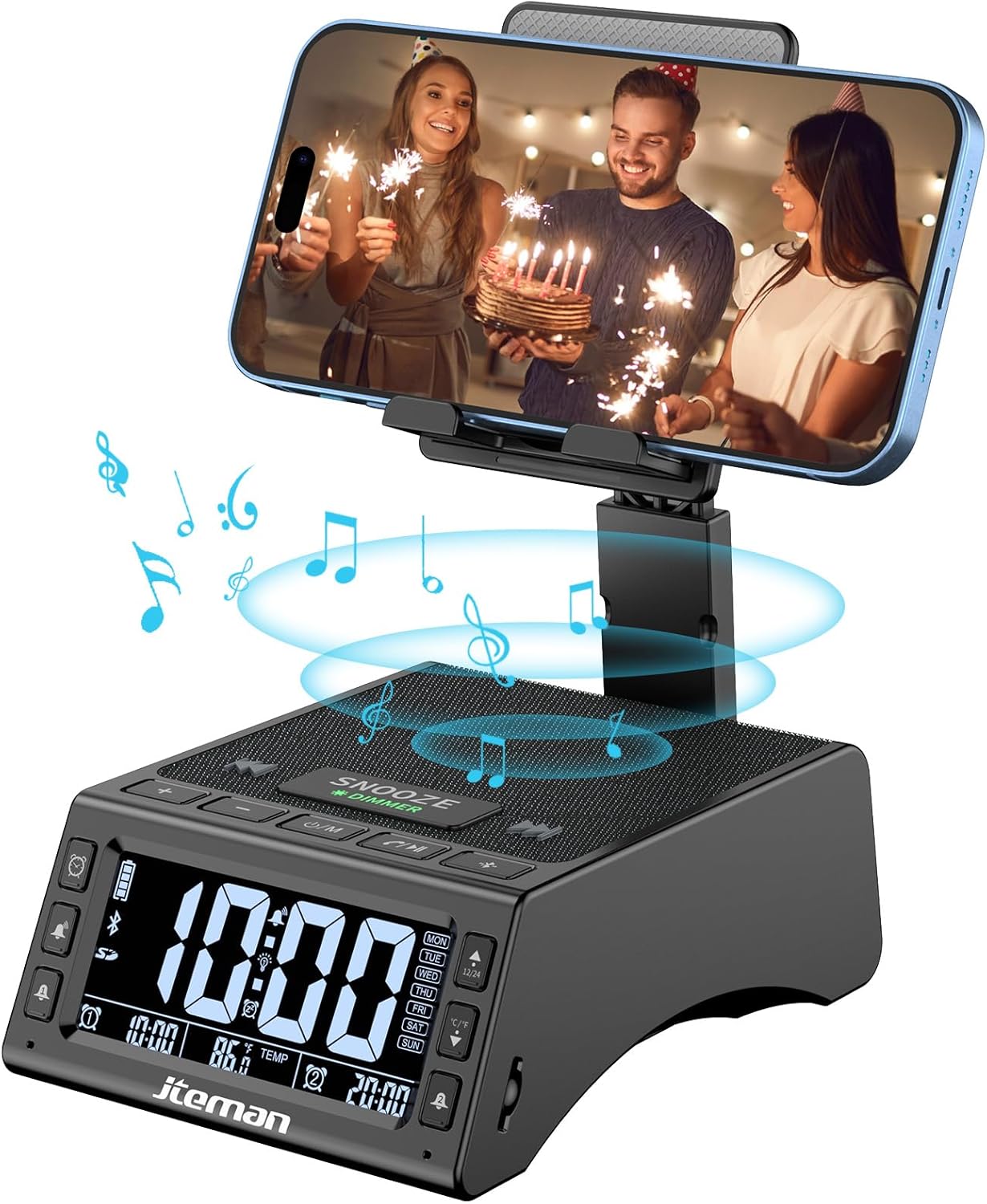
Rajah 1: Depan view of the JTEMAN device with a smartphone on the adjustable stand, displaying the time and temperature.

Gambar 2: Lebihview highlighting the multi-functional aspects including Bluetooth speaker, 12/24H time display, temperature display, foldable phone stand, TF card support, microphone, charging station, dual alarm clocks, and 9 ringtones.
Kawalan dan Pelabuhan:
- Skrin Paparan: Shows time, temperature, day of the week, and alarm indicators.
- Butang TUNDA/DIMMER: Press to snooze an active alarm (5 minutes); long press to adjust display brightness (4 levels).
- Power On/Off/Mode Button: Long press to power on/off; short press to cycle through modes (Bluetooth, TF Card).
- Play/Pause/Answer Button: Controls music playback; answers/ends calls.
- Butang Naik Kelantangan/Trek Seterusnya: Meningkatkan kelantangan; tekan sebentar untuk trek seterusnya.
- Kelantangan Turun/Butang Trek Sebelumnya: Mengurangkan kelantangan; tekan sebentar untuk trek sebelumnya.
- Butang Berpasangan Bluetooth: Memulakan mod berpasangan Bluetooth.
- Alarm 1 & Alarm 2 Buttons: For setting and managing dual alarms.
- mikrofon: Untuk panggilan bebas tangan.
- Port Input Jenis-C: Untuk mengecas peranti.
- Port Output Jenis-C: Untuk mengecas peranti luaran.
- Slot Kad TF: Untuk memainkan muzik terus daripada kad TF.
- Adjustable Phone Stand: Foldable and extendable for various viewing angles. Features anti-slip pads and base for stability.
Persediaan
1. Pengecasan Awal
- Connect the provided Type-C charging cable to the Port Input Jenis-C pada peranti.
- Connect the other end of the cable to a compatible USB power adapter (not included) and plug it into a wall outlet.
- The display will indicate charging status. Fully charge the device before first use.

Figure 3: The device connected via Type-C for charging itself and an external phone.
2. Menetapkan Masa dan Tarikh
- Upon powering on, the device should automatically synchronize the current time.
- If manual adjustment is needed, refer to the detailed instructions in the full user manual (included in the package).
- To switch between 12/24 hour format or °F/°C temperature display, use the dedicated buttons or refer to the full manual.

Figure 4: The HD display showing time, temperature, and alarm settings with brightness adjustment levels.
Arahan Operasi
1. Using the Phone Stand
- The integrated phone stand can be pulled up from the back of the unit.
- Adjust the height and angle of the stand to your preferred viewing position. The stand is designed to be stable and strong, accommodating devices from 4.0 to 13 inches.
- When not in use, the stand can be folded back into the unit for a compact form factor.

Figure 5: Demonstrates the adjustable height and angle of the phone stand, along with its anti-slip features and foldable design.
2. Bluetooth Speaker Function
- Hidupkan kuasa: Long press the Power On/Off/Mode button. The device will enter Bluetooth pairing mode, indicated by a flashing Bluetooth icon on the display.
- Berpasangan: On your smartphone or other Bluetooth-enabled device, search for “JT-L36” in the Bluetooth settings and select it to pair. A confirmation sound will indicate successful pairing.
- Main Balik Muzik: Once paired, you can play audio from your device through the JTEMAN speaker. Use the Play/Pause, Volume Up/Next Track, and Volume Down/Previous Track buttons to control playback.
3. Main Semula Kad TF
- Insert a TF card (not included) with audio files into the TF Card Slot.
- The device will automatically switch to TF Card mode and begin playing music. If not, short press the Mode button to select TF Card mode.
4. Alarm Clock Features
- Menetapkan Penggera: Use the Alarm 1 and Alarm 2 buttons to set up to two independent alarms. Follow the on-screen prompts to set the time and alarm frequency (e.g., Mon-Fri, Sat-Sun, Mon-Sun).
- Fungsi Tunda: When an alarm sounds, press the large SNOOZE button on top to activate a 5-minute snooze.
- Pelarasan Kecerahan: Long press the SNOOZE/DIMMER button to cycle through four levels of display brightness, including an off setting for minimal light disturbance.
5. Panggilan Bebas Tangan
- When a call comes in while your phone is connected via Bluetooth, press the Play/Pause/Answer button to answer the call.
- Gunakan mikrofon terbina dalam untuk komunikasi yang jelas.
- Press the Play/Pause/Answer button again to end the call.
6. Mengecas Peranti Luaran
- Connect your external device (e.g., smartphone, tablet) to the Port Keluaran Jenis-C on the JTEMAN unit using a compatible charging cable.
- The JTEMAN device will provide power to charge your external device.
Penyelenggaraan
- Bersihkan peranti dengan kain lembut dan kering. Jangan gunakan pembersih atau pelarut yang melelas.
- Pastikan semua port bebas daripada habuk dan serpihan.
- Simpan peranti di tempat yang sejuk dan kering apabila tidak digunakan untuk tempoh yang lama.
Menyelesaikan masalah
| Masalah | Kemungkinan Punca | Penyelesaian |
|---|---|---|
| Peranti tidak dihidupkan. | Low battery; power adapter/cable issue. | Charge the device fully. Check power adapter and cable connections. |
| Tiada bunyi dari pembesar suara. | Volume too low; not paired correctly; wrong mode. | Increase volume on both device and connected phone. Re-pair Bluetooth. Ensure correct mode (Bluetooth/TF Card). |
| Gandingan Bluetooth gagal. | Peranti terlalu jauh; mod berpasangan tidak aktif; gangguan. | Ensure device is in pairing mode and within 10 meters. Turn off other Bluetooth devices. Try restarting both devices. |
| Penggera tidak berbunyi. | Alarm not set; alarm volume too low; alarm disabled. | Verify alarm settings and ensure it's enabled. Increase alarm volume. |
| Phone not charging via output port. | Cable issue; device battery low; incompatible device. | Ensure the JTEMAN device is charged. Try a different charging cable. Confirm your phone is compatible with Type-C charging. |
Spesifikasi
| Jenama | JTEMAN |
| Nombor Model | JT-L36 |
| Dimensi Produk | 6.1 x 4.3 x 2.1 inci |
| Berat Barang | 1.26 paun |
| warna | Hitam |
| Antara Muka Perkakasan | USB 2.0 |
| Jumlah Port USB | 2 (Type-C Input, Type-C Output) |
| Keserasian | 4.0-13 inch devices |
Waranti dan Sokongan
JTEMAN products are manufactured with high standards of quality. For specific warranty information, please refer to the warranty card included in your product packaging or visit the official JTEMAN website. If you encounter any issues or have questions not covered in this manual, please contact JTEMAN customer support through the contact information provided on the product packaging or webtapak.
Sila simpan bukti pembelian anda untuk tuntutan waranti.


