1. Produk Lebihview
The TECLAST T40Air is a high-performance tablet designed for various tasks, from entertainment to productivity. It features a 10.4-inch display, 16GB RAM, 256GB ROM, and runs on Android 13, powered by an octa-core processor. Its lightweight design and robust battery ensure portability and extended usage.

Imej 1.1: Depan dan belakang view of the TECLAST T40Air Tablet, showcasing its sleek design and dual rear cameras.
Video 1.1: Seorang pegawai tamatview of the TECLAST T40Air Android Tablet, highlighting its key features and design.
2. Persediaan Awal
2.1 Pembukaan Kotak dan Penggunaan Pertama
Carefully remove the tablet and all accessories from the packaging. Inspect the device for any physical damage. Before first use, it is recommended to fully charge the tablet.
2.2 Mengecas Tablet
Connect the provided USB-C cable to the tablet's charging port and the other end to the 18W PD fast charging adapter. Plug the adapter into a power outlet. The battery indicator on the screen will show the charging status. A full charge typically takes approximately 2-3 hours.
2.3 Menghidupkan/Mematikan
- Untuk Menghidupkan: Press and hold the Power button located on the side of the tablet until the TECLAST logo appears on the screen.
- Untuk Mematikan: Press and hold the Power button until a power menu appears. Select 'Power off' and confirm.
- Untuk Mulakan Semula: Daripada menu kuasa, pilih 'Mulakan Semula'.
2.4 Tatarajah Awal
Setelah dihidupkan pertama, tablet akan membimbing anda melalui proses persediaan awal:
- Pemilihan Bahasa: Pilih bahasa pilihan anda.
- Sambungan Wi-Fi: Pilih rangkaian Wi-Fi anda dan masukkan kata laluan untuk bersambung ke internet.
- Akaun Google: Log masuk dengan akaun Google anda atau buat yang baharu. Ini penting untuk memuat turun apl daripada Gedung Google Play dan menyegerakkan data.
- Tarikh & Masa: Tetapkan tarikh dan masa yang betul, atau benarkan rangkaian menetapkannya secara automatik.
- Keselamatan: Set up a screen lock (PIN, pattern, password, or Face Unlock).
2.5 Pemasangan Kad SIM (Pilihan)
The T40Air supports 4G LTE connectivity. To install a SIM card:
- Cari dulang kad SIM di sisi tablet.
- Gunakan alat ejektor SIM yang disediakan untuk membuka dulang.
- Place the Nano-SIM card(s) into the designated slots, ensuring correct orientation.
- Tolak dulang kembali ke dalam tablet dengan lembut sehingga ia terpasang dengan klik di tempatnya.

Image 2.1: The TECLAST T40Air Tablet highlighting its 4G LTE support and SIM card tray location.
3. Arahan Operasi
3.1 Menavigasi Android 13
The TECLAST T40Air runs on Android 13, offering an intuitive user experience. Use touch gestures to navigate:
- Ketik: Pilih item.
- Leret: Tatal melalui skrin atau senarai.
- Cubit untuk zum: Zum masuk atau keluar pada imej dan web muka surat.
- Tekan lama: Akses menu kontekstual atau alihkan ikon.
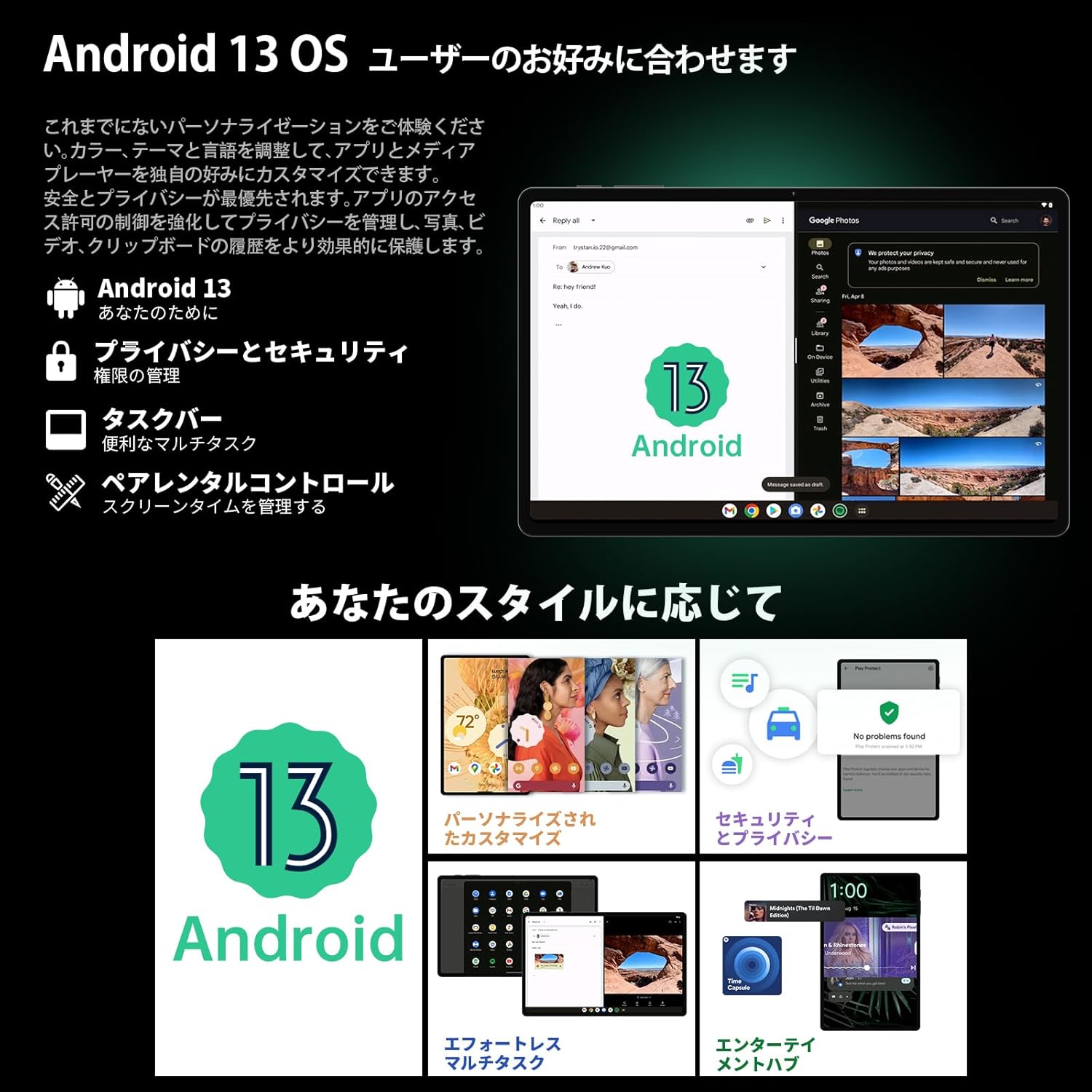
Image 3.1: The Android 13 interface on the TECLAST T40Air Tablet, showing personalization and security features.
3.2 Ciri Paparan
The 10.4-inch 2K FHD IPS display provides vibrant colors and sharp details. It features:
- TDDI Fully Laminated: Enhances touch responsiveness and visual clarity.
- Mod Perlindungan Mata: Reduces blue light to prevent eye strain.
- Mod Bacaan: Optimizes the screen for comfortable reading.
- Dark Mode & Dim Mode: Adjusts screen brightness and color for different lighting conditions.

Image 3.2: Visual representation of the TECLAST T40Air Tablet's display features, including eye protection and reading modes.
3.3 Penggunaan Kamera
The tablet is equipped with a 13MP rear dual camera and an 8MP front camera.
- Mengambil gambar: Buka aplikasi Kamera, bingkaikan tangkapan anda dan ketik butang pengatup.
- Merakam Video: Switch to video mode in the Camera app and tap the record button.
- Kamera Depan: Use for video calls and selfies.

Image 3.3: The TECLAST T40Air Tablet showcasing its camera capabilities and 3.5mm headphone jack.
3.4 Audio dan Kesambungan
- SWEET 4 Speakers: Enjoy immersive audio with the tablet's quad-speaker system and Smart K Digital Amplebih hidup.
- Bicu Fon Kepala 3.5mm: Connect your wired headphones for private listening.
- Wi-Fi: Supports 2.4GHz and 5GHz dual-band Wi-Fi (802.11ac) for stable and fast internet.
- Bluetooth 5.0: Connect wireless accessories like headphones, keyboards, and mice.
- VoLTE: Enables high-quality voice calls over 4G LTE networks.
3.5 Buka Kunci Muka
The tablet supports Face Unlock for convenient and secure access. Set it up in the Security settings. Ensure good lighting conditions for optimal performance.
4. Penyelenggaraan
4.1 Membersihkan Tablet
Untuk membersihkan tablet anda, gunakan kain lembut dan tidak berbulu. Untuk calitan degil, sedikit dampen the cloth with water or a screen cleaner. Avoid using harsh chemicals, abrasive materials, or excessive moisture.
4.2 Penjagaan Bateri
- Elakkan daripada mendedahkan tablet kepada suhu yang melampau.
- Jangan biarkan bateri habis sepenuhnya dengan kerap.
- Use the original charger or a certified 18W PD charger for optimal charging.
4.3 Kemas Kini Perisian
Semak dan pasang kemas kini perisian secara kerap untuk memastikan tablet anda mempunyai ciri terkini, tampung keselamatan dan peningkatan prestasi. Pergi ke Tetapan > Sistem > Kemas kini sistem.
4.4 Pengurusan Storan
The tablet comes with 256GB of internal storage, expandable via microSD card up to 1TB. Regularly manage your storage by:
- Memadam yang tidak perlu files dan apl.
- Moving large files ke kad microSD.
- Utilizing cloud storage services.

Image 4.1: The TECLAST T40Air Tablet highlighting its 16GB RAM, 256GB ROM, and support for microSD card expansion.
5. Penyelesaian masalah
This section addresses common issues you might encounter with your TECLAST T40Air Tablet.
5.1 Peranti Tidak Dihidupkan
- Ensure the battery is sufficiently charged. Connect the charger and wait a few minutes before attempting to power on.
- Tekan dan tahan butang Kuasa selama sekurang-kurangnya 10-15 saat untuk memaksa mulakan semula.
5.2 Isu Sambungan Wi-Fi
- Check if Wi-Fi is enabled in Tetapan > Rangkaian & Internet > Wi-Fi.
- Pastikan anda telah memasukkan kata laluan Wi-Fi yang betul.
- Mulakan semula penghala Wi-Fi anda dan tablet.
- Cuba sambungkan ke rangkaian Wi-Fi lain untuk mengasingkan isu tersebut.
5.3 Prestasi Perlahan
- Tutup aplikasi latar belakang yang tidak digunakan.
- Clear cache data for apps that are running slowly (Tetapan > Apl > [Nama Apl] > Storan & cache > Kosongkan cache).
- Pastikan anda mempunyai ruang simpanan kosong yang mencukupi.
- Mulakan semula tablet.
5.4 Skrin Tidak Membalas
- Restart the tablet by holding the Power button.
- Pastikan skrin bersih dan bebas daripada kelembapan atau serpihan.
5.5 Tetapan Semula Kilang (Pilihan Terakhir)
If issues persist, you may consider performing a factory reset. Amaran: Ini akan memadamkan semua data pada tablet anda. Sandarkan data penting sebelum meneruskan.
Pergi ke Tetapan > Sistem > Tetapkan semula pilihan > Padam semua data (tetapan semula kilang) dan ikut arahan pada skrin.
6. Spesifikasi
Below are the technical specifications for the TECLAST T40Air Tablet:
| Ciri | Spesifikasi |
|---|---|
| Nombor Model | T40Air |
| Saiz Paparan | 10.4 Inci |
| Resolusi Skrin | 1920 x 1080 pixels (2K FHD IPS) |
| RAM | 16 GB |
| Flash Memory Size (ROM) | 256 GB |
| Jenama Pemproses | Rockchip or Unisoc (Octa-core) |
| Sistem Operasi | Android 13 |
| Jenis Wayarles | Frekuensi Radio 5 GHz, 802.11a/b/g/n/ac |
| Bluetooth | Bluetooth 5.0 |
| Purata Hayat Bateri | 5 Hours (7200mAh) |
| Berat Barang | 1.01 paun (lebih kurang 460g) |
| Dimensi Produk | 9.6 x 6.1 x 0.3 inci |
| Ciri Khas | Ringan |
7. Waranti dan Sokongan
7.1 Waranti Produk
The TECLAST T40Air Tablet comes with a standard manufacturer's warranty. Please refer to the warranty card included in your product packaging for specific terms, conditions, and duration. Keep your proof of purchase for warranty claims.
7.2 Sokongan Pelanggan
If you encounter any issues not covered in this manual or require further assistance, please contact TECLAST customer support. You can typically find contact information on the official TECLAST webtapak atau melalui saluran sokongan peruncit anda.
- Visit the official TECLAST webtapak untuk Soalan Lazim dan sumber sokongan.
- Contact the seller or retailer for product-specific support and return policies.


