pengenalan
This manual provides detailed instructions for the EKSA H1 Plus Bluetooth Trucker Headset. Please read thoroughly to ensure proper setup, operation, and maintenance of your device. This headset is designed for clear communication in various environments, featuring advanced noise-cancelling technology and versatile connectivity options.
Kandungan Pakej
- H1 Plus Headset
- Kes Pelindung
- Replacement Ear Pad (Mesh breathable)
- Kabel Pengecasan Jenis-C
- USB Dongle (PC Adapter)
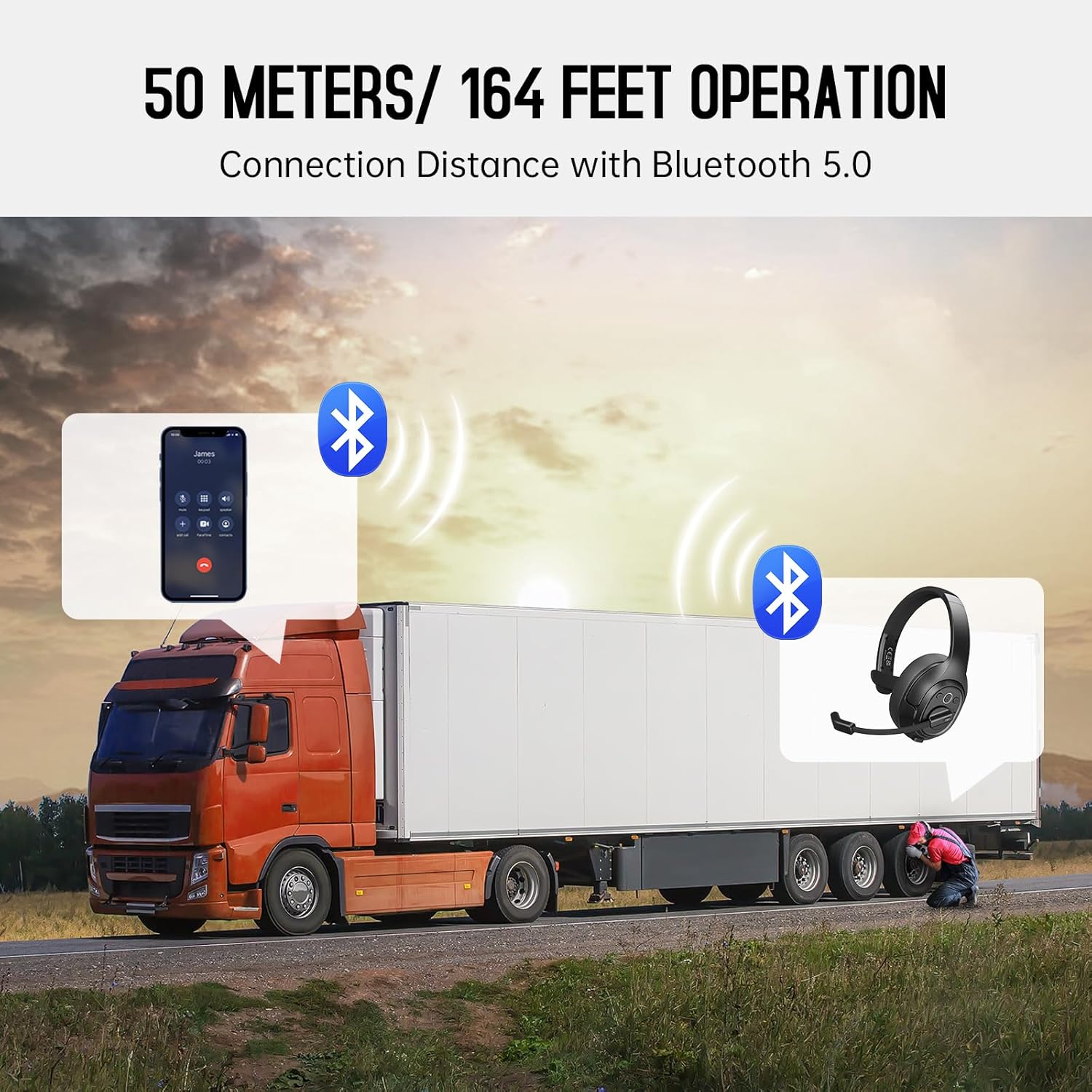
Image: The EKSA H1 Plus headset, USB dongle, and charging cable as typically found in the product packaging.
Persediaan
1. Mengecas Alat Dengar
Before first use, fully charge the headset. Connect the provided Type-C charging cable to the headset's charging port and the other end to a USB power source. The charging indicator will show the charging status. A full charge takes approximately 1.5 hours.

Image: Visual representation of the headset's battery life and charging duration.
2. Menghidupkan/Mematikan
Press and hold the Multi-Function Button (MFB) for 3 seconds to power on or off the headset. A voice prompt will indicate the status.
3. Bluetooth Pairing (for Mobile Devices)
- Pastikan alat dengar dimatikan.
- Press and hold the MFB for 5-7 seconds until the LED indicator flashes blue and red alternately, indicating pairing mode.
- On your mobile device, enable Bluetooth and search for "EKSA-H1PLUS".
- Select "EKSA-H1PLUS" to connect. The LED will turn solid blue once connected.
4. Connecting with USB Dongle (for PC/Mac without Bluetooth)
- Pasangkan dongle USB ke port USB yang tersedia pada komputer anda.
- Hidupkan alat dengar. Ia akan cuba menyambung ke dongle secara automatik.
- The LED on the dongle and headset will turn solid blue when connected.
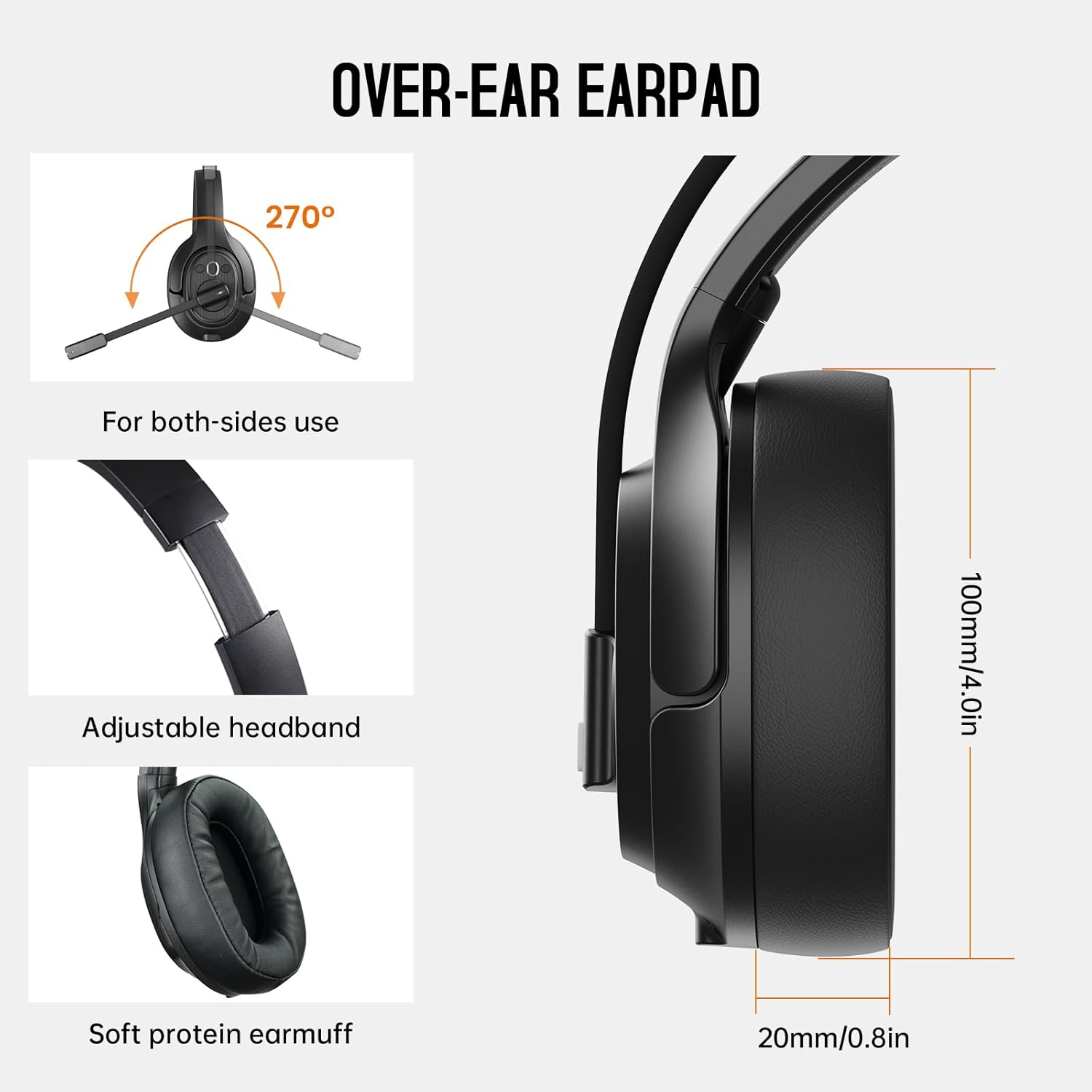
Image: The headset demonstrating simultaneous connection to a phone via Bluetooth and a laptop via USB dongle.
Arahan Operasi
1. Kawalan Ke Atasview
Alat dengar ini mempunyai kawalan intuitif yang terletak pada penutup telinga:
- Butang Berbilang Fungsi (MFB): Hidup/mati kuasa, main/jeda muzik, jawab/tamatkan panggilan.
- Kelantangan Naik (+): Tingkatkan kelantangan.
- Perlahankan suara (-): Kurangkan volum.
- Butang Bisukan: Redam/nyahredamkan mikrofon semasa panggilan.
- AI Assistant Button: Activate your device's voice assistant.

Imej: Jarak dekat view of the headset's control buttons and ports.
2. Membuat dan Menerima Panggilan
- Jawab/Tamatkan Panggilan: Tekan pendek MFB.
- Tolak Panggilan: Tekan dan tahan MFB selama 2 saat.
- Dail Semula Nombor Terakhir: Tekan dua kali pada MFB.
- Redam/Nyahredam Mikrofon: Short press the dedicated mute button on the microphone arm.
3. Microphone and Wearing Adjustments
The headset is designed for comfort and versatility:
- Destar boleh laras: Panjangkan atau tarik balik ikat kepala agar muat dengan selesa di kepala anda.
- Mikrofon Boleh Putar: The microphone arm can rotate 270 degrees, allowing it to be worn on either the left or right ear. Position the microphone close to your mouth for optimal voice pickup.
- Comfortable Earcups: The over-ear design with soft ear pads ensures comfort during extended use.

Image: Features illustrating the ergonomic design of the headset, including adjustable headband and rotatable microphone.
4. Environmental Noise Cancelling (ENC) Microphone
The AI-Powered ENC microphone filters out up to 99.8% of ambient noise, ensuring your voice is transmitted clearly even in noisy environments like call centers, construction sites, or trucks.

Image: A visual explanation of the ENC microphone's function, demonstrating noise reduction.
5. Sambungan Berbilang Peranti
The headset supports simultaneous connection to two different devices, such as a smartphone and a computer, allowing seamless switching between calls and other audio sources.

Image: Illustration of the headset's ability to connect to two devices concurrently.
6. Extended Wireless Range
Utilizing Bluetooth 5.0 technology, the headset offers a stable wireless connection up to 30 meters (99 feet). In unobstructed environments, the range can extend up to 50 meters (164 feet).

Image: Visualizing the headset's long-range wireless capabilities in an outdoor setting.
Penyelenggaraan
- Pembersihan: Gunakan kain lembut dan kering untuk membersihkan set kepala. Elakkan menggunakan bahan kimia yang keras atau bahan yang melelas.
- Penggantian Pad Telinga: The headset comes with a replacement mesh breathable ear pad. To replace, gently twist and pull off the existing ear pad, then align and press the new ear pad into place.
- Storan: Store the headset in its protective case when not in use to prevent damage.

Image: Demonstrating the detachable ear pads and the two types included for different comfort levels.
Menyelesaikan masalah
| Masalah | Penyelesaian |
|---|---|
| Alat dengar tidak dihidupkan. | Ensure the headset is fully charged. Press and hold the MFB for 3 seconds. |
| Tidak boleh berpasangan melalui Bluetooth. | Ensure the headset is in pairing mode (flashing blue/red LED). Turn off and on Bluetooth on your device. Move closer to the device. |
| Tiada bunyi atau kualiti audio yang teruk. | Check volume levels on both the headset and connected device. Ensure the headset is selected as the audio output device. Re-pair the headset. |
| Mikrofon tidak berfungsi. | Ensure the microphone is not muted. Check microphone settings on your connected device. Adjust microphone position. |
| USB dongle not connecting. | Pastikan dongle dimasukkan sepenuhnya. Cuba port USB yang lain. Mulakan semula komputer anda. |
Spesifikasi
| Ciri | Perincian |
|---|---|
| Nama Model | EKSA-H1PLUS |
| Teknologi Ketersambungan | Wayarles (Bluetooth 5.0) |
| Versi Bluetooth | 5.0 |
| Julat Bluetooth | 30 Meters (99 feet), up to 50 Meters (164 feet) unobstructed |
| Mikrofon | AI-Powered Environmental Noise Cancelling (ENC) |
| Hayat Bateri (Masa Berbual) | Sehingga 30 Jam |
| Battery Life (Music Time) | Sehingga 57 Jam |
| Masa Mengecas | lebih kurang 1.5 Jam |
| Bentuk alat dengar | Atas Telinga |
| Jenis Kawalan | Volume Control, Mute, AI Assistant |
| Berat badan | 1.01 paun (lebih kurang 458g) |
Video Produk Rasmi
EKSA H1 Plus Wireless Bluetooth Headset Overview
Video: Seorang pegawai tamatview of the EKSA H1 Plus Wireless Bluetooth Headset, highlighting its key features and design.
EKSA H1Plus Bluetooth Trucker Headset Features
Video: A detailed look at the features and benefits of the EKSA H1Plus Bluetooth Trucker Headset.
Waranti dan Sokongan
EKSA products are designed for durability and performance. For warranty information and customer support, please refer to the official EKSA website or contact their customer service directly. Optional protection plans are available for extended coverage.
Untuk bantuan lanjut, layari: www.eksa.net


