1. Pengenalan
Manual ini memberikan arahan terperinci untuk pemasangan, konfigurasi dan pengendalian Modul Geganti Tanpa Wayar 2-Saluran Tuya (Model JGTY02H). Modul suis pintar ini membolehkan kawalan jauh dua peranti atau peralatan elektrik bebas melalui Wi-Fi, Bluetooth dan RF 433MHz. Ia menyokong penyepaduan dengan aplikasi Smart Life/Tuya, serta kawalan suara melalui Amazon Alexa dan Google Home.
2. Kandungan Pakej
Sahkan bahawa semua item terdapat dalam pakej anda:
- 1 x Modul Suis Rumah Pintar Tanpa Wayar 2 Saluran Tuya
- 1 x Manual Arahan

Imej: Modul Geganti Tanpa Wayar 2 Saluran Tuya ditunjukkan bersama pembungkusan runcitnya dan manual arahan yang disertakan.
3. Spesifikasi Produk
| Nombor Model | JGTY02H |
| Bekerja Voltage | AC / DC 7-32V |
| Penggunaan Kuasa | <1W (Arus pegun: 80mA) |
| Maks. semasa | 10A setiap saluran |
| Maks. Jilidtage | 250V |
| Kesambungan Wayarles | Wi-Fi (IEEE 802.11 b/g/n), Bluetooth, RF 433MHz |
| Suhu Operasi | -40°C hingga 70°C (-40°F hingga 158°F) |
| Kelembapan Operasi | 40% hingga 80% RH |
| Dimensi Produk | Kira-kira 5 x 2 x 1 inci |
| Jenis Pemasangan | Lekap di dinding |
| Bahan Kenalan | Tembaga |
| Jenis Kenalan | Biasanya Terbuka (TIDAK) |
4. Produk Lebihview
Biasakan diri anda dengan komponen dan penunjuk modul geganti.
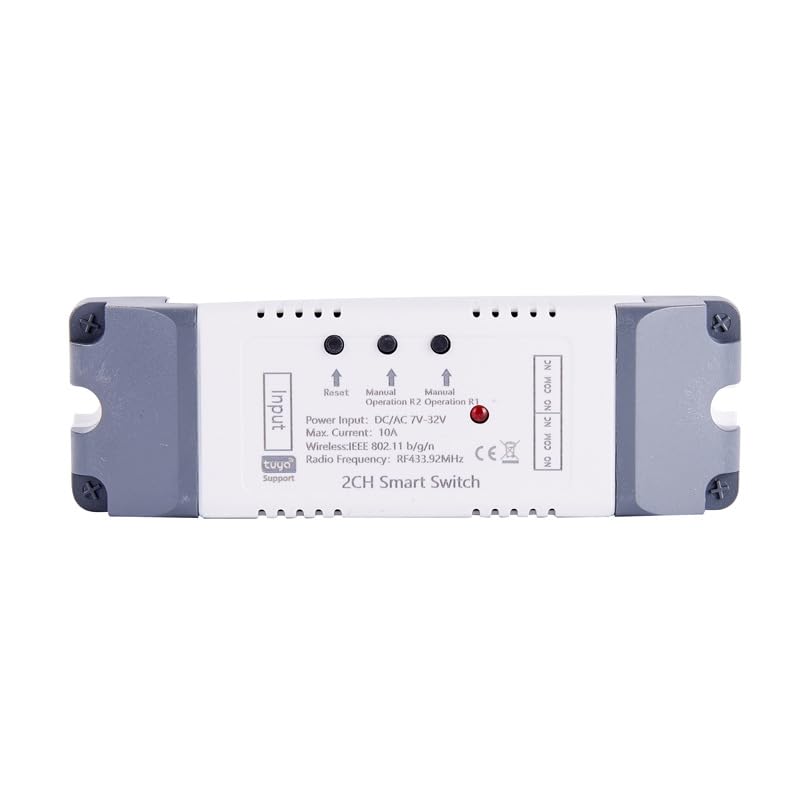
Imej: Atas view modul geganti, yang menonjolkan terminal input dan output, butang set semula, butang operasi manual untuk R1 dan R2, dan penunjuk status.
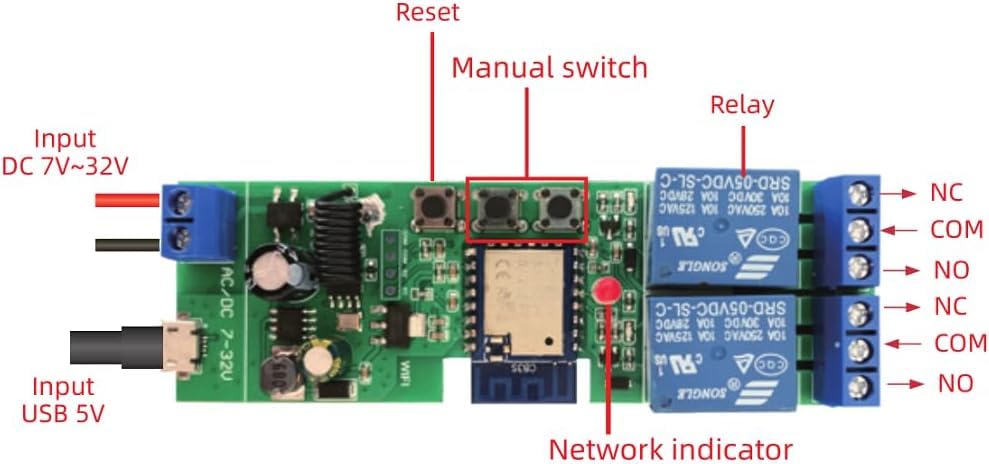
Imej: Terperinci view papan litar dalaman, menunjukkan butang set semula, suis manual, geganti, penunjuk rangkaian dan terminal input untuk DC 7-32V dan USB 5V.
- Terminal Input: Untuk bekalan kuasa (DC 7-32V atau USB 5V).
- Butang Tetapkan Semula: Digunakan untuk memasangkan dan menetapkan semula peranti.
- Suis Manual (R1, R2): Benarkan kawalan manual setiap saluran geganti.
- Geganti: Dua geganti bebas untuk mengawal peranti yang disambungkan.
- Penunjuk Rangkaian: Lampu LED menunjukkan status rangkaian.
- Terminal Output (NC, COM, NO): Sentuhan Biasanya Tertutup, Biasa dan Biasanya Terbuka untuk setiap geganti.
5. Persediaan dan Pemasangan
5.1 Arahan Pendawaian
Pastikan bekalan elektrik diputuskan sambungannya sebelum melakukan sebarang pendawaian. Rujuk gambar rajah di bawah untuk konfigurasi pendawaian biasa.
5.1.1 Gambarajah Pendawaian Umum (Input DC/AC 7-32V)
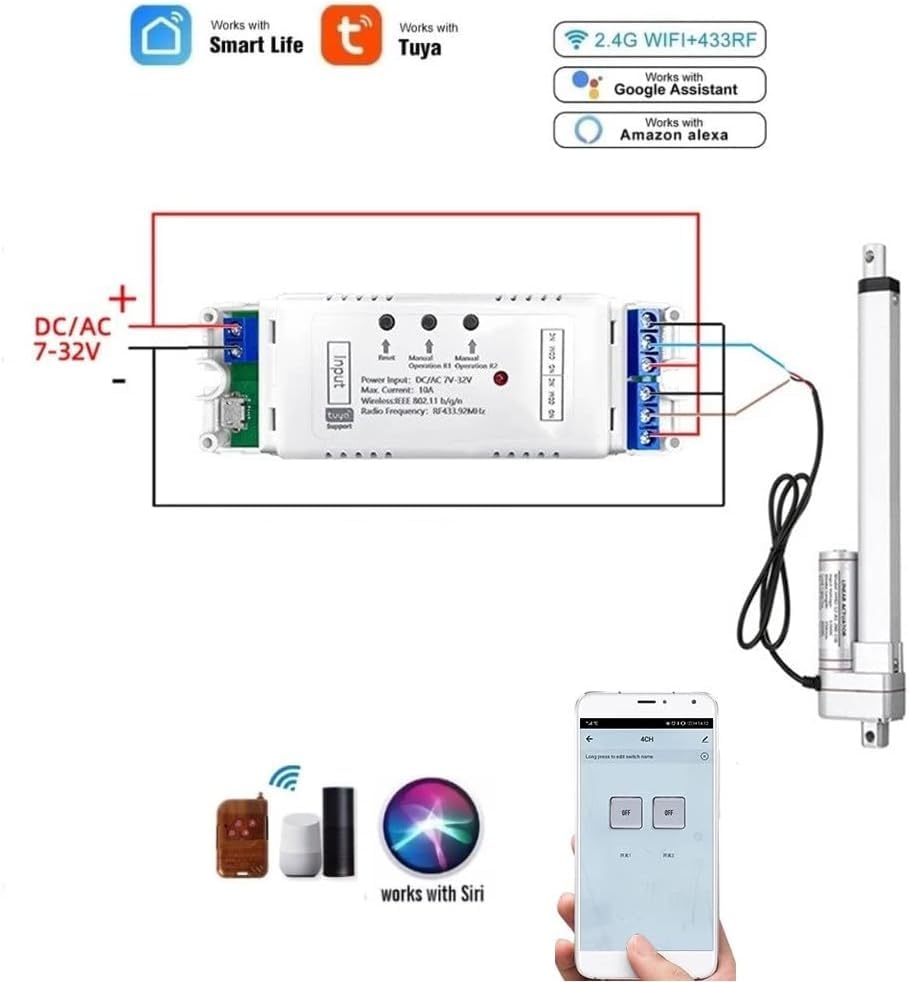
Imej: Gambar rajah ini menggambarkan penyambungan modul geganti kepada sumber kuasa DC/AC 7-32V dan mengawal penggerak linear. Modul ini menyokong kawalan aplikasi Smart Life/Tuya, Wi-Fi 2.4G, RF 433MHz dan kawalan suara melalui Alexa dan Google Assistant.
5.1.2 Mengautomasikan Motor DC
Untuk mengautomasikan motor DC, sambungkan motor ke output geganti seperti yang ditunjukkan. Mod saling kunci modul boleh digunakan untuk kawalan arah.
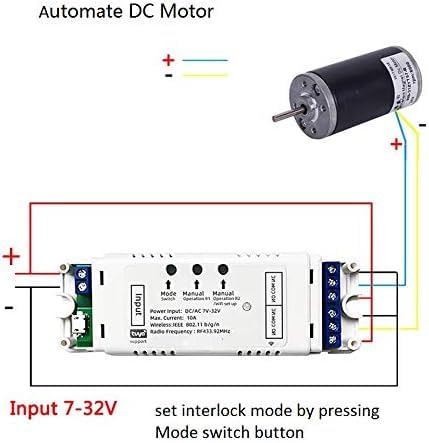
Imej: Gambarajah pendawaian yang menunjukkan cara menyambungkan motor DC ke modul geganti. Kuasa input untuk modul ini ialah 7-32V. Mod saling kunci boleh dikonfigurasikan dengan menekan butang suis mod.
5.1.3 Pendawaian untuk Motor AC 3-Wayar (cth., Pengatup/Langsir)
Untuk mengawal motor AC 3-wayar, seperti yang terdapat dalam pengatup atau langsir elektrik, ikuti konfigurasi pendawaian ini. Pastikan mod saling kunci ditetapkan dalam aplikasi Tuya Smart.

Imej: Gambarajah pendawaian untuk menyambungkan motor AC 3-wayar (seperti motor pengatup) ke modul geganti. Kuasa input ialah DC/AC 7-32V. Wayar neutral, wayar buka pengatup dan tutup pengatup ditunjukkan. Mod saling kunci hendaklah dipilih dan ditetapkan dalam aplikasi Tuya Smart.
5.2 Penggandingan Aplikasi (Aplikasi Smart Life/Tuya)
- Muat turun Apl: Muat turun dan pasang aplikasi "Smart Life" atau "Tuya Smart" daripada gedung aplikasi peranti mudah alih anda (tersedia untuk iOS dan Android).
- Daftar/Log Masuk: Buat akaun atau log masuk ke akaun sedia ada anda.
- Hidupkan kuasa: Sambungkan modul geganti kepada bekalan kuasanya (DC 7-32V).
- Masukkan Mod Berpasangan: Tekan dan tahan butang "Tetapkan Semula" pada modul sehingga LED penunjuk rangkaian mula berkelip dengan cepat. Ini menunjukkan ia berada dalam mod berpasangan.
- Tambah Peranti: Buka aplikasi Smart Life/Tuya. Aplikasi tersebut sepatutnya menemui peranti tersebut secara automatik melalui Bluetooth. Jika tidak, ketik ikon "+" di penjuru kanan sebelah atas, kemudian pilih "Tambah Peranti" dan pilih "Imbas Automatik" atau pilih "Tukar (Wi-Fi)" secara manual.
- Sambung ke Wi-Fi: Ikut arahan dalam aplikasi untuk menyambungkan modul ke rangkaian Wi-Fi 2.4GHz anda. Masukkan kata laluan Wi-Fi anda apabila digesa.
- Penamaan Semula Peranti: Setelah berjaya ditambahkan, anda boleh menamakan semula peranti dan setiap saluran individu dalam aplikasi untuk pengenalpastian yang lebih mudah.
Nota: Walaupun modul geganti kehilangan sambungan Wi-Fi selepas persediaan awal, anda masih boleh mengawalnya melalui Bluetooth menggunakan telefon anda dalam julat.
6. Mod Operasi
Modul Relay Tanpa Wayar 2-Saluran Tuya menyokong pelbagai mod operasi yang boleh dikonfigurasikan melalui aplikasi Smart Life/Tuya:
- Fungsi Sesaat (Inci):
Apabila diaktifkan, geganti akan dihidupkan untuk tempoh yang ditetapkan (lalai 1 saat) dan kemudian dimatikan secara automatik. Ini sesuai untuk aplikasi seperti pembuka pintu garaj. Masa inci boleh dilaraskan dari 1 saat hingga 1 jam dalam aplikasi.

Imej: Gambar rajah ini menggambarkan cara mengubah suai alat kawalan jauh untuk digunakan dengan modul geganti dalam mod inci, yang sering digunakan untuk tindakan seketika seperti membuka pintu garaj.
- Mod Selak (Mengunci Kendiri):
Dalam mod ini, setiap geganti bertindak sebagai suis hidup/mati standard. Menekan butang (fizikal atau dalam aplikasi) akan menukar keadaan geganti (hidup atau mati). Ini membolehkan kawalan bebas bagi dua peranti yang disambungkan.
- Mod Saling Kunci:
Mod ini memastikan hanya satu geganti yang boleh diaktifkan pada satu masa. Apabila satu geganti dihidupkan, geganti yang satu lagi akan dimatikan secara automatik. Mod ini sesuai untuk aplikasi yang memerlukan kawalan arah, seperti kawalan motor untuk pengatup atau pintu pagar, yang menghalang pengaktifan serentak dalam arah yang bertentangan.
6.1 Penjadualan dan Pemasa
Aplikasi ini membolehkan anda menetapkan sehingga 8 jadual waktu untuk kawalan automatik. Anda boleh mencipta pemasa tunggal, ulangan atau undur untuk menghidupkan atau mematikan peranti pada waktu tertentu. Ciri ini berguna untuk mengautomasikan rutin harian atau pencahayaan keselamatan.

Imej: Skrin telefon pintar yang memaparkan antara muka penjadualan dalam aplikasi Smart Life/Tuya, menunjukkan cara menyediakan kawalan automatik untuk peranti seperti pintu garaj. Imej tersebut juga menunjukkan sebuah rumah dengan dua pintu garaj, yang menunjukkan kawalan individu.
7. Integrasi Rumah Pintar (Kawalan Suara)
Modul Relay Tanpa Wayar 2-Saluran Tuya serasi dengan Amazon Alexa dan Google Home untuk kawalan suara yang mudah.
7.1 Menyambung ke Amazon Alexa
- Buka apl Amazon Alexa.
- Pergi ke "Kemahiran & Permainan" dan cari "Kehidupan Pintar" atau "Tuya Pintar".
- Dayakan kemahiran dan pautkan akaun Smart Life/Tuya anda menggunakan kelayakan aplikasi anda.
- Temui peranti: Alexa akan menemui modul geganti anda yang disambungkan secara automatik. Jika tidak, sebut "Alexa, temui peranti saya" atau mulakan penemuan secara manual dalam aplikasi Alexa.
- Anda kini boleh mengawal peranti anda menggunakan arahan suara, contohnya, "Alexa, hidupkan lampu" atau "Alexa, hidupkan pintu Garaj".
7.2 Menyambung ke Google Home
- Buka apl Google Home.
- Ketik ikon "+", kemudian "Sediakan peranti" > "Berfungsi dengan Google".
- Cari untuk "Kehidupan Pintar" atau "Tuya Pintar".
- Pautkan akaun Smart Life/Tuya anda menggunakan kelayakan aplikasi anda.
- Peranti anda akan disegerakkan. Anda kini boleh mengawalnya dengan arahan suara, contohnya, "Hei Google, matikan lampu bilik tidur".
8. Penyelenggaraan
- Simpan modul di persekitaran yang kering, jauh daripada kelembapan dan suhu yang melampau.
- Jangan dedahkan modul kepada cahaya matahari langsung atau bahan menghakis.
- Bersihkan bahagian luar dengan kain lembut dan kering. Jangan gunakan bahan kimia yang keras atau pembersih yang kasar.
- Periksa sambungan pendawaian secara berkala untuk memastikan ia selamat.
- Pastikan firmware dikemas kini melalui aplikasi Smart Life/Tuya untuk prestasi dan keselamatan yang optimum.
9. Penyelesaian masalah
| Masalah | Kemungkinan Punca | Penyelesaian |
|---|---|---|
| Modul tidak dihidupkan. | Bekalan kuasa tidak betul voltage atau sambungan longgar. | Sahkan bekalan kuasa berada dalam lingkungan AC/DC 7-32V. Periksa semua sambungan pendawaian untuk keselamatan. |
| Tidak boleh digandingkan dengan aplikasi Smart Life/Tuya. | Modul tidak dalam mod berpasangan; kata laluan Wi-Fi salah; rangkaian Wi-Fi 5GHz; isyarat Wi-Fi lemah. | Pastikan penunjuk rangkaian berkelip dengan cepat. Sahkan rangkaian Wi-Fi anda ialah 2.4GHz. Masukkan semula kata laluan Wi-Fi dengan berhati-hati. Alihkan modul lebih dekat ke penghala Wi-Fi anda. Cuba tetapkan semula modul dan pasangkan semula. |
| Kawalan suara tidak berfungsi. | Kemahiran tidak didayakan; akaun tidak dipautkan; peranti tidak ditemui oleh Alexa/Google Home. | Pastikan kemahiran "Smart Life" atau "Tuya Smart" diaktifkan dan akaun anda dipautkan dalam aplikasi Alexa/Google Home. Minta Alexa/Google untuk mencari peranti sekali lagi. Semak nama peranti untuk kejelasan. |
| Relay tidak bertindak balas terhadap arahan aplikasi. | Tiada sambungan Wi-Fi; isu aplikasi; kerosakan modul. | Periksa sambungan Wi-Fi. Mulakan semula aplikasi. Hidupkan modul geganti. Jika kawalan Bluetooth berfungsi, masalahnya mungkin berkaitan dengan Wi-Fi. |
10. Waranti dan Sokongan
Produk ini dikeluarkan oleh QIANYI. Untuk maklumat jaminan dan sokongan teknikal, sila rujuk dokumentasi yang disediakan bersama pembelian anda atau hubungi peruncit anda. Lazimnya, produk elektronik didatangkan dengan jaminan pengeluar standard terhadap kecacatan bahan dan mutu kerja untuk tempoh satu tahun dari tarikh pembelian.
Untuk bantuan lanjut, sila rujuk bahagian bantuan aplikasi Smart Life/Tuya atau lawati laman web rasmi Tuya Smart webtapak untuk Soalan Lazim dan sumber sokongan.


