1. Arahan Keselamatan Penting
Sila baca semua arahan dengan teliti sebelum menggunakan perkakas ini. Simpan manual ini untuk rujukan masa hadapan.
- Perkakas ini bertujuan untuk kegunaan isi rumah sahaja.
- Jangan rendamkan perkakas dalam air atau cecair lain.
- Jauhkan perkakas daripada sumber air, terutamanya semasa mengecas.
- Do not use the appliance if the cord or plug is damaged. Contact customer support for repair.
- Always ensure the appliance is switched off before cleaning or performing maintenance.
- Jauhkan daripada kanak-kanak. Perkakas ini bukan mainan.
- Elakkan sentuhan dengan bahagian yang bergerak.
- Do not use the trimmer on irritated skin or open wounds.
- Only use the charging adapter supplied with the appliance.
2. Produk Lebihview
The HTC AT-206A is a rechargeable hair trimmer designed for precise grooming tasks such as edging, outlining, dry shaving, and light shaping around areas like the neck, ears, and sideburns.

Image 2.1: HTC AT-206A Trimmer and its retail packaging, showing the device and included accessories.
Komponen:
- Trimmer Unit (HTC AT-206A)
- Kabel Pengecasan
- Berus Pembersih
- Lubricating Oil Bottle
- Lekapan Sisir
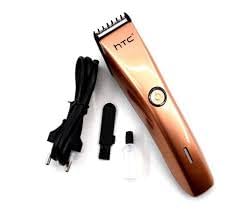
Image 2.2: The HTC AT-206A trimmer displayed with its charging cable, cleaning brush, oil bottle, and comb attachment.
3. Persediaan dan Pengecasan
3.1 Pengecasan Awal
- Before first use, fully charge the trimmer for approximately 8-10 hours.
- Pastikan perapi dimatikan.
- Sambungkan kabel pengecasan ke port pengecasan pemangkas.
- Plug the adapter into a suitable electrical outlet.
- The charging indicator light (if present) will illuminate to show charging is in progress.
- Once fully charged, disconnect the charger from the outlet and the trimmer.
3.2 Attaching the Comb Attachment
- Pastikan perapi dimatikan.
- Align the comb attachment with the trimmer blade.
- Gently push the comb attachment onto the blade until it clicks into place.
- To remove, gently pull the comb attachment away from the blade.
4. Arahan Operasi
4.1 Operasi Asas
- Pastikan perapi dicas.
- Press the power button to turn the trimmer on.
- Press the power button again to turn the trimmer off.
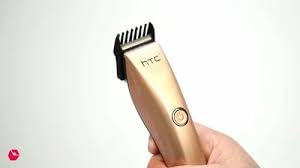
Image 4.1: The HTC AT-206A trimmer held in hand, demonstrating its ergonomic design for ease of use.
4.2 Teknik Menggunting
- Untuk hasil terbaik, gunakan perapi pada rambut yang bersih dan kering.
- Hold the trimmer at a slight angle against the skin.
- Gerakkan perapi perlahan-lahan dan stabil melawan arah pertumbuhan rambut.
- Use the comb attachment for longer hair lengths (0.5mm-13mm).
- For edging and outlining, use the trimmer without the comb attachment for a closer trim.
- Stretch the skin taut with your free hand to ensure a smooth surface for trimming.
5. Penyelenggaraan dan Pembersihan
Pembersihan dan penyelenggaraan yang kerap akan memastikan prestasi optimum dan memanjangkan hayat trimmer anda.
5.1 Membersihkan Bilah
- Ensure the trimmer is switched off and disconnected from the charger.
- Use the provided cleaning brush to remove any loose hairs from the blades.
- For a more thorough clean, you may carefully detach the blade head (refer to specific instructions if provided with your model for blade removal).
- Do not rinse the entire trimmer under water unless explicitly stated as waterproof.
5.2 Meminyaki Bilah
- After cleaning, apply 1-2 drops of the provided lubricating oil onto the blades.
- Hidupkan trimmer selama beberapa saat untuk membolehkan minyak diagihkan secara sama rata.
- Lap sebarang minyak yang berlebihan dengan kain lembut.
- Oiling the blades regularly (e.g., after every few uses) helps maintain cutting efficiency and prevents rust.
5.3 Penyimpanan
Store the trimmer in a cool, dry place, away from direct sunlight and moisture. Ensure it is fully charged before storing for extended periods.
6. Penyelesaian masalah
If you encounter any issues with your trimmer, refer to the following common problems and solutions:
- Pemangkas tidak menyala:
Ensure the trimmer is fully charged. Check if the charging cable is properly connected and the power outlet is functional. - Poor trimming performance / pulling hair:
The blades may be dull or clogged with hair. Clean and oil the blades as described in the Maintenance section. Ensure the trimmer is adequately charged. - Bateri tidak memegang cas:
Ensure the trimmer is charged for the recommended duration. If the issue persists, the battery may need replacement. Contact customer support. - Bunyi atau getaran yang berlebihan:
The blades might be misaligned or require oiling. Clean and oil the blades. If the problem continues, discontinue use and contact customer support.
7. Spesifikasi
| Ciri | Spesifikasi |
|---|---|
| Nombor Model | AT-206A (SA-144) |
| Sumber Kuasa | Bateri boleh dicas semula |
| Bahan Bilah | Stainless Steel (Metal) |
| Cutting Length Range | 0.5mm - 13mm (with comb attachment) |
| Dimensi (L x W x H) | 18.7 x 4.9 x 11.2 cm |
| Penggunaan yang Disyorkan | Dry Shaving, Edging, Light Shaping, Outlining (Neck, Ears, Sideburns, Face) |
| warna | Hitam |
| Pengeluar | CHINA |
8. Waranti dan Sokongan
This product is covered by a standard manufacturer's warranty. Please refer to the product packaging or contact your retailer for specific warranty terms and conditions.
For technical support, troubleshooting assistance, or warranty claims, please contact the retailer or manufacturer directly. Keep your proof of purchase for any warranty-related inquiries.


