1. Pengenalan dan Lebihview
The Acer Aspire 3 A314-36P-35UU is a slim and lightweight laptop designed for everyday productivity and multitasking. Featuring a 14.0-inch Full HD IPS display, an Intel Core i3-N305 Processor, 8GB LPDDR5 memory, and a 128GB NVMe SSD, it offers reliable performance for various tasks. This manual provides essential information for setting up, operating, and maintaining your laptop.

The Acer Aspire 3 A314-36P-35UU laptop, open and ready for use.
Ciri-ciri Utama:
- Purposeful Design: Thin and light for easy portability.
- Ready-to-Go Performance: Powered by an Intel Core i3-N305 Processor for efficient multitasking.
- Visually Stunning Display: 14.0" Full HD IPS screen with narrow bezels for clear visuals.
- Internal Specifications: 8GB LPDDR5 Onboard Memory and 128GB NVMe SSD for storage.
- Enhanced Communication: HD front-facing camera with Acer TNR and PurifiedVoice technology for clear video calls.
- Kesambungan Tanpa Wayar: Wi-Fi 6 (802.11ax) for strong and consistent wireless signals.
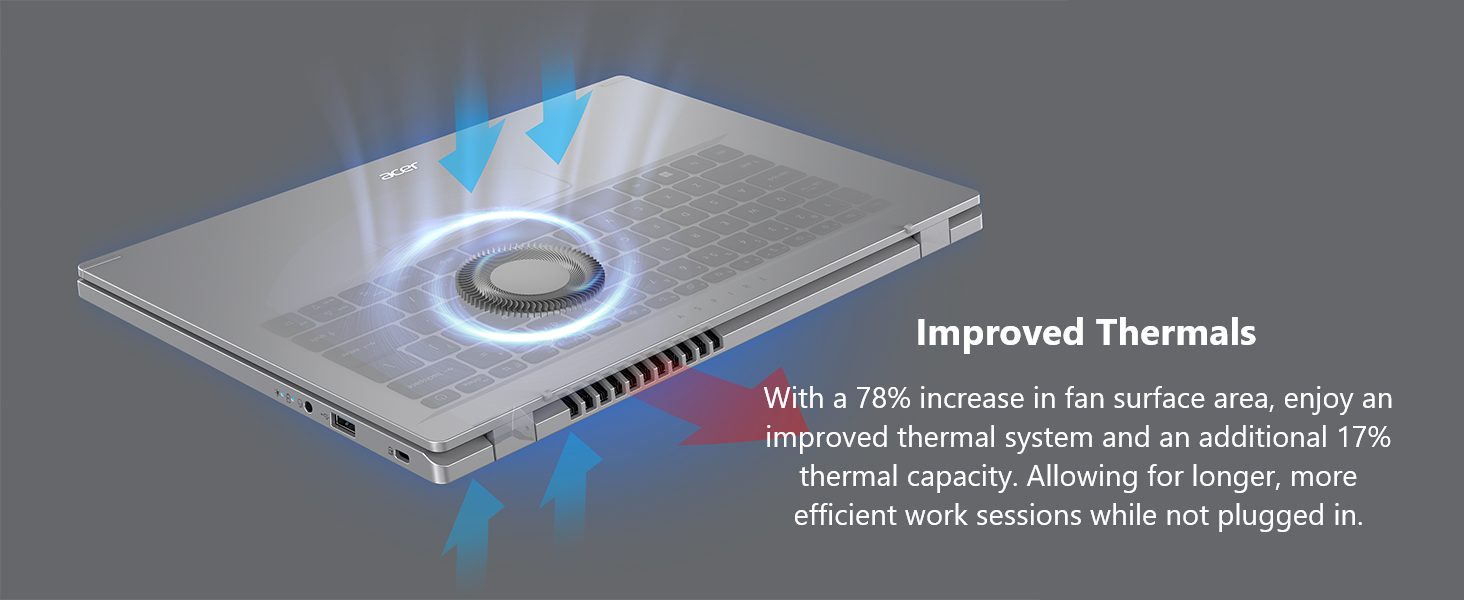
- Improved Thermals: Enhanced thermal system for efficient cooling during extended use.
- Sistem pengendalian: Windows 11 Home dalam mod S.
2. Apa yang ada di dalam Kotak
Upon unpacking your Acer Aspire 3 laptop, please ensure all the following items are present:
- Laptop Acer Aspire
- Penyesuai AC
- Kord Kuasa
3. Persediaan
Ikuti langkah-langkah ini untuk menyediakan komputer riba Acer Aspire 3 baharu anda:
- Buka bungkusan Laptop: Keluarkan komputer riba dan semua aksesori dengan berhati-hati dari pembungkusan.
- Sambungkan Kuasa: Plug the AC adapter into the laptop's DC-in jack and then into a power outlet. It is recommended to fully charge the battery before first use.
- But Permulaan: Open the laptop lid and press the power button. The laptop will guide you through the initial Windows 11 setup process. Follow the on-screen instructions to configure your region, language, network, and user account.
- Sambung Peranti: Connect any external devices such as a mouse, external keyboard, or monitor to the available ports.

The laptop features multiple ports for connectivity, including USB Type-C, USB 3.2, and HDMI.
4. Mengendalikan Komputer Riba Anda
Hidupkan/Mati Kuasa:
- To power on, press the power button located on the keyboard.
- To power off, click the Start button in Windows, then select Power > Shut down.
Menggunakan Pad Sentuh:
The touchpad functions as a mouse. Use single-finger taps for left-clicks and two-finger taps for right-clicks. You can also use multi-touch gestures for scrolling and zooming.
Menyambung ke Wi-Fi:
Your laptop supports Wi-Fi 6 for fast and stable wireless connections. To connect:
- Klik ikon Wi-Fi dalam bar tugas.
- Pilih rangkaian yang anda inginkan daripada senarai.
- Enter the network password if prompted and click Connect.
Enjoy fast and reliable internet with Wi-Fi 6 connectivity.
Windows 11 Home in S Mode:
Your laptop comes with Windows 11 Home in S mode, which is a version of Windows streamlined for security and performance. In S mode, you can only install apps from the Microsoft Store, and you must use Microsoft Edge for safe browsing. You can switch out of S mode at any time, but you cannot switch back.
This video demonstrates the powerful tools available with Microsoft 365, enhancing productivity on your Windows 11 device.
This video showcases Windows AI Photos, demonstrating how to easily enhance and manage your images.
This video illustrates the Windows 11 AI Snipping tool, allowing for easy text extraction and sensitive information protection.
This video demonstrates Windows AI Paint, highlighting its enhanced features for drawing and digital creation, including background removal.
This video introduces Microsoft Windows Copilot, your everyday AI companion for enhancing creativity and productivity.
5. Penyelenggaraan
Penyelenggaraan yang betul memastikan jangka hayat dan prestasi optimum komputer riba anda:
- Pembersihan: Gunakan kain lembut dan tidak berbulu untuk membersihkan skrin dan bahagian luarnya. Untuk kotoran degil,ampen kain dengan air atau pembersih selamat skrin. Elakkan bahan kimia yang keras.
- Penjagaan Bateri: To maximize battery life, avoid fully discharging the battery frequently. Store the laptop in a cool, dry place when not in use for extended periods.
- Kemas Kini Perisian: Regularly update your Windows operating system and drivers to ensure security and performance.
- Pengurusan Terma: The Aspire 3 features improved thermals. Ensure the vents are not obstructed to allow for proper airflow and prevent overheating. Avoid using the laptop on soft surfaces like beds or couches that can block ventilation.

The laptop's improved thermal design helps maintain optimal operating temperatures.
6. Penyelesaian masalah
Jika anda menghadapi masalah dengan komputer riba anda, cuba langkah penyelesaian masalah asas berikut:
- Tiada Kuasa: Pastikan penyesuai AC disambungkan dengan selamat pada kedua-dua komputer riba dan salur keluar kuasa yang berfungsi. Periksa sama ada salur keluar kuasa berfungsi.
- Sistem Tidak Responsif: If the laptop freezes, press and hold the power button for 10-15 seconds to force a shutdown. Wait a few moments, then restart the laptop.
- Isu Kesambungan Wi-Fi: Restart your router and modem. On your laptop, turn Wi-Fi off and then on again. Ensure you are selecting the correct network and entering the correct password.
- Masalah Paparan: If the screen is blank or flickering, try connecting an external monitor to the HDMI port to determine if the issue is with the laptop's display or graphics output.
- Prestasi Perlahan: Close unnecessary applications, check for malware, and ensure your operating system is up to date. Consider freeing up disk space if your storage is nearly full.
Untuk isu yang lebih rumit, rujuk sokongan Acer webtapak atau hubungi perkhidmatan pelanggan.
7. Spesifikasi
Below are the detailed specifications for the Acer Aspire 3 A314-36P-35UU Slim Laptop:
| Ciri | Spesifikasi |
|---|---|
| Nama Model | A314-36P-35UU |
| Saiz Skrin | 14 Inci |
| Resolusi Skrin | 1920 x 1080 piksel (HD Penuh IPS) |
| Pemproses | Intel Core i3-N305 (3.8 GHz) |
| RAM | 8 GB LPDDR5 |
| Kelajuan Memori | 2400 MHz |
| Pemacu Keras | 128 GB NVMe SSD |
| Pemproses bersama Grafik | Grafik Intel UHD (Bersepadu) |
| Jenis Wayarles | 802.11ax (Wi-Fi 6), Bluetooth |
| Port USB 3.0 | 3 (1x USB Type-C 3.2 Gen 2, 2x USB 3.2 Gen 1) |
| Port HDMI | 1 (HDMI 2.1 with HDCP support) |
| Sistem Operasi | Windows 11 Home dalam Mod S |
| Berat Barang | 3.09 paun |
| Dimensi Produk | 12.93 x 0.74 x 8.55 inci |
| warna | Perak |
8. Waranti dan Sokongan
Untuk maklumat jaminan terperinci, sila rujuk kad jaminan yang disertakan dengan produk anda atau lawati sokongan rasmi Acer. webtapak. Waranti biasanya meliputi kecacatan pembuatan untuk tempoh tertentu dari tarikh pembelian.
If you require technical assistance or have questions not covered in this manual, please contact Acer customer support through their official channels. Have your laptop's model number (A314-36P-35UU) and serial number ready when contacting support.