1. Maklumat Keselamatan
Please read this manual carefully before operating your Acekool Portable Air Conditioner. Keep it for future reference. Failure to follow these instructions may result in electric shock, fire, or serious injury.
Langkah Keselamatan Am
- Perkakas ini adalah untuk kegunaan dalaman sahaja.
- Jangan kendalikan unit dengan kord atau palam yang rosak.
- Pastikan bekalan kuasa sepadan dengan voltage dinyatakan pada label penarafan unit.
- Jangan halang saluran masuk atau keluar udara. Kekalkan jarak sekurang-kurangnya 20 cm dari dinding dan objek lain.
- Jangan masukkan jari atau objek ke dalam saluran keluar udara.
- Sentiasa cabut plag unit sebelum membersihkan atau menservis.
- Jangan gunakan pelarut kimia (contohnya, benzena, alkohol, petrol) untuk membersihkan unit.
- Jauhkan unit dari sumber haba dan cahaya matahari langsung.
- Jangan letakkan objek berat di atas unit.
- Perkakas ini tidak dimaksudkan untuk digunakan oleh orang (termasuk kanak-kanak) yang kurang keupayaan fizikal, deria atau mental, atau kurang pengalaman dan pengetahuan, melainkan mereka telah diberi pengawasan atau arahan mengenai penggunaan perkakas oleh orang yang bertanggungjawab untuk keselamatan mereka.
2. Produk Lebihview
The Acekool 9000 BTU Portable Air Conditioner is a versatile 3-in-1 unit designed to provide cooling, fan, and dehumidification functions for your home or office. Its compact design and mobility make it ideal for various room sizes.

Image: Acekool 9000 BTU Portable Air Conditioner with its remote control, showing cool air flowing from the unit.
Kandungan Pakej
Sahkan bahawa semua item terdapat dalam pakej:
- Portable Air Conditioner × 1
- Alat Kawalan Jauh × 1
- Manual Pengguna × 1
- Exhaust Hose × 1
- Window Sealing Plate Kit × 1
- Penyambung Hos × 1
- Hos Longkang × 1

Image: All components included in the Acekool Portable Air Conditioner package, laid out next to the main unit.
Paparan Panel Kawalan

Image: Close-up of the control panel on top of the Acekool portable air conditioner, showing buttons for Timer, Speed, Swing, Sleep, Mode, and Power, along with indicator lights.
- Butang PEMASA: Sets the auto-on/off time.
- Butang SPEED: Adjusts fan speed (Low/High).
- Butang HAyunan: Activates/deactivates automatic louver swing.
- Anak Panah ATAS/BAWAH: Melaraskan tetapan suhu atau pemasa.
- Butang SLEEP: Activates sleep mode for quiet operation.
- Butang MOD: Selects operation mode (Cool, Fan, Dry).
- Butang kuasa: Menghidupkan atau mematikan unit.
3. Persediaan
Proper installation is crucial for the efficient operation of your portable air conditioner. Follow these steps to set up the unit.
Pemasangan Hos Ekzos
- Pasangkan penyambung hos pada satu hujung hos ekzos.
- Attach the window kit adapter to the other end of the exhaust hose.
- Insert the hose connector into the exhaust outlet on the back of the air conditioner unit.
- Adjust the window sealing plate kit to fit your window opening.
- Connect the window kit adapter to the opening in the window sealing plate.
- Pastikan semua sambungan kukuh untuk mengelakkan kebocoran udara.

Image: Visual guide showing the dimensions of the unit and the five steps for installing the exhaust hose and window kit.
Penempatan
- Letakkan unit di permukaan yang rata dan stabil.
- Ensure there is sufficient space around the unit for proper airflow (at least 20 cm from walls).
- Letakkan unit berhampiran tingkap atau bukaan untuk hos ekzos.
4. Arahan Operasi
Your Acekool Portable Air Conditioner offers multiple modes and settings for optimal comfort. You can operate the unit using the control panel on top or the included remote control.

Image: Split image showing the remote control being used with the unit on the left, and the unit operating with swing mode on the right.
Menghidupkan/Mematikan
- Tekan ke KUASA butang pada panel kawalan atau alat kawalan jauh untuk menghidupkan atau mematikan unit.
Pemilihan Mod
Tekan ke MODE butang berulang kali untuk mengitar melalui mod yang tersedia:
- Mod Penyejukan: For powerful cooling. Adjust temperature using the UP/DOWN arrows (16-31°C).
- Mod Kipas: Circulates air without cooling. Choose between Low and High fan speeds.
- Mod Penyahlembapan: Removes excess moisture from the air (up to 42L/day).

Image: Three panels illustrating the cooling mode (lowest 16°C), dehumidifying mode (42L/day), and fan mode (2 speeds).
Penyesuaian Kelajuan Kipas
- Dalam mod Penyejukan atau Kipas, tekan LAJU button to select Low or High fan speed.
Fungsi Pemasa
- Tekan ke PEMASA button to set the desired auto-on or auto-off time (up to 24 hours). Use the UP/DOWN arrows to adjust the time.
Mod Tidur
- Tekan ke TIDUR button to activate sleep mode, which provides quieter operation and gradually adjusts the temperature for comfortable sleep.

Image: An illustration showing a child sleeping peacefully, with icons indicating Automatic Shut-off, Sleep Mode, 24H Smart Timer, and Ultra Quiet operation, along with a noise level comparison chart.
5. Penyelenggaraan
Penyelenggaraan tetap memastikan jangka hayat dan kecekapan penghawa dingin mudah alih anda.
Membersihkan Penapis Udara
The unit has a removable and reusable air filter that should be cleaned regularly (every two weeks or more often depending on usage) to maintain optimal performance and air quality.
- Cabut plag penghawa dingin dari salur keluar kuasa.
- Locate the air filter panel, usually on the side or back of the unit.
- Tarik perlahan penapis udara.
- Clean the filter with a vacuum cleaner to remove dust and debris. For heavy dirt, wash it with lukewarm water and a mild detergent.
- Benarkan penuras kering sepenuhnya sebelum memasukkannya semula. Jangan terdedah kepada cahaya matahari langsung.
- Slide the dry filter back into its slot until it clicks into place.

Image: A hand demonstrating the removal of the washable air filter from the side of the air conditioner unit.
Mengeringkan Air
This air conditioner features an advanced auto-evaporation technology, which automatically evaporates condensed water through the condenser and discharges it outdoors, significantly reducing the need for manual drainage. However, in very humid conditions, the water tank may fill up. When the 'FULL' indicator light illuminates, the unit will stop operating, and you will need to drain the water manually.
- Matikan unit dan cabut plagnya daripada sumber kuasa.
- Place a shallow pan or container under the drain port at the bottom rear of the unit.
- Tanggalkan palam longkang. Air akan mula mengalir keluar.
- Setelah semua air telah dikeringkan, pasangkan semula palam longkang dengan kukuh.
Penyimpanan
Jika unit tidak akan digunakan untuk tempoh lanjutan:
- Toskan semua air pekat dari unit.
- Bersihkan penapis udara.
- Cabut palam kord kuasa dan gulungkannya dengan kemas.
- Simpan unit di tempat yang sejuk dan kering, jauh dari cahaya matahari langsung dan suhu yang melampau.
6. Penyelesaian masalah
Sebelum menghubungi sokongan pelanggan, sila rujuk isu dan penyelesaian biasa berikut.
| Masalah | Kemungkinan Punca | Penyelesaian |
|---|---|---|
| Unit tidak dihidupkan | Tiada bekalan kuasa Kord kuasa tidak dipalamkan Tangki air penuh | Periksa salur keluar kuasa Pastikan palam dimasukkan dengan selamat Drain water tank |
| Unit tidak menyejukkan dengan berkesan | Penapis udara tersumbat Exhaust hose not properly installed Bilik terlalu besar Pintu/tingkap terbuka Tetapan suhu terlalu tinggi | Penapis udara bersih Check exhaust hose connection and window kit Pastikan unit sesuai dengan saiz bilik Tutup semua pintu dan tingkap Turunkan suhu yang ditetapkan |
| Unit bising | Unit bukan pada permukaan rata Penapis udara tersumbat Komponen dalaman bergetar | Letakkan unit pada permukaan yang rata dan stabil Penapis udara bersih This unit operates at 55 dB, which is normal. If noise is excessive, contact support. |
| Kebocoran air | Palam longkang longgar Unit condong Hos longkang tersumbat | Pastikan palam longkang dipasang dengan kukuh Letakkan unit pada permukaan yang rata Check drain hose for blockages |
7. Spesifikasi
| Ciri | Spesifikasi |
|---|---|
| Jenama | Acekool |
| Nombor Model | PAC-M09 |
| Kapasiti Penyejukan | 9000 BTU |
| Kapasiti Dehumidifikasi | 42 Liter/hari |
| Julat Kawalan Suhu | 16-31 °C |
| Voltage | 220 Volt |
| Tahap Kebisingan | 55 dB |
| Bahan penyejuk | R290 (Mesra Alam) |
| Dimensi Produk (L x W x H) | 36 x 39 x 89 cm |
| Berat badan | 26 kg |
| Ciri Khas | Penyejukan Cepat |
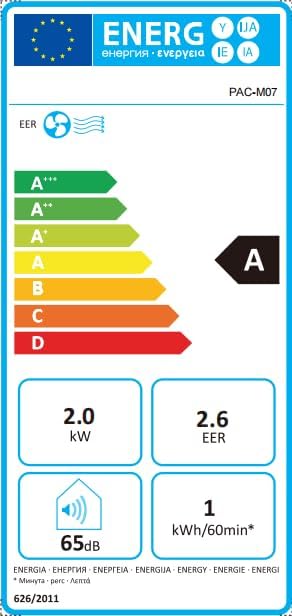
Image: Energy efficiency label showing an 'A' rating for cooling, 2.0 kW power, 2.6 EER, 65dB noise, and 1 kWh/60min energy consumption.
8. Waranti dan Sokongan
For information regarding warranty and returns, please refer to the purchase platform's policies. If you have received a defective or damaged product, consult the specific help page on the platform where you made the purchase.
For technical support or further assistance, please contact Acekool customer service through the contact information provided on your purchase receipt or the official Acekool webtapak.


