pengenalan
This manual provides comprehensive instructions for the setup, operation, maintenance, and troubleshooting of your ENDORFY Krux Qara 60% Mechanical Keyboard. Please read this manual thoroughly before using the product to ensure proper functionality and longevity.
Produk Selesaiview
The ENDORFY Krux Qara 60% is a compact mechanical gaming keyboard designed for performance and portability. It features Outemu Red Mechanical Switches, zone RGB backlighting, and a durable construction.
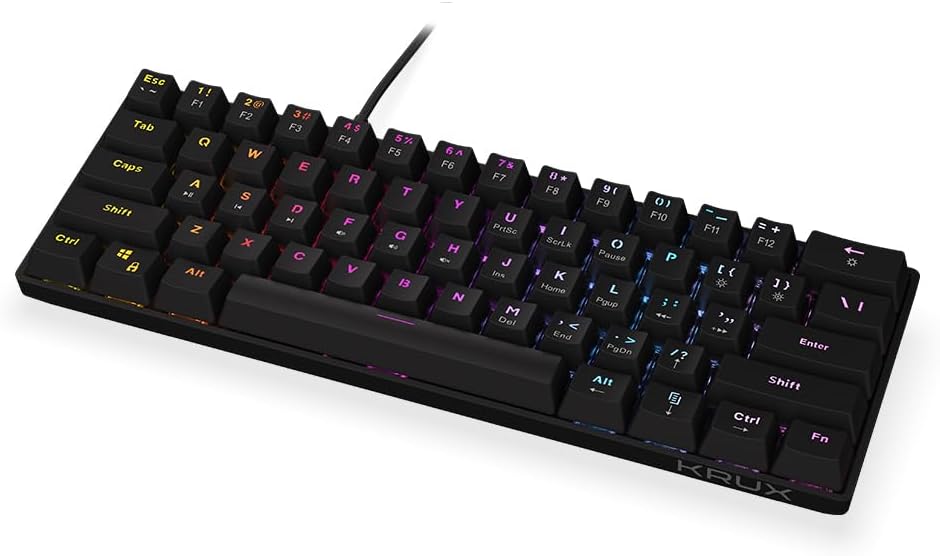
Rajah 1: Depan view of the ENDORFY Krux Qara 60% Mechanical Keyboard, showcasing its compact 60% layout and vibrant RGB zone backlighting. The keyboard features black keycaps with white legends.

Rajah 2: Top-down perspective of the keyboard, highlighting the keycap layout and the integrated USB-A cable connection point at the top center.

Rajah 3: belakang view of the keyboard, showing the product label with model information (KRX0137) and certification marks. The two adjustable feet are visible in their folded position.
Kandungan Pakej
Pastikan semua item ada sebelum meneruskan persediaan:
- ENDORFY Krux Qara 60% Mechanical Keyboard
- USB cable (integrated)
- Manual Pengguna (dokumen ini)
Persediaan
- Membongkar: Tanggalkan papan kekunci dan aksesorinya dari pembungkusan dengan berhati-hati.
- Sambungan: Connect the integrated USB-A cable from the keyboard to an available USB port on your computer (PC, Linux, Mac).
- Pemasangan Pemandu: The keyboard is plug-and-play and typically does not require additional drivers for basic functionality. Your operating system should automatically recognize the device.
- penempatan: Place the keyboard on a stable, flat surface. You may adjust the keyboard height using the foldable feet located on the underside for ergonomic comfort.

Rajah 4: sebelah view illustrating the keyboard's profile and the adjustable feet in their extended position, providing an elevated typing angle.
Arahan Operasi
Fungsi Asas
The keyboard functions as a standard QWERTY input device. All alphanumeric keys, symbols, and basic modifiers (Shift, Ctrl, Alt) operate as expected.
Function Key Combinations (Fn Layer)
Due to its 60% compact layout, many standard keyboard functions are accessed via the Fn key in combination with other keys. The secondary functions are typically printed on the front or side of the keycaps.
- Fn + Number Row (F1-F12): Accesses F1 through F12 functions. For example, fn+1 for F1.
- Fn + P, [, ]: Multimedia controls (Play/Pause, Previous Track, Next Track).
- Fn + ;, ', /: Volume controls (Mute, Volume Down, Volume Up).
- Fn + Shift Kanan: Kekunci anak panah (Atas, Bawah, Kiri, Kanan).
- Fn + M, <, >: Home, End, PgUp, PgDn.
- Fn + I, K, L: Insert, Home, Page Up.
- Fn + U, J, H: Print Screen, Scroll Lock, Pause Break.
Kawalan Lampu Latar
The keyboard features zone RGB backlighting. Use the following combinations to control the lighting:
- Fn + \|: Cycle through backlight modes.
- Fn + Enter: Laraskan kecerahan lampu latar.
- Fn + Right Ctrl: Tukar warna lampu latar.
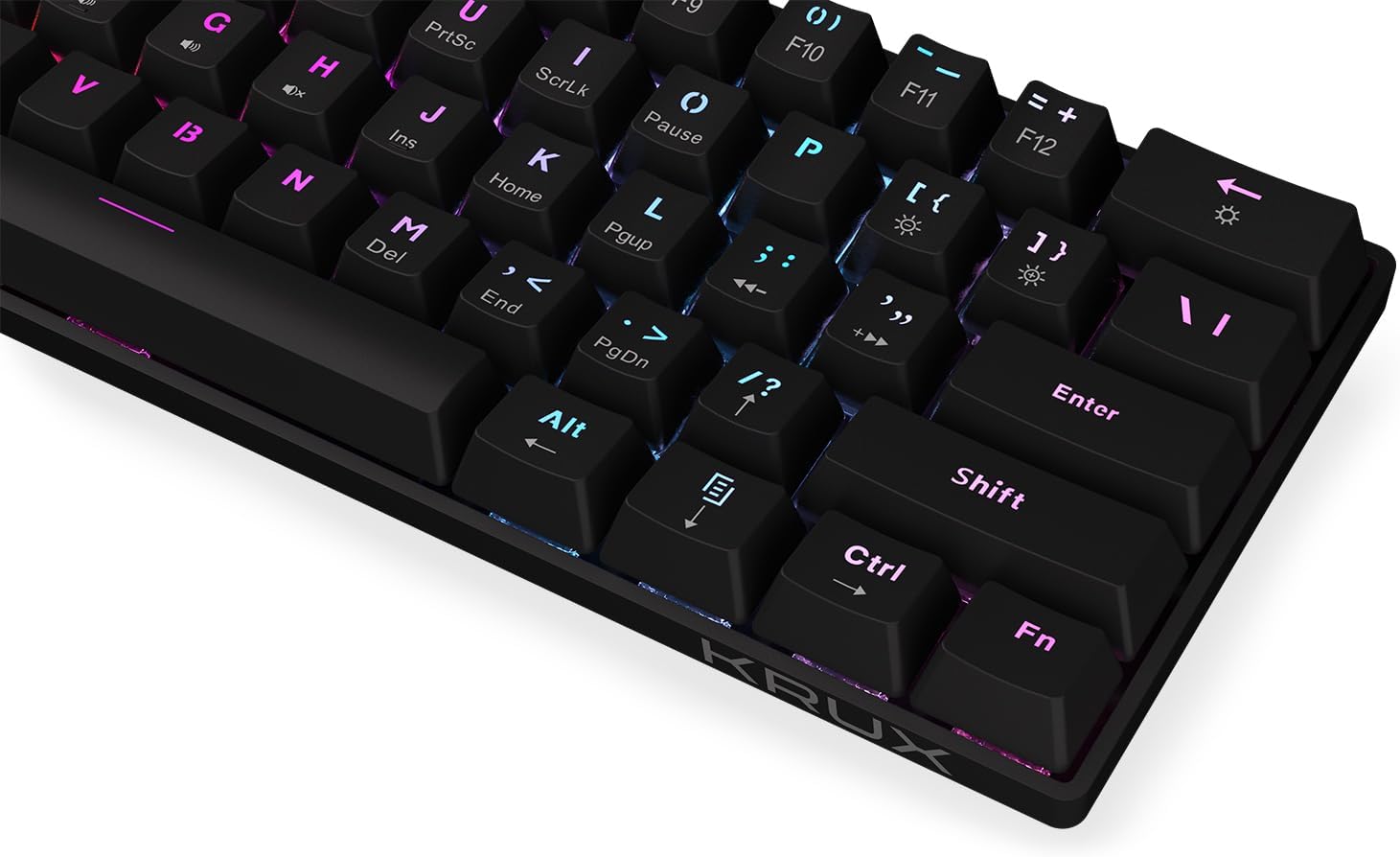
Rajah 5: Satu jarak dekat view of the keycaps, demonstrating the RGB backlighting effect and the secondary functions printed on the front of some keys.
Penyelenggaraan
Regular maintenance helps prolong the life of your keyboard:
- Pembersihan: Use a soft, dry cloth to wipe the surface of the keyboard. For dust and debris between keycaps, use compressed air. Avoid liquid cleaners directly on the keyboard.
- Tumpahan: In case of liquid spills, immediately disconnect the keyboard from your computer. Turn it upside down to drain liquid and allow it to dry completely before reconnecting. Do not use a hairdryer as excessive heat can damage components.
- Storan: Simpan papan kekunci di tempat yang sejuk dan kering jauh dari cahaya matahari langsung dan suhu yang melampau.
Menyelesaikan masalah
| Masalah | Kemungkinan Punca | Penyelesaian |
|---|---|---|
| Papan kekunci tidak bertindak balas | Sambungan USB longgar, port USB rosak, ralat sistem. | Pastikan kabel USB disambungkan dengan selamat. Cuba port USB yang lain. Mulakan semula komputer anda. |
| Kunci tidak mendaftar atau menaip dua kali | Dust/debris under keycap, switch malfunction. | Use compressed air to clean around the affected key. If problem persists, contact support. |
| Lampu latar tidak berfungsi atau tidak konsisten | Backlight setting, software glitch. | Tekan Fn + Enter to adjust brightness. Cycle through modes with Fn + \|. Restart computer. |
| Fn key combinations not working | Incorrect key combination, software conflict. | Refer to the "Operating Instructions" section for correct combinations. Ensure no conflicting software is running. |
Spesifikasi
- model: KRX0137
- Jenis papan kekunci: 60% Mechanical Gaming Keyboard
- Suis: Outemu Red Mechanical Switches
- Lampu latar: Zone RGB
- Ketersambungan: USB-A berwayar
- Dimensi: 29.1 x 10.1 x 3.9 cm (11.46 x 3.98 x 1.54 inci)
- Berat: 506 g (1.11 paun)
- Sistem Operasi yang Serasi: Windows 10, Mac OS X 10.12 Sierra, Linux
- Komponen yang Disertakan: USB cable (integrated)
Waranti dan Sokongan
For warranty information and technical support, please refer to the official KRUX webtapak atau hubungi peruncit tempatan anda. Simpan bukti pembelian anda untuk tuntutan waranti.
Pengeluar: Krux
Webtapak: www.krux.tech (Note: This is a placeholder link, please refer to the official manufacturer's weblaman web untuk maklumat sokongan yang tepat.)


