1. Pengenalan
Thank you for choosing the TEEHO Keyless Entry Door Lock with 2 Handles. This manual provides detailed instructions for installation, operation, and maintenance to ensure optimal performance and security. Please read this manual thoroughly before installation and keep it for future reference.
Kandungan Pakej
- 1 Electronic Keypad Deadbolt
- 1 Door Lever Handle Set (2 handles)
- 1 Keypad Deadbolt Lock
- 4 Bateri AA
- Perkakasan Pemasangan
- Manual Pengguna
Ciri-ciri Utama
- Kemasukan tanpa kunci: Supports up to 20 user access codes (4-10 digits) and one-time codes.
- Smart-Locking: Adjustable auto-lock feature (10-99 seconds) and one-touch auto-lock.
- Keselamatan Dipertingkat: ANSI Grade 3 smart door lock cylinder, anti-peeping password function, mute mode, vacation mode, and backlit keypad.
- Reka bentuk tahan lasak: Constructed from durable alloy with an IP54 weather resistance rating.
- Pemasangan Mudah: Direka untuk persediaan yang mudah.
2. Maklumat Keselamatan
Sila patuhi langkah keselamatan berikut untuk mengelakkan kecederaan atau kerosakan pada produk:
- Jangan cuba membuka atau mengubah suai kunci. Ini boleh menyebabkan kerosakan dan membatalkan jaminan.
- Gunakan hanya bateri AA yang dinyatakan. Jangan campurkan bateri lama dan baharu atau jenis bateri yang berbeza.
- Jauhkan semua komponen dari jangkauan kanak-kanak.
- Lindungi papan kekunci daripada kelembapan berlebihan atau pendedahan air langsung.
- Ensure proper installation to prevent malfunction. If unsure, consult a qualified locksmith or installer.
3. Produk Lebihview
The TEEHO Keyless Entry Door Lock system combines a keypad deadbolt with a door lever for comprehensive security and convenience.
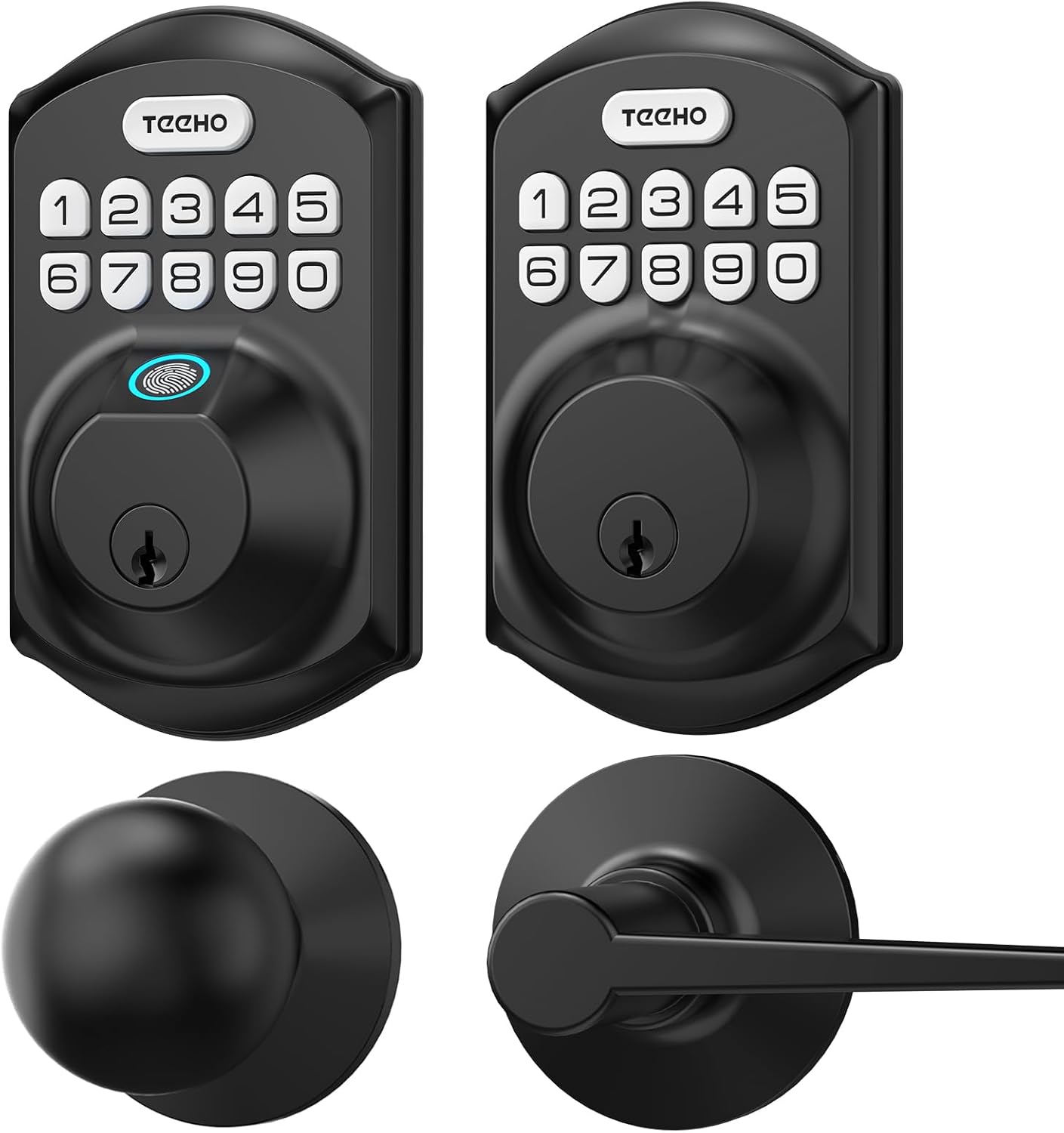
Imej 3.1: Berakhirview of the TEEHO Keyless Entry Door Lock components, including the electronic keypad deadbolt, a standard deadbolt, and two door lever handles, all in a matte black finish.

Imej 3.2: The TEEHO Keyless Entry Door Lock installed on a white door, featuring the electronic keypad deadbolt above a matching door lever. The interior view shows the corresponding hardware.
4. Persediaan dan Pemasangan
The TEEHO Keyless Entry Door Lock is designed for easy installation. Follow these steps carefully.
4.1 Sediakan Pintu
- Ensure your door meets the required dimensions for installation (standard door thickness and backset).
- Remove any existing lock hardware.
4.2 Pasang Selak Deadbolt
- Insert the deadbolt latch into the door edge. Ensure the “UP” marking is facing upwards.
- Secure the latch with screws.
4.3 Pasang Pemasangan Pad Kekunci Luaran
- Feed the cable through the hole in the door.
- Align the exterior keypad assembly with the deadbolt latch and secure it to the door.
4.4 Pasang Plat Pemasangan Dalaman
- Attach the interior mounting plate to the door, ensuring the cable passes through the plate.
- Selamatkan plat pelekap dengan skru.
4.5 Connect Cables and Install Interior Assembly
- Sambungkan kabel dari pemasangan luaran ke pemasangan dalaman.
- Pasangkan pemasangan dalaman pada plat pelekap dan pasangkannya dengan skru.
4.6 Pasang Bateri
- Tanggalkan penutup bateri dari pemasangan dalaman.
- Insert 4 AA batteries, observing polarity (+/-).
- Gantikan penutup bateri.

Imej 4.1: Sebuah meletup view of the TEEHO Keyless Entry Door Lock components, illustrating the internal mechanism and how the exterior keypad, interior assembly, and deadbolt latch fit together during installation.
4.7 Install Door Lever Handles
- Install the latch mechanism for the door lever into the door edge.
- Attach the exterior and interior door lever handles, securing them according to the provided instructions.
5. Arahan Operasi
Learn how to use the various features of your TEEHO Keyless Entry Door Lock.
5.1 Membuka Kunci Pintu
- Menggunakan Kod Pengguna: Enter your 4-10 digit user code on the keypad, then press the “Lock” button (or checkmark/enter button if present). The lock will retract.
- Menggunakan Kekunci Fizikal: Masukkan kunci fizikal ke dalam lubang kunci dan putar untuk membuka kunci.

Imej 5.1: A person using the TEEHO Keyless Entry Door Lock, highlighting the keypad and a fingerprint sensor for quick unlocking. The image suggests a rapid identification and unlocking process.
5.2 Mengunci Pintu
- Penguncian automatik: Jika diaktifkan, kunci akan diaktifkan secara automatik selepas tempoh yang ditetapkan (10-99 saat) sebaik sahaja pintu ditutup.
- Penguncian Satu Sentuhan: Press and hold any key on the keypad for 2 seconds to instantly lock the door.
- Penguncian Manual: From the interior, turn the thumb-turn to lock the deadbolt.

Imej 5.2: A visual representation of the auto-lock and one-touch locking features of the TEEHO Keyless Entry Door Lock. It shows a timer icon indicating automatic locking after 10-99 seconds and a lock icon for the 2-second one-touch lock.
5.3 Kata Laluan Anti-Pengintipan
Untuk mengelakkan orang lain daripada meneka kod anda, anda boleh memasukkan digit rawak sebelum atau selepas kod sebenar anda. Kunci masih akan mengenali urutan yang betul dalam entri yang lebih panjang.

Imej 5.3: An illustration of the anti-peep tactile keypad feature. It demonstrates how random digits can be added before or after the actual password to obscure it from onlookers, enhancing security.
5.4 Mod Redam
The lock can be set to mute mode to disable keypad tones for quiet operation.
5.5 Mod Percutian
Activate vacation mode for enhanced security when you are away for an extended period. This mode typically disables all user codes until manually deactivated.
6. Kod Pengaturcaraan
The lock supports up to 20 user codes and one-time codes.

Imej 6.1: An infographic detailing the access options for the TEEHO Keyless Entry Door Lock, showing support for up to 20 user codes, one-time PIN codes, and two physical keys for unlocking.
6.1 Adding User Codes
- Press the “Program” button (usually located on the interior assembly).
- Enter the default master code (refer to quick start guide or factory settings).
- Follow the voice prompts or indicator lights to enter a new 4-10 digit user code.
- Confirm the new code.
6.2 Memadam Kod Pengguna
- Press the “Program” button.
- Masukkan kod induk.
- Follow the prompts to select the option for deleting user codes.
- Enter the specific user code to be deleted or choose to delete all user codes.
6.3 Setting One-Time Codes
One-time codes are ideal for temporary access (e.g., for delivery personnel or service providers). Once used, the code is automatically deleted.
- Press the “Program” button.
- Masukkan kod induk.
- Follow the prompts to select the one-time code option.
- Enter the desired one-time code.
7. Penyelenggaraan
7.1 Penggantian Bateri
The lock is powered by 4 AA batteries, providing over 1 year of use under normal conditions. Replace batteries when the low battery indicator appears or when the lock becomes unresponsive.
- Tanggalkan penutup bateri pada pemasangan dalaman.
- Keluarkan bateri lama.
- Masukkan 4 bateri AA baharu, memastikan kekutuban yang betul.
- Gantikan penutup bateri.
7.2 Pembersihan
Bersihkan bahagian luar kunci dengan lembut, damp kain. Elakkan pembersih atau pelarut yang melelas yang boleh merosakkan kemasan atau komponen elektronik.
8. Penyelesaian masalah
| Masalah | Kemungkinan Punca | Penyelesaian |
|---|---|---|
| Kunci tidak bertindak balas kepada kemasukan pad kekunci. | Bateri lemah; kod salah; kerosakan pad kekunci. | Gantikan bateri; masukkan semula kod dengan teliti; hubungi sokongan jika masalah berterusan. |
| Ciri kunci automatik tidak berfungsi. | Feature disabled; incorrect time setting. | Ensure auto-lock is enabled and set to desired time in programming. |
| Lock is difficult to turn or operate. | Misalignment during installation; worn components. | Check installation alignment; lubricate moving parts if necessary; contact support for severe issues. |
| Keypad backlight not working. | Batteries low; setting disabled. | Replace batteries; check programming settings for backlight. |
9. Spesifikasi
- Jenama: TEEHO
- model: Keyless Entry Door Lock with 2 Handles
- Jenis Kunci: Keypad Deadbolt with Door Lever
- Ciri Khas: Keyless Entry, Auto-Lock, One-Time Code, Anti-Peep Password, Mute Mode, Vacation Mode, Backlit Keypad
- Security Rating: ANSI Gred 3
- Rintangan Cuaca: IP54
- Sumber Kuasa: 4 AA Batteries (approx. 1 year lifespan)
- Kod Akses: Up to 20 user codes (4-10 digits)
- Kaedah Kawalan: Touch Keypad, Mechanical Key
10. Waranti dan Sokongan
TEEHO products are manufactured to high-quality standards. For warranty information, technical support, or assistance with your product, please refer to the warranty card included in your package or visit the official TEEHO webtapak. Sila sediakan model produk anda dan tarikh pembelian apabila menghubungi sokongan.


