1. Pengenalan
Welcome to the Aveek 4 Channel Pro Powered Amplifier Audio Mixer user manual. This device integrates a power amplifier, audio mixer, and dual wireless microphones into a single unit, designed for various audio applications including karaoke, live streaming, and small performances. This manual provides essential information for safe and effective operation of your new audio mixer.
2. Maklumat Keselamatan
- Baca semua arahan dengan teliti sebelum digunakan.
- Simpan manual ini untuk rujukan masa hadapan.
- Jangan dedahkan unit kepada hujan, kelembapan atau suhu yang melampau.
- Pastikan pengudaraan yang betul untuk mengelakkan terlalu panas.
- Gunakan hanya penyesuai kuasa yang disediakan.
- Jangan cuba membaiki atau mengubah suai unit ini sendiri. Rujuk semua servis kepada kakitangan yang berkelayakan.
- Elakkan mendengar pada tahap kelantangan tinggi untuk tempoh yang lama untuk mengelakkan kerosakan pendengaran.
3. Kandungan Pakej
Sila pastikan semua item ada dalam pakej anda:
- Aveek 4 Channel Pro Powered AmpPengadun Audio pelapis
- 2 x Wireless Microphones (with rechargeable batteries)
- Penyesuai Kuasa
- Kabel USB
- Manual Pengguna (dokumen ini)
- Other accessories as specified on packaging
4. Produk Lebihview
The Aveek 4 Channel Pro mixer features a compact design with comprehensive controls for various audio sources and outputs.
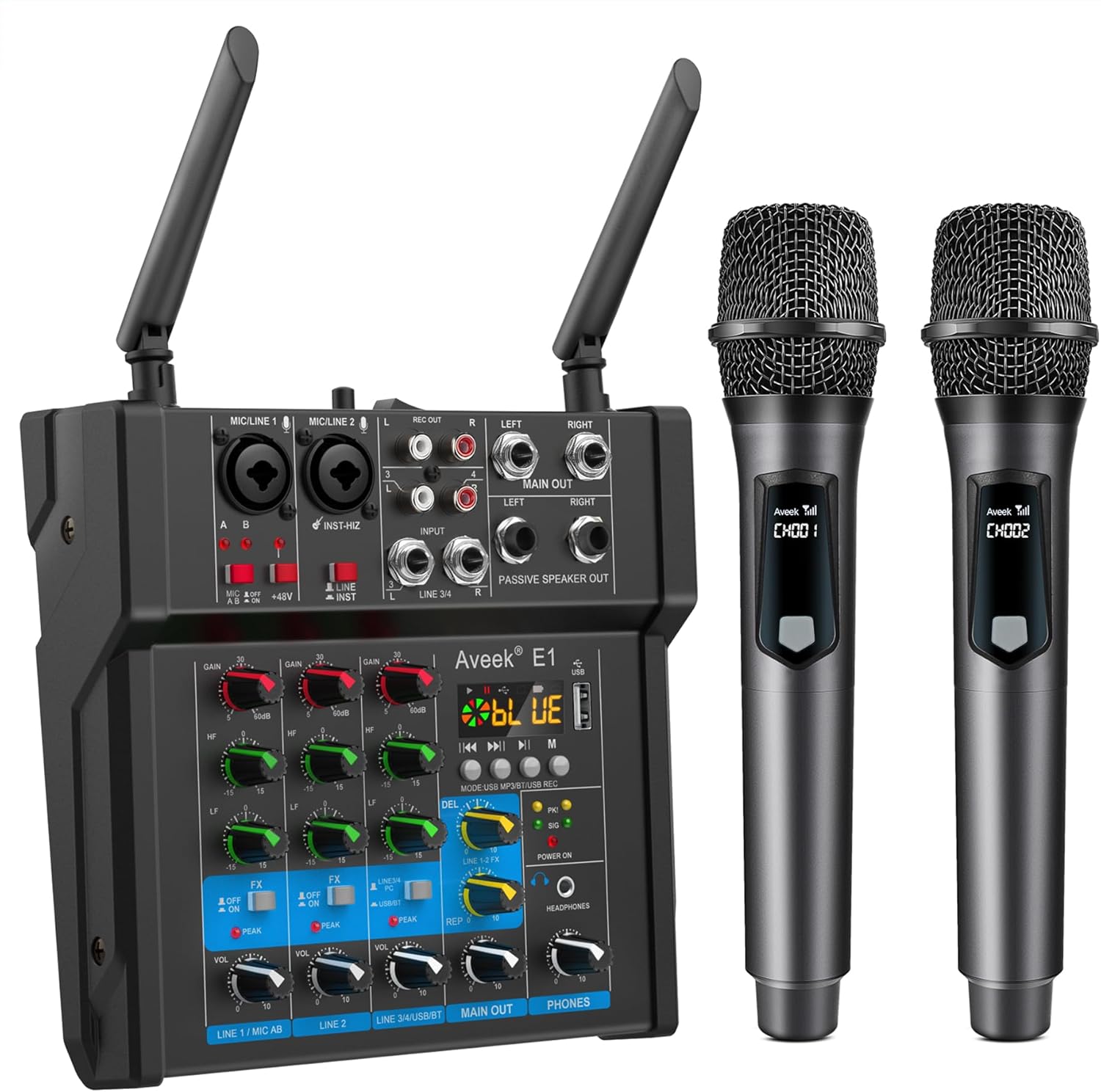
Rajah 4.1: Depan view of the Aveek 4 Channel Pro Powered Amplifier Audio Mixer with included wireless microphones.

Figure 4.2: Detailed diagram of the mixer's input and output interfaces, including connections for microphones, musical instruments, passive speakers, and various media devices.
4.1. Control Panel Features
- Input MIC/LINE (Saluran 1-2): Bicu kombo XLR/TRS untuk mikrofon atau instrumen aras talian.
- Tombol GAIN: Laraskan kepekaan input untuk setiap saluran.
- HF/LF (EQ) Knobs: High and Low frequency equalization for each channel.
- FX Knobs: Send level to the built-in effects processor (Echo/Delay).
- Tombol VOL: Adjust the volume level for each channel.
- Kuasa Hantu 48V: Button to enable +48V phantom power for condenser microphones on XLR inputs.
- INST-HiZ Switch: For high-impedance instruments like guitars.
- Input LINE (Saluran 3-4): 1/4" TRS and RCA stereo inputs for line-level devices.
- MP3/USB/REC Section: Controls for USB playback, recording, Bluetooth, and Type-C audio.
- KELUAR UTAMA: RCA and 1/4" TRS outputs for connecting to external amppengangkat atau peranti rakaman.
- PASSIVE SPEAKER OUT: Speaker terminals for direct connection to passive speakers.
- TELEFON: 3.5mm headphone jack for monitoring.
- KUASA ON / OFF: Suis kuasa utama.
5. Persediaan
5.1. Sambungan Kuasa
- Pastikan suis kuasa pengadun berada dalam kedudukan OFF.
- Connect the provided power adapter to the DC 15V input on the rear panel of the mixer.
- Palamkan penyesuai kuasa ke salur keluar elektrik yang sesuai.
5.2. Wireless Microphone Setup

Figure 5.1: Wireless microphones being charged. Each microphone has a rechargeable battery, providing 5-6 hours of working time after 3-4 hours of charging.
- Charge the wireless microphones using the provided charging cable. A full charge takes approximately 3-4 hours and provides 5-6 hours of operation.
- Turn on the wireless microphones. They will automatically pair with the mixer's built-in receiver.
- Ensure the mixer's antennas are upright for optimal reception. The effective transmission range is up to 60 meters (200 feet) in open spaces.
5.3. Connecting Passive Speakers

Figure 5.2: The Aveek mixer connected to passive speakers, demonstrating its built-in power amplifier capable of driving 6-inch, 8-inch, or 10-inch passive speakers with a maximum output of 150W x 2 (RMS 40W x 2).
- Connect your passive speakers (6-inch, 8-inch, or 10-inch recommended) to the "PASSIVE SPEAKER OUT" terminals on the mixer using appropriate speaker cables.
- Ensure correct polarity (+ to + and - to -) for each speaker.
- The mixer's built-in power amplifier provides 150W x 2 peak power (RMS 40W x 2) and can directly drive these speakers without an additional amplebih hidup.
6. Operasi
6.1. Kawalan Pencampuran Asas
- Pelarasan Keuntungan: Use the GAIN knob for each channel to set the input level. Adjust until the PEAK indicator flashes only occasionally.
- Penyamaan (EQ): Use the HF (High Frequency) and LF (Low Frequency) knobs to shape the tone of each channel.
- Kesan (FX): Turn the FX knob to send a portion of the channel's signal to the built-in Echo/Delay effect. Adjust the overall effect level and parameters in the MP3/USB/REC section.
- Kelantangan Saluran: Use the VOL knob for each channel to balance the levels of different inputs.
- Kelantangan Output Utama: Adjust the MAIN OUT volume knob to control the overall output level to your speakers or recording device.
- Pemantauan Fon Kepala: Plug headphones into the PHONES jack and adjust the PHONES volume knob to monitor the mix.
6.2. Main Semula dan Rakaman USB

Figure 6.1: The mixer's USB interface allows for playing music from a USB flash drive or recording the mixed audio directly to a USB flash drive.
- Insert a USB flash drive into the USB port in the MP3/USB/REC section.
- Use the controls (Play/Pause, Next/Previous, Mode) to navigate and play audio files daripada pemacu USB.
- To record, select the recording mode (refer to the display) and press the record button. The mixed audio will be saved to the USB drive.
- Note: USB playback, Bluetooth playback, and stereo channel input cannot be used simultaneously. Only one of these three functions can be active at a time.
6.3. Sambungan Tanpa Wayar Bluetooth
- Press the MODE button in the MP3/USB/REC section until "BLUE" appears on the display, indicating Bluetooth mode.
- On your mobile device (smartphone, tablet, computer), search for Bluetooth devices and select "Aveek E1" to pair.
- Once connected, you can stream audio wirelessly from your device to the mixer. Use the mixer's controls (Play/Pause, Next/Previous) or your device's controls to manage playback.
- Note: Bluetooth works within approximately 1.5 feet for optimal connection.
6.4. Type-C Audio Interface for PC/Phone
- Connect your computer or mobile phone to the mixer's Type-C USB port using a Type-C to USB cable.
- The mixer will be recognized as an audio input/output device by your computer or phone.
- You can use this connection for audio input (e.g., playing backing tracks from your computer) or for audio output (e.g., recording your mix directly to your computer).
- Note: For mobile phones, an OTG connector may be required.
6.5. Kuasa Hantu 48V
The mixer provides +48V phantom power on its XLR inputs for condenser microphones.
- Ensure all volume levels are turned down before activating phantom power.
- Connect your condenser microphone to an XLR input.
- Press the +48V PHANTOM POWER button to supply power. The indicator light will illuminate.
- Only use phantom power with microphones that require it. Dynamic microphones do not need phantom power and can be damaged if connected incorrectly while phantom power is active.
7. Pilihan Kesambungan
7.1. Connecting to a Smart TV for Karaoke

Figure 7.1: Connection methods for integrating the mixer with a Smart TV for karaoke. Method 1 uses RCA directly, while Method 2 requires a digital-to-analog audio converter for TVs without RCA outputs.
You can connect the mixer to your Smart TV to create a karaoke system:
- Method 1 (TV with RCA Output): Connect the TV's RCA audio output directly to the mixer's RCA stereo input.
- Method 2 (TV without RCA Output): If your TV lacks an RCA output, you will need a digital-to-analog audio converter. Connect the TV's digital audio output (e.g., Optical or Coaxial) to the converter, then connect the converter's RCA output to the mixer's RCA stereo input.
- Ensure your TV's audio settings are configured to output sound to external speakers.
7.2. Connecting to a Desktop Computer for Recording

Figure 7.2: Setup for recording audio from the Aveek mixer to a desktop computer using a 3.5mm to 2 RCA cable. The computer requires a 3.5mm LINE IN port.
To record your mix to a desktop computer:
- Connect the mixer's MAIN OUT (RCA) to your computer's 3.5mm LINE IN port using a 3.5mm to 2 RCA cable.
- Open your preferred recording software on the computer.
- Select the computer's Line In as the audio input source in your recording software.
- Note: A desktop computer cannot record without a 3.5mm LINE IN port.
8. Penyelenggaraan
- Pembersihan: Gunakan kain lembut dan kering untuk membersihkan permukaan pengadun. Jangan gunakan pembersih cecair atau pelarut.
- Storan: Apabila tidak digunakan, simpan pengadun di tempat yang sejuk dan kering, jauh daripada cahaya matahari langsung dan suhu yang melampau.
- Penjagaan Kabel: Elakkan membengkokkan atau mengelim kabel secara berlebihan. Putuskan kabel dengan menarik palamnya, bukan kabel itu sendiri.
- Battery Care (Wireless Mics): For optimal battery life, fully charge the microphones before long periods of disuse and recharge them periodically.
9. Penyelesaian masalah
| Masalah | Kemungkinan Punca | Penyelesaian |
|---|---|---|
| Tiada output suara dari pembesar suara. |
|
|
| Wireless microphones not working. |
|
|
| Isu sambungan Bluetooth. |
|
|
| Audio distortion or feedback. |
|
|
10. Spesifikasi
| Ciri | Perincian |
|---|---|
| Jenama | Aveek |
| Nombor Model | 4 Channel Pro |
| Bilangan Saluran | 4 |
| Output Kuasa (Amplebih hidup) | 150W x 2 (Peak), 40W x 2 (RMS) |
| Impedans Pembesar Suara | 4-8 Ohm |
| Kuasa Hantu | +48V |
| Julat Mikrofon Tanpa Wayar | Sehingga 60m (200 kaki) di kawasan lapang |
| Wireless Microphone Battery Life | 5-6 jam (selepas pengecasan 3-4 jam) |
| Teknologi Ketersambungan | Bluetooth, USB, Type-C |
| Versi Bluetooth | 5.0 |
| Sumber Kuasa | Elektrik Bertali arus (DC 15V) |
| Berat Barang | 2 Kilogram (4.4 paun) |
| Dimensi Pakej | 14.21 x 11.3 x 3.31 inci |
11. Waranti dan Sokongan
Aveek products are designed for reliability and performance. For warranty information, technical support, or service inquiries, please refer to the contact information provided with your purchase or visit the official Aveek webtapak.
Extended protection plans are available for purchase separately. Please refer to your retailer for details.


