pengenalan
Welcome to the user manual for your SEMAITU TH0029DAB Car Radio. This advanced multimedia system is designed to enhance your driving experience with features such as DAB digital radio, Android 12 operating system, Wireless Apple CarPlay, Android Auto, GPS navigation, Bluetooth connectivity, and a reverse camera. This manual provides detailed instructions for installation, operation, maintenance, and troubleshooting to ensure optimal performance and longevity of your device.
Sila baca manual ini dengan teliti sebelum menggunakan produk dan simpan untuk rujukan masa hadapan.
Produk Selesaiview
The SEMAITU TH0029DAB Car Radio is a state-of-the-art in-car entertainment and navigation system. Key features include:
- Sistem pengendalian: Android 12.0
- paparan: 9-inch QLED Quantum Touchscreen (1280x720 resolution)
- Ingatan: 2GB RAM + 32GB Internal Storage
- Radio: DAB Digital Radio, FM/RDS Radio (NXP6856 chip)
- Ketersambungan: Wireless Apple CarPlay, Wireless Android Auto, GPS Navigation (Europe maps), WiFi, Bluetooth (with dual microphone), Dual USB ports
- Audio: DSP EQ for Hi-Fi sound
- Sokongan Kamera: AHD Reverse Camera (170° wide angle, night vision, waterproof)
- Keserasian: Designed for VW, Seat, and Skoda models (specific models listed in compatibility section)
- Ciri-ciri tambahan: Steering Wheel Control (SWC) function, Mirror Link for iOS and Android

Figure 1: SEMAITU TH0029DAB Car Radio main unit with included accessories (DAB antenna, USB cable, reverse camera).
Keserasian
This car radio is specifically designed for certain VW, Seat, and Skoda models. Please verify your vehicle's compatibility before installation.
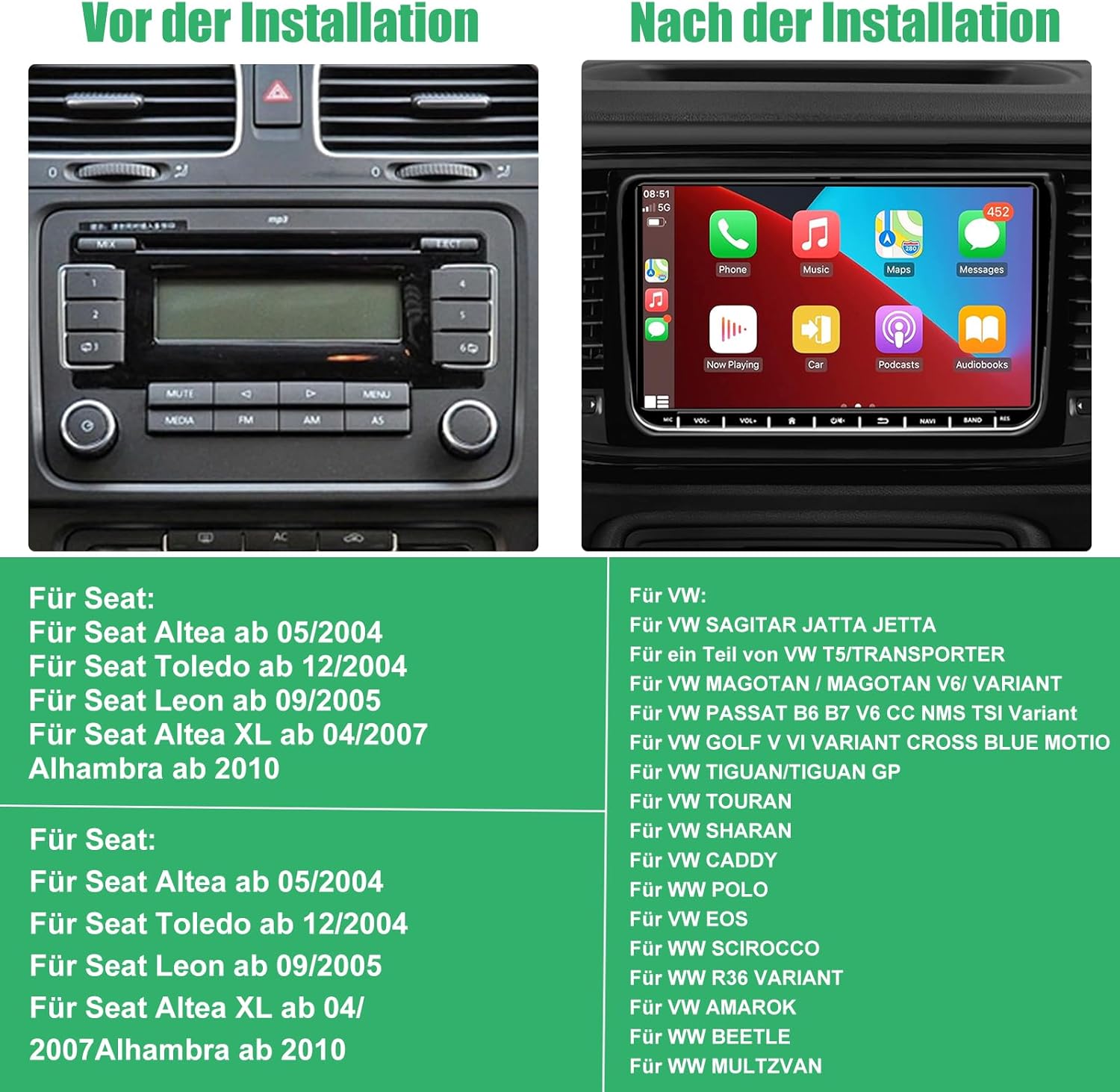
Figure 2: Visual comparison of a car dashboard before and after installation, alongside a list of compatible Seat and VW vehicle models.
Model yang Serasi:
Untuk Tempat Duduk:
- Seat Altea from 05/2004
- Seat Toledo from 12/2004
- Seat Leon from 09/2005
- Seat Altea XL from 04/2007
- Alhambra from 2010
Untuk VW:
- VW SAGITAR JETTA
- VW T5/TRANSPORTER (partial models)
- VW MAGOTAN / MAGOTAN V6 / VARIANT
- VW PASSAT B6 B7 V6 CC NMS TSI VARIANT
- VW GOLF V VI VARIANT CROSS BLUE MOTIO
- VW TIGUAN/TIGUAN GP
- VW TOURAN
- VW SHARAN
- VW CADDY
- VW POLO
- VW EOS
- VW SCIROCCO
- VW R36 VARIANT
- VW AMAROK
- VW BEETLE
- VW MULTZVAN
Kandungan Pakej
Before installation, please check that all components are present in the package:
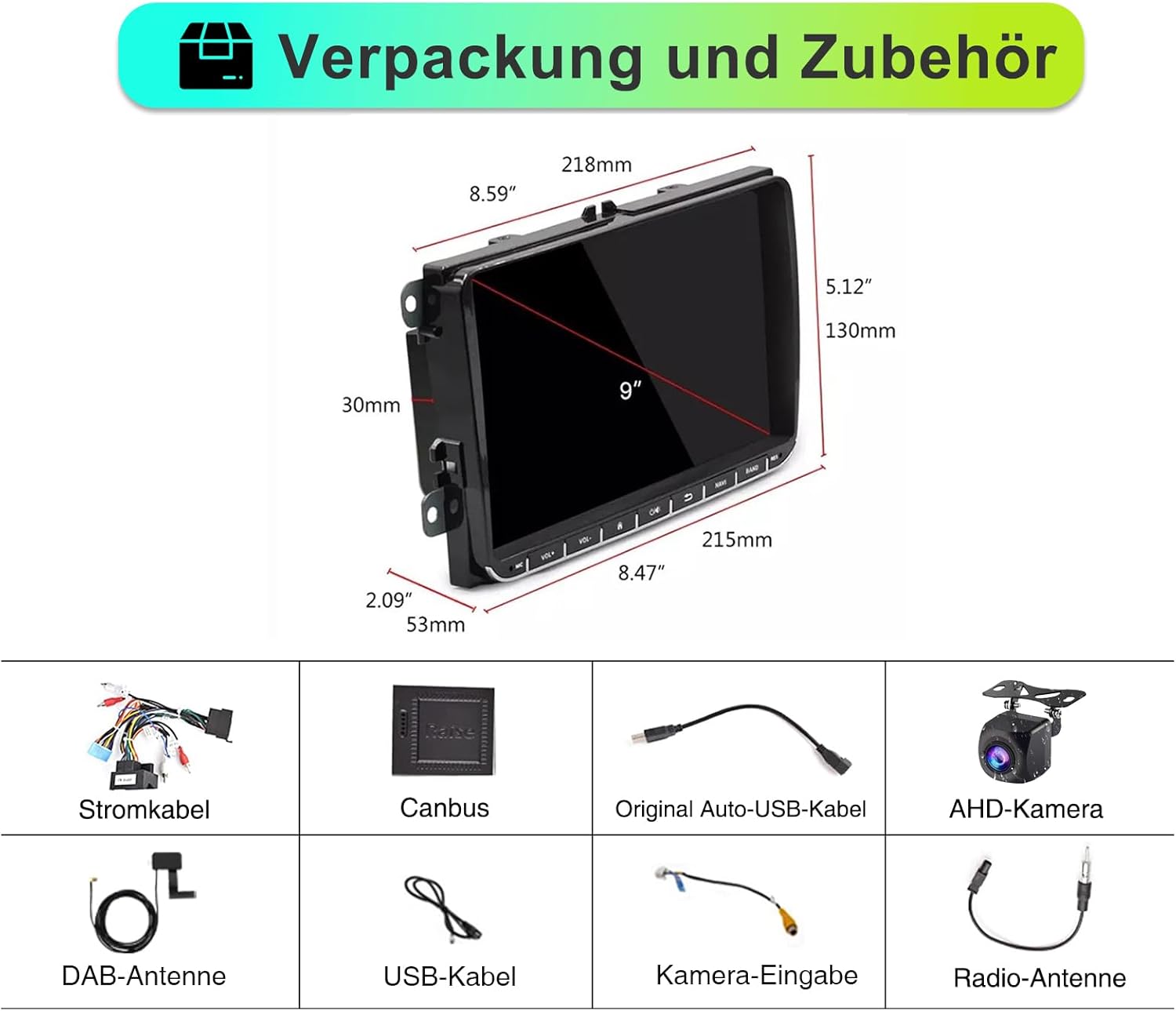
Gambar 3: Lebihview of the car radio dimensions and all included accessories.
- SEMAITU TH0029DAB Car Radio Unit
- Kabel Kuasa
- Penyahkod Canbus
- Original Auto USB Cable
- AHD Camera (Reverse Camera)
- Antena DAB
- Kabel USB
- Kabel Input Kamera
- Antena Radio
Persediaan dan Pemasangan
Pemasangan profesional disyorkan. Pastikan bateri kenderaan dicabut sebelum memulakan pemasangan untuk mengelakkan kerosakan elektrik.
Langkah Pemasangan Umum:
- Penyediaan: Disconnect the negative terminal of the car battery. Remove the original car radio unit from the dashboard.
- Sambungan Pendawaian:
- Connect the main power cable harness from the new radio to the vehicle's wiring harness.
- Connect the Canbus decoder to ensure proper communication with the vehicle's systems (e.g., steering wheel controls, door status).
- Connect the radio antenna and DAB antenna.
- Sambungkan kabel USB untuk peranti luaran.
- If installing the reverse camera, route the camera cable from the rear of the vehicle to the radio unit and connect it to the camera input. Ensure the camera's power is connected to the reverse light circuit.
- Pemasangan: Secure the new SEMAITU car radio into the dashboard opening. Ensure all cables are neatly tucked away and not pinched.
- Ujian: Reconnect the car battery. Turn on the ignition and test the radio's basic functions: power on/off, radio reception, touchscreen responsiveness, and sound output.
- Perhimpunan Akhir: Pasang semula panel trim papan pemuka.
For detailed wiring diagrams and specific vehicle instructions, please refer to the included installation guide or consult a professional installer.
Arahan Operasi
Operasi asas:
- Hidupkan/Mati Kuasa: Press the power button (usually located on the front panel or integrated with volume knob) to turn the unit on or off.
- Kawalan Kelantangan: Use the volume knob or touchscreen controls to adjust audio levels.
- Skrin Utama: Tap the home icon on the touchscreen to return to the main menu.
- Navigasi: Swipe left/right on the touchscreen to access different application pages.
Radio Functions (DAB/FM/RDS):

Figure 4: DAB Digital Radio interface showing station selection and signal strength.
- Menukar Mod: Select "Radio" from the main menu. Choose between FM or DAB mode.
- Scanning Stations: In FM mode, use the "Scan" or "Seek" function to find available stations. In DAB mode, the unit will automatically scan for digital stations upon first use or when entering a new area.
- Menyimpan Pratetap: Tune to your desired station, then press and hold a preset button (P1-P6) on the screen to save it.
- RDS (Sistem Data Radio): When available, RDS will display station information, song titles, and traffic announcements on FM.
Apple CarPlay & Android Auto Tanpa Wayar:
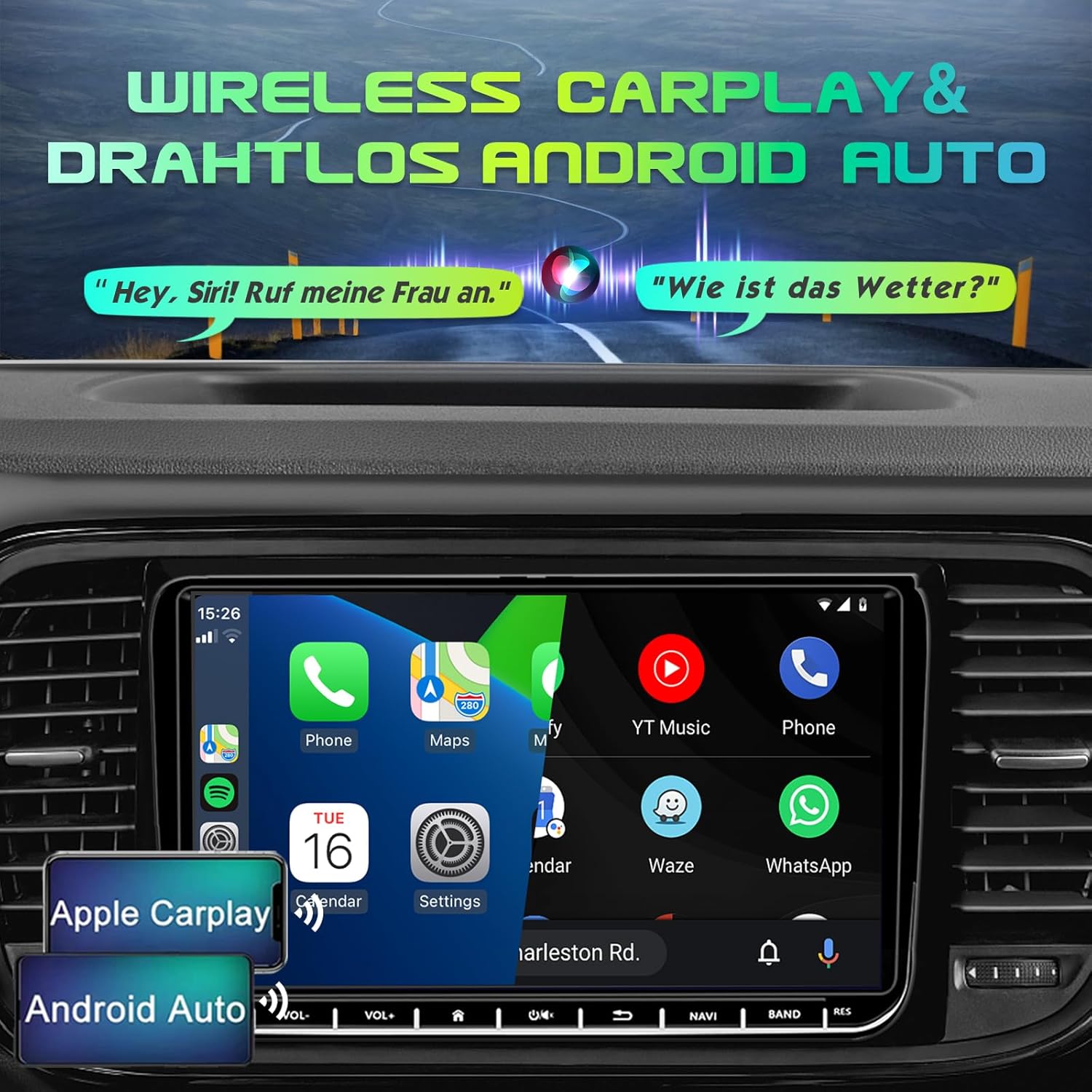
Figure 5: Display demonstrating Wireless Apple CarPlay and Android Auto functionality.
Connect your smartphone wirelessly to access navigation, music, calls, and messages directly on the car radio screen.
- Dayakan Bluetooth & Wi-Fi: Pastikan Bluetooth dan Wi-Fi didayakan pada telefon pintar anda.
- Berpasangan: On the car radio, go to the Bluetooth settings and search for your phone. Pair the devices.
- Launch CarPlay/Android Auto: Once paired, the system should prompt you to launch Apple CarPlay or Android Auto. Follow the on-screen instructions.
- Kawalan Suara: Use voice commands (e.g., "Hey Siri" for CarPlay, "Hey Google" for Android Auto) for hands-free operation.
Navigasi GPS:

Figure 6: GPS Navigation interface displaying map, current location, and route details.
The unit comes with pre-installed Europe maps and supports online and offline navigation.
- Starting Navigation: Tap the "Navigation" icon on the main screen.
- Entering Destination: Use the on-screen keyboard to enter your destination address or select from recent destinations/points of interest.
- Kemas Kini Peta: Connect to Wi-Fi to download map updates or use online navigation services.
Kesambungan Bluetooth:

Figure 7: Bluetooth interface for hands-free calling and audio streaming.
- Berpasangan: Go to "Bluetooth" settings, enable Bluetooth on your phone, and select the car radio from the list of available devices.
- Panggilan Bebas Tangan: Make and receive calls directly through the car radio. Your phonebook can be synchronized.
- Penstriman Audio: Play music from your phone via Bluetooth audio streaming (A2DP).
Reverse Camera (AHD Camera):
When the vehicle is shifted into reverse gear, the display will automatically switch to the rear view camera feed, providing a wide 170° view dengan keupayaan penglihatan malam.
Figure 8: AHD Reverse Camera display showing day and night vision modes.
DSP EQ (Digital Sound Processor Equalizer):
Customize your audio experience with the built-in DSP EQ. Adjust frequency bands to match your preferences and vehicle acoustics.
Figure 9: DSP EQ interface for advanced audio customization.
- Mengakses EQ: Navigate to the "Sound Settings" or "DSP" menu.
- Melaraskan Tetapan: Use the sliders to adjust individual frequency bands. Select from preset sound modes (e.g., Pop, Rock, Jazz) or create custom profiles.
Kawalan Roda Stereng (SWC):
If your vehicle supports it and the Canbus is correctly connected, you can program the steering wheel buttons to control the car radio functions (e.g., volume, track skip, mode change).
Figure 10: Steering Wheel Control (SWC) setup interface.
- Persediaan: Go to "Settings" > "Steering Wheel Control" and follow the on-screen instructions to map your vehicle's steering wheel buttons to the radio functions.
Pautan Cermin:
Mirror Link allows you to display your smartphone's screen directly on the car radio, supporting both iOS and Android devices. This enables you to view content like navigation, videos, and messages from your phone on the larger display.
Figure 11: Mirror Link feature displaying a mirrored smartphone screen.
- Sambungan: Connect your smartphone via USB or Wi-Fi (depending on the specific Mirror Link app/protocol).
- Pengaktifan: Launch the Mirror Link application on the car radio and follow the pairing instructions on both devices.
Penyelenggaraan
- Pembersihan Skrin: Gunakan kain lembut dan tidak berbulu untuk mengelap skrin sentuh dengan lembut. Untuk calitan degil, sedikit dampen kain dengan air atau pembersih selamat skrin. Elakkan bahan yang melelas atau bahan kimia yang keras.
- Pembersihan Am: Pastikan unit bebas daripada habuk dan serpihan. Gunakan berus lembut atau udara termampat untuk membersihkan sekeliling butang dan port.
- Kemas Kini Perisian: Periodically check for software updates from the manufacturer (if available) to ensure optimal performance and access to new features. Updates can usually be performed via Wi-Fi.
- Elakkan Suhu Melampau: Jangan dedahkan unit kepada haba atau sejuk yang melampau, kerana ini boleh menjejaskan prestasi dan jangka hayatnya.
- Pengurusan tenaga: Ensure the vehicle's electrical system is stable. Avoid frequent power fluctuations.
Menyelesaikan masalah
If you encounter issues with your SEMAITU TH0029DAB Car Radio, please refer to the following common problems and solutions:
| Masalah | Kemungkinan Punca | Penyelesaian |
|---|---|---|
| Unit tidak dihidupkan. | No power supply; Blown fuse; Incorrect wiring. | Check vehicle's fuse box and radio fuse. Verify power cable connections. Ensure battery is connected. |
| Tiada keluaran bunyi. | Kelantangan terlalu rendah; Bisu diaktifkan; Isu pendawaian pembesar suara; Sumber audio salah. | Increase volume. Check if mute is on. Verify speaker connections. Select correct audio source (e.g., FM, Bluetooth). |
| Poor radio reception (FM/DAB). | Antena tidak disambungkan; Antena rosak; Kawasan isyarat lemah. | Ensure radio and DAB antennas are securely connected. Check antenna for damage. Try scanning for stations in a different location. |
| CarPlay/Android Auto tidak bersambung. | Bluetooth/Wi-Fi dimatikan pada telefon; Gandingan yang salah; Gangguan perisian. | Ensure Bluetooth and Wi-Fi are enabled on your phone. Re-pair the devices. Restart both phone and car radio. Update phone OS. |
| Reverse camera not displaying. | Camera not powered; Incorrect camera input connection; Reverse trigger wire not connected. | Check camera power supply (usually from reverse light). Verify camera input cable is connected to the correct port. Ensure reverse trigger wire is connected. |
| Skrin sentuh tidak bertindak balas. | System freeze; Dirt on screen. | Restart the unit (press and hold power button). Clean the screen. If issue persists, a factory reset might be needed (consult support). |
| Kawalan Roda Stereng tidak berfungsi. | Canbus not connected; Incorrect SWC programming. | Ensure Canbus decoder is correctly installed. Re-program the steering wheel controls in the settings menu. |
Jika masalah berterusan selepas mencuba penyelesaian ini, sila hubungi sokongan pelanggan.
Spesifikasi
| Ciri | Perincian |
|---|---|
| Nama Model | Autoradio Android 12.0 9" (DAB) |
| Pengeluar | SEMAITU |
| Sistem Operasi | Android 12.0 |
| Saiz Skrin | 9 Inci |
| Jenis Paparan | QLED Quantum Touchscreen |
| Resolusi | 1280 x 720 piksel |
| Memori (RAM + Storan) | 2GB RAM + 32GB ROM |
| Penala Radio | DAB, FM, RDS (NXP6856) |
| Ketersambungan | Bluetooth, Wi-Fi, USB (Dual ports) |
| Navigasi | GPS (Europe maps included) |
| Integrasi Telefon Pintar | Wireless Apple CarPlay, Wireless Android Auto, Mirror Link |
| Mod Keluaran Audio | Stereo with DSP EQ |
| Ciri Khas | Touchscreen, AHD Reverse Camera Support, Steering Wheel Control (SWC) |
| Jenis Perkhidmatan Kenderaan | kereta |
| Jenis Pemasangan | Pemasangan Papan Pemuka |
| Dimensi Pakej | 28 x 25.3 x 9 cm |
| Berat Barang | 1.4 kilogram |
Waranti dan Sokongan
For warranty information and customer support, please refer to the documentation provided with your purchase or contact SEMAITU customer service directly. Keep your proof of purchase for warranty claims.
For technical assistance or further inquiries, please visit the official SEMAITU webtapak atau hubungi pasukan sokongan mereka.


