1. Pengenalan
Welcome to the user manual for your Optoma HD30LV 1080p Full HD Home Projector. This document provides essential information for the safe and efficient operation of your device. Please read these instructions carefully before using the projector and retain them for future reference.
2. Produk Lebihview
The Optoma HD30LV is designed to deliver a high-quality visual experience for home theater and gaming. It features 1080p Full HD resolution, 4K HDR input compatibility, and a compact design for versatile placement.
Ciri-ciri Utama:
- 4,500 Lumen: Provides bright images suitable for various lighting conditions.
- 4K UHD and HDR Compatible: Supports high-resolution and high dynamic range content for enhanced detail and color.
- Mudah Alih dan Ringan: Designed for easy transport and flexible installation.
- Mod Permainan Dipertingkat: Offers lightning-fast response times for a smooth gaming experience.
- Dual HDMI Connectors: Allows connection to multiple devices simultaneously.
Apa yang ada di dalam Kotak:
- Optoma HD30LV Projector
- Kabel Kuasa
- Alat Kawalan Jauh
- Manual Pengguna (dokumen ini)
Visual Produk:

Depan view of the Optoma HD30LV projector, showcasinkanta dan pengudaraan.

Atas view of the Optoma HD30LV projector, showing the control panel and focus/zoom adjustments.
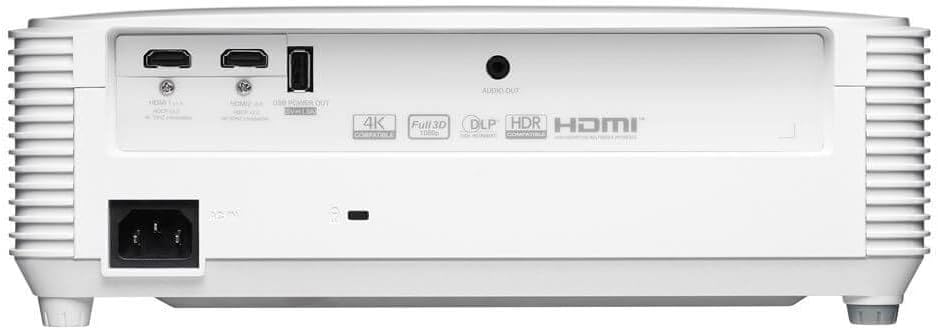
belakang view of the Optoma HD30LV projector, detailing the input and output ports.
Video Produk:
Produk rasmiview video demonstrating the features and design of the Optoma HD30LV projector.
3. Persediaan
3.1 Membongkar dan Meletakkan
- Keluarkan projektor dan semua aksesori dengan berhati-hati daripada pembungkusan.
- Place the projector on a stable, flat surface or mount it securely according to the manufacturer's guidelines. Ensure adequate ventilation around the unit.
- Consider the throw distance for your desired screen size. The HD30LV can project a 120-inch image from approximately 13 feet 10 inches (4.22 meters) away.

Diagram illustrating recommended throw distances for 100-inch and 120-inch screen sizes for the HD30LV projector.
3.2 Menyambung Peranti
The HD30LV features multiple connectivity options. Refer to the diagram below for port locations.

Terperinci view of the Optoma HD30LV projector's dimensions and labeled connectivity ports, including HDMI and USB.
- Kuasa: Sambungkan kabel kuasa ke projektor dan soket kuasa yang sesuai.
- HDMI: Use an HDMI cable to connect your video source (e.g., Blu-ray player, gaming console, streaming device) to one of the two HDMI 2.0 ports.
- Kuasa USB Keluar: A USB port (5V/1.5A) is available for powering compatible devices.
- Keluar Audio: Connect external audio systems via the 3.5mm stereo audio jack if desired.
- Kunci Kensington: For security, a Kensington lock slot is provided.
4. Arahan Operasi
4.1 Menghidupkan/Mematikan
- Tekan butang kuasa pada projektor atau alat kawalan jauh untuk menghidupkan unit.
- Untuk mematikan kuasa, tekan butang kuasa sekali lagi. Sahkan penutupan jika digesa.
4.2 Melaraskan Imej
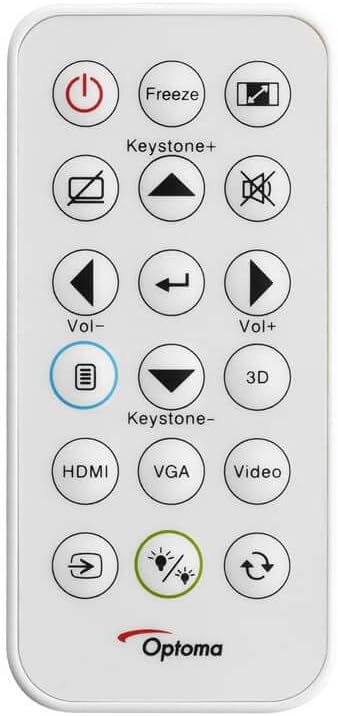
The remote control for the Optoma HD30LV projector, showing buttons for power, input, keystone, volume, and 3D functions.
- Fokus: Putarkan gelang fokus pada kanta sehingga imej tajam dan jelas.
- Zum: Laraskan gelang zum pada kanta untuk menukar saiz imej tanpa menggerakkan projektor.
- Pembetulan Keystone: Use the 'Keystone+' and 'Keystone-' buttons on the remote control or the projector's control panel to correct trapezoidal image distortion.
- Sumber Input: Press the 'HDMI' button on the remote or the 'Source' button on the projector to cycle through available input sources.
4.3 Ciri Dipertingkat
- 4K HDR Input: The projector is compatible with 4K HDR signals, providing enhanced contrast and color. Ensure your source device is configured to output HDR.
- Mod Permainan Dipertingkat: Activate this mode through the projector's menu for reduced input lag, optimizing your gaming experience.
- Full 3D: The projector supports Full 3D content from compatible sources. Active DLP Link 3D glasses (sold separately) are required for 3D viewing.

Visual comparison of different resolutions (SD, HD, Full HD 1080p) to demonstrate the clarity of the HD30LV's native 1080p output.
5. Penyelenggaraan
Penyelenggaraan berkala memastikan prestasi optimum dan memanjangkan jangka hayat projektor anda.
- Membersihkan Lensa: Gunakan kain lembut dan tidak berbulu yang direka khas untuk kanta optik. Elakkan bahan yang kasar atau bahan kimia yang keras.
- Cleaning the Projector Casing: Lap bahagian luar dengan lembut, damp kain. Jangan gunakan pembersih atau pelarut yang melelas.
- Pengudaraan: Ensure the projector's ventilation openings are clear and unobstructed to prevent overheating. Do not block air vents.
- Storan: Apabila tidak digunakan untuk tempoh yang lama, simpan projektor di tempat yang sejuk dan kering, terlindung daripada habuk dan suhu yang melampau.
6. Penyelesaian masalah
If you encounter issues with your Optoma HD30LV projector, refer to the following common problems and solutions:
| Masalah | Penyelesaian yang Mungkin |
|---|---|
| Tiada imej dipaparkan | Check power connections. Ensure the correct input source is selected. Verify the video cable is securely connected. |
| Imej kabur | Adjust the focus ring on the lens. Ensure the projection surface is flat and the projector is stable. |
| Imej adalah trapezoid | Use the keystone correction function on the remote or projector control panel. Position the projector perpendicular to the screen if possible. |
| Tiada bunyi | Check volume settings on the projector and source device. Ensure external audio systems are correctly connected and powered on. |
| Projektor menjadi terlalu panas atau dimatikan | Ensure ventilation openings are clear. Operate the projector in a well-ventilated area. |
For more detailed troubleshooting or issues not listed here, please refer to the comprehensive support section on the Optoma webtapak atau hubungi sokongan pelanggan.
7. Spesifikasi
| Ciri | Perincian |
|---|---|
| Nombor Model | HD30LV |
| Resolusi Paparan | 1920 x 1080 (1080p HD Penuh) |
| Kecerahan | 4,500 Lumen |
| Teknologi Ketersambungan | HDMI, USB |
| Ciri Khas | 4K HDR Input, Compact Size, Full 3D, High Brightness, Low Input Lag |
| Dimensi Produk | 9.61 x 12.44 x 4.25 inci (244 x 316 x 108 mm) |
| Berat Barang | 6.35 paun (2.88 kg) |
| Pengeluar | Optoma Technology Inc |
| Bateri | 1 bateri Lithium Metal diperlukan (termasuk untuk alat kawalan jauh) |
8. Waranti dan Sokongan
For information regarding your product's warranty, please refer to the warranty card included with your projector or visit the official Optoma website. Optoma provides customer support for technical assistance, service, and parts.
Sokongan dalam talian: Lawati Optoma Support Page untuk Soalan Lazim, muat turun dan maklumat hubungan.
Maklumat Hubungan: Refer to your product packaging or the Optoma webtapak untuk butiran hubungan perkhidmatan pelanggan terkini.


