1. Pengenalan
The Ankilo Mini Bluetooth 5.3 Receiver/Transmitter is a versatile 2-in-1 audio adapter designed to add Bluetooth functionality to non-Bluetooth devices. Featuring the latest Bluetooth 5.3 technology, it ensures stable connections and a transmission range of up to 33 feet (10 meters). This device is suitable for use with cars, speakers, stereo systems, and headphones, allowing you to enjoy wireless audio streaming and hands-free calling.

Figure 1: Ankilo Mini Bluetooth 5.3 Receiver/Transmitter.

Figure 2: Highlighting Bluetooth 5.3 for stable connections, auto reconnect in RX mode, 33 ft signal range, and fast transmission.
2. Produk Lebihview
Biasakan diri anda dengan komponen peranti:
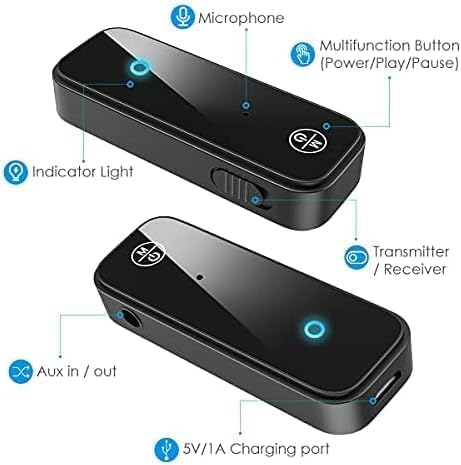
Figure 3: Labeled diagram of the Ankilo Bluetooth adapter. Key components include the Microphone, Multifunction Button (Power/Play/Pause), Indicator Light, Transmitter/Receiver (TX/RX) switch, Aux in/out port, and 5V/1A Charging port.
3. Kandungan Pakej
Pastikan semua item ada dalam pakej:
- 1 x Ankilo Mini Bluetooth 5.3 Receiver/Transmitter
- 1 x 3.5mm Audio Connector (new and old versions may be sent randomly)
- 1 x Kabel Pengecas USB
- 1 x Manual Pengguna
4. Persediaan dan Sambungan
4.1. Mod Penerima (RX)
Use Receiver Mode to stream audio from your Bluetooth-enabled device (e.g., smartphone, laptop) to a non-Bluetooth audio system (e.g., car stereo, wired speakers, wired headphones).
- Tukar ke Mod RX: Locate the TX/RX switch on the side of the adapter and slide it to the "RX" position.
- Sambung ke Sistem Audio: Plug the 3.5mm audio connector into the Aux in/out port of the Bluetooth adapter. Then, plug the other end of the 3.5mm audio connector into the auxiliary input port of your non-Bluetooth audio system.
- Hidupkan dan Pasangkan: Press and hold the Multifunction Button (power button) for 3 seconds to turn on the device. The indicator light will flash red and blue alternately, indicating it is in pairing mode.
- Gandingkan dengan Peranti Anda: On your smartphone or other Bluetooth-enabled device, go to Bluetooth settings and search for "Ankilo" or "ZF-360" (or similar device name). Select it to connect. Once connected, the indicator light on the adapter will turn solid blue.

Figure 4: Step-by-step visual guide for connecting in both Receiver (RX) and Transmitter (TX) modes.
4.2. Mod Pemancar (TX)
Use Transmitter Mode to stream audio from a non-Bluetooth audio source (e.g., TV, computer, MP3 player) to your Bluetooth headphones or speakers.
- Tukar ke Mod TX: Locate the TX/RX switch on the side of the adapter and slide it to the "TX" position.
- Sambung ke Sumber Audio: Plug the 3.5mm audio connector into the Aux in/out port of the Bluetooth adapter. Then, plug the other end of the 3.5mm audio connector into the auxiliary output port of your non-Bluetooth audio source (e.g., TV headphone jack).
- Hidupkan dan Pasangkan: Press and hold the Multifunction Button (power button) for 3 seconds to turn on the device. The indicator light will flash red and blue alternately, indicating it is in pairing mode.
- Pasangkan dengan Fon Kepala/Pembesar Suara Bluetooth: Put your Bluetooth headphones or speakers into pairing mode. The adapter will automatically search and connect to your headphones/speakers. Once connected, the indicator light on the adapter will turn solid red.
Video 1: General guide on how to use an Aux Bluetooth Adapter for Car. (Note: Product shown may vary slightly from Ankilo model.)
Video 2: Demonstration of ensuring the audio plug is firmly inserted for optimal sound quality. (Note: Product shown may vary slightly from Ankilo model.)
5. Mod dan Fungsi Operasi
5.1. Panggilan Bebas Tangan
The adapter features a built-in HD microphone for convenient hands-free calling while driving or performing other tasks.
- Jawab/Tutup Panggilan: Tekan Butang Multifungsi sekali.
- Tolak Panggilan: Tekan dan tahan Butang Multifungsi selama 2 saat.
- Dail Semula Nombor Terakhir: Tekan dua kali Butang Pelbagai Fungsi.
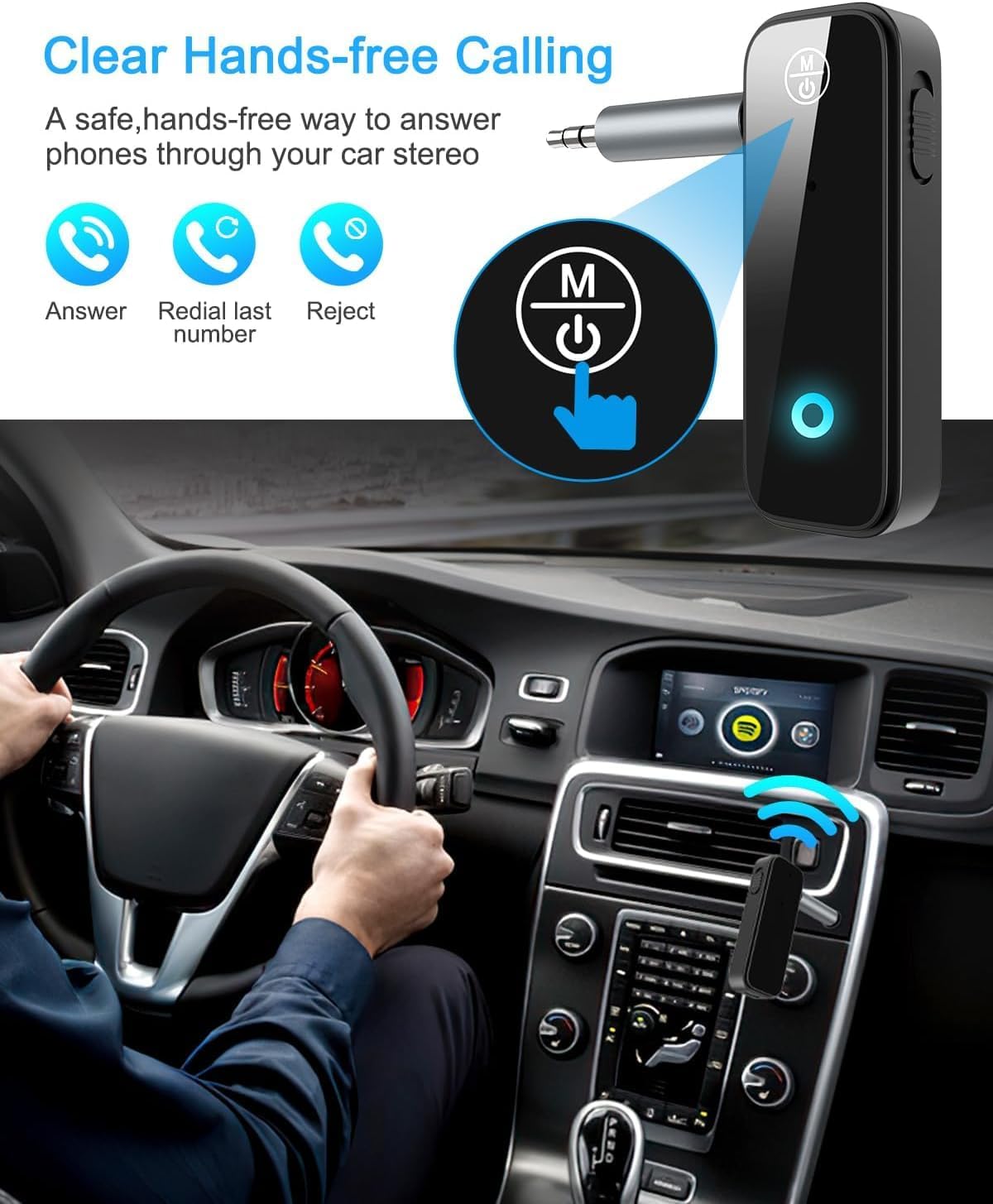
Figure 5: Visual representation of hands-free calling functionality in a vehicle.
5.2. Kawalan Main Semula Muzik
- Main/Jeda: Tekan Butang Multifungsi sekali.
- Lagu Seterusnya: Tekan butang "+" sekali.
- Trek Sebelumnya: Tekan butang "-" sekali.
- Kelantangan: Tekan dan tahan butang "+".
- Perlahankan suara: Tekan dan tahan butang "-".
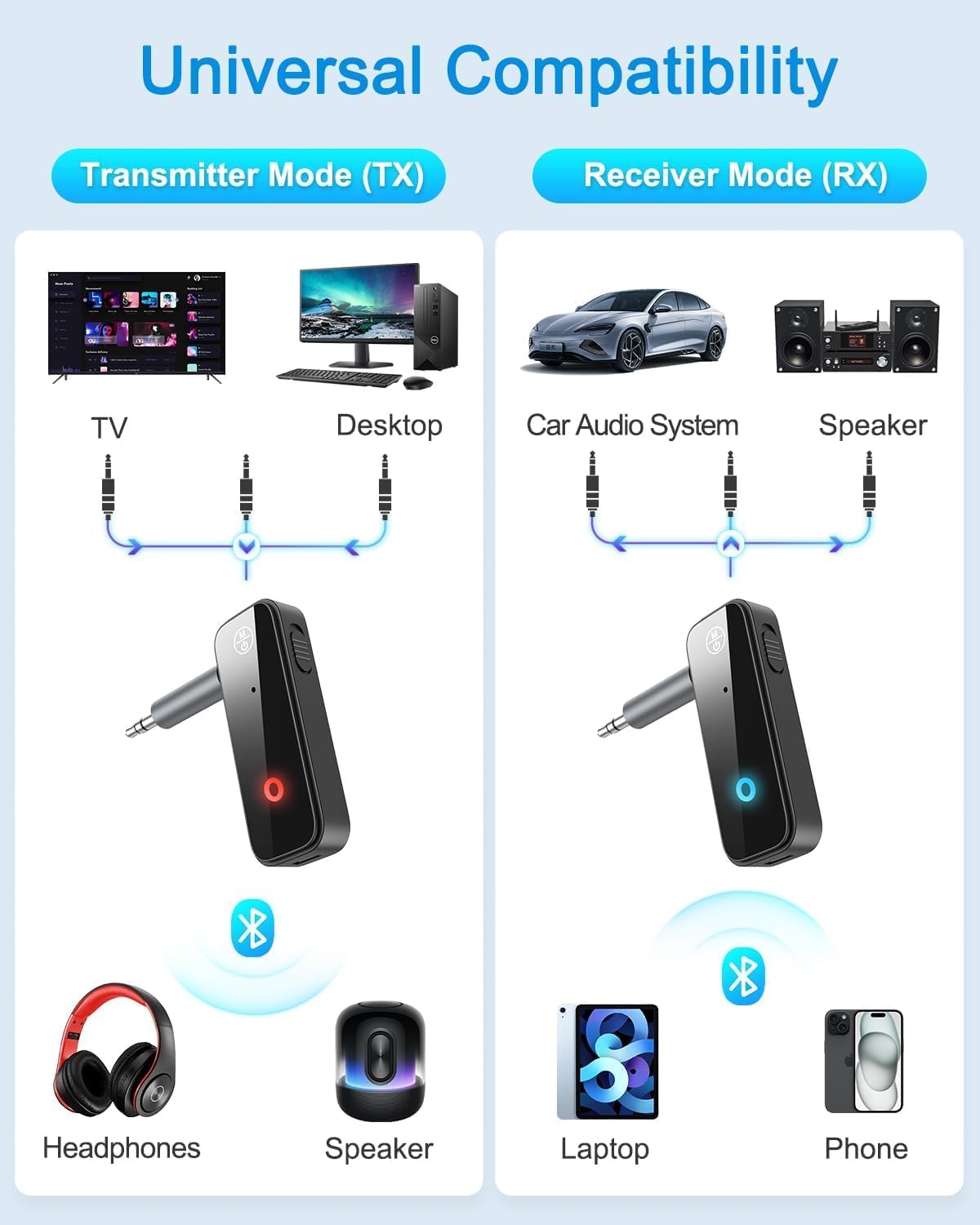
Figure 6: Illustrates the universal compatibility of the device in both Transmitter (TX) and Receiver (RX) modes with various devices like TVs, desktops, car audio systems, speakers, headphones, laptops, and phones.
6. Pengecasan dan Hayat Bateri
The Ankilo Mini Bluetooth adapter is equipped with a built-in rechargeable battery. A full charge takes approximately 2 hours and provides up to 8 hours of music playback or call time.
- mengecas: Connect the provided USB charging cable to the 5V/1A Charging port on the adapter and to a USB power source. The red indicator light will be solid during charging and turn off when fully charged.
- Petunjuk Bateri Rendah: When the battery is low, the red indicator light will flash.

Figure 7: Details on the device's 8-hour battery life, 2-hour fast charging, and USB charging port.
7. Spesifikasi
| Ciri | Perincian |
|---|---|
| Jenama | Ankilo |
| Model | CP210-MA06CA-KH |
| Versi Bluetooth | 5.3 |
| Mod Pengendalian | Receiver (RX) & Transmitter (TX) |
| Julat Penghantaran | Sehingga 33 kaki (10 meter) |
| Hayat Bateri | Approx. 8 hours (music/call) |
| Masa Mengecas | lebih kurang 2 jam |
| Port Pengecasan | 5V/1A (USB) |
| Input/Output Audio | 3.5mm Bantu |
| Mikrofon Terbina dalam | Yes (HD) |
| bahan | plastik |
| Dimensi Produk | 6.7 x 1.8 x 10cm; 30g |
8. Penyelesaian masalah
- Peranti tidak dihidupkan: Pastikan peranti dicas sepenuhnya. Sambungkannya ke sumber kuasa menggunakan kabel USB.
- Cannot pair with a device:
- Ensure the adapter is in the correct TX or RX mode.
- Make sure the adapter is in pairing mode (red and blue lights flashing alternately).
- Ensure the target device (phone, headphones, speaker) is also in pairing mode.
- Turn off and on the Bluetooth function on your device and try searching again.
- Kosongkan sambungan Bluetooth sebelumnya pada kedua-dua peranti jika perlu.
- No audio or low audio:
- Check that the 3.5mm audio connector is fully and firmly inserted into both the adapter and the audio system/source.
- Ensure the volume on both the adapter and the connected audio device is turned up.
- Verify that the adapter is correctly connected to the audio source/system (TX mode for output, RX mode for input).
- Sambungan terputus-putus: Ensure there are no significant obstacles (like walls) between the adapter and the connected Bluetooth device. Keep devices within the 33-foot (10-meter) range.
9. Maklumat Keselamatan
- Do not expose the device to extreme temperatures, moisture, or corrosive environments.
- Jangan buka atau cuba membaiki peranti itu sendiri.
- Jauhkan daripada kanak-kanak.
- Note: This adapter is not suitable for SONY devices. Please confirm compatibility before purchase.
10. Waranti dan Sokongan
Ankilo offers a 12-month quality protection warranty and 60 days free replacement for this product. For any questions or concerns, please contact our customer support. We are committed to responding within 24 hours to assist you.


