1. Maklumat Keselamatan
Sentiasa memakai topi keledar semasa menunggang.
Operating an electric kickscooter carries inherent risks, including but not limited to loss of control, collisions, and falls. To minimize these risks, it is crucial to read and follow all instructions and warnings in this manual. Ensure you understand how to operate the kickscooter safely before your first ride.
- Sentiasa pakai peralatan keselamatan yang sesuai, termasuk topi keledar, pelapik lutut dan pelapik siku.
- Do not ride in wet conditions, on slippery surfaces, or in poor visibility.
- Adhere to local laws and regulations regarding electric kickscooter use.
- Kekalkan kelajuan dan jarak yang selamat daripada kenderaan lain dan pejalan kaki.
- Avoid sudden maneuvers, sharp turns, and excessive speeds.
- Do not allow children under the recommended age or individuals exceeding the weight limit to operate the kickscooter.
- Regularly inspect the kickscooter for any damage or loose parts before each ride.
2. Produk Lebihview
The Segway Ninebot F2 Pro Electric KickScooter is designed for urban commuting, offering a balance of performance, safety, and convenience. It features a robust design with advanced functionalities.
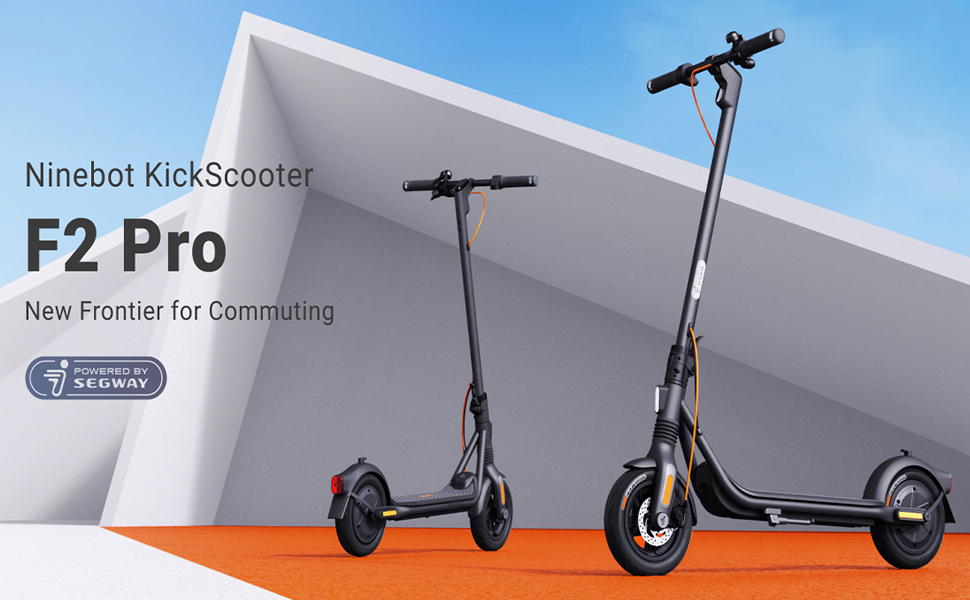
Image: The Segway Ninebot F2 Pro Electric KickScooter, showcasing its design for urban commuting.
Ciri-ciri Utama:
- Kelajuan Maks: 32 km/j (20 mph)
- Julat Maksima: Sehingga 55 km (34 batu)
- Keluaran Motor: 800W maximum power
- Tayar: 10-inch self-sealing tubeless tires
- Penggantungan: Front spring suspension for a smoother ride
- Sistem Brek: Dual braking system (front disc brake + rear E-ABS)
- Ciri-ciri Keselamatan: Integrated turn signals, Traction Control System (TCS), high-decibel electric horn, built-in LED headlight.
- Ketersambungan: Bluetooth connection, Apple Find My compatibility.
- mudah alih: Portable folding design.

Imej: Depan view of the Segway Ninebot F2 Pro Electric KickScooter.

Imej: Sisi view of the Segway Ninebot F2 Pro Electric KickScooter.

Imej: Belakang view of the Segway Ninebot F2 Pro Electric KickScooter.
3. Persediaan
3.1 Unfolding the KickScooter
- Place the kickscooter on a flat surface.
- Lift the stem until it locks into the upright position. Ensure the locking mechanism is securely engaged.
- Buka lipatan kaki untuk menyokong skuter.

Image: Dimensions of the Segway Ninebot F2 Pro KickScooter in both folded and unfolded states.
3.2 Pengecasan Awal
Before first use, fully charge the kickscooter's battery. Connect the charger to the charging port and then to a power outlet. The charging indicator on the charger will change color (e.g., red to green) when fully charged.
- Masa pengecasan adalah lebih kurang 8 jam untuk pengecasan penuh.
- Only use the official charger provided with the kickscooter.

Imej: Dalaman view of the battery cells within the kickscooter deck, illustrating the 34-mile max range and 8-hour fast charging capability.
3.3 Connecting to the Smart App
Download the official Segway-Ninebot app from your smartphone's app store. Follow the in-app instructions to connect your F2 Pro KickScooter via Bluetooth. The app allows for firmware updates, riding status monitoring, and scooter locking/unlocking.

Image: Screenshot of the Segway-Ninebot smart app, demonstrating features like Bluetooth connection, lock/unlock, riding status, cruise mode, and firmware updates.
4. Arahan Operasi
4.1 Menghidupkan/Mematikan
- Hidupkan kuasa: Press the power button located on the display panel.
- Matikan: Tekan dan tahan butang kuasa selama beberapa saat.
4.2 Riding the KickScooter
- Letakkan satu kaki dengan kuat di atas geladak.
- Tolak dengan kaki anda yang lain untuk mendapatkan momentum awal.
- Setelah bergerak, tekan tuil pendikit perlahan-lahan untuk menghidupkan motor.
- Letakkan kaki kedua anda di atas geladak.
- To slow down, release the throttle. To brake, use the brake lever on the handlebar.

Image: Detail of the front wheel, highlighting the disc brake and front suspension system.

Image: Diagram showing the front spring suspension, designed for smooth riding over bumps.
4.3 Using Turn Signals and Horn
- Isyarat Belok: Use the switch on the handlebar to activate the integrated turn signals for indicating turns.
- tanduk: Press the horn button on the handlebar to alert others.

Image: Close-up of the handlebar, showing the activated turn signal for improved visibility.
4.4 Folding for Transport
To fold the kickscooter for storage or transport:
- Ensure the kickscooter is powered off.
- Locate the folding mechanism at the base of the stem.
- Follow the specific instructions in the quick start guide to release the latch and fold the stem down until it clicks into place.

Image: A person carrying the folded Segway Ninebot F2 Pro KickScooter, demonstrating its portability.
5. Penyelenggaraan
Regular maintenance ensures the longevity and safe operation of your Segway Ninebot F2 Pro KickScooter.
5.1 Pembersihan Am
Wipe the kickscooter with a soft, damp cloth. Do not use alcohol, gasoline, kerosene, or other corrosive chemical solvents to clean the scooter. Do not wash the scooter with a high-pressure water jet.
5.2 Penjagaan Tayar
The F2 Pro features 10-inch self-sealing tubeless tires, which reduce the risk of punctures. However, it is important to regularly check tire pressure and inflate to the recommended PSI for optimal performance and safety.

Image: Diagram showing the self-sealing layer within the tire, designed to prevent punctures.
5.3 Penyelenggaraan Bateri
- Avoid fully discharging the battery. Charge it regularly, even if not in use for extended periods.
- Store the kickscooter in a cool, dry place, away from direct sunlight and extreme temperatures.
- Jangan cuba membuka atau mengubah suai pek bateri.
5.4 Brake System Check
Periodically check the functionality of both the front disc brake and the rear E-ABS brake. Ensure the brake levers operate smoothly and the braking power is effective. If you notice any issues, consult a qualified technician.

Image: Illustration detailing the dual braking system, which includes a front disc brake and a rear E-ABS for effective stopping power.
6. Penyelesaian masalah
This section addresses common issues you might encounter with your F2 Pro KickScooter.
6.1 KickScooter Not Powering On
- Semak Tahap Bateri: Ensure the battery is sufficiently charged. Connect the charger and attempt to power on after a short charge.
- Butang Kuasa: Confirm the power button is being pressed correctly and held for the required duration.
6.2 Isu Sambungan Apl
- Bluetooth: Ensure Bluetooth is enabled on your smartphone and the kickscooter is within range.
- Mula Semula Aplikasi: Close and reopen the Segway-Ninebot app.
- Kemas kini Firmware: If possible, check for and install any pending firmware updates via the app on a successful connection.
6.3 Reduced Performance or Range
- Tekanan Tayar: Incorrect tire pressure can significantly impact range and performance. Check and adjust to recommended levels.
- Syarat Menunggang: Steep inclines, heavy loads, and aggressive riding (e.g., frequent acceleration/braking) will reduce range.
- Kesihatan Bateri: Over time, battery capacity may decrease. Ensure proper battery maintenance.
7. Spesifikasi
| Ciri | Spesifikasi |
|---|---|
| Nama Model | F2 Pro |
| Nombor Model Item | 051203U |
| Jenama | Segway |
| Kelajuan Maks | 32 km/j (20 mph) |
| Julat Maks | Sehingga 55 km (34 batu) |
| Keluaran Motor | 900W (Puncak) |
| Gred Bukit | Sehingga 22% |
| Saiz Tayar | 10 Inches (Self-Sealing Tubeless) |
| Jenis Brek | Front Disc Brake, Rear E-ABS |
| Penggantungan | Front Spring Suspension |
| Jenis Bateri | Ion Litium (1 diperlukan, disertakan) |
| Masa Mengecas | lebih kurang 8 jam |
| Dimensi Produk (Tidak dilipat) | 56.9 x 125.22 x 115.82 cm |
| Berat Barang | 18.5 kg (Kira-kira 39 paun) |
| Kapasiti Berat Maksimum | 265 paun |
| Julat Umur | Dewasa |
| bahan | Aluminum (Frame: Alloy Steel) |
| Tahan Air | IPX5 Resistant |
| Komponen yang Disertakan | Pengecas |

Image: Infographic detailing key specifications and features such as range, speed, power, climbing slope, TCS, dual braking, front suspension, electric horn, self-sealing tires, and Apple Find My compatibility.
8. Waranti dan Sokongan
Specific warranty details and support contact information are typically provided with the product packaging or available on the manufacturer's official website. Please refer to the documentation included with your purchase or visit the official Segway website for the most up-to-date information regarding warranty coverage and customer support.
9. Video Produk
Tiada video produk rasmi daripada penjual disediakan dalam data yang tersedia untuk disematkan dalam manual ini.