1. Pengenalan
Terima kasih kerana membeliasing the BlitzWolf BW-V5 LED Projector. This manual provides detailed instructions for the setup, operation, and maintenance of your projector. Please read this manual thoroughly before using the product to ensure proper operation and to extend its lifespan.
The BlitzWolf BW-V5 is a portable LED projector featuring a physical 1080P resolution, 9000 lumens brightness, and Bluetooth 5.0 connectivity, designed for home theater and entertainment use. It is compatible with various devices including TV sticks, smartphones, and supports HDMI, USB, and AV inputs.
2. Maklumat Keselamatan
- Jangan lihat terus ke dalam kanta projektor apabila lamp sedang aktif.
- Pastikan pengudaraan yang betul di sekitar projektor untuk mengelakkan terlalu panas. Jangan halang bukaan pengudaraan.
- Gunakan hanya penyesuai kuasa yang dibekalkan dengan projektor.
- Jangan dedahkan projektor kepada hujan atau kelembapan untuk mengelakkan renjatan elektrik atau kebakaran.
- Elakkan meletakkan projektor pada permukaan yang tidak stabil.
- Jangan cuba membuka atau membaiki projektor sendiri. Hubungi kakitangan servis yang berkelayakan untuk mendapatkan bantuan.
- Keep the projector away from direct sunlight, heat sources, and extreme temperatures.
3. Kandungan Pakej
Sila pastikan semua item berikut disertakan dalam pakej anda:
- BlitzWolf BW-V5 LED Projector
- Alat Kawalan Jauh
- Kabel Kuasa
- Kabel HDMI (mungkin berbeza mengikut rantau/pakej)
- AV Cable (may vary by region/package)
- Manual Pengguna (dokumen ini)
4. Produk Lebihview
4.1 Komponen Projektor
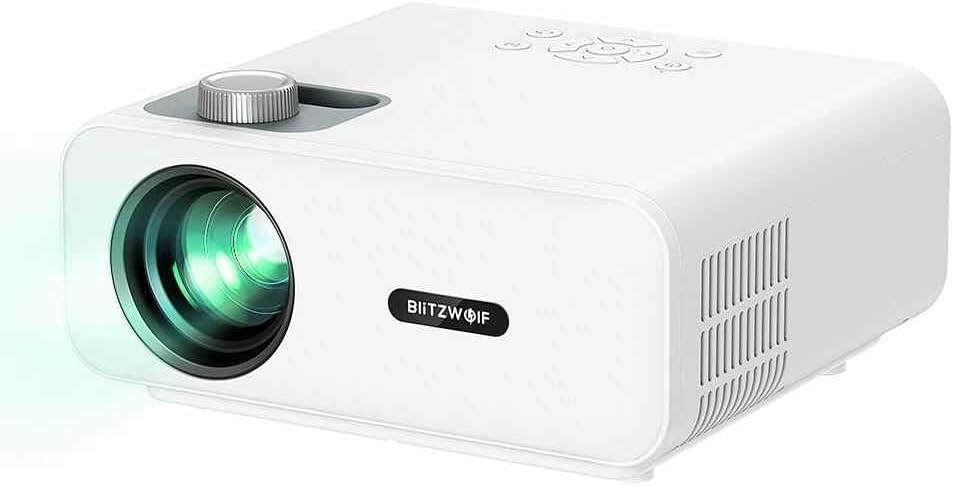
Rajah 4.1: Bahagian hadapan view of the BlitzWolf BW-V5 LED Projector, showing the lens, focus knob, and control panel on top.
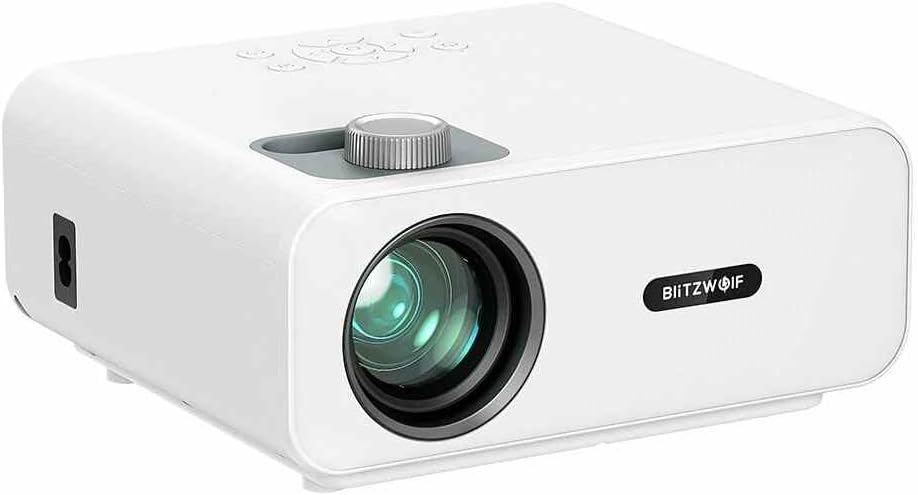
Rajah 4.2: Depan view of the BlitzWolf BW-V5 LED Projector, highlighting the projection lens and the BlitzWolf logo.
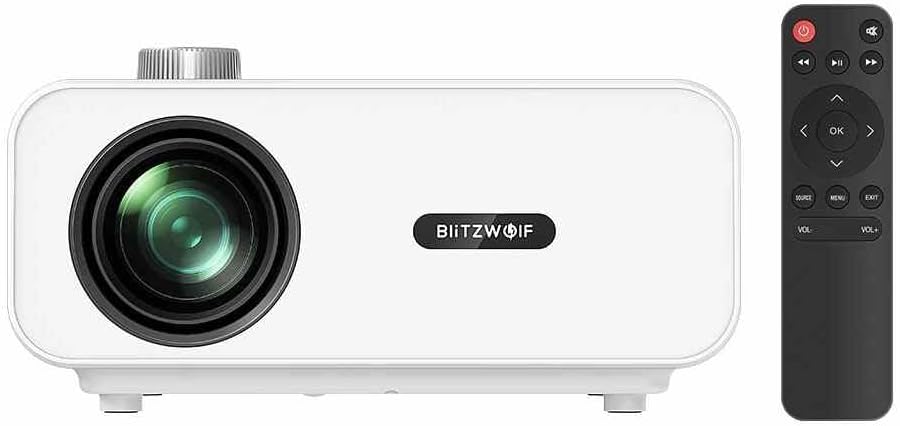
Rajah 4.3: Depan view of the BlitzWolf BW-V5 LED Projector alongside its remote control, illustrating the compact design of both units.

Rajah 4.4: Belakang view of the BlitzWolf BW-V5 LED Projector, showcasing the various input/output ports including HDMI, USB, AV, and headphone jack.
The projector features a manual focus knob, an intuitive control panel on the top, and multiple connectivity options on the rear panel. The included remote control allows for convenient operation from a distance.
4.2 Panel Kawalan dan Alat Kawalan Jauh
The control panel on top of the projector includes buttons for power, navigation (up, down, left, right, OK), source selection, menu, and volume control. The remote control mirrors these functions and provides additional shortcuts for ease of use.
5. Persediaan
5.1 Penempatan
Letakkan projektor pada permukaan yang stabil dan rata. Untuk optimum viewing, position the projector perpendicular to the projection screen or wall. The recommended projection distance ranges from 1.5 to 4.8 meters, yielding a screen size of 50 to 170 inches.
- 50" screen: approx. 1.5 meters (4.9 feet)
- 100" screen: approx. 3.0 meters (9.8 feet)
- 170" screen: approx. 4.8 meters (15.7 feet)
5.2 Menyambung ke Kuasa
- Sambungkan kabel kuasa ke port input kuasa projektor.
- Plug the other end of the power cable into a standard AC 110-240V power outlet.
- Lampu penunjuk kuasa pada projektor akan menyala.
5.3 Menyambung Peranti Luaran
The BW-V5 projector supports multiple input sources:
- HDMI: Connect a TV stick, laptop, game console, or Blu-ray player using an HDMI cable. The projector has multiple HDMI ports.
- USB: Masukkan pemacu kilat USB untuk memainkan media files (video, audio, images).
- DARI: Use the AV port for older devices like DVD players or set-top boxes.
- Headphone/Audio Out: Sambungkan pembesar suara luaran atau fon kepala untuk audio yang dipertingkatkan.
6. Arahan Operasi
6.1 Hidupkan/Mati Kuasa
- Hidupkan kuasa: Press the power button on the projector or the remote control. The projector will start up and display the main interface.
- Matikan: Press the power button again. A confirmation message may appear; select "Yes" to shut down.
6.2 Pemilihan Sumber Input
After powering on, press the "Source" button on the projector or remote control to cycle through available input sources (HDMI1, HDMI2, USB, AV). Select the desired input source corresponding to your connected device.
6.3 Pelarasan Fokus
Rotate the focus knob located near the lens until the projected image appears clear and sharp. This adjustment is manual and may need to be fine-tuned based on projection distance.
6.4 Pembetulan Keystone
If the projected image appears trapezoidal (wider at the top or bottom), use the optical keystone correction feature. The projector supports ±15° trapezoidal correction. Adjust the keystone ring or use the menu options to square the image.
6.5 Kesambungan Bluetooth
The BW-V5 supports Bluetooth 5.0 for connecting external audio devices like Bluetooth speakers or headphones. Navigate to the Bluetooth settings in the projector's menu, enable Bluetooth, and pair with your desired device.
6.6 Media Playback (USB)
When a USB drive is inserted, the projector's interface will typically prompt you to select the media type (Video, Music, Photo). Navigate through your files using the remote control and press "OK" to play.
- Supported Video Formats: MPEG1/MPEG2/MPEG4/H.263/H.264/AVS/VC1/MJPEG/RV30/RV40/HEVC
- Supported Audio Formats: MPEG1/MPEG2/LPCM/MP3/WMA2/AAC/WAV
- Supported Image Formats: JPEG/PNG/BMP
7. Penyelenggaraan
7.1 Membersihkan Projektor
- Kanta: Gunakan kain lembut dan tidak berbulu yang direka khas untuk kanta optik. Jangan gunakan pembersih yang kasar atau daya yang berlebihan.
- Badan: Lap bahagian luar projektor dengan kain lembut dan kering. Untuk tanda degil, sedikit damp Kain boleh digunakan, diikuti dengan tisu kering.
- Port Pengudaraan: Periodically clean the ventilation ports with a soft brush or compressed air to prevent dust buildup, which can affect cooling performance.
7.2 Lamp kehidupan
The LED light source in the BW-V5 projector has a long work life of approximately 50,000 hours. This means the lamp is designed to last for many years under normal usage conditions, reducing the need for frequent replacements.
8. Penyelesaian masalah
| Masalah | Kemungkinan Punca | Penyelesaian |
|---|---|---|
| Tiada imej ditayangkan | Power cable disconnected; Incorrect input source; Lens cap on. | Check power connection; Select correct input source; Remove lens cap. |
| Imej kabur | Tidak fokus; Jarak unjuran salah. | Adjust the focus knob; Adjust projection distance. |
| Imej adalah trapezoid | Projektor tidak berserenjang dengan skrin. | Adjust keystone correction; Reposition projector. |
| Tiada bunyi | Volume too low; Muted; External audio device not connected or selected. | Increase volume; Unmute; Check audio cable connection or Bluetooth pairing. |
| Alat kawalan jauh tidak berfungsi | Bateri lemah/mati; Halangan antara alat kawalan jauh dan projektor. | Gantikan bateri; Pastikan garis penglihatan yang jelas kepada penerima IR. |
9. Spesifikasi
| Ciri | Spesifikasi |
|---|---|
| Jenama | BlitzWolf |
| Model | BW-V5 |
| Teknik Paparan | LCD |
| Resolusi Asli | 1920x1080P (Physical 1080P) |
| Nisbah Aspek | 16:9 |
| Bulb Luminance | 9000 LM |
| Light Work Life | 50000 jam |
| FOFO Contrast | 1000:1 |
| Nisbah Lemparan | 1.35 |
| Saiz Projektor | 50" - 170" |
| Jarak Lontar | 1.5 - 4.8 M |
| Cara Fokus | Fokus manual |
| Optical Keystone Correction | ±15° trapezoidal |
| Teknologi Ketersambungan | Bluetooth 5.0, HDMI, USB, AV |
| Antara muka | AV, Headphone, HDMI (x2), USB (x2) |
| Overall Operating Power Consumption | 75W ± 5W |
| Penggunaan Kuasa Siap Sedia | 1W |
| Bekerja Voltage | AC 110-240V |
| Berat Bersih | 1.6 KG (approx. 3.52 pounds) |
| Dimensi Keseluruhan | 220*190.5*93mm |
10. Waranti dan Sokongan
This product comes with a standard manufacturer's warranty. Please refer to the warranty card included in your package for specific terms and conditions. For technical support, troubleshooting assistance, or warranty claims, please contact the retailer or manufacturer's customer service. Keep your purchase receipt as proof of purchase.
For the latest information and support, please visit the official BlitzWolf webtapak atau hubungi saluran perkhidmatan pelanggan mereka.


