1. Pengenalan
This manual provides essential information for the safe and efficient operation of your Fenton RP118B Bluetooth Turntable. Please read it thoroughly before using the device and retain it for future reference.

Image 1.1: The Fenton RP118B Bluetooth Turntable in its open position, showcasing a vinyl record ready for playback.
2. Arahan Keselamatan
- Sumber Kuasa: Pastikan bekalan kuasa sepadan dengan voltage dinyatakan pada unit.
- Air dan Kelembapan: Jangan dedahkan unit kepada hujan atau lembapan. Jangan letakkan objek yang diisi dengan cecair, seperti pasu, pada unit.
- Pengudaraan: Pastikan pengudaraan mencukupi. Jangan tutup bukaan pengudaraan.
- haba: Jangan letakkan unit berhampiran sumber haba seperti radiator, daftar haba, dapur, atau radas lain (termasuk amppenghidup) yang menghasilkan haba.
- Pembersihan: Bersihkan hanya dengan kain kering.
- Servis: Rujuk semua servis kepada kakitangan perkhidmatan yang berkelayakan.
3. Kandungan Pakej
Sahkan bahawa semua item ada semasa membongkar:
- Fenton RP118B Bluetooth Turntable
- Penyesuai Kuasa
- USB Cable (for PC encoding)
- Manual Arahan
4. Produk Lebihview
The Fenton RP118B turntable is designed for playing vinyl records. Its black polyurethane leather suitcase design provides a classic aesthetic. This turntable offers three playback speeds (33, 45, and 78 RPM). It features integrated stereo speakers for clear sound reproduction. Bluetooth connectivity allows for connecting external speakers, headphones, and other devices. The PC encoding function via USB enables conversion of vinyl records to MP3 files for digital archiving. The turntable includes a tonearm with manual or automatic stop functionality and a 3.5mm AUX input. Its belt drive system ensures stable record playback. The RP118B combines traditional vinyl playback with modern features in a compact format.

Imej 4.1: Selesaiview of the Fenton RP118B's key features, including USB encoding, headphone output, integrated speakers, Bluetooth, and Line In.
4.1. Kawalan dan Sambungan

Imej 4.2: Terperinci view of the turntable's control panel and connection ports.
- Pinggan: Menyokong rekod vinil.
- Tonearm: Memegang stylus dan menjejaki alur rakaman.
- Stylus/Needle: Reads the audio information from the record.
- Pemilih Kelajuan: Switch between 33, 45, and 78 RPM.
- Suis Berhenti Automatik: Enables or disables automatic tonearm stop at the end of a record.
- Tombol Kuasa/Kelantangan: Turns the unit on/off and adjusts speaker volume.
- Lampu Penunjuk: Shows power and Bluetooth status.
- Jack fon kepala: Untuk menyambungkan fon kepala.
- Line In (AUX) Jack: Untuk menyambungkan sumber audio luaran.
- Port USB: For PC connection for MP3 encoding.
- Line Out (RCA) Jacks: Untuk menyambung ke luaran amppengangkat atau pembesar suara berkuasa.
- Input DC 5V: Untuk menyambungkan penyesuai kuasa.
- BT OUT/PHONO/BT IN Switch: Selects Bluetooth transmission, Phono output, or Bluetooth reception mode.
5. Persediaan
5.1. Membongkar dan Meletakkan
- Keluarkan meja putar dari bungkusannya dengan berhati-hati.
- Letakkan unit di atas permukaan yang stabil dan rata, jauh daripada cahaya matahari langsung, sumber haba dan habuk atau getaran yang berlebihan.
- Remove any protective materials from the tonearm and stylus.
5.2. Sambungan Kuasa
- Connect the DC 5V power adapter to the DC 5V input port on the turntable.
- Pasangkan penyesuai ke soket dinding yang sesuai.
5.3. External Audio Connections (Optional)
- To External Speakers/Amplebih hidup: Connect RCA cables (not included) from the "Line Out" jacks on the turntable to the audio input of your amppembesar atau pembesar suara berkuasa.
- To Headphones: Palamkan fon kepala 3.5mm ke dalam bicu fon kepala.
- From External Audio Source (AUX In): Connect a 3.5mm audio cable (not included) from your external device (e.g., MP3 player, smartphone) to the "Line In" jack on the turntable.
6. Arahan Operasi
6.1. Memainkan Rekod Vinyl
- Open the turntable lid.
- Letakkan rekod vinil di atas pinggan.
- Pilih kelajuan yang sesuai (33, 45 atau 78 RPM) menggunakan suis pemilih kelajuan. Untuk rekod 45 RPM, letakkan penyesuai 45 RPM yang disertakan pada gelendong.
- Turn the Power/Volume knob clockwise to power on the unit.
- Set the BT OUT/PHONO/BT IN switch to "PHONO" mode.
- Lift the tonearm using the cue lever and position it over the desired track of the record.
- Gently lower the tonearm onto the record using the cue lever. The record will begin to play.
- Laraskan kelantangan menggunakan tombol Kuasa/Kelantangan.
- At the end of the record, if the Auto Stop switch is ON, the platter will stop rotating. If OFF, the platter will continue to rotate, and you must manually lift the tonearm.
- To stop playback, lift the tonearm and return it to its rest.

Image 6.1: The three-speed turntable platter, capable of playing 33 1/3, 45, and 78 RPM records.
6.2. Bluetooth Reception (BT IN)
Use this function to stream audio from your smartphone or tablet to the turntable's built-in speakers.
- Turn the Power/Volume knob clockwise to power on the unit.
- Set the BT OUT/PHONO/BT IN switch to "BT IN" mode. The indicator light will flash, indicating pairing mode.
- Enable Bluetooth on your smartphone or tablet and search for "Fenton RP118B" (or similar).
- Select the turntable from the list of available devices to pair. Once paired, the indicator light will stop flashing and remain solid.
- Play music from your device. Audio will be streamed through the turntable's speakers.
- Adjust the volume using the Power/Volume knob on the turntable and/or your connected device.

Image 6.2: The turntable utilizing Bluetooth wireless technology to receive audio from a smartphone.
6.3. Bluetooth Transmission (BT OUT)
Use this function to stream audio from your playing vinyl record to external Bluetooth speakers or headphones.
- Ensure your external Bluetooth speaker or headphones are in pairing mode.
- Turn the Power/Volume knob clockwise to power on the unit.
- Set the BT OUT/PHONO/BT IN switch to "BT OUT" mode. The indicator light will flash.
- The turntable will automatically search for and attempt to pair with nearby Bluetooth audio devices.
- Setelah dipasangkan, lampu penunjuk akan berhenti berkelip.
- Begin playing a vinyl record as described in section 6.1. The audio will be transmitted to your paired Bluetooth device.
- Adjust the volume on your connected Bluetooth speaker or headphones.
6.4. USB Encoding (Vinyl to MP3)
This feature allows you to convert your vinyl records into digital MP3 files pada komputer anda.
- Connect the turntable to your computer using the supplied USB cable.
- Install the necessary recording software on your computer (software typically provided on a CD or available for download from the manufacturer's webtapak).
- Follow the instructions provided with the recording software to capture the audio from your vinyl record.
- Play the vinyl record on the turntable as you would normally. The audio will be sent to your computer for recording.
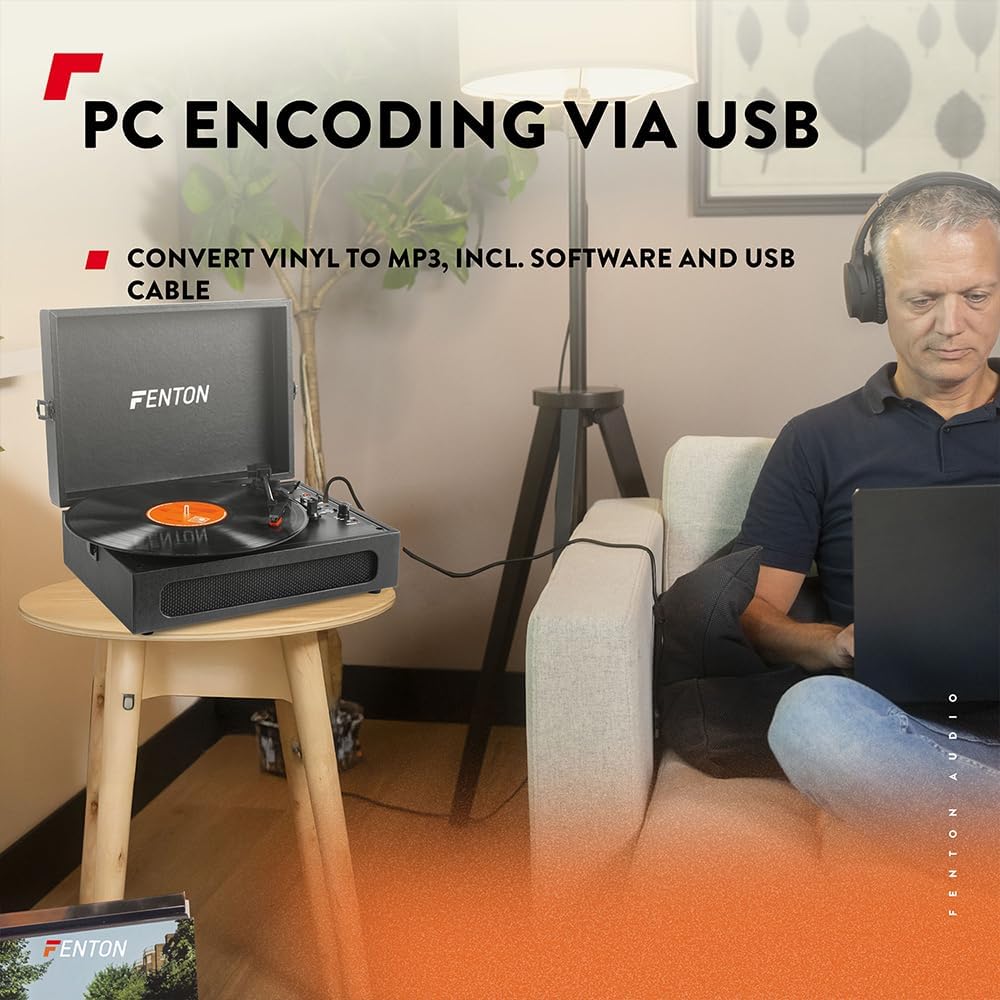
Image 6.3: USB encoding in progress, converting vinyl audio to MP3 files pada komputer.
6.5. Using the AUX Input (Line In)
Connect an external audio device (e.g., smartphone, MP3 player) to the turntable's built-in speakers.
- Connect a 3.5mm audio cable from your external device's headphone or line-out jack to the "Line In" jack on the turntable.
- Turn the Power/Volume knob clockwise to power on the unit.
- Ensure the BT OUT/PHONO/BT IN switch is not in "BT IN" mode (it can be in PHONO or BT OUT, as Line In is a separate input).
- Play audio from your external device. The sound will be routed through the turntable's speakers.
- Adjust the volume using the Power/Volume knob on the turntable and/or your connected device.
7. Penyelenggaraan
7.1. Membersihkan Meja Putar
- Sentiasa cabut plag unit daripada salur keluar kuasa sebelum membersihkan.
- Gunakan kain lembut dan kering untuk mengelap permukaan luar. Jangan gunakan pembersih yang melelas, lilin atau pelarut.
- Gently brush the stylus with a soft brush designed for stylus cleaning, moving from back to front.
- Pastikan penutup habuk ditutup apabila tidak digunakan untuk mengelakkan pengumpulan habuk.
7.2. Penggantian Stilus
The stylus is a consumable part and will wear out over time. A worn stylus can damage your records and degrade sound quality. Replace the stylus after approximately 300-500 hours of playback, or if you notice a significant drop in sound quality or visible damage.
- Rujuk pengilang website or your retailer for compatible replacement styli.
- Follow the instructions provided with the replacement stylus for proper installation.
8. Penyelesaian masalah
| Masalah | Kemungkinan Punca | Penyelesaian |
|---|---|---|
| Tiada kuasa | Power adapter not connected; Power outlet not working; Power/Volume knob off. | Ensure power adapter is securely connected. Try a different outlet. Turn Power/Volume knob clockwise to ON. |
| Tiada suara dari pembesar suara | Volume too low; BT OUT/PHONO/BT IN switch in incorrect position; Headphones connected. | Increase volume. Set switch to "PHONO" for vinyl or "BT IN" for Bluetooth reception. Disconnect headphones. |
| Bunyi herot atau melangkau | Record dirty or damaged; Stylus worn or dirty; Turntable not level. | Clean record. Clean or replace stylus. Place turntable on a level surface. |
| Isu berpasangan Bluetooth | Device too far; Turntable not in pairing mode; Incorrect BT mode selected. | Move device closer. Ensure turntable is in "BT IN" (for reception) or "BT OUT" (for transmission) mode and indicator is flashing. Restart both devices. |
| Record stops prematurely (Auto Stop) | Auto Stop switch is ON. | This is normal operation. If you prefer continuous rotation, set the Auto Stop switch to OFF. |
9. Spesifikasi
| Jenama | Fenton |
| Nombor Model | RP118B |
| warna | Hitam |
| bahan | Poliuretana |
| Jenis Motor | Bergerak tali pinggang |
| Kelajuan Main Semula | 33 1/3, 45, 78 RPM |
| Peranti Serasi | Personal computer, MP3 player, smartphone, headphones, speakers, tablet |
| Versi Bluetooth | 5.0 (for reception and transmission) |
| Kefungsian USB | PC encoding (Vinyl to MP3) |
| Output Audio | RCA Line Out, 3.5mm Headphone Jack |
| Input Audio | 3.5mm AUX In |
| Penceramah Bersepadu | Yes, stereo |
| Berat Barang | 3.25 Kilogram |
| Bekalan Kuasa | DC 5V (Adapter included) |

Image 9.1: Dimensions of the Fenton RP118B turntable.
10. Waranti dan Sokongan
For warranty information, please refer to the documentation included with your purchase or visit the official Fenton website. For technical support or service inquiries, please contact your retailer or the manufacturer directly.
Manufacturer: Tronios B.V.


