pengenalan
Thank you for choosing the Syncwire Bluetooth 5.3 FM Transmitter Car Adapter. This device allows you to stream music and calls wirelessly from your Bluetooth-enabled device to your car's FM radio, while also providing fast charging capabilities for your mobile devices. Please read this manual carefully to ensure proper use and optimal performance.
Maklumat Keselamatan
- Use according to manufacturer's instructions.
- Avoid interference with other wireless devices.
- Kendalikan peranti dengan berhati-hati untuk mengelakkan kerosakan.
- Follow temperature and humidity guidelines for storage and operation.
- Jangan buka atau cuba membaiki peranti itu sendiri.
Ciri-ciri Produk
- Teknologi Bluetooth 5.3: Provides a fast, stable, and smart connection with minimal sound quality loss for music and calls.
- Dual USB Fast Charging: Equipped with a PD 36W USB-C port and a 12W USB-A port, allowing simultaneous charging of two devices. Features over-current, over-voltage, intelligent temperature, and short-circuit protection.
- Hi-Fi Deep Bass: Enhance your audio experience with deep bass by pressing the dedicated 'B' button.
- Ambient LED Light: Features a colorful rainbow light design that can be easily turned on or off by double-pressing the 'B' button.
- Panggilan Bebas Tangan: Noise Suppression (CVC) technology and echo-cancellation ensure clear hands-free communication.
- USB Drive Support: Play music directly from a USB stick (up to 64GB).
Arahan Persediaan
- Masukkan Pemancar: Plug the Syncwire FM Transmitter into your car's 12V/24V cigarette lighter socket. The LED display will light up, showing the current FM frequency.
- Select an Unused FM Frequency: Tune your car's FM radio to an empty frequency with no active broadcast. This will minimize interference and provide the clearest audio.
- Match Transmitter Frequency: On the Syncwire transmitter, long-press the multi-function knob (phone button) until the frequency display flashes. Use the left/right arrows (or rotate the knob) to adjust the transmitter's frequency to match the empty frequency on your car radio. Once matched, the display will stop flashing.
- Pasangkan dengan Bluetooth: Aktifkan Bluetooth pada peranti mudah alih anda. Cari untuk available devices and select "SW-XC727" to pair. Once connected, the display will show "bt" (Bluetooth) and you can start streaming audio.
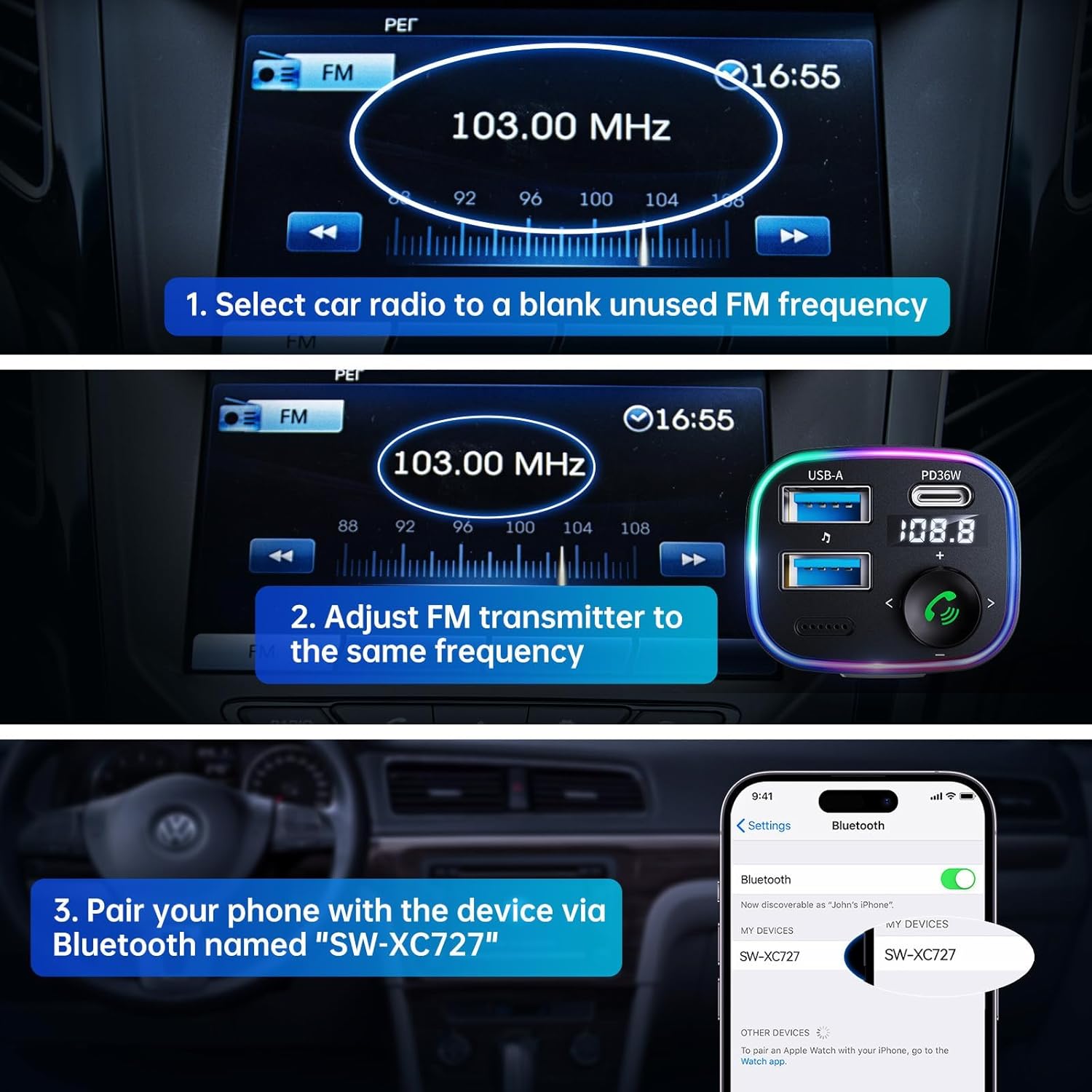
Image: Visual guide for connecting the Syncwire FM Transmitter to your car radio and phone.
Arahan Operasi
Main balik Muzik
- Penstriman Bluetooth: After successful Bluetooth pairing, play music from your phone. The audio will transmit to your car's speakers.
- Main Semula Pemacu USB: Masukkan pemacu kilat USB (sehingga 64GB) yang mengandungi MP3/WMA/WAV/FLAC files into the designated USB-A port (with music note icon). The device will automatically detect and play music from the drive.
- Laraskan Kelantangan: Rotate the multi-function knob clockwise to increase volume, counter-clockwise to decrease.
- Trek Seterusnya / Sebelumnya: Use the left (<) and right (>) arrow buttons to skip tracks.
- Peningkatan Bass: Press the 'B' button once to activate Hi-Fi Deep Bass mode (display shows 'b1'). Press again to deactivate (display shows 'b0').
Panggilan Bebas Tangan
- Jawab/Tamatkan Panggilan: Press the multi-function knob (phone button) once to answer an incoming call or end an ongoing call.
- Tolak Panggilan: Long-press the multi-function knob to reject an incoming call.
- Panggil semula: Double-press the multi-function knob to redial the last number.
Mengecas Peranti
The adapter features two charging ports:
- Port USB-C PD 36W: Untuk peranti yang serasi dengan pengecasan pantas.
- 12W USB-A Port: For standard charging of devices.

Image: Detail of the charging and USB drive ports on the Syncwire FM Transmitter.
Ambient LED Light Control
The device features a colorful LED light ring. To turn the lights on or off, double-press the 'B' button located on the side of the adapter.
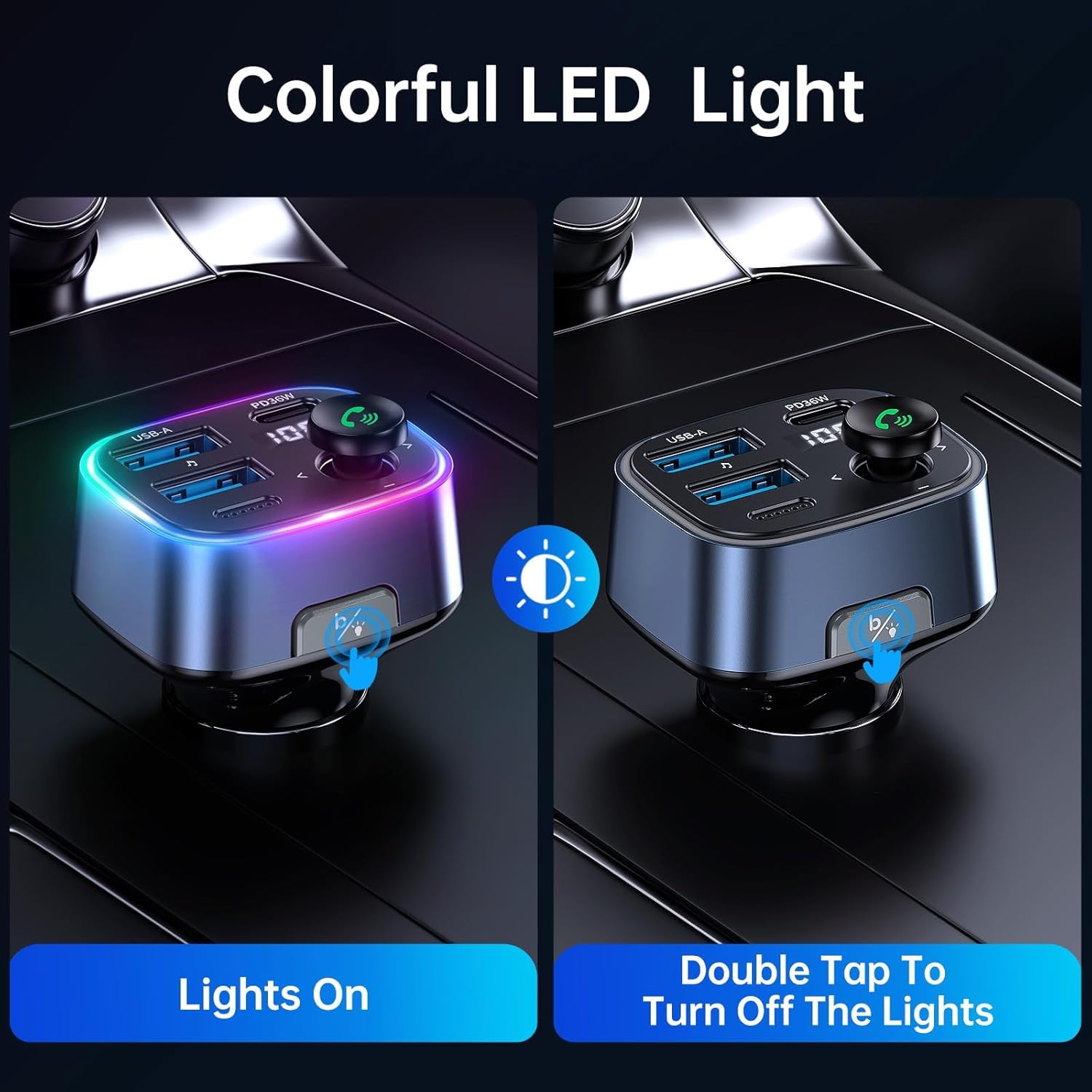
Image: Demonstrating how to control the ambient LED lights on the Syncwire FM Transmitter.
Penyelenggaraan
- Pastikan peranti bersih dengan mengelapnya dengan kain lembut dan kering.
- Elakkan daripada mendedahkan peranti kepada suhu yang melampau, cahaya matahari langsung atau lembapan.
- Jangan gunakan pembersih atau pelarut yang melelas.
- Simpan di tempat yang sejuk dan kering apabila tidak digunakan.
Menyelesaikan masalah
- Kualiti Audio/Statik Lemah:
- Ensure your car radio and the FM transmitter are tuned to the exact same unused frequency.
- Try a different FM frequency if the current one has interference.
- Adjust the volume on both your phone and car radio to an appropriate level.
- Isu Sambungan Bluetooth:
- Make sure Bluetooth is enabled on your phone and the transmitter is powered on.
- Lupakan peranti daripada tetapan Bluetooth telefon anda dan cuba pasangkan semula.
- Restart both your phone and the FM transmitter.
- Pengecasan Tidak Berfungsi:
- Check if the transmitter is securely plugged into the car's power outlet.
- Ensure your charging cable is not damaged and is properly connected.
- Verify that your device is compatible with the charging ports (e.g., PD fast charging).
Spesifikasi
| Ciri | Perincian |
|---|---|
| Nombor Model | SW-XC727 |
| Versi Bluetooth | 5.3 |
| Input Voltage | 12V-24V (Vehicle Powered) |
| Output USB-C | PD 36W |
| Keluaran USB-A | 12W |
| Jumlah Output | 48W |
| Format Audio yang Disokong | MP3, WMA, WAV, FLAC |
| USB Drive Capacity | Sehingga 64GB |
| bahan | plastik |
| Dimensi | 4.45 x 3.35 x 1.42 inci |
| Berat badan | 2.57 auns |
Waranti dan Sokongan
Syncwire provides a Waranti 36 bulan dan sokongan seumur hidup for this product. If you encounter any issues or have questions, please contact Syncwire customer service for assistance. They are committed to finding a satisfying solution.
For support, please contact the seller, Syncwire Shop, through the platform where you purchased the product.


