1. Pengenalan
Thank you for choosing the FERM Cordless Li-ion Screwdriver 4V, model CDM1178. This manual provides essential information for the safe and effective use of your new tool. Please read these instructions carefully before operating the screwdriver and keep them for future reference. Proper use and maintenance will ensure long-lasting performance and safety.
2. Arahan Keselamatan
Always observe the following basic safety precautions when using electric tools to reduce the risk of fire, electric shock, and personal injury.
2.1 Keselamatan Alat Kuasa Am
- Keselamatan Kawasan Kerja: Pastikan kawasan kerja bersih dan terang. Kawasan bersepah atau gelap mengundang kemalangan. Jangan kendalikan alatan kuasa dalam atmosfera yang mudah meletup, seperti di hadapan cecair mudah terbakar, gas atau habuk.
- Keselamatan Elektrik: Elakkan sentuhan badan dengan permukaan yang dibumikan atau dibumikan seperti paip, radiator, julat dan peti sejuk. Terdapat peningkatan risiko kejutan elektrik jika badan anda dibumikan atau dibumikan.
- Keselamatan Diri: Sentiasa pakai pelindung mata. Gunakan peralatan pelindung diri seperti topeng habuk, kasut keselamatan tidak tergelincir, topi keras, atau perlindungan pendengaran apabila sesuai. Sentiasa berwaspada, perhatikan perkara yang anda lakukan dan gunakan akal semasa mengendalikan alat kuasa.
- Penggunaan dan Penjagaan Alat: Do not force the power tool. Use the correct power tool for your application. It will do the job better and safer at the rate for which it was designed. Disconnect the plug from the power source and/or the battery pack from the power tool before making any adjustments, changing accessories, or storing power tools.
2.2 Battery Safety (Li-ion)
- Hanya cas semula dengan pengecas yang ditentukan oleh pengilang. Pengecas yang sesuai untuk satu jenis pek bateri boleh menimbulkan risiko kebakaran apabila digunakan dengan pek bateri yang lain.
- Gunakan alatan kuasa hanya dengan pek bateri yang ditetapkan secara khusus. Penggunaan mana-mana pek bateri lain boleh menyebabkan risiko kecederaan dan kebakaran.
- Apabila pek bateri tidak digunakan, jauhkan ia daripada objek logam lain, seperti klip kertas, syiling, kunci, paku, skru atau objek logam kecil lain, yang boleh membuat sambungan dari satu terminal ke terminal yang lain. Pemintas terminal bateri boleh menyebabkan melecur atau kebakaran.
- Dalam keadaan kesat, cecair mungkin dikeluarkan daripada bateri; elakkan bersentuhan. Jika terkena secara tidak sengaja, siram dengan air. Jika cecair terkena mata, dapatkan bantuan perubatan tambahan. Cecair yang dikeluarkan daripada bateri boleh menyebabkan kerengsaan atau melecur.
3. Produk Lebihview
The FERM Cordless Li-ion Screwdriver 4V is designed for various light-duty screwing tasks around the home. It features a compact design, USB-C charging, and multiple torque settings for versatile use.
3.1 Komponen
- Cordless Screwdriver Unit
- Kabel Pengecas USB-C
- Screwdriver Bits (5 included, plus an additional 21-piece bit set)
- Integrated Li-ion Battery
3.2 Panduan Visual
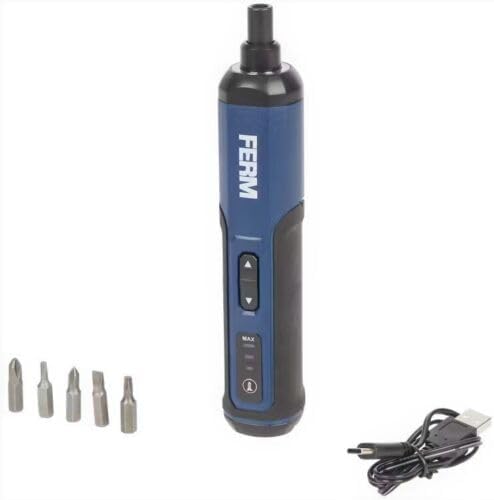
Rajah 1: The FERM Cordless Li-ion Screwdriver 4V shown with its included screwdriver bits and USB-C charging cable. This image illustrates the compact design and essential accessories.
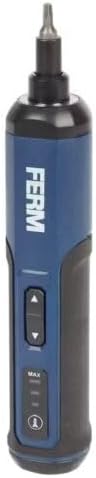
Rajah 2: A terperinci view of the FERM Cordless Screwdriver, highlighting the forward/reverse buttons, torque setting indicators (MAX, MID, MIN), and the power/battery indicator light.
4. Persediaan
4.1 Mengecas Bateri
The screwdriver is equipped with an integrated Li-ion battery. Before first use, fully charge the battery.
- Cari port pengecasan USB-C pada pemutar skru.
- Connect the provided USB-C cable to the screwdriver's charging port.
- Connect the other end of the USB-C cable to a compatible USB power adapter (not included) or a USB port on a computer.
- The battery indicator lights will show the charging status. Allow the screwdriver to charge until the indicator shows a full charge.
- Once fully charged, disconnect the USB-C cable.
Nota: Only use the provided USB-C cable for charging. Do not attempt to charge with damaged cables or non-compatible chargers.
4.2 Memasang Bit Pemutar Skru
Pemutar skru menggunakan bit shank hex standard 1/4 inci.
- Ensure the screwdriver is turned off and not operating.
- Pilih bit pemutar skru yang sesuai untuk tugas anda.
- Insert the hex shank of the bit firmly into the screwdriver's chuck until it clicks into place.
- Untuk mengeluarkan sedikit, tariknya keluar terus dari chuck.
5. Arahan Operasi
5.1 Menghidupkan/Mematikan dan Pemilihan Arah
The screwdriver features a simple control for forward and reverse rotation.
- To drive screws (forward rotation), press the upper button.
- To remove screws (reverse rotation), press the lower button.
- Lepaskan butang untuk menghentikan pemutar skru.
5.2 Melaraskan Tetapan Tork
The FERM screwdriver offers 3 torque speed settings to match different applications.
- Locate the torque selection button/switch (refer to Figure 2).
- Cycle through the settings (e.g., MIN, MID, MAX) to select the desired torque.
- Use lower torque settings for delicate materials or small screws to prevent overtightening or damage.
- Use higher torque settings for larger screws or tougher materials.
Petua: Always start with a lower torque setting and increase it if necessary to avoid stripping screw heads or damaging the workpiece.
6. Penyelenggaraan
Regular maintenance ensures the longevity and safe operation of your FERM screwdriver.
- Pembersihan: Pastikan slot pengudaraan alat bersih untuk mengelakkan terlalu panas. Gunakan kain lembut danamp cloth to clean the housing. Do not use harsh chemicals or abrasive cleaners.
- Storan: Store the screwdriver in a dry, secure place, out of reach of children. Ensure the battery is partially charged before long-term storage.
- Penjagaan Bateri: Do not allow the battery to fully discharge for extended periods. Recharge the battery periodically if the tool is not used frequently. Avoid exposing the battery to extreme temperatures.
- Pemeriksaan: Regularly check the screwdriver for any signs of damage, loose parts, or wear. If any issues are found, do not use the tool and contact customer support.
7. Penyelesaian masalah
This section addresses common issues you might encounter with your FERM Cordless Screwdriver.
| Masalah | Kemungkinan Punca | Penyelesaian |
|---|---|---|
| Pemutar skru tidak boleh dihidupkan. | Bateri dinyahcas. | Cas bateri menggunakan kabel USB-C. |
| Pemutar skru kekurangan kuasa atau berhenti semasa penggunaan. | Low battery charge. Overload. | Recharge the battery. Reduce the load or use a higher torque setting if appropriate. |
| Bit slips in screw head. | Incorrect bit size. Torque setting too low. | Ensure the correct bit size is used. Increase the torque setting. Apply firm, steady pressure. |
| Screwdriver gets hot. | Penggunaan berat yang berpanjangan. Pengudaraan tersumbat. | Allow the tool to cool down. Ensure ventilation slots are clear. Avoid continuous heavy-duty tasks. |
If you encounter problems not listed here or if solutions do not resolve the issue, please contact FERM customer support.
8. Spesifikasi
Key technical specifications for the FERM Cordless Li-ion Screwdriver 4V, model CDM1178.
| Nombor Model | CDM1178 |
| Jenama | FERM |
| Voltage | 4 V |
| Jenis Bateri | Ion litium (bersepadu) |
| Kaedah Pengecasan | USB-C |
| Tetapan Tork | 3 kelajuan |
| Komponen yang Disertakan | Screwdriver, Li-ion battery, USB-C cable, 5 bits (+ 21-piece bit set) |
| Dimensi (Pakej) | 22.3 x 8.9 x 7.1 cm |
| Berat (Produk) | 530 gram |
9. Waranti dan Sokongan
For warranty information, technical support, or spare parts availability, please refer to the warranty card included with your product or visit the official FERM webtapak. Simpan bukti pembelian anda untuk sebarang tuntutan waranti.
Pengeluar: FERM power since 1965


