1. Pengenalan
Produk Selesaiview
The LAMTTO Portable Wireless Car Stereo (Model RC06A) is a versatile 7-inch HD touchscreen device designed to bring modern connectivity features like Apple CarPlay and Android Auto to any vehicle. It offers seamless integration with your smartphone for navigation, music, calls, and more, enhancing your driving experience with advanced technology.

Figure 1.1: LAMTTO Portable Wireless Car Stereo (Model RC06A)
Ciri-ciri Utama
- Apple CarPlay & Android Auto Tanpa Wayar: Access smartphone apps, maps, music, and more directly on the 7-inch screen.
- Upgraded Bluetooth Stereo: Connects to car speakers for enhanced audio quality. Supports AUX, FM Transmitter, and built-in speaker audio output.
- Wireless AirPlay Video Playback: Mirror iPhone screen to play videos (e.g., YouTube, TikTok) via 5GHz Wi-Fi. (Note: Does not support Netflix).
- Smart Live GPS Navigation: Utilizes smartphone's navigation system for real-time guidance without additional fees.
- Built-In Mic & Voice Control: Supports Siri/Google Assistant for hands-free calls, music control, navigation, and messaging.
- 2.5D HD Touchscreen: Features a 1024*600 resolution display supporting 1080P videos.
2. Apa yang ada di dalam Kotak
Kandungan Pakej
- 1 x 7 Inch Portable Car Stereo Monitor
- 1 x Installation Tool & Manual
- 1 x 9.8 ft Car Charger Cable
- 1 x Pendakap Cawan Sedutan
- 1 x 4.65ft Aux cable
Video Nyah Tinju
Video 2.1: Pembukaan kotak rasmi dan seterusnyaview of the 7" Wireless Car Stereo with Apple CarPlay & Android Auto.
3. Spesifikasi
| Atribut | Nilai |
|---|---|
| Nama Model | Drive Play for Car (Model RC06A, also seen as RC08) |
| Saiz Skrin | 7 Inci |
| Resolusi Skrin | 1024*600 (2.5D HD Touchscreen) |
| Teknologi Ketersambungan | 5Ghz WIFI / FM / AUX / Dual Bluetooth |
| Mod Keluaran Audio | Stereo |
| Jenis Perkhidmatan Kenderaan | Kereta, Lori |
| Berat Barang | 1.9 paun |
| Dimensi Pakej | 8.98 x 5.51 x 4.17 inci |
4. Panduan Persediaan
Memasang Peranti
The LAMTTO Portable Wireless Car Stereo offers flexible installation options using the included suction cup bracket or a dash-mount base. Ensure the mounting surface is clean and stable for secure attachment.

Figure 4.1: Mounting options for the device.
Initial Connection & Power
Power the device using the provided 9.8 ft car charger cable by plugging it into your vehicle's cigarette lighter socket. The device will automatically power on when the vehicle starts.

Gambar 4.2: Lebihview of included accessories for setup.
Connecting Your Smartphone (Wireless CarPlay / Android Auto)
To enable wireless CarPlay or Android Auto, follow these steps:
- Ensure your phone's Wi-Fi and Bluetooth are not occupied by other devices.
- Turn on your phone's Bluetooth and Wi-Fi first.
- On the car stereo, select either "Apple CarPlay" or "Android Auto" from the main menu.
- Pair your phone to the SmartScreen using Bluetooth (e.g., Bluetooth T86-150EE5).
- When prompted on your iPhone, select "Use CarPlay with SmartScreen". For Android, the system will primarily transmit data via Wi-Fi after successful Bluetooth connection.

Figure 4.3: Wireless CarPlay and Android Auto compatibility requirements.
Important Setup Tips
- The first connection may take longer.
- For optimal audio, use Bluetooth to connect to your car's audio system. Bluetooth transmission is generally more stable than AUX or FM.
- Do NOT put the car charger close to the car dashboard to avoid interference with the built-in FM transmitter.
- If you need a car charger with a USB interface, please contact the after-sales team.

Figure 4.4: Key considerations before using the device.
5. Arahan Operasi
Antara Muka CarPlay & Android Auto Tanpa Wayar
Once connected, the 7-inch screen displays a familiar interface similar to your smartphone's CarPlay or Android Auto, allowing easy access to navigation, music, phone calls, and messaging.

Figure 5.1: Wireless CarPlay interface.
Voice Control & GPS Navigation
Utilize the built-in microphone and voice assistants (Siri/Google Assistant) for hands-free operation. This enables safe control of music, GPS navigation, sending messages, and making phone calls while driving.

Figure 5.2: Voice control for navigation and communication.
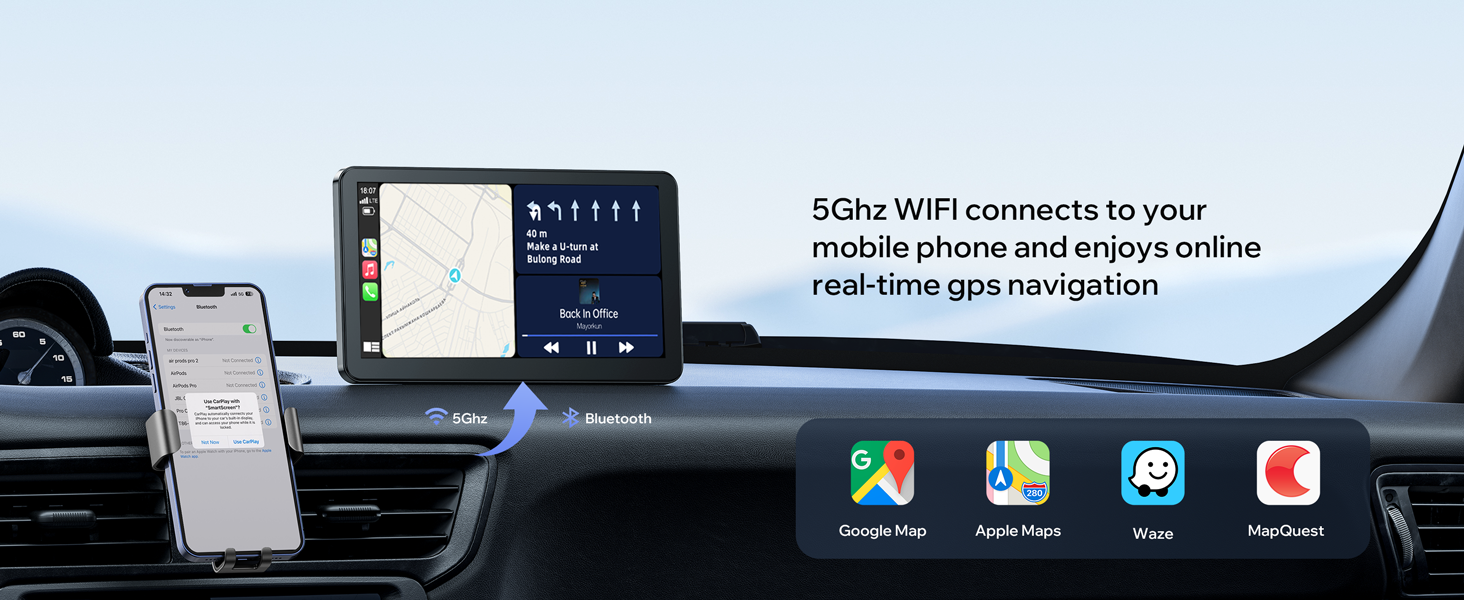
Figure 5.3: Real-time GPS navigation via 5GHz Wi-Fi.
Media Playback (AirPlay, Bluetooth, FM, AUX)
The device supports multiple audio output methods to integrate with your car's sound system:
- Pembesar Suara Terbina dalam: Untuk output audio terus daripada unit.
- Sambungan AUX: Use the provided AUX cable to connect directly to your car's AUX input for high-quality audio.
- Pemancar FM: Broadcast audio to your car's FM radio on a selected frequency.
- Bluetooth ke Pembesar Suara Kereta: Connect via Bluetooth to your car's audio system for wireless sound.

Figure 5.4: Audio output options.
For video playback, connect your iPhone to the same Wi-Fi network as the CarPlay unit and use Apple AirPlay for screen mirroring. This allows you to play videos from apps like YouTube and TikTok directly on the screen.

Figure 5.5: Apple AirPlay for video streaming.
Kamera Sandaran (Pilihan)
If your package included a backup camera, it can be integrated with the unit to provide adjustable parking assistance, making reversing safer and easier. The camera typically offers FHD 1080P resolution and is IP67 waterproof.

Figure 5.6: Backup camera features and display.
6. Penyelenggaraan
- Pembersihan: Gunakan kain lembut dan kering untuk membersihkan skrin dan badan peranti. Elakkan pembersih atau pelarut yang kasar.
- Suhu: Avoid exposing the device to extreme temperatures. While designed for automotive use, prolonged exposure to very cold (below 32°F) or very hot conditions can affect performance.
- Kemas Kini Perisian: Semak pengeluar website or contact support for any available firmware updates to ensure optimal performance and compatibility.
7. Penyelesaian masalah
| Isu | Kemungkinan Punca / Penyelesaian |
|---|---|
| Peranti tidak dihidupkan | Ensure the car charger is securely plugged into the cigarette lighter socket and the vehicle's power outlet is active. Check the charger cable for damage. |
| Wireless CarPlay/Android Auto connection issues | Ensure phone's Wi-Fi and Bluetooth are enabled and not connected to other devices. Restart both the phone and the car stereo. Verify phone compatibility with CarPlay/Android Auto requirements. |
| Poor FM Transmitter audio quality | Move the car charger away from the dashboard to reduce interference. Try different FM frequencies to find a clear channel. Consider using the AUX cable or Bluetooth connection for better audio. |
| Screen distorted in cold weather | This can occur in temperatures around 32°F (0°C) or below. Allow the unit to warm up or restart it. Performance should normalize as the device reaches operating temperature. |
| AirPlay function not working | Ensure your iPhone and the CarPlay unit are connected to the same Wi-Fi network. Verify that screen mirroring is enabled on your iPhone. Note that Netflix is not supported via AirPlay. |
8. Waranti dan Sokongan
LAMTTO is committed to providing quality products and satisfactory services. Your purchase is covered by a 12-month warranty from the date of purchase.
Perkhidmatan Pelanggan
- Respons 24 Jam: Expect quick and professional responses to your inquiries within 24 hours.
- Pemulangan/Pertukaran 90 Hari: Enjoy a 90-day period for returns or exchanges without reason.
- Perkhidmatan Pelanggan Sepanjang Hayat: Benefit from lifelong customer service for products and accessories.
For any operational questions, technical support, or warranty claims, please refer to the contact information provided in your user manual or on the product packaging. You can also check the official LAMTTO store on Amazon for further assistance.


