pengenalan
This manual provides comprehensive instructions for the JALL Digital Alarm Clock (Model: WX-1502). This device features a wooden electronic LED display, multiple alarm settings, 10W wireless charging capability, and displays the day of the week and temperature. Designed for convenience and modern aesthetics, it is suitable for office, bedroom, and bedside use.

Figure 1: JALL Digital Alarm Clock with Wireless Charging Functionality.
Persediaan
Sambungan Kuasa
The JALL Digital Alarm Clock is powered by a USB cable and requires a constant power supply. It does not support battery operation for its primary functions.
- Connect the provided USB power cable to the clock's power input port.
- Plug the other end of the USB cable into a compatible USB power adapter (included) and then into a wall outlet.
- Paparan akan menyala, menunjukkan jam telah dihidupkan.
Tetapan Masa dan Tarikh Permulaan
Refer to the included Owner's Manual for detailed instructions on setting the time, date, and other initial configurations.
Arahan Operasi
Time and Display Features
- Paparan Masa: The clock displays time in either 12-hour or 24-hour format. Refer to the Owner's Manual for switching between formats.
- Paparan Tarikh dan Hari: The current date and day of the week are displayed alongside the time.
- Paparan suhu: The clock features a temperature sensor, displaying the ambient room temperature.
- Kecerahan boleh laras: The LED display brightness can be adjusted to 6 levels to suit your preference and ambient light conditions. This allows for comfortable viewing during both day and night.
- Kawalan Bunyi: The display can be set to activate with a light tap or clap, allowing for a completely dark room when not actively viewed.
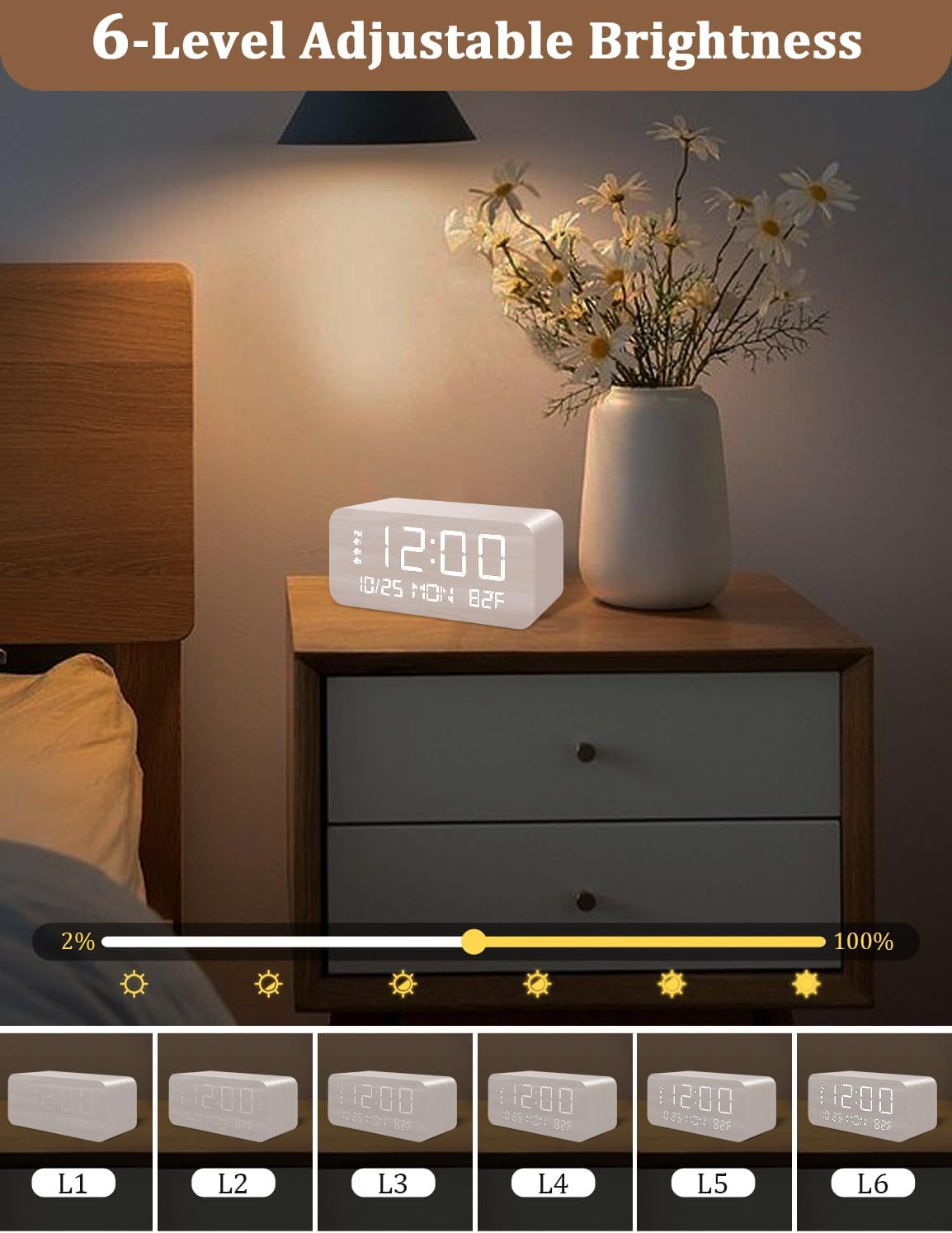
Figure 2: Six levels of adjustable brightness for optimal viewing.
Fungsi Penggera
- Three Independent Alarms: Set up to three separate alarms to manage different wake-up times or reminders.
- Customizable Ring Modes: Alarms can be configured for weekdays, weekends, or daily repetition, providing flexibility for your schedule.
- Fungsi Tunda: The snooze duration is adjustable from 5 to 60 minutes, allowing for extra rest.
- Kelantangan Boleh Laras: Alarm volume can be adjusted from 35dB to 70dB.

Gambar 3: Lebihview of the three independent alarm functions.
Pengecasan Tanpa Wayar 10W
The top surface of the clock features a 10W wireless charging pad. This allows for convenient charging of compatible smartphones and other devices.
- Place your wireless charging compatible device directly on the charging pad.
- Pastikan peranti dipusatkan pada pad untuk pengecasan optimum.
- The charging indicator on your device will confirm active charging.

Figure 4: Universal compatibility for wireless charging with various phone models.
Penyelenggaraan
- To clean the clock, gently wipe the surface with a soft, dry cloth.
- Elakkan menggunakan pembersih atau pelarut yang melelas, kerana ini boleh merosakkan kemasan.
- Keep the device away from excessive moisture and direct sunlight.
Menyelesaikan masalah
| Masalah | Kemungkinan Punca / Penyelesaian |
|---|---|
| Paparan malap atau dimatikan. |
|
| Pengecasan tanpa wayar tidak berfungsi. |
|
| Penggera tidak berbunyi. |
|
Spesifikasi
- Jenama: JALL
- model: WX-1502
- Jenis Paparan: digital
- Dimensi Produk: 5.7"W x 2.5"H
- Sumber Kuasa: Elektrik Bertali arus (USB)
- Bahan Bingkai: kayu
- Berat Barang: 10.8 auns
- Output Pengecasan Tanpa Wayar: 10W
- Tetapan Penggera: 3 Independent Alarms
- Tempoh Tunda: 5-60 minutes (Adjustable)
- Kelantangan Penggera: 35-70dB (Adjustable)
- Komponen yang Disertakan: Penyesuai Kuasa, Manual Pemilik
Waranti dan Sokongan
This JALL Digital Alarm Clock comes with a Waranti 1 tahun from the date of purchase. For any questions, technical support, or warranty claims, please refer to the contact information provided in your Owner's Manual or contact the seller directly through the platform where the product was purchased.


