1. Pengenalan
This manual provides essential information for the safe and effective operation of your VOLTCRAFT DSO-2202H + AFG Handheld Oscilloscope. This versatile device combines the functions of an oscilloscope, a multimeter, and an arbitrary function generator (AFG) into a single portable unit. Please read this manual thoroughly before using the device to ensure proper handling and to prevent damage or injury.
2. Maklumat Keselamatan
Always observe the following safety precautions to avoid personal injury and prevent damage to the instrument or other equipment.
- Baca semua arahan: Before operating the device, read and understand all safety and operating instructions.
- Use proper probes: Gunakan hanya prob dan aksesori yang dinilai untuk volumtage and current of the measurement.
- Elakkan keadaan basah: Jangan kendalikan peranti dalam keadaan basah atau damp persekitaran.
- Pembumian: Ensure proper grounding when connecting to mains power or high-voltage litar.
- Jangan buka casing: Refer all servicing to qualified service personnel. Opening the casing boleh mendedahkan anda kepada voltages.
- Observe all ratings: Do not exceed the maximum input ratings of the device.
3. Produk Lebihview
The VOLTCRAFT DSO-2202H + AFG is a compact, multi-functional test instrument designed for various electrical measurement tasks. It features a clear color LCD display and intuitive controls.
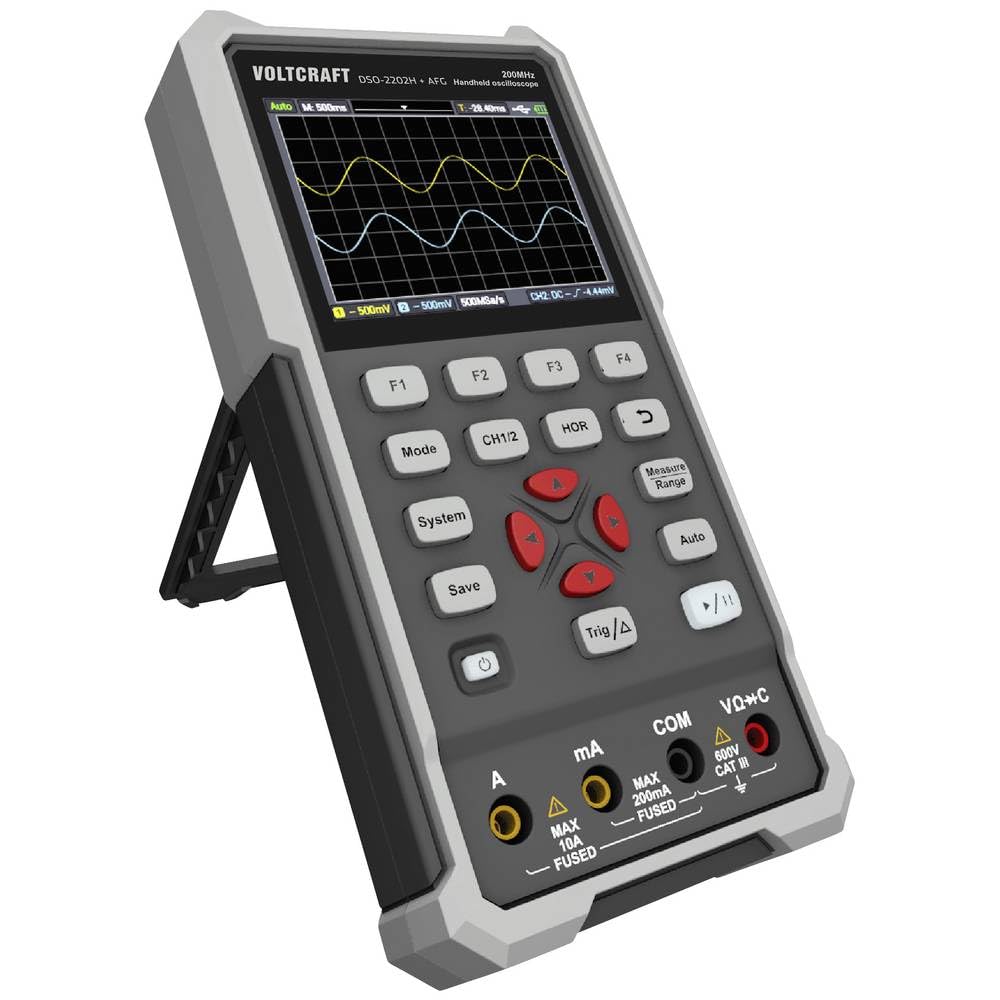
Rajah 1: Depan view of the VOLTCRAFT DSO-2202H + AFG Handheld Oscilloscope with connected test probes. The display shows a voltage reading, and the control panel with function buttons and navigation keys is visible below.
Ciri-ciri Utama:
- 3-in-1 Oscilloscope, Multimeter, and Waveform Generator
- 3.5-inch (8.89 cm) Color LCD Screen (320 x 240 pixels)
- USB Type-C Interface for connectivity and data storage
- Reka bentuk tahan lama dan teguh
4. Persediaan
Follow these steps for initial setup of your device.
4.1 Menghidupkan/Mematikan
- Untuk menghidupkan peranti, tekan dan tahan butang kuasa button located on the side/top panel.
- The color LCD screen will illuminate, displaying the startup sequence.
- Untuk mematikan, tekan dan tahan kuasa butang sekali lagi sehingga peranti dimatikan.
4.2 Menyambung Probe
For oscilloscope functions, connect the oscilloscope probes to the BNC connectors. For multimeter functions, connect the test leads to the appropriate input jacks (VΩ+C, mA, A, COM) at the bottom of the device.
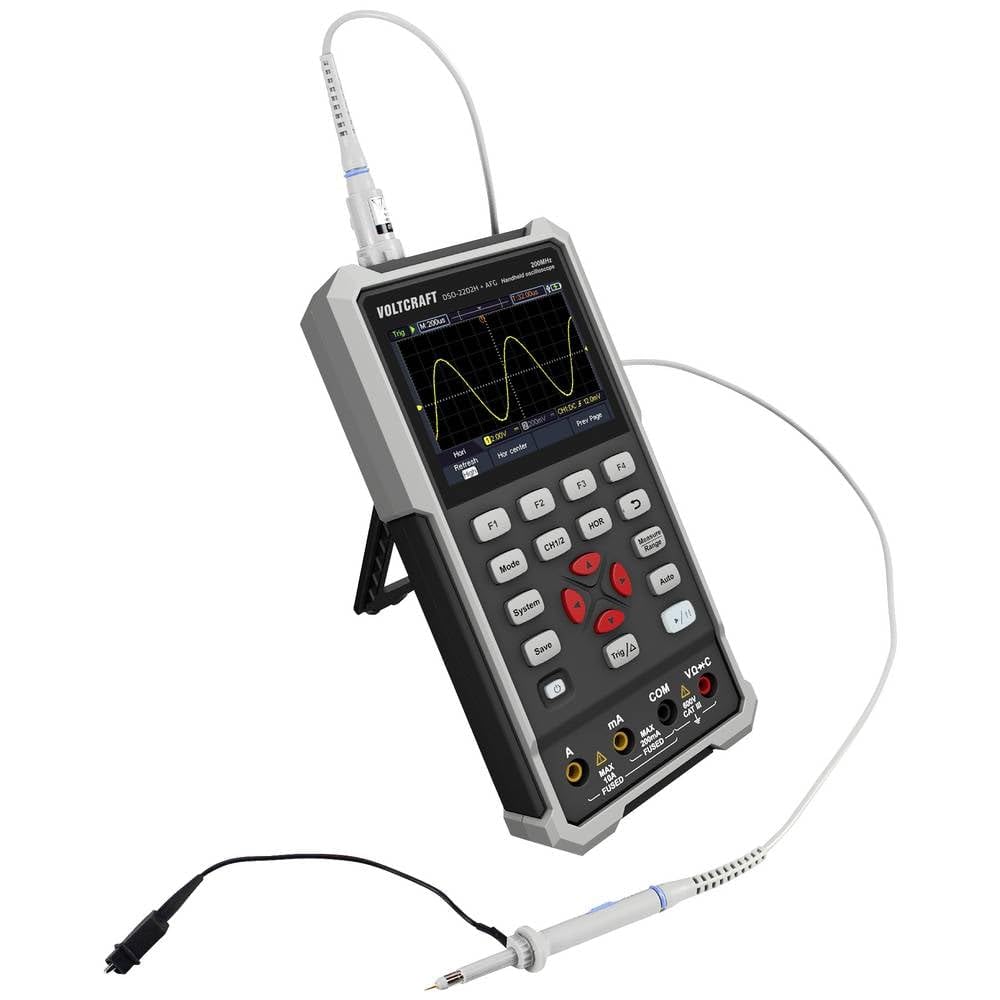
Rajah 2: Sisi view of the device showing the kickstand extended for desktop use and an oscilloscope probe connected to the BNC input. The multimeter input jacks are visible at the bottom.
5. Arahan Operasi
The DSO-2202H + AFG offers three primary modes of operation: Oscilloscope, Multimeter, and Arbitrary Function Generator.
5.1 Mod Osiloskop
This mode allows you to visualize and analyze electrical signals. The device features 2 channels and a 200MHz bandwidth.
- Tekan ke Mod butang untuk memilih mod Osiloskop.
- Connect the oscilloscope probe(s) to the circuit under test.
- Gunakan CH1/2 button to switch between channels or view kedua-duanya.
- Adjust the vertical sensitivity (V/div) and horizontal time base (s/div) using the navigation buttons.
- Gunakan Trig/Δ button to set trigger conditions for stable waveform display.
- The Auto button can automatically adjust settings for a stable waveform.

Figure 3: The device displaying a waveform in oscilloscope mode. The screen shows voltage and time divisions, indicating a signal measurement.
5.2 Mod Multimeter
The multimeter function allows for precise measurements of voltage, arus, rintangan, kemuatan, dan kesinambungan.
- Tekan ke Mod butang untuk memilih mod Multimeter.
- Connect the test leads to the appropriate input jacks (e.g., VΩ+C for voltage/resistance/capacitance, A or mA for current, COM for common).
- Select the desired measurement function (e.g., DC Voltage, Vol. ACtage, Resistance) using the function buttons (F1-F4) or navigation keys.
- Baca nilai ukuran pada paparan.
5.3 Arbitrary Function Generator (AFG) Mode
The AFG allows you to generate various waveforms for testing circuits.
- Tekan ke Mod button to select AFG mode.
- Connect the output of the AFG to the circuit requiring a signal input.
- Use the function buttons (F1-F4) and navigation keys to select waveform type (sine, square, triangle, etc.), frequency, amplitud, dan ofset.
- Adjust parameters as needed for your application.
5.4 Penyimpanan Data
The USB Type-C port can be used for data storage. Connect the device to a computer using a USB Type-C cable to transfer saved waveforms or measurement data.
6. Penyelenggaraan
Proper maintenance ensures the longevity and accuracy of your device.
- Pembersihan: Bersihkan peranti dengan kerap menggunakan kain lembut dan kering. Jangan gunakan pembersih atau pelarut yang melelas.
- Storan: Simpan peranti di tempat yang sejuk dan kering jauh dari cahaya matahari langsung dan suhu yang melampau.
- Penjagaan Bateri: If the device has an internal rechargeable battery, ensure it is charged periodically if stored for long periods to maintain battery health.
- Penjagaan Probe: Inspect probes and test leads for damage before each use. Replace any damaged accessories immediately.
7. Penyelesaian masalah
If you encounter issues with your device, refer to the following common troubleshooting steps.
- Peranti tidak dihidupkan: Ensure the device is charged or connected to a power source. Check the power button for proper engagement.
- Tiada paparan: If the device powers on but the screen is blank, try adjusting the display brightness (if available) or restarting the device.
- Bacaan yang salah: Verify that probes and test leads are correctly connected and not damaged. Ensure the correct measurement mode and range are selected. Calibrate the device if necessary (refer to advanced settings or contact support).
- Bentuk gelombang tidak stabil: In oscilloscope mode, adjust the trigger level, trigger source, and time base settings. Use the Auto button for initial setup.
For persistent issues, contact VOLTCRAFT customer support or your retailer.
8. Spesifikasi
| Spesifikasi | Nilai |
|---|---|
| Pengeluar | KERA VOLTCRAFT |
| Nombor Model | VC-13438620 (DSO-2202H + AFG) |
| Dimensi Produk (L x W x H) | 17 x 12 x 40 cm |
| Berat badan | 600 gram |
| bahan | plastik |
| Lebar Jalur Osiloskop | 200 MHz |
| Saluran | 2-Saluran |
| Sample kadar | 1 GSa/s |
| Kedalaman Memori | 8 kpts |
| Resolusi | 8 Bit |
| Paparan | 3.5-inch (8.89 cm) Color LCD (320 x 240 pixels) |
| Antara muka | USB Jenis-C |
| Sistem Pengukuran | Metrik |
| Bateri Termasuk | Tidak |
| Bateri Diperlukan | Tidak |
9. Waranti dan Sokongan
For warranty information, please refer to the documentation provided with your purchase or contact your retailer. For technical support, visit the official VOLTCRAFT webtapak atau hubungi bahagian perkhidmatan pelanggan mereka.


