1. Pengenalan
Thank you for choosing the iKF R1 Wireless Bluetooth Headphones. These headphones combine retro aesthetics with modern technology, offering a lightweight design, extended battery life, and dual device connectivity. This manual provides essential information to help you set up, operate, and maintain your headphones for the best possible experience.
Apa yang ada dalam Kotak
- iKF R1 Headphones x1
- Manual Pengguna x1
- Kabel Pengecasan x1

Image: The iKF R1 Wireless Bluetooth Headphones in brown, showcasing their classic design.
2. Produk Lebihview
Familiarize yourself with the components and controls of your iKF R1 headphones.
Ciri Fon Kepala
- Destar boleh laras: Untuk kesesuaian yang selesa dan selamat.
- Rotatable Ear Cups: Allows for easy storage and portability.
- Reka bentuk ringan: Weighing approximately 90g for extended wear comfort.
- Butang Kawalan: Located on the earcups for easy access to playback, calls, and mode switching.
- Mikrofon terbina dalam: Untuk komunikasi bebas tangan yang jelas.
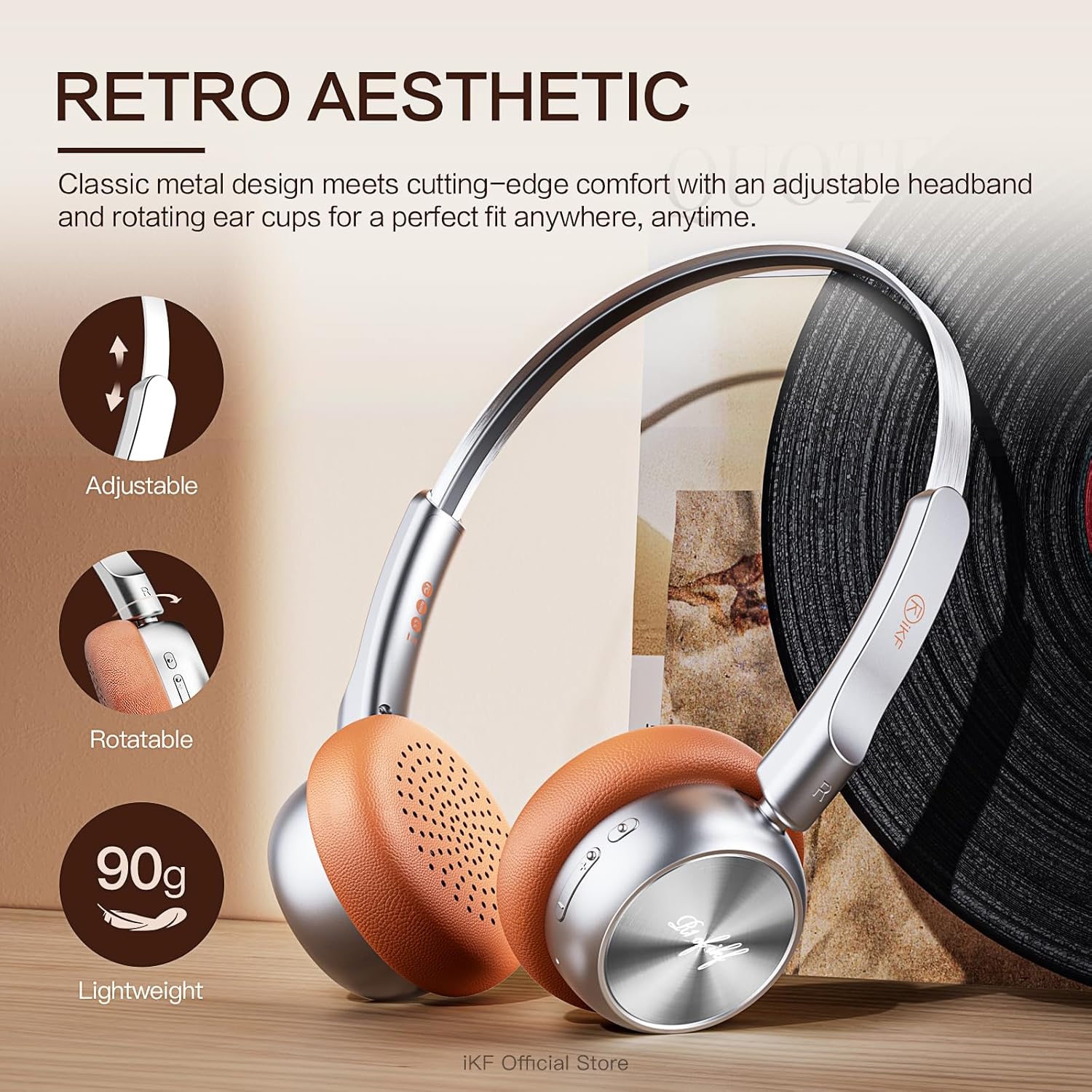
Imej: Terperinci view of the iKF R1 headphones highlighting their adjustable headband, rotatable earcups, and lightweight nature.

Image: A close-up shot of the control buttons on the iKF R1 headphone earcup, indicating power, volume, and mode controls.
3. Persediaan
Mengecas Fon Kepala
Before first use, fully charge your iKF R1 headphones. A full charge provides up to 60 hours of playback.
- Sambungkan kabel pengecas yang disediakan ke port pengecasan pada fon kepala.
- Sambungkan hujung kabel yang satu lagi ke sumber kuasa USB (cth, port USB komputer, penyesuai dinding).
- Lampu penunjuk akan menunjukkan status pengecasan dan padam atau bertukar warna apabila dicas sepenuhnya.

Image: The iKF R1 headphones with a visual representation of their 60-hour battery life, emphasizing extended playtime.
Berpasangan Bluetooth
Pair your headphones with your device to enjoy wireless audio.
- Pastikan fon kepala dicas dan dimatikan.
- Tekan dan tahan butang kuasa sehingga lampu penunjuk berkelip, menunjukkan mod berpasangan.
- Pada peranti anda (telefon pintar, tablet, komputer), dayakan Bluetooth dan cari peranti yang tersedia.
- Select "iKF R1" from the list of found devices.
- Once connected, the indicator light will stop flashing or change to a steady color.
Kesambungan Dwi Peranti
The iKF R1 headphones support simultaneous connection to two devices, allowing seamless switching between them.
- Pasangkan fon kepala dengan peranti pertama seperti yang diterangkan di atas.
- Disconnect the headphones from the first device's Bluetooth settings (do not unpair).
- Put the headphones back into pairing mode and connect to the second device.
- Reconnect the headphones to the first device from its Bluetooth settings.
- The headphones are now connected to both devices. Audio will automatically switch to the device playing content.

Image: The iKF R1 headphones positioned between a laptop and a smartphone, illustrating their dual device connectivity feature.
4. Arahan Operasi
Kawalan Asas
| Fungsi | Tindakan |
|---|---|
| Hidupkan/Mati Kuasa | Tekan dan tahan butang Kuasa. |
| Main/Jeda | Tekan butang Pelbagai fungsi sekali. |
| Kelantangan Naik/Turun | Press the Volume + / - buttons. |
| Trek Seterusnya | Press and hold Volume + button. |
| Trek Sebelumnya | Press and hold Volume - button. |
| Jawab/Tamatkan Panggilan | Tekan butang Berbilang fungsi sekali semasa panggilan. |
| Tolak Panggilan | Tekan dan tahan butang Berbilang fungsi. |
| Aktifkan Pembantu Suara | Tekan dua kali butang Berbilang fungsi. |
Mod Lutsinar
The transparent mode allows you to hear your surroundings without removing your headphones, enhancing safety and convenience.
- Aktifkan: Press the dedicated Transparent Mode button (refer to product diagram for location).
- Nyahaktifkan: Press the Transparent Mode button again.

Image: A person wearing the iKF R1 headphones, illustrating the 'Stay Aware, Stay Safe' feature, which allows ambient sounds to be heard.
Professional Gaming Mode
Optimize your gaming experience with ultra-low latency (38ms) for synchronized audio and visuals.
- Aktifkan: Refer to the iKF app or specific button combination (usually a triple-press of the Multi-function button or a dedicated button).
- Nyahaktifkan: Repeat the activation action.
Penyesuaian Apl
Download the iKF app to unlock additional features and customize your audio experience.
- Adjust equalizer settings.
- Kemas kini perisian tegar.
- Manage device connections.

Image: The iKF R1 headphones alongside a smartphone, showcasing the dedicated iKF app for customization and control.
5. Penyelenggaraan
Pembersihan
- Lap fon kepala dengan kain lembut, kering dan tidak berbulu.
- Jangan gunakan pembersih yang melelas, alkohol atau pelarut kimia.
- Pastikan port pengecasan bebas daripada habuk dan serpihan.
Penyimpanan
- Simpan fon kepala di tempat yang sejuk dan kering jauh dari cahaya matahari langsung dan suhu yang melampau.
- When not in use for extended periods, charge the headphones every few months to maintain battery health.
6. Penyelesaian masalah
| Masalah | Penyelesaian yang Mungkin |
|---|---|
| Fon kepala tidak dapat dihidupkan. | Pastikan fon kepala dicas sepenuhnya. Tekan dan tahan butang kuasa selama beberapa saat. |
| Tidak boleh berpasangan dengan peranti. | Ensure headphones are in pairing mode. Turn off and on Bluetooth on your device. Move headphones closer to the device. Clear previous Bluetooth connections on your device. |
| Tiada bunyi atau kelantangan rendah. | Check volume levels on both headphones and connected device. Ensure headphones are properly paired. Try playing different audio sources. |
| Pemutusan bunyi masuk/keluar. | Move closer to the connected device. Avoid strong electromagnetic interference. Disconnect and reconnect Bluetooth. |
| Mikrofon tidak berfungsi. | Ensure the headphones are selected as the input device in your device's audio settings. Check for any mute functions. |
7. Spesifikasi
| Ciri | Perincian |
|---|---|
| Nama Model | iKF R1 |
| Teknologi Ketersambungan | Wayarles (Bluetooth) |
| Versi Bluetooth | 5.3 |
| Julat Bluetooth | 10 Meter |
| Hayat Bateri | Up to 75 Hours (Playback) |
| Latensi Audio | 38 milisaat (Mod Permainan) |
| Saiz Pemacu Audio | 30 Milimeter |
| Julat Kekerapan | 20 Hz hingga 20,000 Hz |
| Impedans | 32 Ohm |
| Kawalan Bunyi | Pembatalan Bunyi Pasif |
| Jenis Kawalan | Kawalan Butang, Kawalan Apl |
| Berat Barang | 7.4 auns |
| Dimensi Produk | 7.09 x 6.1 x 3.15 inci |
8. Waranti dan Sokongan
For warranty information and customer support, please refer to the official iKF webtapak atau hubungi penjual secara terus. Simpan resit pembelian anda untuk tuntutan waranti.
Versi digital manual pengguna ini tersedia untuk dimuat turun: Manual Pengguna (PDF)
For further assistance, you may contact the iKF Official Store where the product was purchased.


