1. Arahan Keselamatan Penting
Please read all instructions carefully before beginning installation and save this manual for future reference. Improper installation or operation can lead to electric shock, fire, or personal injury.
- Pastikan kuasa dimatikan pada pemutus litar sebelum pemasangan atau penyelenggaraan.
- Semua pendawaian mestilah mengikut kod elektrik nasional dan tempatan. Jika anda tidak biasa dengan pendawaian, rujuk juruelektrik yang bertauliah.
- The mounting structure must be capable of supporting the fan's weight (approximately 14.15 lbs).
- Jangan bengkokkan pemegang bilah semasa pemasangan, pengimbangan atau pembersihan.
- Keep hands, tools, and other objects clear of the fan blades when the fan is operating.
- This fan is suitable for indoor and covered outdoor use. Avoid direct water contact.
2. Kandungan Pakej
Sahkan bahawa semua komponen hadir sebelum memulakan pemasangan.
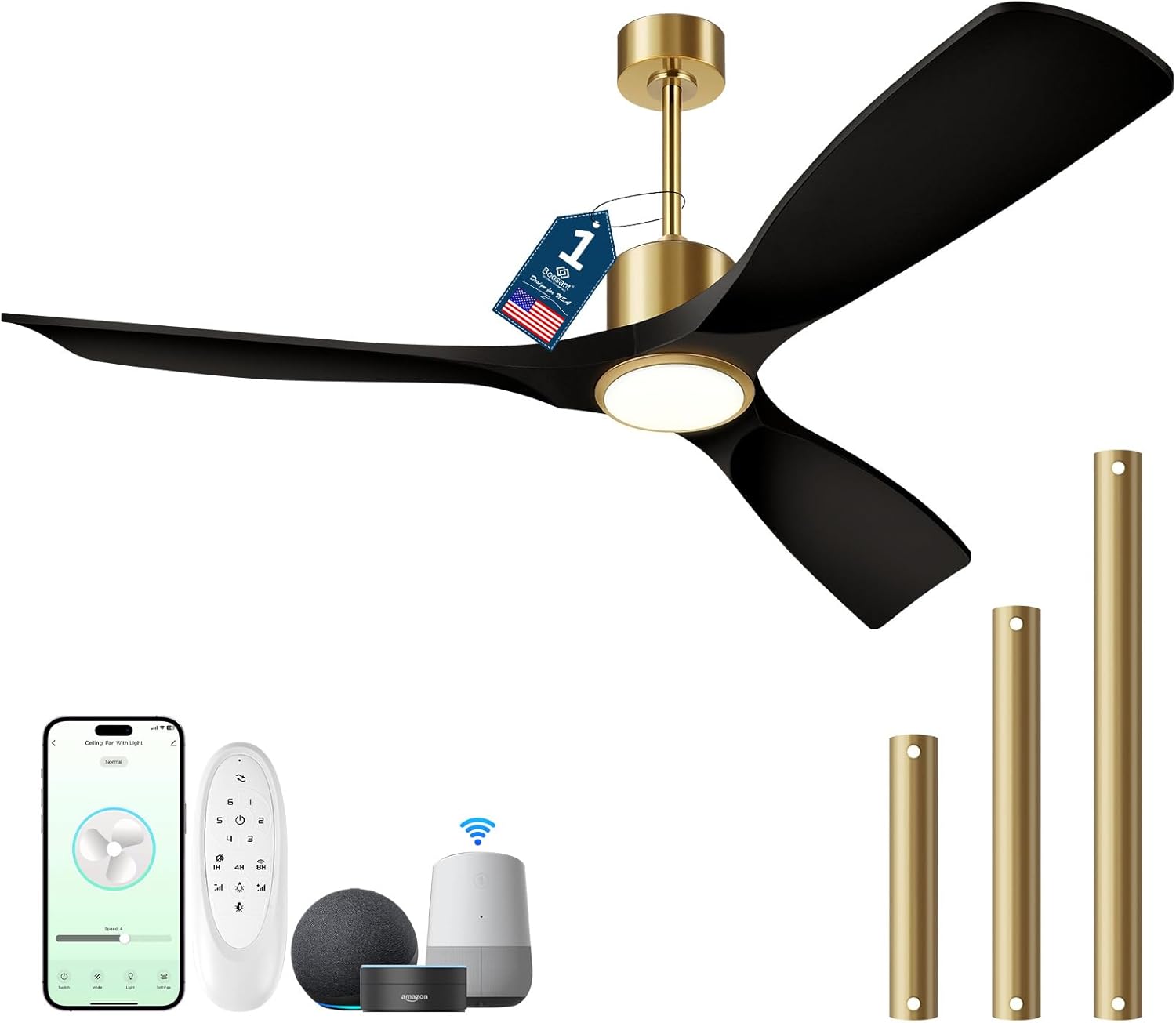
Imej: Selesaiview of the BOOSANT 52-inch Smart Ceiling Fan and its included accessories, such as the remote control, various downrod lengths, and compatibility with smart home devices like Amazon Alexa and Google Assistant.
- Perhimpunan Kipas Siling (Motor, Bilah, Kit Lampu)
- Alat Kawalan Jauh
- Downrod (pilihan 5 inci, 10 inci, 15 inci)
- Pendakap Pemasangan
- Pek Perkakasan (skru, nat dawai, dll.)
- Manual Arahan
3. Panduan Pemasangan
3.1 Pra-Pemasangan
- Matikan kuasa pada pemutus litar utama.
- Pastikan kotak elektrik dipasang dengan kukuh dan mampu menyokong kipas.
- Buka semua komponen dan periksa sebarang kerosakan.
3.2 Memasang Kipas
The fan supports flat ceilings and sloped ceilings up to 15 degrees. Select the appropriate downrod length (5", 10", or 15") for your ceiling height.
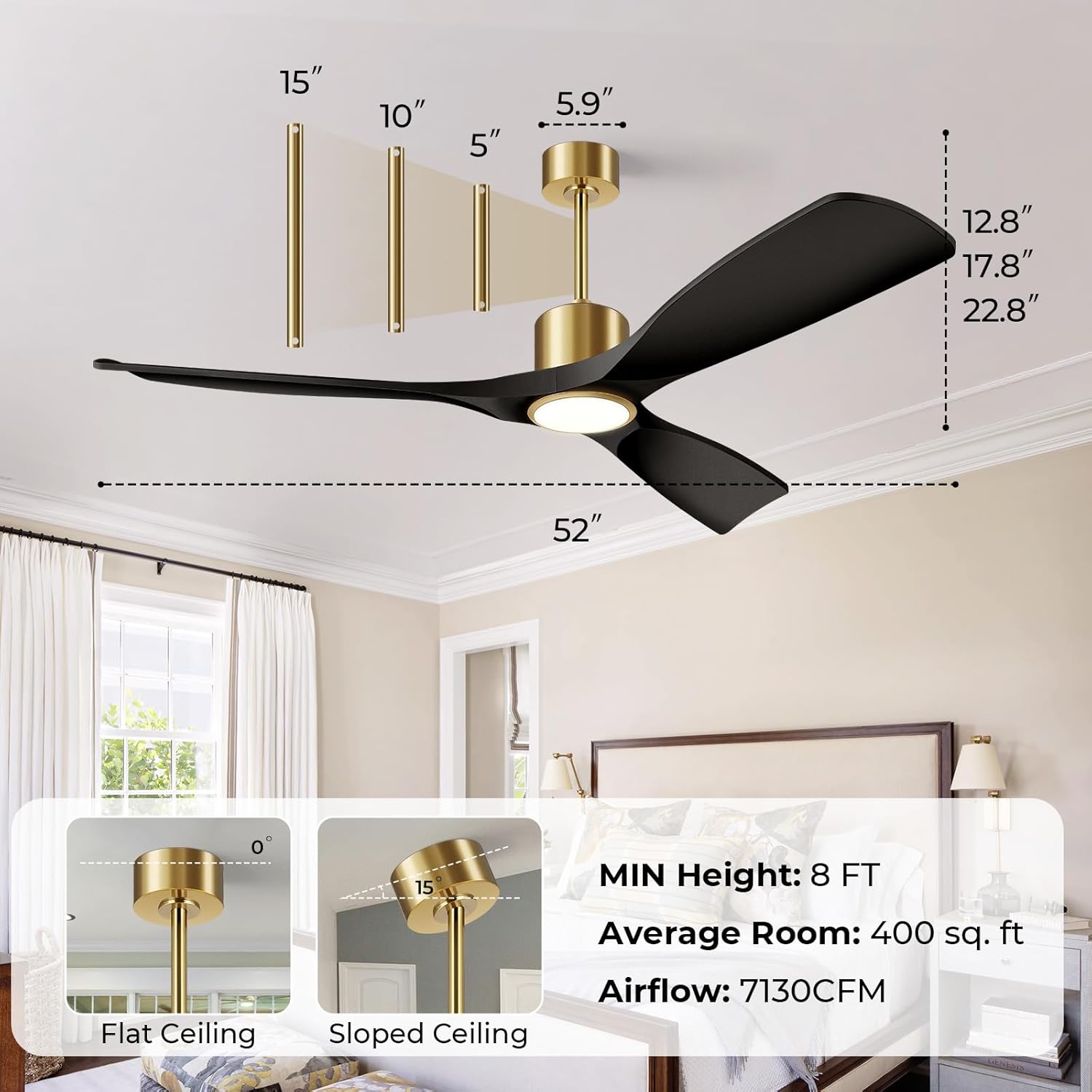
Image: This diagram illustrates the dimensions of the 52-inch ceiling fan and various installation configurations, including options for flat and sloped ceilings, and the use of 5-inch, 10-inch, and 15-inch downrods to achieve a minimum height of 8 feet.
- Attach the mounting bracket to the ceiling electrical box using the provided screws.
- Assemble the downrod with the canopy and hang the fan motor assembly onto the mounting bracket.
- Connect the electrical wires according to the wiring diagram (typically black to black, white to white, and ground to ground).
- Secure the canopy to the mounting bracket.
3.3 Memasang Bilah dan Kit Ringan
- Attach the fan blades to the motor housing using the provided screws.
- Connect the light kit wiring to the fan motor wiring.
- Secure the light kit to the fan motor housing.
4. Arahan Operasi
4.1 Fungsi Kawalan Jauh
The included remote control allows for convenient operation of your ceiling fan and light.
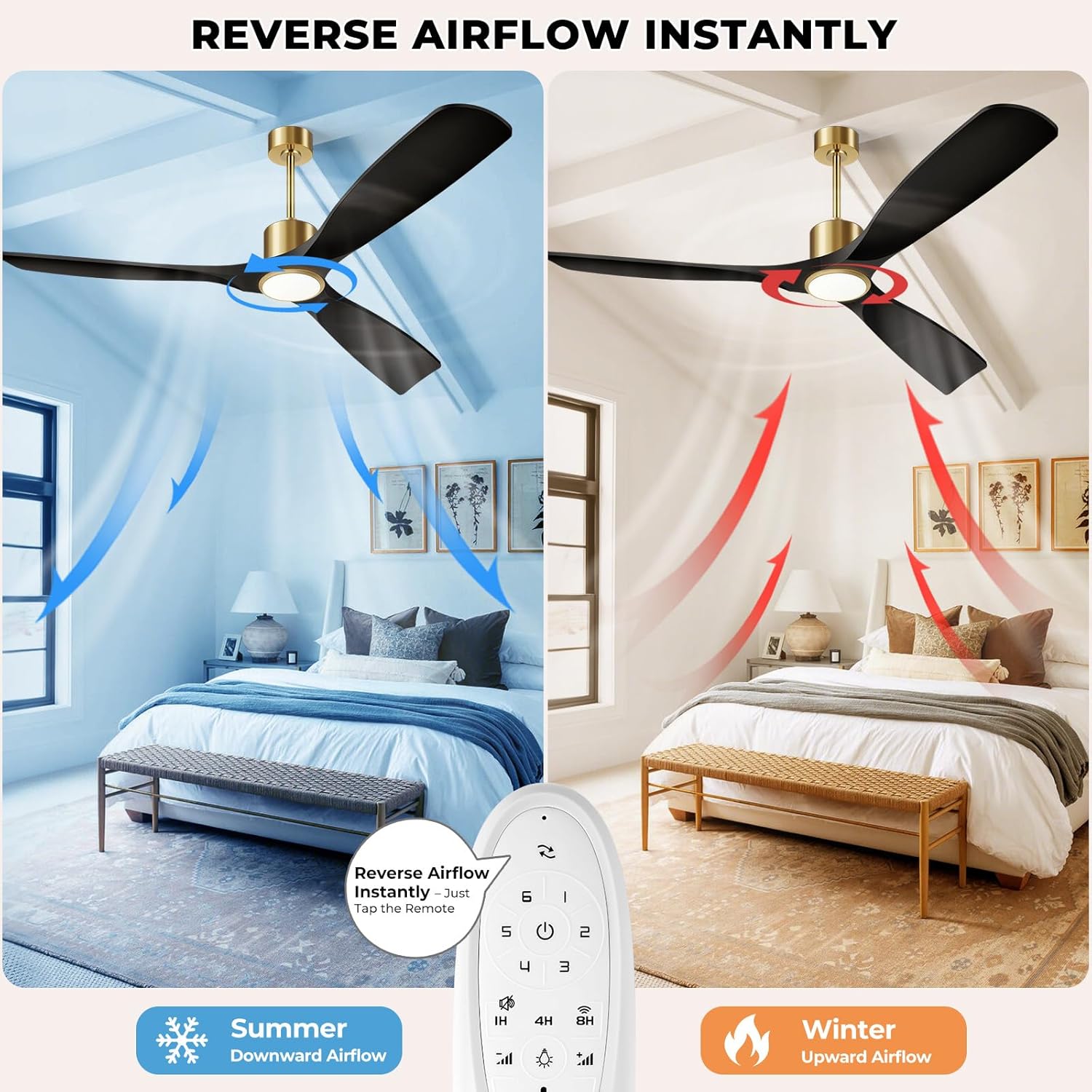
Image: This illustration demonstrates the reversible airflow feature of the BOOSANT ceiling fan, showing downward airflow for cooling in summer and upward airflow for heat circulation in winter, controlled by a button on the remote.
- Kipas HIDUP/MATI: Menghidupkan atau mematikan kipas.
- Kelajuan Kipas (1-6): Melaraskan kelajuan kipas dari rendah (1) ke tinggi (6).
- Lampu HIDUP/MATI: Menghidupkan atau mematikan lampu.
- Kecerahan +/-: Dims or brightens the light (10% to 100%).
- Suhu Warna: Cycles through 3000K (Warm White), 4000K (Neutral White), and 6000K (Daylight). The light features a memory function to recall the last setting.
- Aliran Udara Terbalik: Menukar arah putaran bilah untuk mod musim panas (aliran udara ke bawah) atau musim sejuk (aliran udara ke atas).
- Pemasa (1H/4H/8H): Menetapkan kipas supaya mati secara automatik selepas 1, 4 atau 8 jam.
- Fungsi senyap: Activates a low-noise mode for quiet operation.
- Berpasangan Wi-Fi: Press and hold the designated key for less than 3 seconds to turn off the fan and light. Press and hold for more than 3 seconds to reset Wi-Fi.

Image: This image demonstrates the three adjustable light color temperatures (6000K Cool White, 4500K Natural White, 3000K Warm White) and the dimming capability from 12% to 100% brightness of the BOOSANT ceiling fan light.
4.2 Kawalan Pintar (Aplikasi & Suara)
This smart ceiling fan can be controlled via a mobile application and voice commands through Amazon Alexa or Google Assistant.

Image: This image illustrates the smart voice control feature of the BOOSANT ceiling fan, showing compatibility with Amazon Alexa and Google Assistant for hands-free operation.
- Kawalan Apl: Download the designated smart home app (refer to packaging or product details for specific app name). Follow the in-app instructions to pair your fan. The app allows full control over fan speed, light settings, and scheduling.
- Kawalan Suara: Once paired with Amazon Alexa or Google Assistant, use voice commands such as "Alexa, turn on the fan" or "Hey Google, set fan speed to 3."
5. Penyelenggaraan
Penyelenggaraan tetap memastikan prestasi optimum dan jangka hayat kipas siling anda.
- Pembersihan: Gunakan yang lembut, damp cloth to clean the fan blades and motor housing. Do not use abrasive cleaners or solvents. Ensure power is off before cleaning.
- Penjagaan Bilah: Periksa secara berkala bahawa semua skru bilah adalah ketat. Bilah yang longgar boleh menyebabkan goyah dan bunyi.
- Kit Cahaya: The integrated LED light source is designed for long life and typically does not require replacement.
6. Penyelesaian masalah
Rujuk bahagian ini untuk isu biasa dan penyelesaiannya.
| Masalah | Kemungkinan Punca | Penyelesaian |
|---|---|---|
| Kipas tidak bermula | No power; Loose wire connections; Remote control battery low/dead; Incorrect pairing. | Check circuit breaker; Verify all wire connections are secure; Replace remote battery; Re-pair remote/app. |
| Cahaya tidak berfungsi | Loose wire connections; Remote control battery low/dead; Light function off. | Check light kit wiring; Replace remote battery; Ensure light is turned on via remote/app. |
| Kipas bergoyang | Skru bilah longgar; Bilah yang tidak seimbang; Pendakap pelekap longgar. | Ketatkan semua skru bilah; Gunakan kit pengimbang (tidak disertakan) untuk mengimbang bilah; Pastikan pendakap pelekap kukuh. |
| Alat kawalan jauh tidak bertindak balas | Battery low/dead; Remote not paired; Obstruction between remote and receiver. | Replace battery; Re-pair remote (refer to Wi-Fi pairing instructions); Ensure clear line of sight. |
| Kebisingan yang berlebihan | Skru longgar; Masalah motor; Bilah terkena halangan. | Check and tighten all screws; Ensure no obstructions are near blades. If noise persists, contact support. |
7. Spesifikasi
Technical details for the BOOSANT 52-inch Smart Ceiling Fan.
| Ciri | Perincian |
|---|---|
| Nama Model | 102L-52 |
| Saiz | 52 inci |
| Dimensi Produk | 21"D x 52"W x 21"H |
| Berat Barang | 14.15 paun |
| Sumber Kuasa | Elektrik Bertali |
| Voltage | 120 Volt |
| Wattage | 50 watt |
| Jenis Motor | Motor DC |
| Bilangan Bilah | 3 |
| Kapasiti Aliran Udara | 6000 CFM |
| Bilangan Tahap Kuasa | 6 |
| Tahap Kebisingan | 35 dB (typically <30dB during operation) |
| Suhu Warna Cerah | 3000K / 4000K / 6000K (Dimmable 10%-100%) |
| Kaedah Kawalan | App, Remote, Voice (Alexa, Google Assistant) |
| Penggunaan Dalaman/Luar | Dalaman, Luaran Bertutup |
| Pensijilan | Diperakui ETL |
8. Waranti dan Sokongan
Your BOOSANT ceiling fan is manufactured to high-quality standards and is ETL certified for safety. For technical assistance or any product-related inquiries, please contact our support team.
- Sokongan Teknikal: 24/7 technical support is available.
- Nombor Perhubungan: +1-7712322914 (AS)
- Waktu Operasi: Monday to Friday: 9 AM - 5 PM (PT)


