1. Pengenalan
Thank you for choosing the AVATTO WT400-16A-B Smart WiFi Thermostat. This device is designed to provide intelligent temperature control for your water heater and gas boiler systems, offering convenience through programmable schedules, app control, and voice commands. Please read this manual carefully before installation and operation to ensure proper use and optimal performance.
2. Maklumat Keselamatan
- Always disconnect power to the heating system before installing or servicing the thermostat.
- Pemasangan hendaklah dilakukan oleh juruelektrik atau juruteknik pemanasan yang berkelayakan.
- Jangan dedahkan termostat kepada air atau kelembapan berlebihan.
- Pastikan semua sambungan pendawaian selamat dan mematuhi kod elektrik tempatan.
- Jauhkan bateri daripada kanak-kanak. Buang bateri terpakai dengan cara yang bertanggungjawab.
3. Kandungan Pakej
Sahkan bahawa semua item terdapat dalam pakej anda:
- AVATTO WT400-16A-B Thermostat Unit
- Manual Pengguna
- Skru Pemasangan (2 pcs)
- NTC Sensor Cable (3 meters)
4. Produk Lebihview
4.1 Ciri-ciri Utama
- Kawalan WiFi Pintar: Connects directly to 2.4 GHz Wi-Fi for remote control via smartphone app.
- Kawalan Suara: Serasi dengan Amazon Alexa dan Google Assistant untuk operasi bebas tangan.
- Jadual Boleh Diprogram: Offers 6 distinct heating programs for weekdays and 2 for weekends, optimizing energy use.
- Heating and Cooling Functionality: Supports both heating and cooling modes for year-round comfort.
- Paparan LCD Besar: A 4.6-inch screen clearly shows room temperature, set temperature, operating status, battery level, day, and time.
- Pemasangan Mudah: Designed for surface mounting with potential-free output (NO, NC, COM).
- Pilihan Kuasa Dwi: Operates on AAA batteries with an optional Type-C power input.
4.2 Paparan dan Kawalan
The thermostat features a clear LCD screen and an intuitive rotary knob for adjustments.
4.3 Keserasian
This thermostat is designed for use with water heaters and gas boilers that have dry contact connections. Ia adalah not compatible with electric underfloor heating systems or instantaneous electric water heaters.

Image: This diagram illustrates the thermostat's compatibility. It is compatible with gas boilers featuring dry contact connections (indicated by a checkmark) and is not compatible with electric heating systems or actuator valves (indicated by cross marks).
5. Persediaan
5.1 Pemasangan
The thermostat is designed for surface mounting. Choose a suitable location on an interior wall, away from direct sunlight, drafts, or heat sources that could affect temperature readings.
- Putuskan Kuasa: Matikan bekalan kuasa utama ke sistem pemanasan anda di pemutus litar.
- Lekapkan Plat Belakang: Detach the front panel of the thermostat from its backplate. Secure the backplate to the wall using the provided screws.
- Pendawaian: Connect the heating system wires to the NO (Normally Open), NC (Normally Closed), and COM (Common) terminals on the backplate. Refer to your heating system's manual for specific wiring diagrams. The thermostat provides a potential-free output.
- Pasang Panel Depan: Once wiring is complete and secure, reattach the front panel to the backplate.
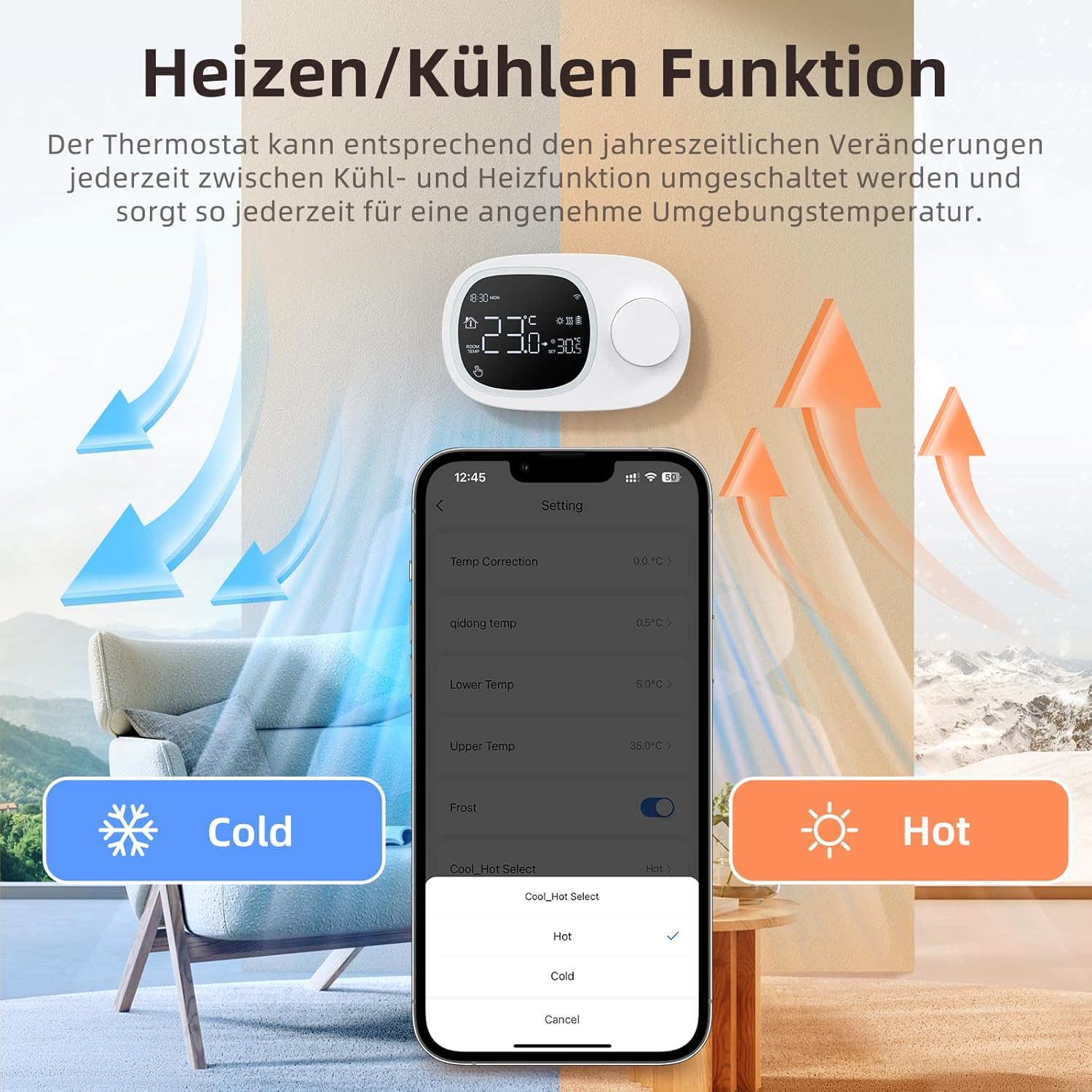
Image: This image shows the thermostat's backplate with wiring terminals and its physical dimensions (13.3 cm width, 8.6 cm height, 2.5 cm depth).
5.2 Bekalan Kuasa
The thermostat can be powered by three AAA batteries or via a Type-C USB connection.
- Pemasangan Bateri: Open the battery compartment on the back of the thermostat and insert three AAA batteries, observing the correct polarity. The screen will display the battery level. Under normal operation, batteries typically last about 6 months.
- Type-C Power (Optional): For continuous power, you can connect a Type-C USB cable to the designated port.

Image: This image illustrates the battery compartment for AAA batteries and the Type-C port for alternative power input.
5.3 Sambungan WiFi
To enable smart features, connect your thermostat to your home's 2.4 GHz Wi-Fi network.
- Muat turun Aplikasi: Download and install the 'Smart Life' or 'AVATTO' app from your smartphone's app store.
- Daftar/Log Masuk: Buat akaun atau log masuk ke apl.
- Tambah Peranti: In the app, select 'Add Device' or the '+' icon. Choose 'Thermostat' or 'Heating Control'.
- Mod Berpasangan: Follow the in-app instructions to put the thermostat into pairing mode (usually involves pressing and holding a button on the thermostat until a Wi-Fi icon flashes).
- Sambung ke Wi-Fi: Ensure your mobile phone is connected to your home's 2.4 GHz Wi-Fi network. Enter your Wi-Fi password in the app.
- Persediaan Lengkap: The app will guide you through the final steps to connect the thermostat.
6. Arahan Operasi
6.1 Operasi Asas
- Hidupkan/Mati Kuasa: Tekan butang kuasa untuk menghidupkan atau mematikan termostat.
- Laraskan Suhu: Rotate the knob to set your desired room temperature. The display will show both the current room temperature and the set temperature.
6.2 Mod Boleh Aturcara
The thermostat allows you to set a weekly schedule to automatically adjust the temperature.
- Weekday Programs: Set up to 6 different heating periods for Monday to Friday.
- Weekend Programs: Set up to 2 heating periods per day for Saturday and Sunday.
- Setting Schedule: Access the programming menu via the thermostat's interface or the Smart Life/AVATTO app to configure your desired times and temperatures for each period.

Image: This image displays the app interface for setting a weekly programmable schedule, showing different time slots and temperatures for each day.
6.3 Kawalan Apl
Control your thermostat remotely using the Smart Life or AVATTO app.
- Pelarasan Suhu Jauh: Change the set temperature from anywhere.
- Pengurusan Jadual: Easily create, modify, or disable heating schedules.
- Penukaran Mod: Switch between heating and cooling modes.
- Perkongsian Peranti: Share control of the thermostat with family members.
6.4 Kawalan Suara
Integrate your thermostat with Amazon Alexa or Google Assistant for convenient voice commands.
- Memautkan Akaun: Follow the instructions in the Smart Life/AVATTO app to link your account with Alexa or Google Assistant.
- Perintah Suara: Gunakan arahan seperti:
- "Alexa, tetapkan [Nama Termostat] kepada 22 darjah."
- "Ok Google, apakah suhu di [Nama Bilik]?"

Image: This image demonstrates remote control via the Smart Life app and voice control using an Alexa device, showing a command to set the room temperature.
6.5 Heating and Cooling Function
The thermostat supports both heating and cooling modes. You can switch between these functions as needed to maintain a comfortable ambient temperature throughout the year.
- Pemilihan Mod: The mode can typically be changed through the thermostat's menu settings or directly within the Smart Life/AVATTO app.
- Temperature Hysteresis: The thermostat features precise temperature control with adjustable hysteresis (0.5-10°C) to prevent rapid cycling of your heating/cooling system.
- Had Suhu: Set minimum and maximum temperature limits (e.g., 5-35°C) to ensure safe and efficient operation.

Image: This image illustrates the heating and cooling functions, showing temperature arrows and the app interface for selecting 'Hot' or 'Cold' modes.
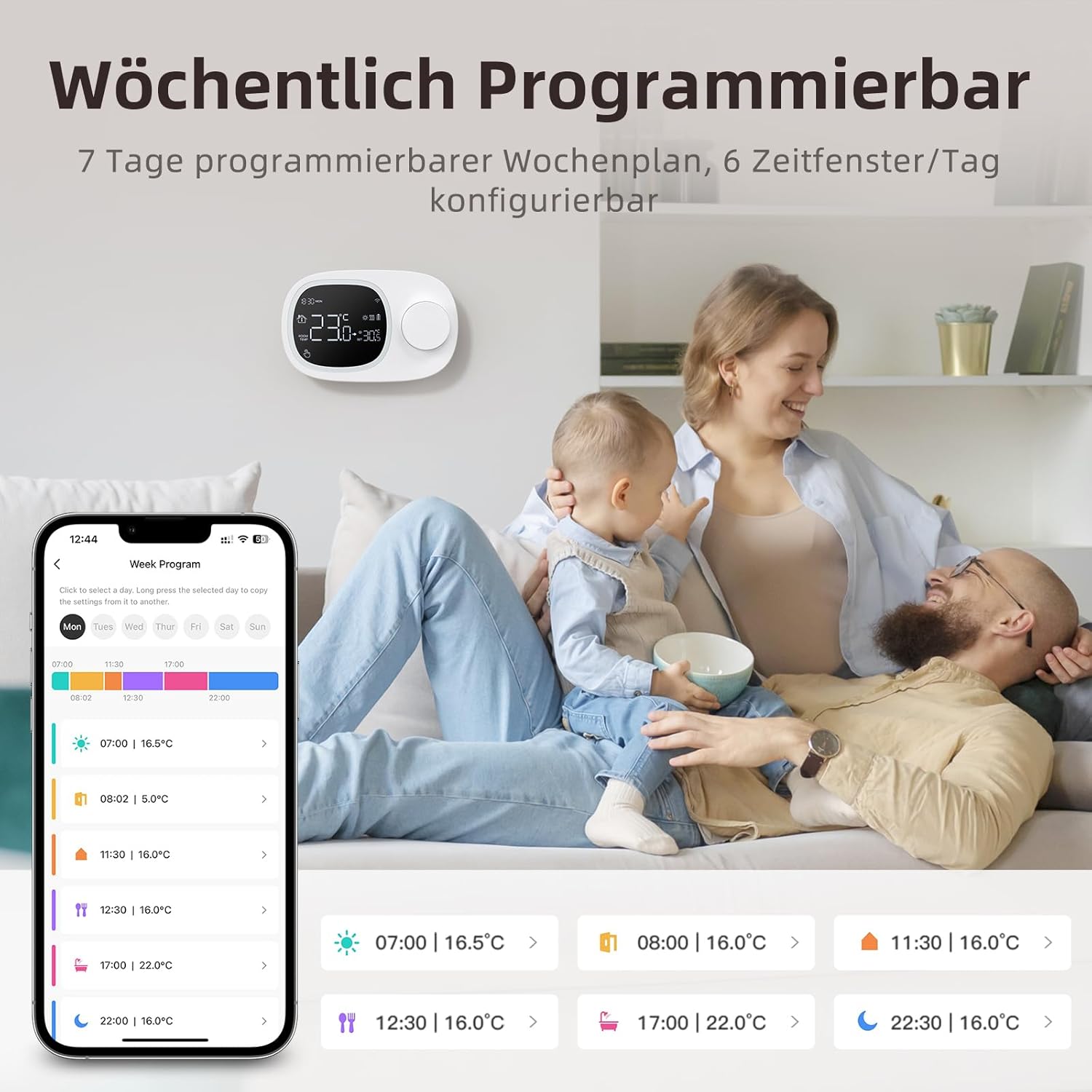
Image: This image highlights the precise temperature control features, including temperature hysteresis (0.5-10°C), minimum temperature setting (0.5°C), and upper/lower temperature limits (5-35°C).
7. Penyelenggaraan
7.1 Penggantian Bateri
When the battery level indicator on the screen shows low power, replace the three AAA batteries promptly to ensure continuous operation. Refer to section 5.2 for battery installation instructions.
8. Penyelesaian masalah
Jika anda menghadapi masalah dengan termostat anda, rujuk masalah dan penyelesaian biasa berikut:
| Masalah | Kemungkinan Punca / Penyelesaian |
|---|---|
| Thermostat does not power on. | Check if the AAA batteries are correctly inserted and charged. Ensure the power button is functioning. If using Type-C power, verify the cable connection. |
| Confused characters appear on the screen. | This may indicate an installation issue. Reinstall the device, ensuring all connections are secure. |
| Suhu yang dipaparkan tidak tepat. | Access the advanced menu mode on the thermostat or the calibration menu in the Smart Life/Tuya app to adjust temperature settings. |
| Device starts normally, but screen does not show output temperature. | Check the connection between the main control board and the power board. Verify that all wiring is correct according to the markings on the device connector. |
| Tidak dapat menyambung ke Wi-Fi. | Ensure your router is broadcasting a 2.4 GHz Wi-Fi signal. Confirm your mobile phone is connected to the 2.4 GHz network during pairing. Check Wi-Fi password. |
9. Spesifikasi
- Jenama: AVATTO
- Nombor Model: WT400-16A-B (also referred to as WT580)
- warna: Hitam
- Dimensions (Thermostat): Kira-kira 13.3 x 8.6 x 2.5 cm
- Berat Barang: 270 gram
- Power Output (Heating System): Sehingga 3800 Watt
- Voltage: 240 Volt (AC)
- Bahan: plastik
- Power Source (Thermostat): 3 x AAA Batteries (sold separately), optional Type-C USB
- Ketersambungan: Wi-Fi (2.4 GHz), Bluetooth
- Jenis Pengawal: Amazon Alexa, Pembantu Google
- Ciri Khas: Voice control, LCD display (temperature, weather, time, date, room temp, heating icon), 0.5°C temperature increments, Silent operation, Smart Life/Tuya Smart remote control.
- Specific Product Uses: Water heaters and gas boilers with dry contact.
10. Waranti dan Sokongan
Information regarding specific warranty details is not available in this document. For technical assistance, troubleshooting, or any questions not covered in this manual, please contact AVATTO customer support. You may also find additional support resources through the Smart Life or AVATTO application.


