1. Pengenalan
Thank you for choosing the UrbanX Wireless Bluetooth Keyboard and Mouse Combo. This manual provides detailed instructions for setting up, operating, and maintaining your new peripheral devices. Please read this manual thoroughly before use to ensure optimal performance and longevity of your product.
2. Kandungan Pakej
Sila semak kandungan pakej untuk memastikan semua item ada:
- UrbanX Bluetooth Wireless Keyboard
- UrbanX Wireless Mouse
- Shared USB Receiver (stored in the mouse battery compartment)
- Kabel Pengecas USB
- Panduan Pengguna
3. Produk Lebihview
The UrbanX Keyboard and Mouse Combo is designed for versatility and comfort, featuring dual-mode connectivity (Bluetooth and 2.4GHz wireless) and long-lasting rechargeable batteries.
3.1 Ciri-ciri Papan Kekunci
- Reka Letak Saiz Penuh: Includes a numeric keypad and arrow keys for comprehensive functionality.
- Rendah-Profile kunci: Designed for a quiet and comfortable typing experience.
- Kekunci pintas: Dedicated keys for Windows functions such as volume control, playback, and copy/paste.
- Kesambungan Dwi Mod: Supports Bluetooth (BT1, BT2) and 2.4GHz wireless connection.
- Sokongan Berbilang Peranti: Easily switch between up to three connected devices.

Image: The UrbanX keyboard highlighting the BT1, BT2, and 2.4G connection buttons for multi-device pairing.

Image: The UrbanX keyboard and mouse, illustrating the low-profile, scissor-switch keys designed for quiet and comfortable typing.
3.2 Ciri-ciri Tetikus
- Reka bentuk ergonomik: Shaped to reduce hand strain during extended use.
- Suis DPI: Allows adjustment of cursor speed for precision or rapid movement.
- Kesambungan Dwi Mod: Supports Bluetooth (BT1, BT2) and 2.4GHz wireless connection.
- Storan Penerima USB: The nano USB receiver is conveniently stored within the mouse.

Image: The underside of the UrbanX mouse, indicating its Bluetooth and 2.4GHz dual-mode wireless capabilities.
4. Arahan Persediaan
The UrbanX combo offers two connection methods: 2.4GHz wireless via USB receiver or Bluetooth.
4.1 2.4GHz Wireless Connection (USB Receiver)
- Locate the nano USB receiver stored in the battery compartment of the mouse.
- Palamkan penerima USB ke dalam port USB yang tersedia pada komputer atau peranti anda.
- Hidupkan papan kekunci dan tetikus menggunakan suis kuasa masing-masing.
- The devices should connect automatically. No additional drivers are required.
4.2 Sambungan Bluetooth
The keyboard and mouse can connect to up to two Bluetooth devices each (BT1 and BT2 channels).
4.2.1 Keyboard Bluetooth Pairing
- Hidupkan papan kekunci.
- Tekan dan tahan butang BT1 or BT2 button for 3-5 seconds until the indicator light flashes, indicating pairing mode.
- On your device (e.g., laptop, tablet, smartphone), go to Bluetooth settings and search for new devices.
- Select "UrbanX Keyboard" from the list of available devices.
- Ikut sebarang gesaan pada skrin untuk melengkapkan gandingan.
- Repeat for a second Bluetooth device using the other BT channel (BT2 if BT1 was used first).
4.2.2 Mouse Bluetooth Pairing
- Hidupkan tetikus.
- Tekan dan tahan butang BT1 or BT2 button (usually on the bottom of the mouse) for 3-5 seconds until the indicator light flashes.
- Pada peranti anda, pergi ke tetapan Bluetooth dan cari peranti baharu.
- Select "UrbanX Mouse" from the list.
- Ikut sebarang gesaan pada skrin untuk melengkapkan gandingan.
- Repeat for a second Bluetooth device using the other BT channel.

Image: An illustration showing the UrbanX keyboard and mouse connected to a tablet (Channel 1), a laptop (Channel 2), and a smartphone (Channel 3), demonstrating multi-device connectivity.
5. Arahan Operasi
5.1 Bertukar Antara Peranti
Untuk bertukar antara peranti yang disambungkan:
- papan kekunci: Tekan ke BT1, BT2, atau 2.4G button briefly to switch to the corresponding connected device.
- tetikus: Tekan ke BT1, BT2, atau 2.4G button (usually on the bottom) briefly to switch to the corresponding connected device.
5.2 Keyboard Hotkeys
The keyboard features dedicated hotkeys for quick access to common functions. These are typically located on the F-keys row and activated by pressing the Fn key in combination with the desired F-key, or directly depending on the operating system.
| Gabungan Kunci | Fungsi |
|---|---|
| Fn + F1 | Pemain Media |
| Fn + F2 | Kelantangan Kurang |
| Fn + F3 | Kelantangan Naik |
| Fn + F4 | bisu |
| Fn + F5 | Trek Sebelumnya |
| Fn + F6 | Trek Seterusnya |
| Fn + F7 | Main/Jeda |
| Fn + F8 | Berhenti |
| Fn + F9 | Halaman Utama |
| Fn + F10 | Mel |
| Fn + F11 | Komputer Saya |
| Fn + F12 | Kalkulator |
| Fn + Esc | Kunci Skrin |
Note: Some hotkey functions may vary depending on your operating system (Windows, macOS, Android, iPadOS).
5.3 Pelarasan DPI Tetikus
The mouse features a DPI switch button, usually located near the scroll wheel. Press this button to cycle through different cursor speeds (DPI settings). This allows you to adjust the sensitivity of the mouse to your preference.
6. Arahan Mengecas
Both the keyboard and mouse are equipped with rechargeable Li-polymer batteries.
- Connect the provided USB charging cable to the charging port on the keyboard or mouse.
- Pasangkan hujung kabel USB yang satu lagi ke sumber kuasa USB (cth., port USB komputer, penyesuai dinding USB).
- An indicator light will typically show the charging status. It will turn off or change color when fully charged.
Hayat Bateri:
- papan kekunci: Up to 6 months on a single charge (based on 2 hours of non-stop use per day).
- tetikus: Up to 4 months on a single charge (based on 2 hours of non-stop use per day).
- Masa Pengecasan: Kira-kira 2 jam untuk cas penuh.
- Masa Siap sedia: Exceeds 2160 hours (90 days).

Image: The UrbanX keyboard and mouse shown connected via USB cables for charging, with indicators for charging time and standby time.
7. Penyelenggaraan
To ensure the longevity and optimal performance of your UrbanX Keyboard and Mouse Combo:
- Pembersihan: Use a soft, dry cloth to wipe the surfaces. For stubborn dirt, a slightly damp kain boleh digunakan, memastikan tiada kelembapan memasuki peranti.
- Storan: Simpan peranti di tempat yang sejuk dan kering, jauh daripada cahaya matahari langsung dan suhu yang melampau.
- Elakkan Cecair: Do not expose the devices to water or other liquids.
- Tangani dengan Berhati-hati: Elakkan daripada menjatuhkan atau meletakkan peranti kepada kesan yang kuat.
8. Penyelesaian masalah
If you encounter issues with your UrbanX Keyboard and Mouse Combo, please refer to the following common solutions:
| Masalah | Penyelesaian yang Mungkin |
|---|---|
| Devices not connecting via 2.4GHz |
|
| Devices not connecting via Bluetooth |
|
| Papan kekunci/Tetikus tidak bertindak balas |
|
| Pergerakan kursor tidak menentu atau perlahan |
|
9. Spesifikasi
| Ciri | Perincian |
|---|---|
| Nombor Model | UXM030 |
| Teknologi Ketersambungan | Bluetooth, Tanpa Wayar 2.4GHz |
| Peranti Serasi | HP ENVY 17t CG Laptop, Mobile Phone, Tablet, Laptop, Smartphone, PC, Mac (Windows, macOS, iPadOS, Android, Chrome OS) |
| Penerangan Papan Kekunci | US Layout, Full-Size, Low-Profile, Scissor-Switch |
| Ciri Khas | Ergonomic, Rechargeable, Multi-Device Switching |
| Sumber Kuasa | Battery Powered (Built-in Li-polymer) |
| Hayat Bateri Papan Kekunci | Up to 6 months (2 hours/day usage) |
| Hayat Bateri Tetikus | Up to 4 months (2 hours/day usage) |
| Masa Mengecas | lebih kurang 2 jam |
| Julat Operasi | Sehingga 33 kaki (10 meter) |
| Dimensi Produk (Papan Kekunci) | 17.1 x 5.1 x 0.7 inci (anggaran) |
| Dimensi Produk (Tetikus) | 4.5 x 2.2 x 1 inci (anggaran) |
| Berat Barang | 1.54 ounces (Mouse only, approximate) |
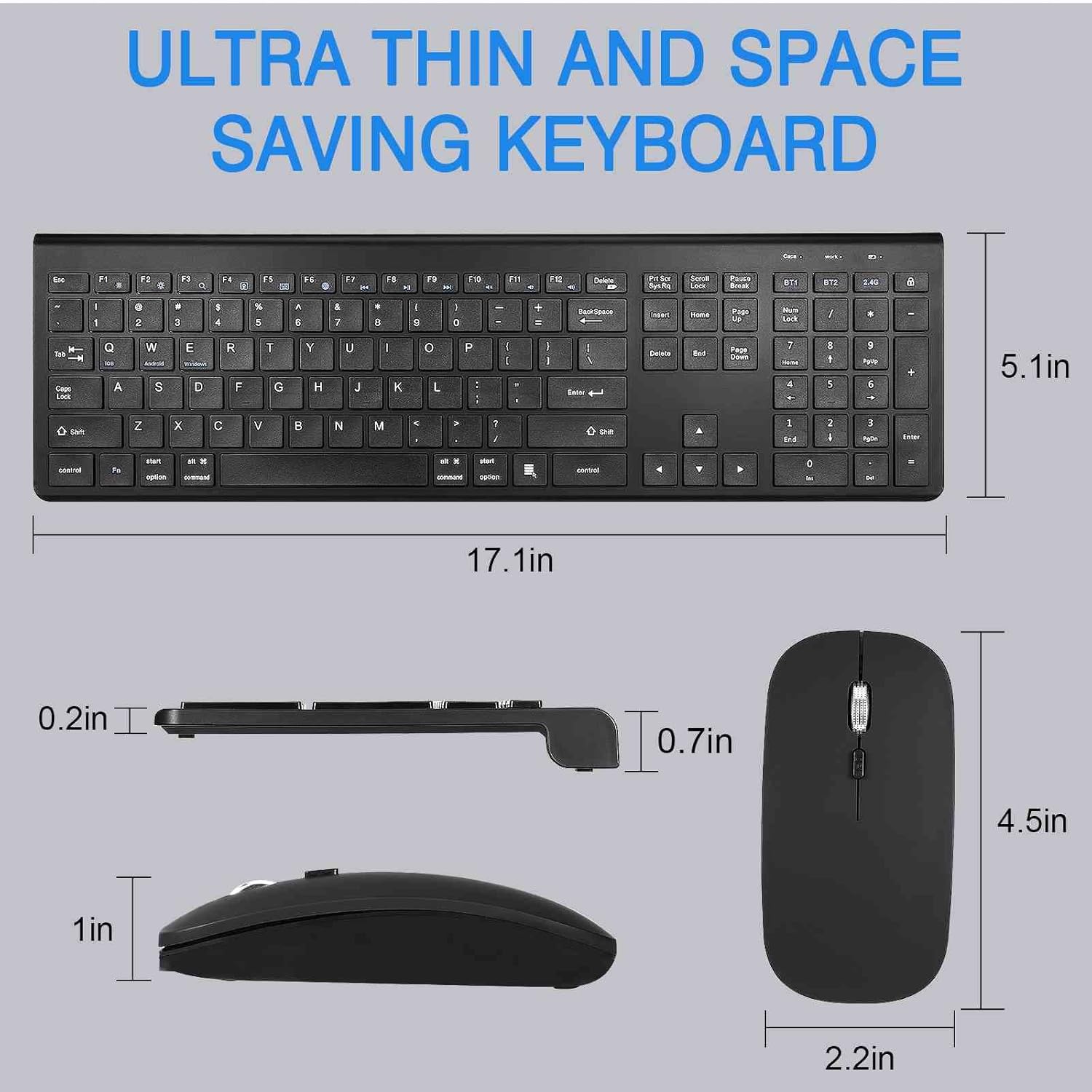
Image: Detailed dimensions of the UrbanX keyboard and mouse, showing their ultra-thin and space-saving design.
10. Waranti dan Sokongan
The UrbanX Keyboard and Mouse Combo comes with a Waranti 1 tahun dari tarikh pembelian.
For technical support, warranty claims, or any questions regarding your product, please contact UrbanX customer support. Refer to the contact information provided on the product packaging or the UrbanX official webtapak.


