1. Pengenalan
Terima kasih kerana membeliasing the CANYON BSP-8 Bluetooth Speaker. This manual provides essential information for the safe and efficient use of your device. Please read it thoroughly before operation and retain it for future reference.
Ciri-ciri Utama:
- 10W Audio Output: Delivers clear and powerful sound.
- Bluetooth 5.2: For stable and energy-efficient wireless connection up to 10 meters.
- Lampu Belakang RGB: Integrated lighting for enhanced ambiance.
- Stereo Tanpa Wayar Sejati (TWS): Connect two BSP-8 speakers for a full stereo sound experience.
- Pelbagai Pilihan Main Semula: Supports Bluetooth, AUX, USB, and MicroSD card inputs.
- Reka Bentuk Mudah Alih: Compact size with a convenient hanger for easy transport.
- Hayat Bateri yang Panjang: Sehingga 3 jam masa bermain dengan sekali caj.
2. Maklumat Keselamatan
- Jangan dedahkan pembesar suara kepada suhu yang melampau, cahaya matahari langsung atau kelembapan yang tinggi.
- Elakkan daripada menjatuhkan atau menundukkan pembesar suara kepada impak yang kuat.
- Do not disassemble or attempt to repair the speaker yourself. Contact qualified service personnel.
- Keep the speaker away from water and other liquids. It is not waterproof.
- Gunakan hanya kabel pengecasan yang disediakan atau kabel Jenis-C yang diperakui untuk mengecas.
- Buang bateri dan pembesar suara mengikut peraturan tempatan.
3. Kandungan Pakej
- CANYON BSP-8 Bluetooth Speaker
- Kabel Pengecasan USB Jenis-C
- Manual Pengguna
4. Produk Lebihview
Biasakan diri anda dengan komponen dan kawalan pembesar suara.
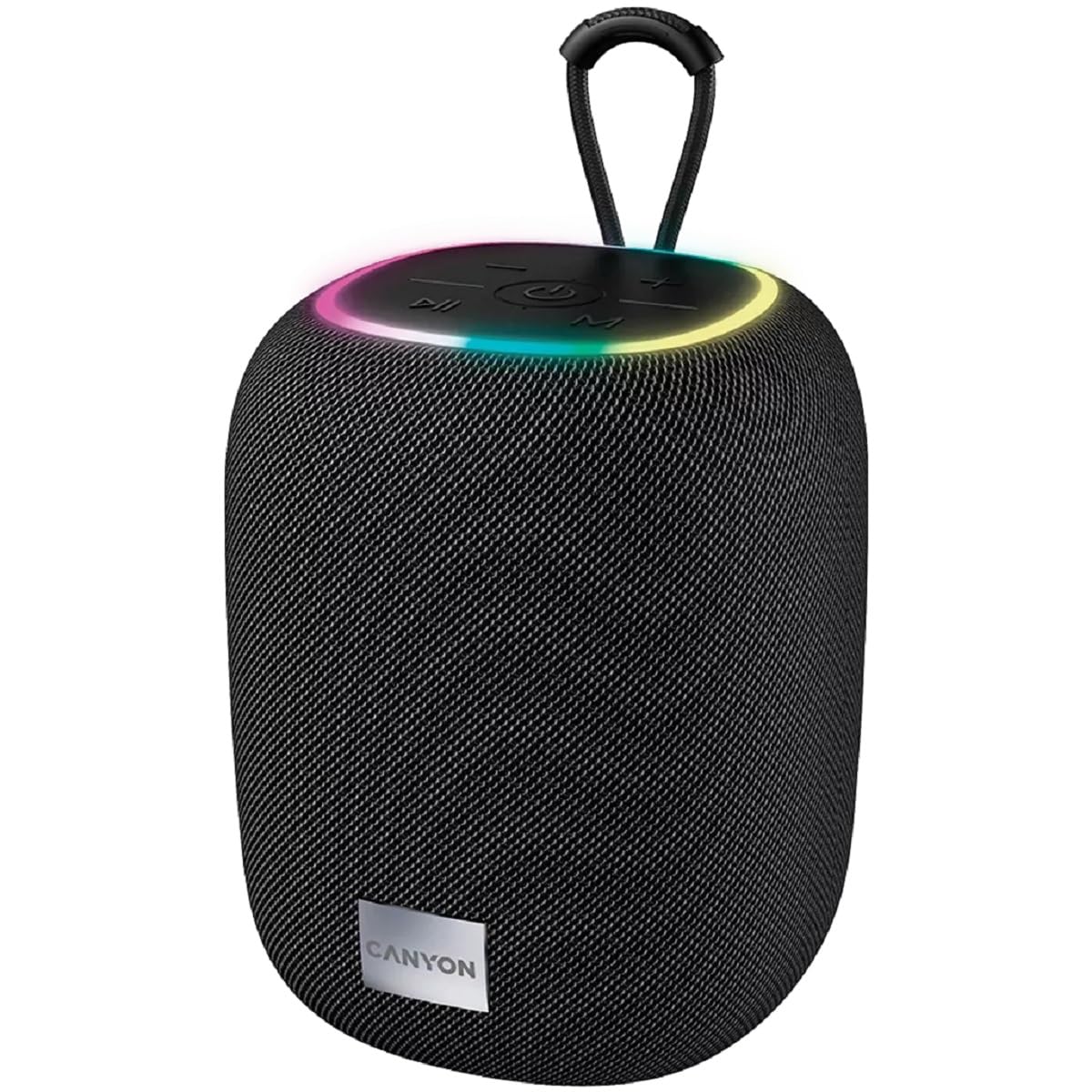
Imej 1: Atas view of the CANYON BSP-8 speaker, showing the control buttons, RGB backlight, and integrated hanger.
Butang Kawalan (Panel Atas):
- Butang Kuasa: Press and hold to turn on/off. Short press to play/pause.
- Butang Kelantangan Kurang / Trek Sebelumnya: Tekan sebentar untuk menurunkan kelantangan. Tekan lama untuk trek sebelumnya.
- Butang Naikkan Kelantangan / Trek Seterusnya: Tekan sebentar untuk menaikkan kelantangan. Tekan lama untuk trek seterusnya.
- Butang Mod (M): Short press to switch between Bluetooth, AUX, USB, and MicroSD modes.

Imej 2: Belakang view of the CANYON BSP-8 speaker, illustrating the various input ports including AUX, USB, TF (MicroSD) card slot, and DC5V Type-C charging port.
Input Ports (Rear Panel):
- Pelabuhan AUX: Untuk menyambungkan peranti audio luaran melalui kabel audio 3.5mm.
- Port USB: Untuk memainkan audio daripada pemacu kilat USB.
- TF Card Slot (MicroSD): For playing audio from a MicroSD card.
- DC5V (Type-C) Port: Untuk mengecas pembesar suara.
5. Persediaan
5.1 Mengecas Speaker
- Connect the provided USB Type-C cable to the DC5V port on the speaker.
- Sambungkan hujung kabel yang satu lagi ke penyesuai kuasa USB (disyorkan 5V/1A) atau port USB komputer.
- Lampu penunjuk pengecasan akan menyala. Ia akan padam atau berubah warna setelah dicas sepenuhnya.
Nota: Untuk hayat bateri yang optimum, cas sepenuhnya pembesar suara sebelum penggunaan pertama.

Image 3: Illustration showing the 1800 mAh battery capacity and up to 3 hours of playtime for the CANYON BSP-8 speaker.
5.2 Menghidupkan/Mematikan
- Untuk Menghidupkan: Press and hold the Power button for approximately 3 seconds. You will hear an audible prompt.
- Untuk Mematikan: Press and hold the Power button for approximately 3 seconds. You will hear an audible prompt.
5.3 Berpasangan Bluetooth
- Hidupkan pembesar suara. Ia akan memasuki mod gandingan Bluetooth secara automatik, ditunjukkan oleh lampu LED yang berkelip.
- Dayakan Bluetooth pada peranti mudah alih anda (telefon pintar, tablet, komputer).
- Cari untuk available Bluetooth devices and select "CANYON BSP-8" from the list.
- Once paired, the LED light will stop flashing, and you will hear a confirmation sound.
Note: The speaker will automatically reconnect to the last paired device if it is within range and Bluetooth is enabled.

Image 4: Illustration highlighting the stable and energy-efficient Bluetooth 5.2 connection with an operating range of up to 10 meters.
5.4 Penggandingan Stereo Tanpa Wayar Sebenar (TWS)
To connect two CANYON BSP-8 speakers for a stereo sound experience:
- Ensure both BSP-8 speakers are powered on and not connected to any Bluetooth device.
- Pada satu pembesar suara (ini akan menjadi pembesar suara utama), tekan dua kali butang Kuasa. Ia akan memasuki mod pasangan TWS.
- Kedua-dua pembesar suara secara automatik akan mencari dan bersambung antara satu sama lain. Anda akan mendengar bunyi pengesahan setelah disambungkan.
- Setelah TWS diwujudkan, sambungkan peranti mudah alih anda ke pembesar suara utama melalui Bluetooth seperti yang diterangkan dalam bahagian 5.3.
Note: TWS mode only works with two identical CANYON BSP-8 speakers.
6. Arahan Operasi
6.1 Memainkan Audio
- Mod Bluetooth: Selepas pemasangan berjaya, audio daripada peranti anda yang disambungkan akan dimainkan melalui pembesar suara.
- Mod AUX: Connect a 3.5mm audio cable from your external audio device to the AUX port on the speaker. Press the 'M' button to switch to AUX mode.
- Mod USB: Masukkan pemacu kilat USB ke dalam port USB. Pembesar suara akan bertukar kepada mod USB secara automatik dan mula memainkan audio files. If not, press the 'M' button.
- Mod Kad MicroSD: Insert a MicroSD card into the TF card slot. The speaker will automatically switch to MicroSD mode and begin playing audio files. If not, press the 'M' button.
6.2 Kawalan Main Semula
- Main/Jeda: Tekan pendek butang Kuasa.
- Kelantangan: Tekan pendek butang Kelantangan Naik (+).
- Perlahankan suara: Tekan pendek butang Kelantangan Turun (-).
- Lagu Seterusnya: Tekan lama butang Naikkan Kelantangan (+).
- Trek Sebelumnya: Tekan lama butang Kelantangan Turun (-).
6.3 Lampu Latar RGB
The speaker features an integrated RGB backlight on the top panel. The backlight activates automatically when the speaker is powered on. There are no specific controls for changing the RGB pattern or turning it off/on independently of the speaker's power state.


