pengenalan
This manual provides detailed instructions for the setup, operation, and maintenance of your TONOR TW630 UHF Dual Wireless Microphone System. Please read this manual thoroughly before using the product to ensure proper function and longevity.
Apa yang ada dalam Kotak
Sahkan bahawa semua item yang disenaraikan di bawah disertakan dalam pakej anda:
- 2 x Mikrofon Genggam
- 1 x Receiver with 6.35mm Plug
- 2 x Cincin Anti-gelincir
- 2 x Mic Covers (Foam Windscreens)
- 1 x Kabel Pengecas USB
- 1 x Manual Pengguna

Image: All components included in the TONOR TW630 package.
Produk Selesaiview
The TONOR TW630 system features two durable metal handheld microphones and a compact plug-in receiver, designed for clear audio transmission over a UHF frequency band.

Imej: Terperinci view of the microphone, showing its display, power button, and channel switch button.
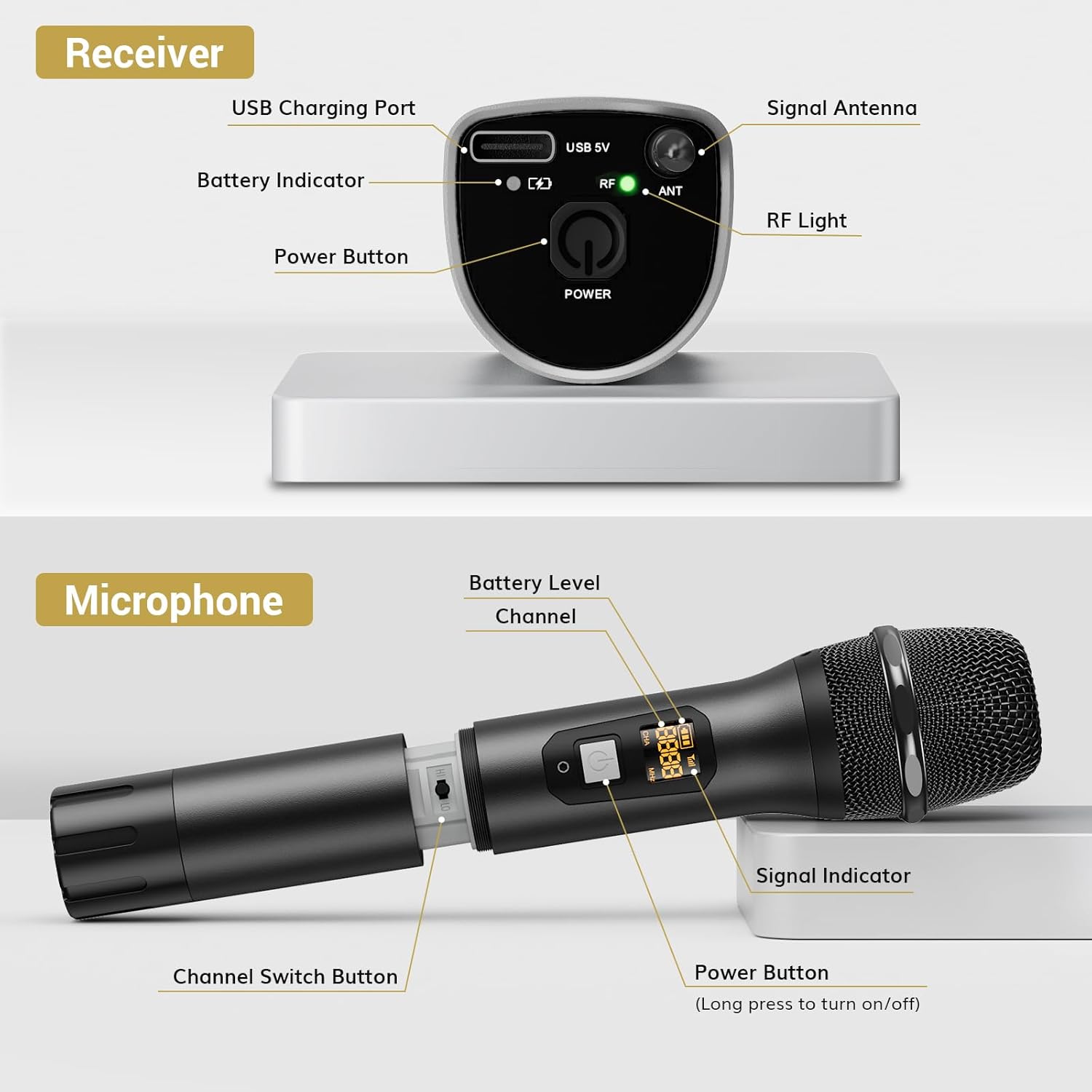
Imej: Terperinci view of the receiver, highlighting its charging port, antenna, and indicator lights.
Ciri-ciri Utama:
- Kebebasan Tanpa Wayar: Up to 200ft (60m) operating range (line of sight).
- Isyarat Stabil: 15 adjustable channels to minimize interference.
- Pembinaan Tahan Lama: Microphones and receiver are made of rugged metal.
- Jangka Hayat Bateri: Receiver provides up to 6 hours of use on a 2-3 hour charge.
Panduan Persediaan
1. Bekalan Kuasa
- Mikrofon: Each microphone requires 2 x AA batteries (not included). Open the battery compartment at the bottom of the microphone and insert the batteries, observing polarity.
- Penerima: The receiver has a built-in rechargeable battery. Charge it using the provided USB cable and a 5V adapter (not included). A full charge takes approximately 2-3 hours and provides up to 6 hours of operation.

Image: Instructions for powering the microphone with AA batteries and charging the receiver via USB.
2. Pairing the Microphones and Receiver
The system is designed for automatic pairing:
- Turn on both the microphone(s) and the receiver.
- The receiver will automatically sync its frequency with the microphone(s). The RF light on the receiver will illuminate when a stable connection is established.
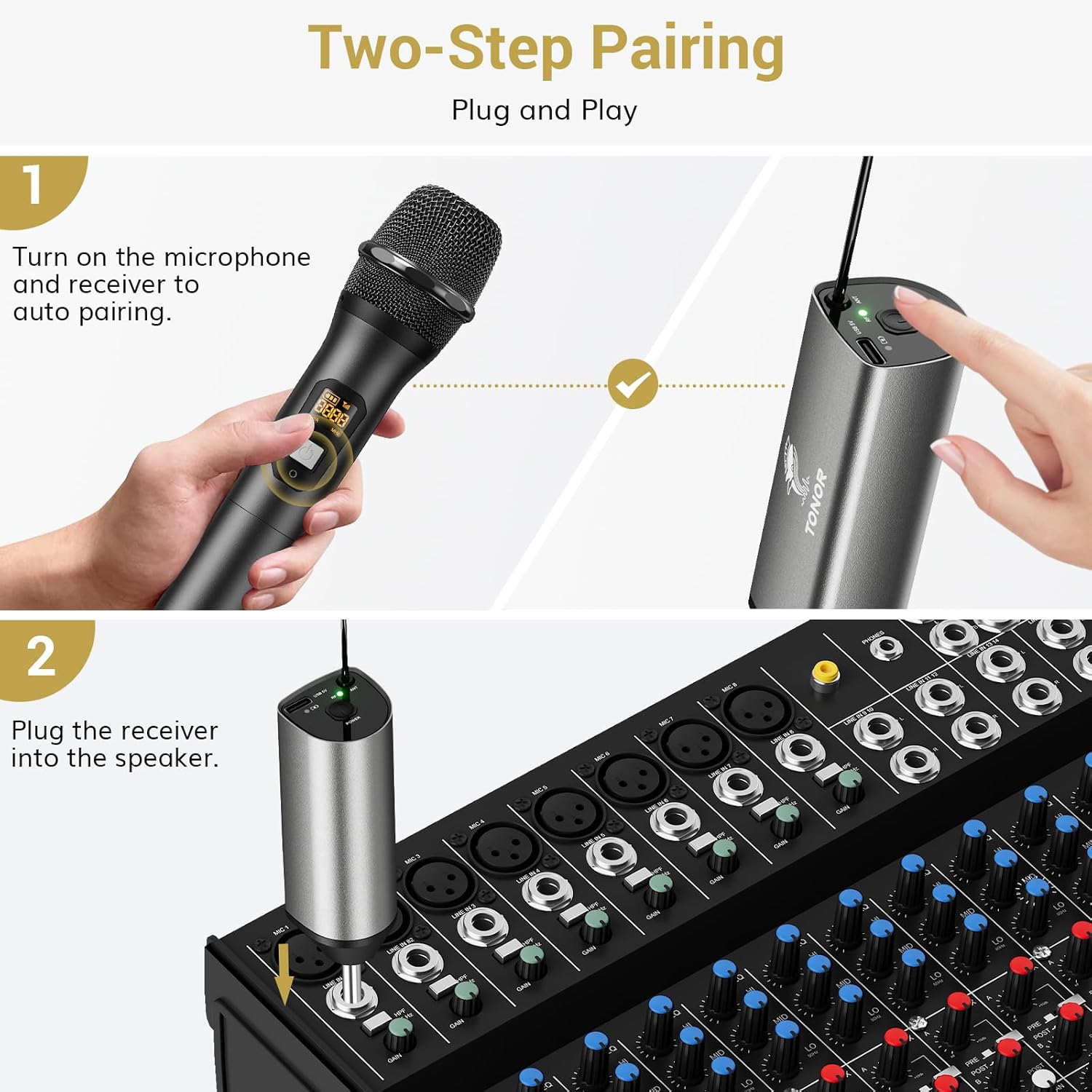
Image: Visual guide for the two-step pairing process and connecting the receiver.
3. Menyambung ke Peranti Audio
Plug the 6.35mm receiver directly into the "MIC IN" input of compatible audio equipment.
- Peranti Serasi: Powered speakers, karaoke machines, amplifiers, mixers, and audio interfaces.
- Peranti Tidak Serasi: This system is not compatible with phones, computers, or tablets directly. An additional 3.5mm (1/8") adapter is required for these devices (not included).

Imej: Cthamples of compatible audio devices and correct input connection.
Arahan Operasi
Penukaran Saluran
The TW630 system offers 15 adjustable channels to avoid interference. If you experience signal issues or are using multiple sets simultaneously, you can change the microphone's channel:
- To switch channels, briefly press the "Channel Switch Button" located inside the microphone's battery compartment (after unscrewing the bottom part).
- The display on the microphone will show the current channel (CHA) and frequency (MHz).
- The receiver will automatically adjust to the new channel.

Image: Guide to changing microphone channels.
Using Multiple Microphone Sets
Up to 15 sets of TONOR TW630 systems can be used simultaneously without interference. Ensure each set operates on a different channel to prevent signal conflicts.
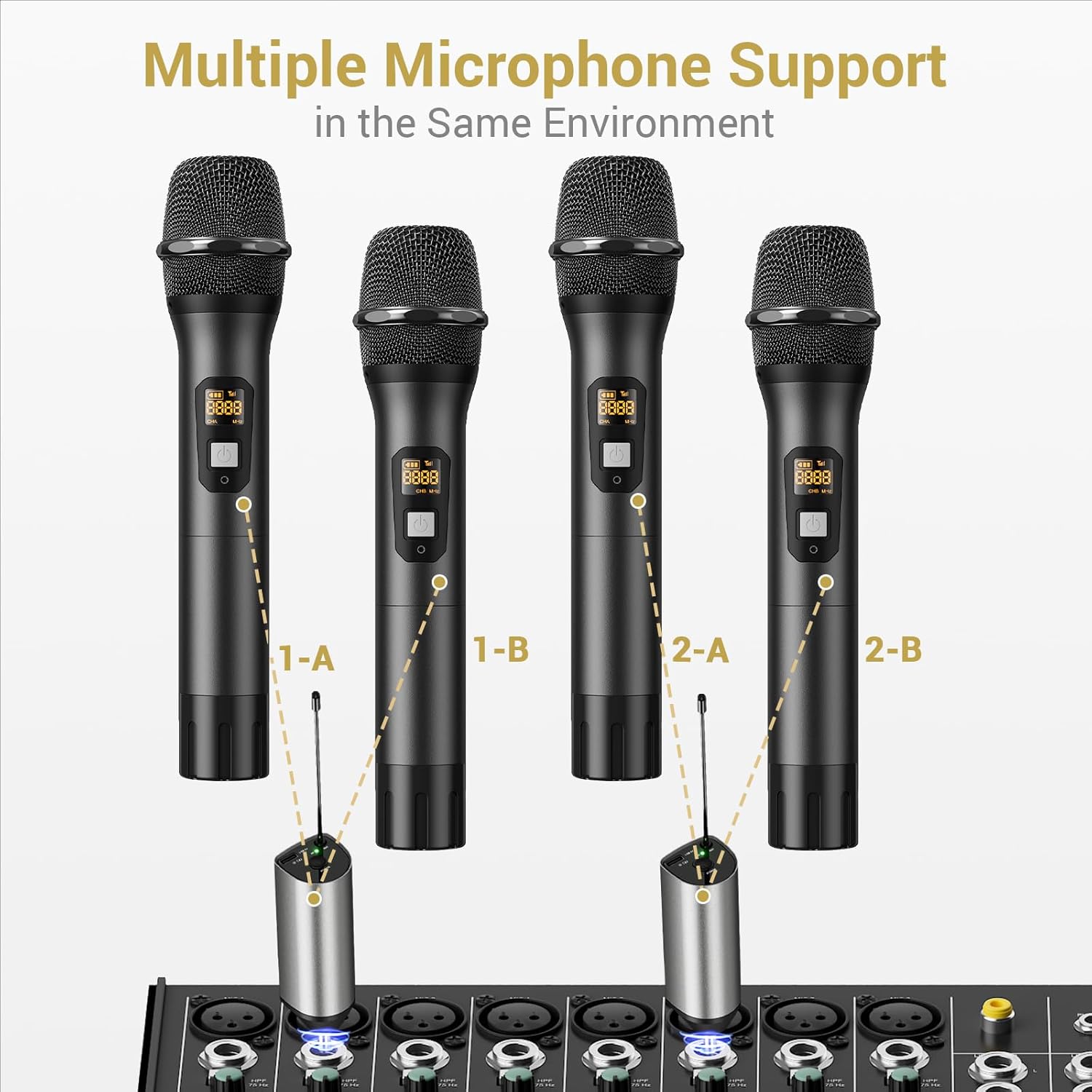
Image: Setup for using multiple microphone systems in the same environment.
Penyelenggaraan
- Pembersihan: Wipe the microphones and receiver with a soft, dry cloth. Do not use liquid cleaners or solvents.
- Penjagaan Bateri: Remove AA batteries from microphones if not in use for extended periods to prevent leakage. Recharge the receiver regularly to maintain battery health.
- Storan: Simpan sistem di tempat yang sejuk dan kering jauh dari cahaya matahari langsung dan suhu yang melampau.
- Microphone Covers: Use the provided foam mic covers to protect against wind noise and moisture.
Menyelesaikan masalah
| Masalah | Kemungkinan Punca | Penyelesaian |
|---|---|---|
| Tiada bunyi dari mikrofon |
|
|
| Interference or poor sound quality |
|
|
| Penerima tidak dicas |
|
|
Spesifikasi
| Ciri | Perincian |
|---|---|
| Jenama | TONOR |
| Nama Model | TW630 |
| Nombor Model Item | TN120106 |
| Teknologi Ketersambungan | UHF |
| Jenis Penyambung | Jack 6.35 mm |
| Faktor Bentuk Mikrofon | pegang tangan |
| bahan | logam |
| Bilangan Saluran | 15 |
| Kepekaan Audio | 52 Desibel |
| Nisbah Isyarat-ke-Bunyi | 70 dB |
| Corak Kutub | Satu arah |
| Sumber Kuasa | Battery Powered (Microphones: 2x AA each; Receiver: Rechargeable Lithium Ion) |
| Masa Mengecas Penerima | 2-3 jam |
| Masa Kerja Penerima | Sehingga 6 jam |
| Julat Operasi | 200ft / 60m (line of sight) |
| Berat Barang | 1.32 paun (600 Gram) |
| Dimensi Pakej | 11.18 x 6.42 x 2.99 inci |
Maklumat Keselamatan
- Jangan dedahkan produk kepada air atau kelembapan berlebihan.
- Elakkan daripada menjatuhkan atau meletakkan produk kepada kesan yang kuat.
- Use only a 5V adapter for charging the receiver to prevent damage.
- Jauhkan daripada kanak-kanak.
- Jangan cuba membuka atau membaiki unit ini sendiri. Hubungi kakitangan servis yang berkelayakan.
Waranti dan Sokongan
Untuk maklumat jaminan dan sokongan teknikal, sila rujuk laman web rasmi TONOR. website or contact TONOR customer service directly. Keep your purchase receipt for warranty claims.
You can visit the TONOR store on Amazon for more information: TONOR Store


