1. Pengenalan
This manual provides detailed instructions for the safe installation, correct operation, and proper maintenance of the DINUY PT Sup EL4 3-Wire Tactile Push-Button Timer. Please read this manual thoroughly before attempting any installation or operation to ensure optimal performance and safety. Keep this manual for future reference.
2. Maklumat Keselamatan
AMARAN: Electrical installation should only be performed by a qualified and licensed electrician.
- Sentiasa putuskan kuasa pada pemutus litar utama sebelum melakukan sebarang pemasangan, penyelenggaraan atau penyelesaian masalah.
- Sahkan bahawa bekalan voltage matches the specifications of the device (230 V AC, 50 Hz).
- Jangan pasang dalam keadaan basah atau damp locations. The device has an IP20 protection rating, suitable for indoor dry environments.
- Ensure all wiring connections are secure and correctly insulated to prevent short circuits or electric shock.
- Failure to follow these instructions may result in electric shock, fire, serious injury, or property damage.
3. Produk Lebihview dan Ciri
The DINUY PT Sup EL4 is a sophisticated 3-wire tactile push-button timer designed for controlling various types of lighting fixtures. Its modern design and advanced features make it suitable for a wide range of residential and commercial applications.

Rajah 1: Depan view of the DINUY PT Sup EL4 Tactile Push-Button Timer. This image shows the white square-shaped device with a central power symbol, a small blue LED indicator, and two visible mounting screws.
Ciri-ciri Utama:
- Pemasangan 3-Wayar: Requires Phase (L), Neutral (N), and Lamp Return (L') for connection.
- Keserasian Universal: Suitable for all types of luminaires, including LED lamps, incandescent, halogen (230V and 12V with electronic/ferromagnetic transformers), and fluorescent lamps.
- Tactile Operation: Easy and intuitive control with a gentle touch.
- Pemasa boleh laras: Configurable timing from 30 seconds to 12 minutes.
- Rearmable Function: The timer can be reset at any point during its cycle by another touch.
- Permanent Luminous LED: An integrated LED remains illuminated, indicating the device's status and aiding visibility in the dark.
- Pemasangan Permukaan: Designed for easy surface wall installation.
- Skru Keselamatan: Includes screws designed to deter unauthorized removal.
- Zero-Crossing Detection: Enhances relay life and reduces electrical noise.
- Contactor Support: Can be used in conjunction with a contactor for higher load applications.
4. Arahan Pemasangan
Before beginning installation, ensure the main power supply to the circuit is turned OFF at the circuit breaker. This device is designed for surface mounting in a universal box.
4.1 Gambarajah Pendawaian
The DINUY PT Sup EL4 requires a 3-wire connection. Refer to the diagram below for correct wiring.
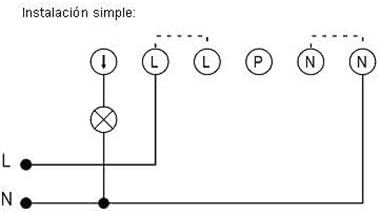
Figure 2: Wiring diagram for the DINUY PT Sup EL4. The diagram illustrates a 3-wire connection: 'L' for Phase, 'N' for Neutral, and a connection to the lamp. The dashed lines indicate optional connections for additional push-buttons (L) or neutral (N) connections.
- Sambungkan Fasa (L) wire from the electrical supply to the terminal marked 'L' on the device.
- Sambungkan Neutral (N) wire from the electrical supply to the terminal marked 'N' on the device.
- Sambungkan Lamp Return (L') wire (the wire going to the light fixture) to the terminal indicated by the lamp symbol (often labeled with an arrow pointing down to a circle with an 'X').
- Pastikan semua sambungan adalah ketat dan selamat.
4.2 Pemasangan
- After wiring, carefully place the device into the universal wall box.
- Secure the device to the wall box using the provided security screws. Do not overtighten.
- Once mounted, restore power at the main circuit breaker.
5. Arahan Operasi
5.1 Operasi Asas
- To turn on the connected light, gently touch the tactile surface of the push-button. The light will illuminate, and the timer will begin its cycle.
- The integrated blue LED will remain permanently illuminated, indicating the device is powered and ready for operation.
5.2 Fungsi Pemasa
- Once activated, the light will remain on for the preset duration (adjustable between 30 seconds and 12 minutes).
- To extend the lighting duration, simply touch the tactile surface again at any point during the active timer cycle. This will rearm the timer, restarting the countdown from its full preset duration.
- The light will automatically turn off once the timer cycle completes without being rearmed.
6. Penyelenggaraan
The DINUY PT Sup EL4 is designed for long-term, maintenance-free operation. However, periodic cleaning and inspection can help ensure its longevity and proper function.
- Pembersihan: To clean the surface of the device, use a soft, dry cloth. Do not use abrasive cleaners, solvents, or excessive moisture, as these can damage the finish or internal components.
- Pemeriksaan: Periodically check the device for any visible damage or loose connections. If any issues are found, disconnect power immediately and consult a qualified electrician.
- Tiada Bahagian Boleh Diservis Pengguna: There are no user-serviceable parts inside the device. Do not attempt to open or repair the unit yourself.
7. Penyelesaian masalah
If you experience issues with your DINUY PT Sup EL4, refer to the following common troubleshooting steps:
| Masalah | Kemungkinan Punca | Penyelesaian |
|---|---|---|
| Cahaya tidak menyala. | Tiada kuasa pada peranti. Pendawaian yang tidak betul. Ralat lamp. | Check the circuit breaker. Ensure power is restored. Verify wiring against the diagram (Section 4.1). Uji lamp with another switch or replace it. |
| Light stays on permanently or turns off too quickly. | Timer setting issue. Kerosakan peranti. | The timer duration is factory set or adjusted internally. If the behavior is inconsistent with expected operation, consult a qualified electrician. If the issue persists after checking power and wiring, the device may require professional inspection. |
| Blue LED indicator is off. | Tiada kuasa pada peranti. | Check the circuit breaker and ensure power is supplied to the device. |
If these steps do not resolve the issue, contact a qualified electrician or the manufacturer's support for assistance. Do not attempt to repair the device yourself.
8. Spesifikasi Terperinci
| Parameter | Nilai |
|---|---|
| Bekalan Voltage | 230 V AC |
| Kekerapan | 50 Hz |
| Pengambilan sendiri | 0.7 W |
| Relay Cut-off Power | 16 A |
| Max. Load (LED Lamps) | 400 W |
| Max. Load (Incandescent & Halogen 230V) | 3000 W |
| Max. Load (Halogen 12V with Electronic Transformer) | 3000 W |
| Max. Load (Halogen 12V with Ferromagnetic Transformer) | 2400 W |
| Max. Load (Fluorescent Lamps) | 1300 W (1300 VA) |
| Contactor Support | ya |
| Pengesanan Sifar-Crossing | ya |
| Jenis Pemasangan | 3 wires (Phase, Neutral, Lamp Return) |
| Permanent Lighting Function | Tidak |
| Stop Warning Function | Tidak |
| Minimum Timer Duration | 30 saat |
| Tempoh Pemasa Maksimum | 12 minit |
| Suis Bermasa | Tidak |
| Luminous Push-buttons Support | Tidak |
| Suhu Operasi | 0°C hingga 40°C |
| Permanent Luminous LED | ya |
| Melekap | Universal box, Surface, Security screws |
| Perlindungan Alam Sekitar | IP20 (according to UNE20324) |
| Piawaian Pematuhan | UNE-EN60669-2-1 and UNE-EN60669-2-3 |
9. Waranti dan Sokongan
Specific warranty information for the DINUY PT Sup EL4 is typically provided at the point of purchase or within the product packaging. Please refer to your purchase documentation for details regarding warranty coverage and duration.
For technical support, troubleshooting assistance beyond what is provided in this manual, or warranty claims, please contact your retailer or the official DINUY customer service. Contact information can usually be found on the manufacturer's webtapak atau pembungkusan produk.


