1. Pengenalan
This manual provides essential information for setting up, operating, and maintaining your Amazfit Pop 3S Smart Watch. Please read it carefully to ensure optimal performance and longevity of your device.

Image 1.1: Amazfit Pop 3S Smart Watch with metallic silver strap.
2. Persediaan
2.1. Apa yang ada di dalam Kotak
- Amazfit Pop 3S Smart Watch (with strap) x 1
- Pangkalan Pengecasan x 1
- Watch Strap Adjustment Tool x 1
- Manual Pengguna x 1

Image 2.1: Contents of the Amazfit Pop 3S retail box, including the smartwatch, charging base, strap adjustment tool, and user manual.
2.2. Mengecas Peranti
Before first use, fully charge your Amazfit Pop 3S. Connect the charging base to a USB power source and place the watch onto the magnetic contacts. The watch display will indicate charging status.
2.3. Pemasangan Apl dan Berpasangan
- Download the 'Zepp Active' app from your smartphone's app store (iOS or Android).
- Buka aplikasi dan buat akaun atau log masuk.
- Follow the on-screen instructions in the app to pair your Amazfit Pop 3S Smart Watch via Bluetooth. Ensure Bluetooth is enabled on your smartphone.
2.4. Pelarasan Tali
If your watch comes with a metallic strap, use the provided strap adjustment tool to remove or add links for a comfortable fit. Refer to the detailed instructions in the included user manual for proper adjustment.
3. Arahan Operasi
3.1. Paparan dan Navigasi
The Amazfit Pop 3S features a 1.96-inch HD AMOLED display. Navigate through menus and functions using touch gestures and the multi-function button on the side.
- Leret ke Bawah: Access quick settings (brightness, do not disturb, flashlight, battery saver, Bluetooth, settings).
- Leret ke atas: View notifications/messages.
- Leret Kiri/Kanan: Cycle through widgets (e.g., activity data, heart rate, weather).
- Tekan Butang Sisi: Kembali ke skrin utama atau akses menu utama.

Image 3.1: The Amazfit Pop 3S showcasing its ultra-large 1.96" HD AMOLED display and metallic design.
3.2. Panggilan Bluetooth
The watch supports Bluetooth calling with a built-in microphone and speaker. Once paired with your smartphone, you can make and answer calls directly from your wrist.
- Access the 'Dial' function from the main menu to dial numbers.
- View 'Contact Person' and 'Call Records' directly on the watch.
- Incoming calls will display on the watch, allowing you to answer or reject them.

Image 3.2: A user demonstrating Bluetooth phone calls on the Amazfit Pop 3S, highlighting the built-in mic and speaker.
3.3. Pembantu Suara AI
Interact with your smartphone's AI voice assistant (e.g., Siri, Google Assistant) through your watch. Ensure your watch is connected to your phone via Bluetooth.

Image 3.3: Visual representation of using the Bluetooth Voice Assistant feature on the Amazfit Pop 3S.
3.4. Kawalan Muzik
Control music playback on your smartphone directly from your watch. This includes playing, pausing, skipping tracks, and adjusting volume.

Image 3.4: A user controlling music playback on their smartphone using the Amazfit Pop 3S.
3.5. Watch Faces and Always-On Display (AOD)
Customize your watch's appearance with a variety of watch faces. The watch also supports an Always-On Display feature.
- To change watch faces, long-press on the current watch face and swipe to select.
- AOD settings can be configured in the watch's settings menu, offering digital and analog clock styles.
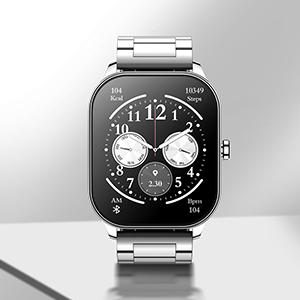
Image 3.5: A digital watch face displayed on the Amazfit Pop 3S.
3.6. Mod Sukan
The Amazfit Pop 3S supports over 100 sports modes to track various physical activities. Select your desired sport from the workout menu to begin tracking.

Image 3.6: Icons representing various sports modes available on the Amazfit Pop 3S, including walking, football, running, cycling, and cricket.
4. Pemantauan Kesihatan
The Amazfit Pop 3S provides comprehensive health monitoring features to help you stay informed about your physical condition.
- Pemantauan Denyut Jantung: Continuous 24-hour heart rate tracking with alerts for excessively high rates.
- Pemantauan SpO2: All-day blood-oxygen saturation (SpO2) monitoring.
- Pemantauan Tekanan: Mengesan tahap tekanan anda sepanjang hari.
- Penjejakan Tidur: Monitors total sleep, light sleep, deep sleep periods, awake time, fall asleep time, and wake-up time.

Image 4.1: Visuals depicting the 24/7 heart rate, SpO2, and stress monitoring capabilities of the Amazfit Pop 3S.
5. Penyelenggaraan
5.1. Pembersihan
Bersihkan jam tangan dan tali anda secara berkala dengan kain lembut dan kering. Untuk kotoran degil, gunakan sedikit pembersihamp kain dan sabun lembut, kemudian bilas dan keringkan dengan teliti. Elakkan bahan kimia yang keras atau bahan yang melelas.
5.2. Tahan Air
The Amazfit Pop 3S has an IP68 water resistance rating, making it suitable for daily use and light water exposure. Avoid prolonged submersion or use in hot water/steam.
5.3. Pengoptimuman Hayat Bateri
To maximize the 12-day battery life, consider adjusting settings such as screen brightness, Always-On Display duration, and frequency of heart rate/SpO2 monitoring. Frequent Bluetooth calls and media playback will consume more power.
6. Penyelesaian masalah
- Tonton tidak dihidupkan: Pastikan jam tangan dicas sepenuhnya. Sambungkannya ke tapak pengecas dan sumber kuasa selama sekurang-kurangnya 30 minit.
- Tidak boleh berpasangan dengan telefon pintar: Make sure Bluetooth is enabled on your phone and the watch. Restart both devices and try pairing again through the Zepp Active app.
- Bacaan sensor yang tidak tepat: Pastikan jam tangan dipakai dengan kemas di pergelangan tangan anda, tidak terlalu ketat atau terlalu longgar. Bersihkan kawasan sensor di bahagian belakang jam tangan.
- Tiada pemberitahuan: Check app notification settings on both your phone and the Zepp Active app. Ensure the app is running in the background and has necessary permissions.
- Bluetooth call issues: Verify that the watch is properly connected for both call audio and media audio in your phone's Bluetooth settings.
7. Spesifikasi
| Ciri | Perincian |
|---|---|
| Jenama | Amazfit |
| Model | Pop 3S |
| Jenis Paparan | AMOLED |
| Saiz Skrin | 1.96 Inci |
| Resolusi | 410 x 502 |
| Kapasiti Bateri | Polimer Litium 300 mAh |
| Hayat Bateri (Penggunaan Biasa) | 12 Hari |
| Ketersambungan | Bluetooth |
| Ciri Khas | Bluetooth Calling, SpO2, Heart Rate, AI Voice Assistance, 100 Sports Modes |
| Tahan Air | IP68 |
| Berat Barang | 107 g |
| Peranti Serasi | Telefon pintar |

Image 7.1: Diagram illustrating the dimensions of the Amazfit Pop 3S Smart Watch, including case width, case length, and strap width.
8. Waranti dan Sokongan
The Amazfit Pop 3S Smart Watch comes with a 1-year warranty. For warranty claims, technical support, or further assistance, please visit the official Amazfit support webtapak atau hubungi perkhidmatan pelanggan mereka.
Official Amazfit Store: Amazfit Store on Amazon


