1. Pengenalan
Thank you for choosing the EIGHTREE ET25 5GHz Smart Plug. This smart plug allows you to control your electronic devices remotely, monitor energy consumption, and automate your home with ease. It supports both 2.4GHz and 5GHz Wi-Fi networks for enhanced connectivity and stability. Please read this manual carefully before use to ensure proper operation and safety.
2. Maklumat Keselamatan
- Jangan buka atau ubah suai peranti.
- Do not expose the device to water or humid environments.
- Jauhkan daripada kanak-kanak.
- Pastikan penggunaan kuasa perkakas yang disambungkan tidak melebihi penarafan maksimum palam pintar (16A, 3680W).
- Use only in dry indoor locations.
3. Kandungan Pakej
- EIGHTREE ET25 5GHz Smart Plug (1 unit)
- Manual Pengguna (dokumen ini)
4. Produk Lebihview
The EIGHTREE ET25 Smart Plug is a compact device designed for easy integration into your home. It features a single power button and an indicator light.

This image shows the EIGHTREE ET25 Smart Plug alongside a smartphone screen displaying detailed electricity consumption statistics, including power, current, voltage, and cost over a weekly period. The plug itself is white with a blue power button.
Ciri-ciri Utama:
- Pemantauan Tenaga: Track real-time and historical power consumption.
- Kawalan Suara: Compatible with Alexa and Google Home.
- Kawalan Jauh: Manage devices from anywhere via the app.
- Pemasa & Jadual: Automate on/off times for appliances.
- Perkongsian Peranti: Kongsi kawalan dengan ahli keluarga.
- Kawalan Kumpulan: Urus berbilang palam pintar secara serentak.
- Sokongan Wi-Fi 5GHz: Enhanced stability and faster response times.

This image highlights the key features of the EIGHTREE 5GHz Smart Plug, including energy monitoring, voice control, remote control, timers and scheduling, device sharing, and group control. A smart plug is shown connected to a coffee machine, demonstrating its practical application.
5. Arahan Persediaan
5.1 Muat turun Apl Smart Life
The EIGHTREE Smart Plug uses the Smart Life app for control and configuration. Cari untuk "Smart Life" in your smartphone's app store (Google Play Store for Android or Apple App Store for iOS) and download it.
5.2 Plug In the Smart Plug
Plug the EIGHTREE Smart Plug into a standard wall outlet. The indicator light on the plug should start blinking, indicating it's in pairing mode.
5.3 Sambung ke Wi-Fi
The EIGHTREE ET25 Smart Plug supports both 2.4GHz and 5GHz Wi-Fi networks. For optimal performance, connecting to a 5GHz network is recommended, but 2.4GHz is also supported.

This image depicts the easy installation process for the EIGHTREE Smart Plug. A hand holds a smartphone displaying the Smart Life app, which automatically detects the smart plug via Bluetooth for connection to a 5GHz (or 2.4GHz) Wi-Fi network, shown with a router.
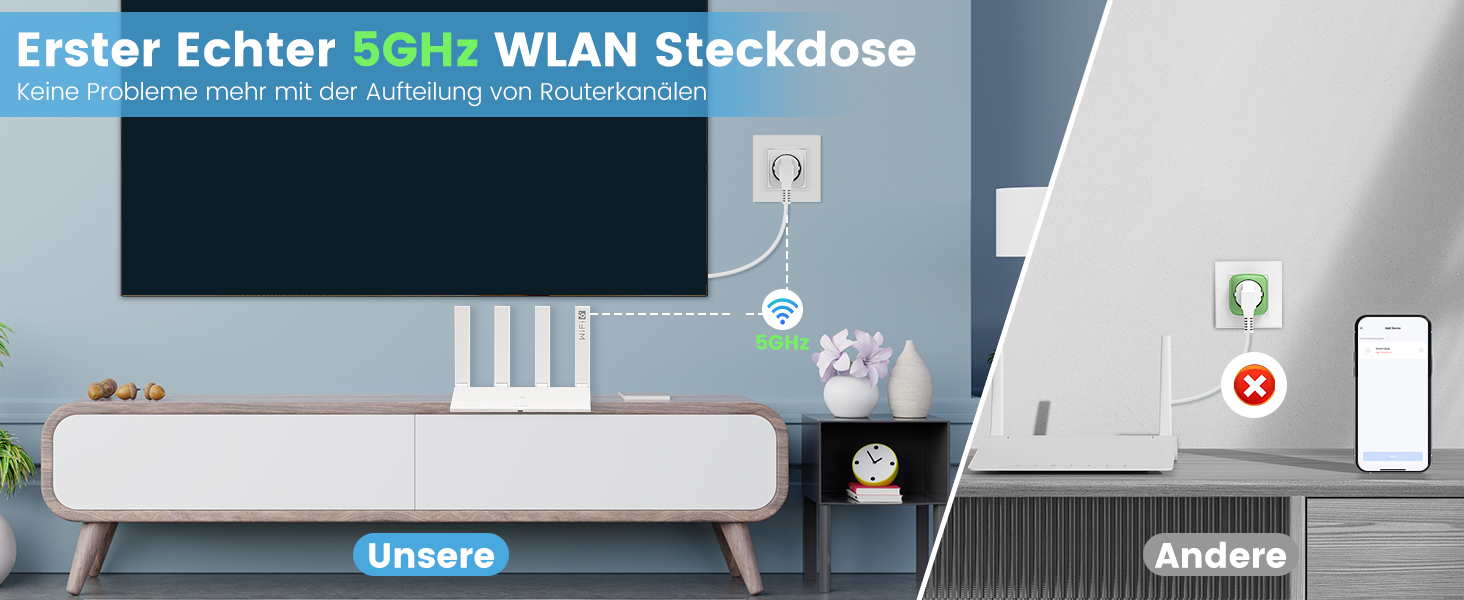
This image compares the EIGHTREE 5GHz Smart Plug's stable connection with a 5GHz router to other smart plugs that might experience connectivity issues due to router separation or incompatible frequencies. It emphasizes the EIGHTREE plug's reliable 5GHz Wi-Fi capability.
5.4 Pairing Steps (Smart Life App)
- Start the Smart Life App: Open the Smart Life application on your smartphone.
- Tambah Peranti: Tap the "+" icon or "Add Device" button in the app. The app should automatically detect the smart plug via Bluetooth. Tap "Add" to proceed.
- Masukkan Kata Laluan Wi-Fi: Select your 5GHz (or 2.4GHz) Wi-Fi network and enter the correct password.
- Tunggu Sambungan: Follow the on-screen instructions and wait for the smart plug to connect to your Wi-Fi network. Once connected, the indicator light will stop blinking and remain solid.

This image provides a visual, four-step guide for setting up the EIGHTREE Smart Plug. It shows screenshots of the Smart Life app: 1) Starting the app, 2) Tapping "Add" to find the device, 3) Entering the 5GHz Wi-Fi password, and 4) Waiting for the connection to complete.
6. Arahan Operasi
6.1 Kawalan Manual
Press the physical power button on the smart plug to manually turn the connected appliance on or off. The indicator light will change state accordingly.
6.2 Kawalan Apl
Once paired, you can control the smart plug through the Smart Life app:
- Hidup/Mati: Tap the power icon in the app to toggle the connected appliance.
- Pemasa & Jadual: Set specific times for the plug to turn on or off automatically. This allows for intelligent programming of your appliances.

This image illustrates the timers and schedules feature of the EIGHTREE Smart Plug. A humidifier is shown in a living room setting, with on/off times (e.g., 7:00 PM ON, 10:00 PM OFF, 8:00 AM ON) indicating automated control of appliances.
- Kiraan balik: Set a countdown timer for the plug to turn off after a specified duration.
6.3 Pemantauan Tenaga
The smart plug allows you to monitor the energy consumption of your connected devices and estimate electricity costs. This feature helps you make informed decisions to reduce energy usage.
- View Statistik: Access real-time and historical data on power, current, voltage, and energy consumption within the Smart Life app.
- Eksport Data: Easily export detailed energy consumption data in PDF format for analysis and budgeting.

This image illustrates the energy monitoring capability of the EIGHTREE Smart Plug. A graph on a smartphone screen displays weekly electricity consumption in kWh, allowing users to track and estimate costs. The smart plug is shown connected to a microwave oven.
6.4 Kawalan Suara
Integrate your EIGHTREE Smart Plug with voice assistants like Amazon Alexa and Google Home for hands-free control.
- Pautkan Akaun: Follow the instructions in the Smart Life app to link your account with Alexa or Google Home.
- Perintah Suara: Use commands such as "Alexa, turn on the living room light" or "Hey Google, turn off the fan."

This image demonstrates the voice control feature of the EIGHTREE Smart Plug. A Google Home speaker is shown next to a smart plug connected to a floor lamp, with text indicating voice commands like "OK Google, turn on the light." It also shows compatibility with Alexa, Google Home, and SmartThings.
7. Penyelenggaraan
- Keep the smart plug clean by wiping it with a dry, soft cloth.
- Jangan gunakan bahan kimia atau pembersih kasar.
- Simpan peranti di tempat yang sejuk dan kering apabila tidak digunakan.
- Regularly check for any signs of damage to the plug or connected cables.
8. Penyelesaian masalah
8.1 Peranti Tidak Menyambung ke Wi-Fi
- Pastikan rangkaian Wi-Fi anda aktif dan stabil.
- Sahkan anda memasukkan kata laluan Wi-Fi yang betul.
- Make sure the smart plug is within range of your Wi-Fi router.
- Try resetting the smart plug by unplugging it for 10 seconds and plugging it back in.
- Confirm your router supports 5GHz (or 2.4GHz if you are trying to connect to that band) and that the network name (SSID) is visible.
8.2 Device Not Responding to App/Voice Commands
- Check if the smart plug is connected to Wi-Fi (solid indicator light).
- Pastikan telefon pintar anda mempunyai sambungan internet yang aktif.
- Verify that the Smart Life app is up to date.
- For voice control, ensure your Alexa/Google Home account is correctly linked to Smart Life.
- If the issue persists, try removing the device from the app and re-pairing it.
8.3 Kuasa Outage/Router Restart
Sekiranya berlaku kuasa outage or router restart, the smart plug should automatically reconnect to your Wi-Fi network once power and network services are restored. If it does not, follow the Wi-Fi connection troubleshooting steps above.
9. Spesifikasi
| Ciri | Spesifikasi |
|---|---|
| Nombor Model | ET25 |
| Dimensi (L x W x H) | 5.5 x 5.8 x 8.7 cm |
| Berat badan | 100 gram |
| bahan | ABS |
| Mod Pengendalian | ON-OFF-ON |
| Penilaian Semasa | 16 A |
| Vol Operasitage | 230 Volt (AC) |
| Jenis Kenalan | Biasa buka |
| Jenis Penyambung | Plug-in (Type F) |
| Pengeluar | lapan belas |
10. Waranti
The EIGHTREE ET25 Smart Plug comes with a Waranti 24 bulan tanpa bimbang from the date of purchase. This warranty covers manufacturing defects and ensures fast service for a great user experience. Please retain your proof of purchase for warranty claims.

This image displays EIGHTREE's commitment to quality and customer satisfaction, featuring certifications (ETL, Intertek, FCC) and highlighting a "24 months worry-free warranty" and fast service.
11. Sokongan Pelanggan
If you encounter any issues or have questions regarding your EIGHTREE ET25 Smart Plug, please refer to the troubleshooting section of this manual. For further assistance, contact EIGHTREE customer support through the official webtapak atau maklumat hubungan yang diberikan bersama pembelian anda.
We are always here to help you enjoy the convenience that smart home technology brings to your life.


