1. Pengenalan
Thank you for choosing the FLYLINKTECH BD10 6000A 12V Car Jump Starter and Power Bank. This device is designed to provide emergency jump-starting for vehicles and serve as a portable power bank for various electronic devices. Please read this manual thoroughly before use to ensure safe and optimal operation.

Image 1.1: The FLYLINKTECH BD10 Jump Starter unit with its smart battery clamps.
2. Maklumat Keselamatan
Sentiasa patuhi langkah berjaga-jaga keselamatan berikut untuk mengelakkan kecederaan atau kerosakan pada peranti atau kenderaan:
- Jangan cuba lompat-mulakan bateri beku.
- Pastikan sambungan kekutuban yang betul (clamp kepada positif, cl hitamamp to negative). Reverse polarity can cause damage.
- Jangan benarkan pencahayaan pintaramps to touch each other when connected to the jump starter.
- Jauhkan peranti daripada kanak-kanak.
- Do not expose the device to extreme temperatures (above 60°C / 140°F or below -20°C / -4°F) or direct sunlight for extended periods.
- Jangan buka atau ubah suai peranti.
- Gunakan hanya cl pintar yang disediakanamps dan kabel pengecas.
- Jika peranti menjadi terlalu panas semasa digunakan, putuskan sambungannya dengan segera.

Image 2.1: The jump starter incorporates multiple safety features such as spark-proof, reverse polarity, overvoltage, short circuit, overload, and high-temperature protection.
3. Kandungan Pakej
Sahkan bahawa semua item terdapat dalam pakej:
- FLYLINKTECH BD10 Jump Starter Unit
- Bateri Pintar Clamps
- Kabel USB-C ke USB-C
- Kabel USB-A ke USB-C
- Penyesuai Pengecas Kereta 12V DC
- Manual Pengguna
- Sarung Penyimpanan

Image 3.1: The complete package includes the jump starter, smart clamps, various cables, user manual, and a protective storage case.
4. Persediaan dan Pengecasan
4.1 Caj Permulaan
Before first use, fully charge the jump starter. The device features a 26800mAh battery capacity.
- Connect the provided USB-C cable to the jump starter's USB-C input port.
- Connect the other end of the cable to a compatible USB wall charger (not included). For fastest charging, use a PD 45W charger.
- The LED screen will display the charging status and battery percentage.
4.2 Charging Times
| Penilaian Pengecas | Anggaran Masa Pengecasan |
|---|---|
| 5W | 18 Jam |
| 18W | 7 Jam |
| 45W | 2 Jam |
Note: A 45W wall charger is not included in the package.

Image 4.1: The device supports PD 45W fast charging, significantly reducing recharge time when using a compatible charger.
5. Arahan Operasi
5.1 Lompat Memulakan Kenderaan
The FLYLINKTECH BD10 is capable of jump-starting all gas engines and diesel engines up to 12.0L.
- Ensure Sufficient Charge: Check the jump starter's LED screen to ensure it has at least 50% charge.
- Sambungkan Smart Clamps: Masukkan palam biru cl pintaramps into the jump starter's 12V output port. Ensure a firm connection.
- Sambungkan ke Bateri Kereta:
- Lampirkan merah (+) clamp ke terminal bateri positif kenderaan.
- Lampirkan hitam (-) clamp to the vehicle's negative battery terminal.
- Petunjuk Semak: cl yang bijakamp indicator light should turn solid green, indicating a correct connection. If it flashes or shows red, check connections and battery status.
- Press BOOST (if needed): If the vehicle battery is extremely low or completely dead, press the 'BOOST' button on the jump starter. Wait for the indicator light on the smart clamps to turn solid green.
- Mulakan Kenderaan: Attempt to start your vehicle. If it doesn't start on the first try, wait 30 seconds before trying again. Do not attempt more than 3 consecutive starts.
- Keluarkan Clamps: Sebaik sahaja kenderaan dihidupkan, segera tanggalkan lampu pintarampdaripada bateri kereta, kemudian tanggalkannya daripada jump starter.

Image 5.1: The jump starter connected to a car battery, ready for operation. It supports 6000A peak current, 12V output, and is suitable for a wide range of engines.

Image 5.2: Visual guide illustrating the four steps to jump-start a vehicle: connect the plug, attach clamps, press boost, and start the engine.
5.2 Fungsi Power Bank
The BD10 can charge multiple electronic devices via its USB-A and USB-C ports.
- Output USB1: Up to 18W (max)
- Output USB2: Up to 18W (max)
- Output USB-C: Sehingga 45W (PD)
Connect your device using the appropriate USB cable to the desired output port. The LED screen will show 'OUT' and the wattage being drawn.

Image 5.3: The jump starter functioning as a power bank, simultaneously charging a smartphone and a tablet via its USB ports.
5.3 Lampu Suluh LED
The built-in LED flashlight offers three modes: constant light, SOS signal, and strobe light.
- Press and hold the flashlight button to turn on the constant light.
- Press the button again to cycle through SOS and strobe modes.
- Tekan dan tahan sekali lagi untuk mematikan.

Image 5.4: The integrated LED flashlight provides illumination, an SOS signal, and a strobe function for emergency situations.
5.4 Informative LED Screen
The 6.0-inch LED screen provides real-time information about the device's status:
- Tahap Bateri: Memaparkan peratusan bateri yang tinggaltage.
- IN/OUT Indicator: Shows whether the device is charging (IN) or discharging (OUT).
- Wattage Paparan: Indicates the power (W) being drawn or supplied.
- Amaran Ralat: Displays specific error codes or symbols if an issue occurs.
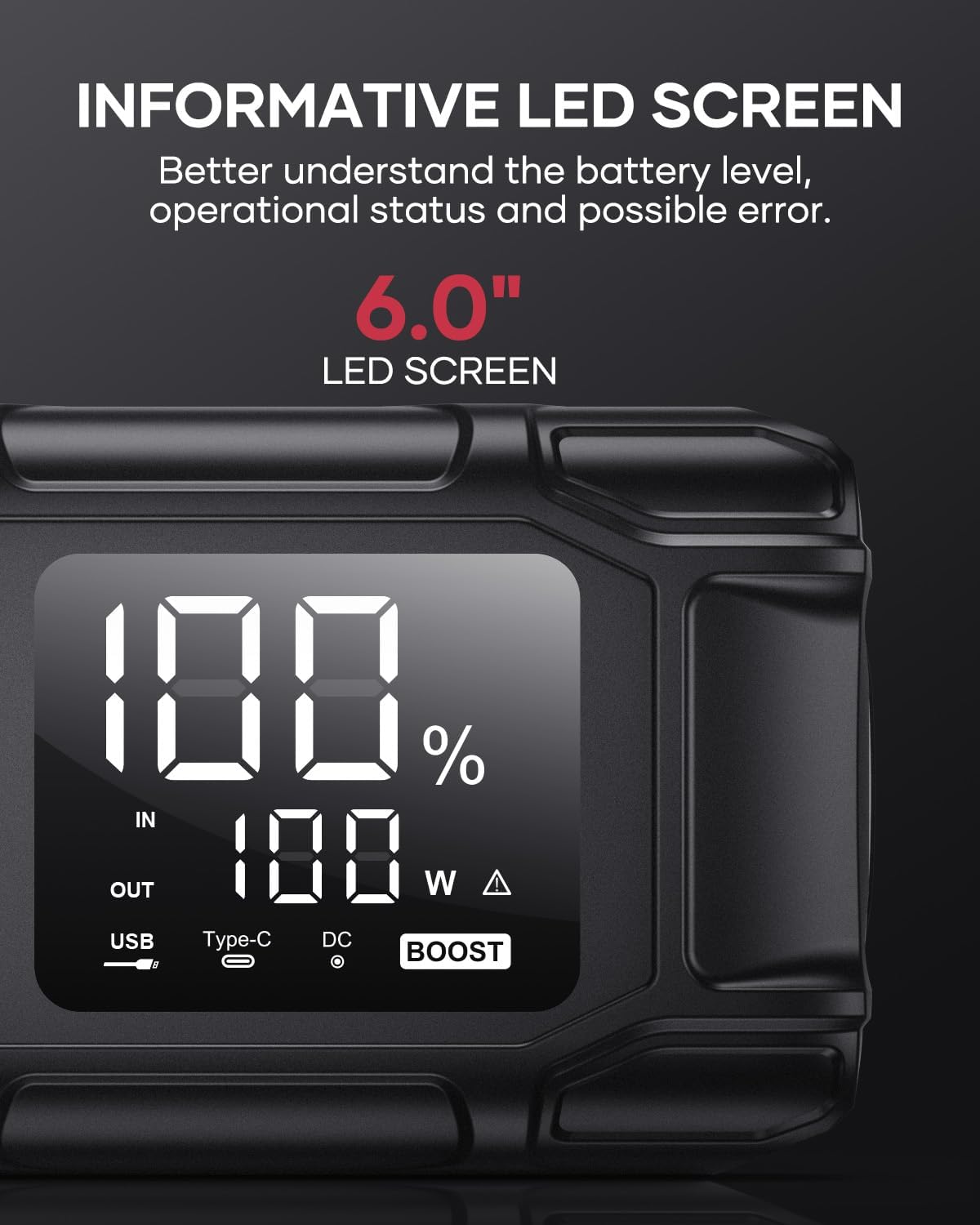
Image 5.5: The 6.0-inch LED screen provides clear information on battery percentage, input/output status, and power consumption.
6. Penyelenggaraan
- Isi semula secara berkala: To prolong battery life, recharge the jump starter every 3-6 months, even if not in use.
- Storan: Store the device in its protective case in a cool, dry place, away from direct sunlight and moisture.
- Pembersihan: Lap peranti dengan kain lembut dan kering. Jangan gunakan bahan kimia yang keras atau bahan yang melelas.
- Clamp Penjagaan: Pastikan cl pintaramps are clean and free of corrosion before and after each use.
7. Penyelesaian masalah
The device features multiple alarm situations indicated by audible signals and screen displays:
- Vol. Rendahtage Perlindungan: Audible signal "3". Recharge the device.
- Bahagian Luar Voltage Exceeds Vehicle Voltage: Audible signal "4". Check vehicle battery voltage.
- Perlindungan Litar pintas: Audible signal "5". Check clamp connections for short circuits.
- Safety Mode Activated: Audible signal "6". Device has entered safety mode due to an issue.
- Perlindungan lebihan arus: Audible signal "7". Reduce load or check connections.
- Penggera Suhu Tinggi/Rendah: Audible signal "8". Allow device to return to operating temperature range (-20°C to 60°C).
- Reverse Connection: Audible signal "9". Correct the clamp kekutuban.

Imej 7.1: Selesaiview of the device's multi-alarm system, indicating various protection states with unique audible signals.
Jika masalah berterusan selepas mengikuti langkah-langkah ini, sila hubungi khidmat pelanggan.
8. Spesifikasi
| Ciri | Spesifikasi |
|---|---|
| Jenama | FLYLINKTECH |
| Model | BD10 |
| Arus Keluaran Puncak | 6000 Ampsebelum |
| Kapasiti Bateri | 26800mAh |
| Keluaran Voltage | 12V |
| Input/Output USB-C | PD 45W |
| Keluaran USB-A | 18W (maks) |
| Jenis Enjin yang Berkenaan | All Gas, up to 12.0L Diesel |
| Suhu Operasi | -20°C hingga 60°C (-4°F hingga 140°F) |
| Dimensi Produk | 23.95 x 10 x 5.69 cm |
| Berat Barang | 920 g |

Image 8.1: The device is designed to operate reliably in extreme climates, from -20°C (-4°F) to 60°C (140°F).
9. Waranti dan Sokongan
FLYLINKTECH is committed to providing high-quality products. For any questions, technical assistance, or warranty claims, please refer to the contact information provided with your purchase or visit the official FLYLINKTECH webtapak. Sila simpan bukti pembelian anda untuk tujuan waranti.


