1. Pengenalan
This manual provides detailed instructions for the installation, operation, and maintenance of your Jennov Security Camera, model IJ1-P23WJ35-3-FAS. This device is designed to provide reliable surveillance for indoor environments, offering features such as high-definition video, night vision, and motion detection. Please read this manual thoroughly before using the product to ensure proper functionality and safety.
2. Produk Lebihview
The Jennov Security Camera is a compact, dome-shaped device designed for discreet monitoring. It integrates seamlessly into standard light bulb sockets for easy power and installation.
Ciri-ciri Utama:
- Video Definisi Tinggi: Menangkap foo yang jelastage dengan resolusi 1080p.
- Penglihatan Malam: Equipped with infrared LEDs for visibility up to 30 meters in low-light conditions.
- Pengesanan Pergerakan: Sends notifications upon detecting movement within its field of view.
- Audio Dua hala: Membolehkan komunikasi melalui kamera.
- Kesambungan Tanpa Wayar: Operates via Wi-Fi for remote access.
- Storan Fleksibel: Supports Micro SD card (up to 128GB) and cloud storage options.
- Integrasi Rumah Pintar: Compatible with Amazon Alexa and Android devices.
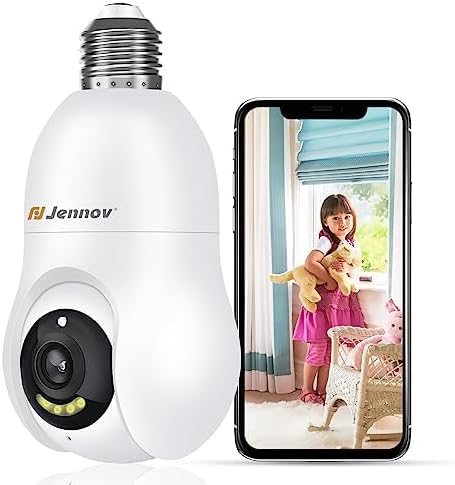
Figure 2.1: The Jennov Security Camera shown alongside a smartphone displaying live footage of a child.
3. Persediaan
3.1 Kandungan Pakej
Sahkan bahawa pakej anda mengandungi item berikut:
- 1 x Jennov Security Camera (Model: IJ1-P23WJ35-3-FAS)
- 1 x Manual Pengguna (dokumen ini)
3.2 Pemasangan
The Jennov Security Camera is designed for easy installation into a standard light bulb socket.
- Matikan: Ensure the power to the light socket is turned off at the circuit breaker before installation.
- Skru Masuk: Carefully screw the camera into a standard E27/E26 light bulb socket. Ensure it is securely fastened but do not overtighten.
- Hidupkan kuasa: Restore power to the light socket. The camera will power on and initiate its startup sequence.

Figure 3.1: The camera is designed for quick installation by screwing it into an ordinary bulb base.
3.3 Muat Turun Apl dan Sambungan
To operate the camera, you will need to download the companion mobile application.
- Muat turun Aplikasi: Cari untuk the official Jennov security camera app in your device's app store (e.g., Google Play Store for Android, Apple App Store for iOS).
- Buat Akaun: Buka aplikasi dan ikut arahan pada skrin untuk membuat akaun pengguna baharu atau log masuk jika anda sudah mempunyainya.
- Tambah Peranti: Select the option to 'Add Device' or 'Add Camera' within the app.
- Sambung ke Wi-Fi: Follow the app's prompts to connect the camera to your 2.4GHz Wi-Fi network. Ensure your Wi-Fi password is correct.
- Berpasangan: The app will guide you through the pairing process, which may involve scanning a QR code displayed on your phone with the camera, or listening for an audible prompt.
- Konfigurasi: Once connected, you can name your camera and adjust initial settings.
4. Arahan Operasi
4.1 Langsung View dan Kualiti Video
Access the live feed of your camera through the mobile application. The camera provides 1080p Full HD resolution for clear monitoring.

Figure 4.1: Visual comparison demonstrating the enhanced clarity of 2K Ultra HD resolution provided by the Jennov camera compared to standard 1080p.
4.2 Pengesanan Gerakan dan Penjejakan Automatik
The camera features intelligent motion detection and auto-tracking capabilities.
- Dayakan Pengesanan Gerakan: In the app settings, activate motion detection and customize sensitivity levels.
- Terima Makluman: When motion is detected, you will receive push notifications on your smartphone.
- Penjejakan Automatik: Kamera boleh menjejaki pergerakan yang dikesan secara automatik dalam medannya view, ensuring the subject remains in frame.
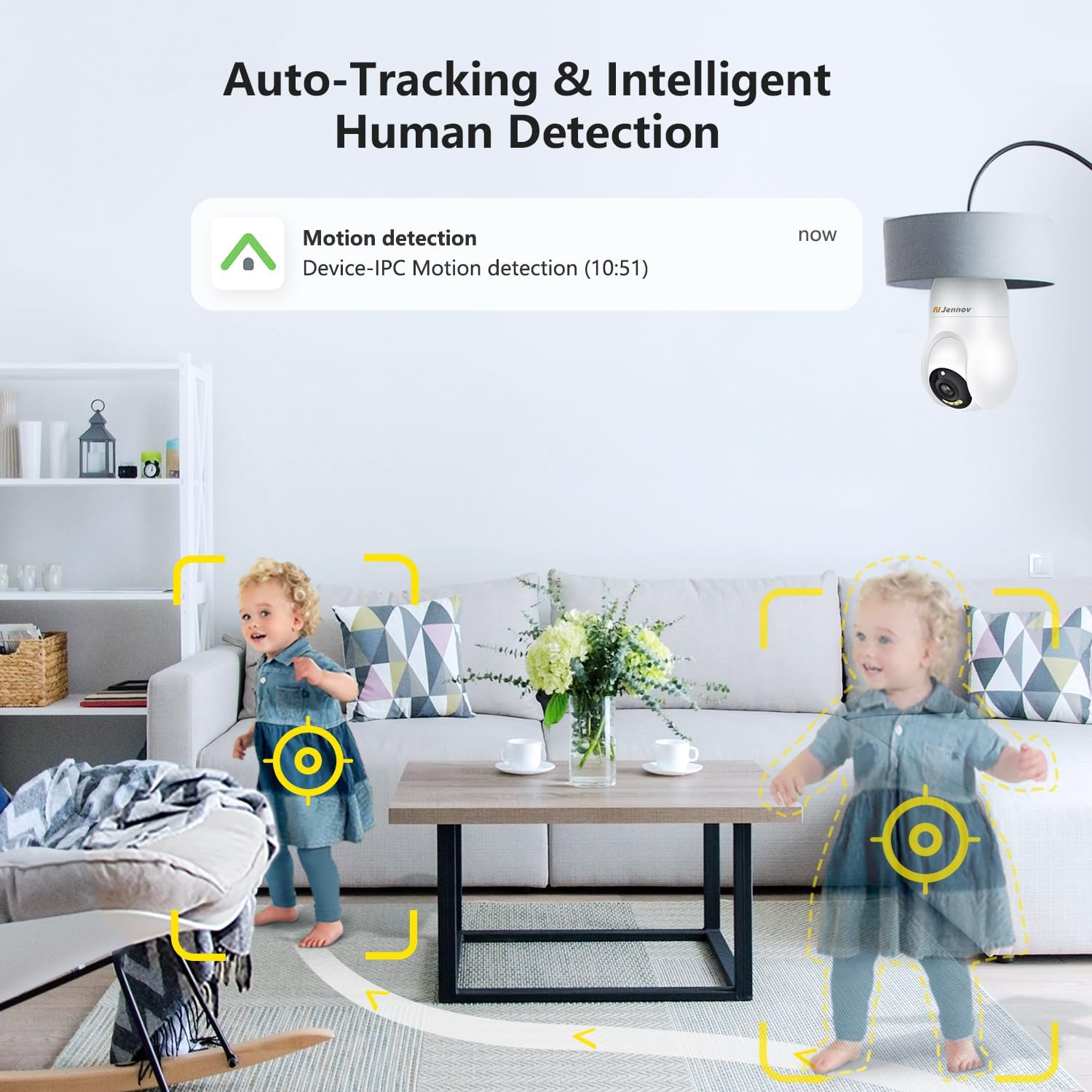
Figure 4.2: The camera's auto-tracking and intelligent human detection feature, showing a motion detection alert.
4.3 Penglihatan Malam
The camera is equipped with infrared LEDs to provide clear vision in low-light or no-light conditions.
- Pengaktifan Automatik: Night vision typically activates automatically when ambient light levels drop.
- Julat: Effective night vision range is up to 30 feet (approximately 9 meters).
- Penglihatan Malam Warna Cahaya Bintang: In certain low-light conditions, the camera may provide enhanced color night vision.

Figure 4.3: A visual comparison illustrating the clarity and color retention of Starlight Color Night Vision compared to traditional night vision.
4.4 Audio Dua Hala
Utilize the camera's built-in microphone and speaker for two-way communication.
- Cakap: Ketik ikon mikrofon dalam siaran langsung view interface of the app to speak through the camera.
- Dengar: Mikrofon kamera merakam audio dari persekitarannya, yang boleh didengari melalui aplikasi.

Figure 4.4: Demonstration of the two-way audio feature, showing a child speaking through the camera and a parent responding via smartphone.
4.5 Penyimpanan Video
The camera supports two primary methods for video storage:
- Kad SD mikro: Insert a Micro SD card (up to 128GB, not included) into the designated slot on the camera for local storage of recordings.
- Storan Awan: The camera offers optional cloud storage services, which may require a subscription. Refer to the app for details on available plans.

Figure 4.5: The camera supports both cloud storage and local storage via a Micro SD card (up to 128GB).
4.6 Integrasi Rumah Pintar
The Jennov Security Camera is compatible with certain smart home platforms.
- Amazon Alexa: Link your camera to Amazon Alexa through the Alexa app to view suapan langsung pada peranti Echo Show yang serasi atau menggunakan arahan suara.
- Peranti Android: The camera app is compatible with Android smartphones and tablets.

Figure 4.6: The camera's compatibility with Amazon Alexa, allowing users to view camera feeds on smart displays.
5. Penyelenggaraan
5.1 Membersihkan Kamera
To ensure optimal performance, keep the camera lens and body clean.
- Matikan: Disconnect the camera from its power source before cleaning.
- Kanta: Gently wipe the camera lens with a soft, lint-free cloth. For stubborn smudges, use a lens cleaning solution designed for optics.
- Badan: Lap badan kamera dengan kain kering atau sedikitamp kain. Elakkan menggunakan bahan kimia yang keras atau bahan yang melelas.
5.2 Kemas Kini Perisian Tegar
Periodically check the mobile application for available firmware updates. Updates can improve performance, add new features, and enhance security.
- Semak Kemas Kini: Navigate to the camera settings within the app to check for and install any available firmware updates.
- Sambungan Stabil: Ensure the camera has a stable Wi-Fi connection and sufficient power during the update process. Do not interrupt the update.
6. Penyelesaian masalah
If you encounter issues with your Jennov Security Camera, refer to the following common problems and solutions:
- Kamera tidak dihidupkan:
- Ensure the light socket has power and the camera is securely screwed in.
- Test the socket with a working light bulb to confirm power supply.
- Tidak dapat menyambung ke Wi-Fi:
- Verify your Wi-Fi network is 2.4GHz. The camera does not support 5GHz networks.
- Pastikan kata laluan Wi-Fi dimasukkan dengan betul dalam aplikasi.
- Gerakkan kamera lebih dekat dengan penghala Wi-Fi anda untuk meningkatkan kekuatan isyarat.
- Mulakan semula penghala anda dan kamera.
- No motion detection alerts:
- Check if motion detection is enabled in the app settings.
- Laraskan kepekaan pengesanan gerakan.
- Pastikan pemberitahuan apl didayakan pada telefon pintar anda.
- Kualiti video yang lemah:
- Check your Wi-Fi signal strength; a weak signal can affect video streaming quality.
- Clean the camera lens for any dust or smudges.
- Ensure adequate lighting for optimal daytime video.
- Audio dua hala tidak berfungsi:
- Ensure microphone and speaker permissions are granted to the app on your smartphone.
- Semak tetapan kelantangan pada telefon anda dan dalam aplikasi kamera.
7. Spesifikasi
| Nombor Model | IJ1-P23WJ35-3-FAS |
| Jenis Pemasangan | Light socket (Screw In) |
| Resolusi Tangkapan Video | 1080p |
| Komunikasi Tanpa Wayar | Wi-Fi (2.4GHz sahaja) |
| Faktor Bentuk | Kubah |
| bahan | plastik |
| Voltage | 220 Volt (AC) |
| Wattage | 3 watt |
| Dimensi (L x W x H) | 7.62 x 7.62 x 17.02 cm |
| Berat Barang | 177 g |
| Ciri Khas | Penglihatan Malam, Pengesanan Pergerakan, Audio Dua Hala |
| Pilihan Storan | Micro SD card (Max 128GB), Cloud Storage |
| Penggunaan Dalaman/Luar | Dalaman |
| Peranti Serasi | Komputer riba, Telefon Pintar, Tablet |
| Jenis Pengawal | Amazon Alexa, Android |
8. Maklumat Waranti
The Jennov Security Camera (Model: IJ1-P23WJ35-3-FAS) comes with a Waranti terhad 1 tahun dari tarikh pembelian. Waranti ini meliputi kecacatan pembuatan dan kerosakan dalam penggunaan biasa. Ia tidak melindungi kerosakan yang disebabkan oleh penyalahgunaan, kemalangan, pengubahsuaian yang tidak dibenarkan, atau pemasangan yang tidak betul.
Please retain your proof of purchase for warranty claims. For detailed warranty terms and conditions, refer to the official Jennov webtapak atau hubungi sokongan pelanggan.
9. Sokongan Pelanggan
For further assistance, technical support, or inquiries regarding your Jennov Security Camera, please refer to the following resources:
- Sokongan dalam talian: Visit the official Jennov website for FAQs, troubleshooting guides, and product information.
- E-mel hubungan: Refer to the product packaging or the Jennov website for customer service contact email.
When contacting support, please have your product model number (IJ1-P23WJ35-3-FAS) and purchase information readily available.


