1. Pengenalan
This manual provides detailed instructions for the installation, operation, and maintenance of your NexiGo 3 Channel Dash Cam D621. Please read this manual thoroughly before using the device to ensure proper functionality and safety. Keep this manual for future reference.
2. Apa yang ada di dalam Kotak
Verify that all items are present and in good condition upon unboxing.
- NexiGo D621 Dash Cam
- Kad SD 128GB
- Gunung sedutan
- Auxiliary Power Cable (11.5 ft)
- Rear Camera with Extension Cable (21.3 ft)
- Alat Pry
- Kain Pembersih
- Manual Pengguna

Image: NexiGo D621 Dash Cam and its components, including the main unit, suction mount, cables, and SD card.
3. Produk Lebihview
The NexiGo D621 is a 3-channel dash cam designed to record front, interior, and rear views simultaneously. It features a rotatable interior/front camera for flexible recording options.
Ciri-ciri Utama:
- Rotatable Interior/Front Camera: Allows the interior camera to be rotated to face forward, providing dual front-facing recording.
- High Resolution Recording: Front camera records in 4K/2K, interior and rear cameras in 1080P.
- Sony STARVIS Sensors: Enhanced low-light performance for clear night vision.
- Wi-Fi terbina dalam: Supports 5.0 GHz and 2.4 GHz for fast file transfer and app connectivity.
- GPS bersepadu: Records real-time trip data including location and speed.
- Mod Parkir 24 Jam: Monitors your vehicle when parked (requires hard-wire kit, sold separately).
- G-Sensor: Automatically locks emergency footage upon impact detection.
- Rakaman Gelung: Mengganti foo tertuatage apabila kad SD penuh.

Image: Diagram illustrating the three-channel recording capability of the NexiGo D621, showing simultaneous front, interior, and rear views.

Image: Visual representation of the optimized field of view for the front (88°) and interior (132°) cameras of the NexiGo D621.
4. Persediaan
4.1. Pemasangan Awal
- Attach Suction Mount: Slide the suction cup mount into the slot on the top of the dash cam until it clicks securely into place.
- Masukkan Kad SD: If not already inserted, gently push the provided 128GB Micro SD card into the TF slot on the side of the dash cam until it clicks. The dash cam supports up to 256GB.
- Mount Dash Cam: Clean the desired area on your windshield. Attach the suction mount firmly to the windshield, ensuring it does not obstruct your view.
- Sambungkan Kuasa: Plug the auxiliary power cable into the dash cam and then into your vehicle's 12V auxiliary power outlet.
- Pasang Kamera Belakang: Connect the rear camera to the main unit using the extension cable. Route the cable neatly along the vehicle's interior trim using the pry tool. Mount the rear camera on the rear windshield or above the license plate.
Video: Official NexiGo D621 User Guide demonstrating the physical installation of the dash cam and its components.
4.2. Powering On and Initial Settings
- Once connected to power, the dash cam will automatically power on and begin recording.
- Use the physical buttons below the screen to navigate the menu.
- Access "Settings" (gear icon) to configure basic settings like date, time, and time zone.
- Ensure the date and time are correct for accurate timestamping of recordings.
5. Arahan Operasi
5.1. Mod Rakaman
- Rakaman Biasa: Automatically starts when the vehicle is powered on. Footage disimpan dalam gelung berterusan.
- Rakaman Kecemasan: Activated by the G-sensor upon detecting an impact. This footage is locked and will not be overwritten.
- Mod Letak Kereta: When connected to a hard-wire kit (ASIN: B0C5RYDBBD, sold separately), the dash cam can monitor your vehicle for impacts or motion while parked.
5.2. Adjusting Camera Views
The interior camera can be rotated to face forward, effectively providing two front-facing cameras. To do this:
- Physically rotate the interior camera lens until it faces forward.
- Navigate to "Camera Settings" in the menu.
- Toggle "Rear Camera: Flip Horizontally" to ON if needed to correct the image orientation.
- Set "Interior Camera Recording" to "Front" to ensure it records the forward view.
Video: Official NexiGo D621 User Guide demonstrating how to rotate the interior camera and adjust settings for dual front-facing recording.
5.3. Night Vision and Exposure
The D621 features Sony STARVIS sensors and infrared LED lights for enhanced night vision. You can adjust the exposure level for optimal clarity in low-light conditions, especially for capturing license plates.
- Press and hold the OK button to quickly access the front camera's special exposure settings.
- Use the up and down buttons to adjust the exposure level until license plates are clearly visible.
- To automate this, go to "Camera Settings" and select "Set special exposure time" to define a time range (e.g., sunset to sunrise) for automatic exposure adjustments.

Image: Comparison showing a default image versus an image with Manual Highlight Compensation (HLC) enabled, demonstrating improved readability of license plates at night.
6. Sambungan Wi-Fi dan Penggunaan Aplikasi
The NexiGo D621 features built-in Wi-Fi (2.4 GHz and 5.0 GHz) for seamless connection to the NexiGo app on your iOS or Android device.
- Muat turun Aplikasi: Cari untuk "NexiGo Dash Cam" in your device's app store and install it.
- Dayakan Wi-Fi pada Kamera Pendahulu: On the dash cam, navigate to "Settings" > "Wi-Fi Settings" > "Wi-Fi Information" to view the Wi-Fi SSID and password.
- Connect Phone to Dash Cam Wi-Fi: On your smartphone, go to Wi-Fi settings, find the NexiGo dash cam's SSID, and connect using the provided password.
- Gunakan Apl:
- Langsung View: Strim foo masa nyatatage from the dash cam to your phone.
- Playback & Download: Access recorded videos and photos stored on the SD card. You can stream them directly or download them to your phone.
- tetapan: Adjust dash cam settings directly from the app, including video resolution, loop recording duration, G-sensor sensitivity, and Wi-Fi password.

Image: Illustration of the NexiGo D621 Dash Cam wirelessly transferring data to a smartphone via Wi-Fi, showing different transfer speeds for 5G and 2.4G Wi-Fi.
Video: Official NexiGo D621 User Guide demonstrating the process of connecting the dash cam to the mobile app and navigating its features.
7. Penyelenggaraan
- Kanta Bersih: Regularly clean the camera lenses with the provided cleaning cloth to ensure clear recordings.
- Format Kad SD: Format the Micro SD card periodically (e.g., once a month) to prevent data corruption and ensure optimal performance. This can be done via the dash cam's settings menu.
- Kemas kini Firmware: Semak NexiGo website or app for any available firmware updates to improve performance and add new features.
- Suhu: The dash cam is designed to operate in temperatures from -4°F (-20°C) to 158°F (70°C). Avoid prolonged exposure to extreme temperatures outside this range.
Video: Official NexiGo D621 User Guide demonstrating how to format the Micro SD card.
8. Penyelesaian masalah
- Dash Cam Tidak Dihidupkan:
- Pastikan kabel kuasa disambungkan dengan selamat pada kedua-dua cam pemuka dan alur keluar 12V kenderaan.
- Check the vehicle's 12V outlet for power.
- Try a different power cable or outlet if available.
- Recording Issues (e.g., blurry footage, missing files):
- Bersihkan kanta kamera.
- Format kad SD.
- Ensure the SD card is properly inserted and not full. Replace the SD card if it's old or damaged.
- Semak tetapan resolusi video dalam menu.
- Masalah Sambungan Wi-Fi:
- Ensure Wi-Fi is enabled on the dash cam and your smartphone.
- Verify the correct SSID and password are being used.
- Forget the dash cam's Wi-Fi network on your phone and reconnect.
- Mulakan semula kedua-dua kamera pemuka dan telefon pintar anda.
- GPS Data Not Displaying Correctly:
- Pastikan modul GPS disambungkan dengan betul dan mempunyai view dari langit.
- Check time zone settings in the dash cam menu.
- For full GPS data, download the DVPlayer app from nexigo.com/dashcam dan view footage pada komputer.
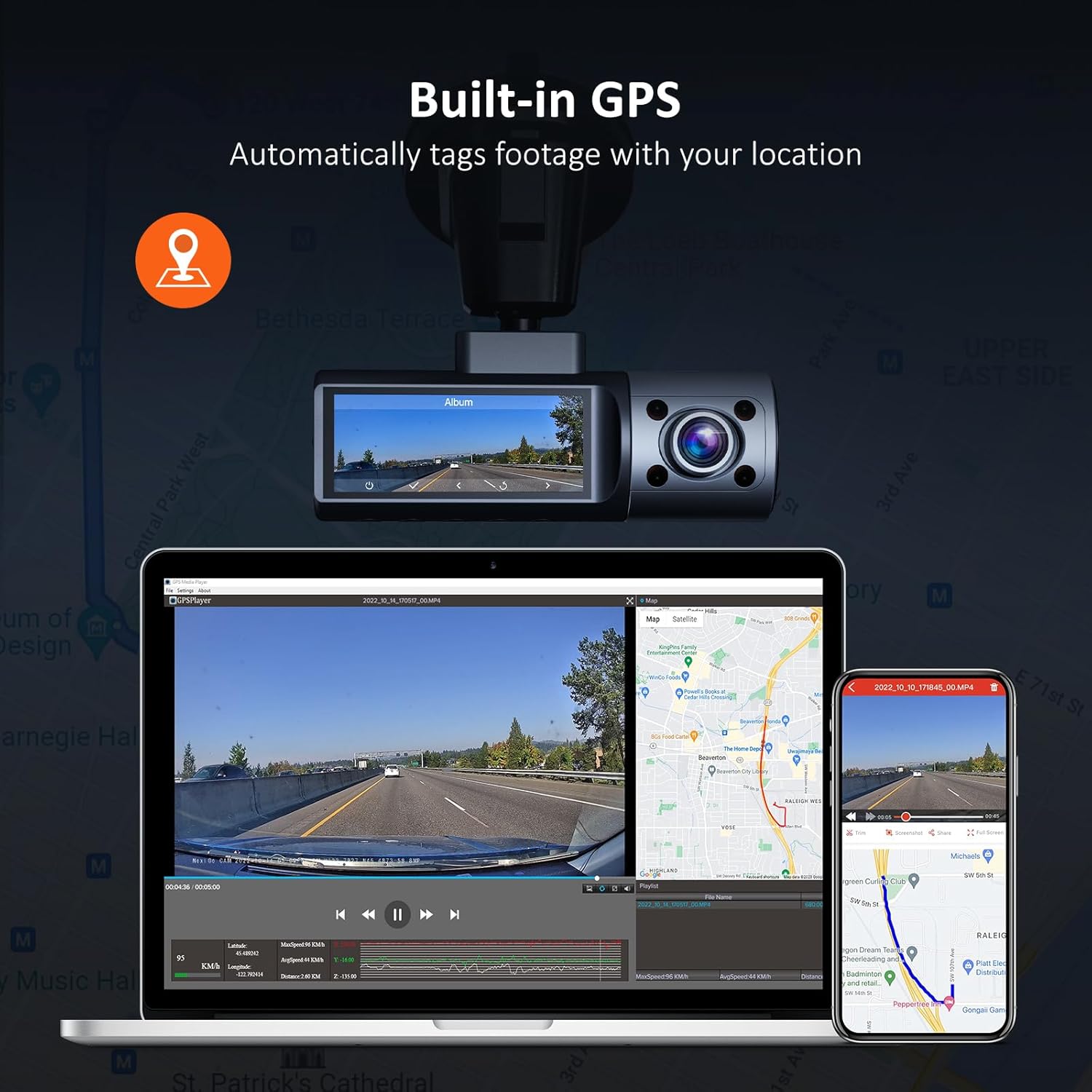
Image: Illustration of the NexiGo D621 Dash Cam's built-in GPS, showing how it tags footage with location data, viewable on a map via the app or desktop software.
9. Spesifikasi
| Model | D621 |
| Resolusi Video | Front: 4K/2K (1440P), Interior: 1080P, Rear: 1080P |
| Bidang View (FOV) | Front: 88°, Interior: 132°, Rear: 132° |
| Penderia | Sony STARVIS IMX335 & IMX307 |
| Ketersambungan | Wi-Fi (2.4 GHz & 5.0 GHz), GPS |
| Penyimpanan | Supports up to 256GB Micro SD Card (128GB included) |
| Suhu Operasi | -4°F hingga 158°F (-20°C hingga 70°C) |
| Sumber Kuasa | Kapasitor Super |
| Dimensi | 5 x 4 x 2 inci |
| Berat badan | 1.79 paun |
10. Waranti & Sokongan
NexiGo products come with a standard manufacturer's warranty. For specific warranty details, product registration, or technical support, please visit the official NexiGo webtapak atau hubungi perkhidmatan pelanggan mereka.
- rasmi Webtapak: www.nexigo.com
- E-mel Sokongan: Refer to your product packaging or official webtapak untuk maklumat hubungan.
For additional protection, consider purchasing an extended protection plan. Options may include 2-Year or 3-Year Protection Plans, or a Complete Protect plan for broader coverage.


