1. Pengenalan
Thank you for choosing the SPLITSKY NZFS Kids Alarm Clock. This device combines an alarm clock, white noise sleep aid, and an 8-mode RGB night light, designed to assist with sleep and wake-up routines for children and adults. Please read this manual thoroughly to understand its features and ensure proper operation.
Maklumat Keselamatan:
- Jauhkan peranti daripada air dan persekitaran kelembapan tinggi.
- Jangan cuba membuka atau membaiki peranti sendiri.
- Use only the provided USB-C power cable or a certified equivalent.
- Pastikan pengudaraan yang betul di sekeliling peranti.
2. Kandungan Pakej
Sahkan bahawa semua item terdapat dalam pakej anda:
- SPLITSKY NZFS Kids Alarm Clock
- 1.2M (4.7 inch) USB-C Power Cable
- Manual Pengguna (dokumen ini)
- 1 x CR2032 Lithium Ion Battery (pre-installed for memory backup)
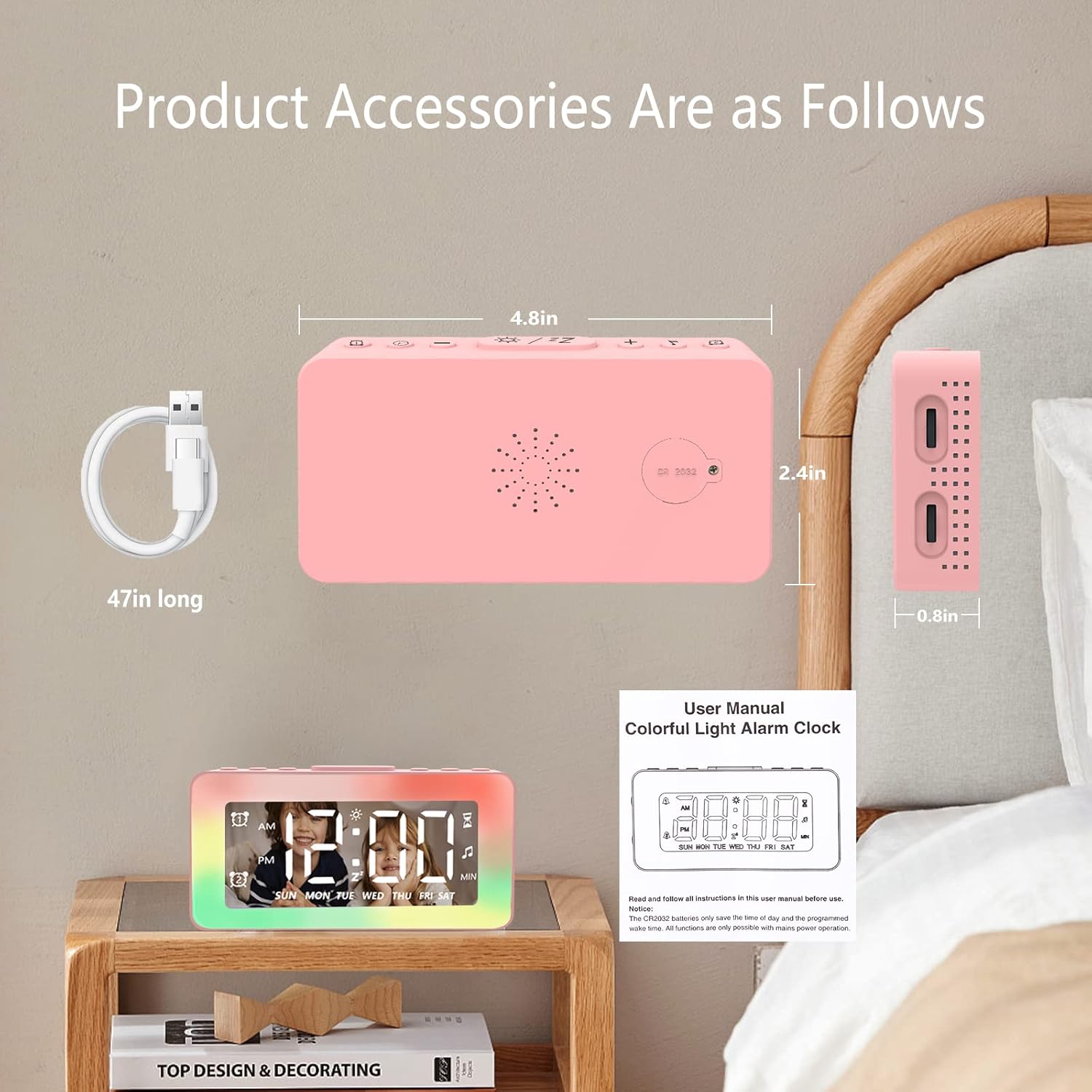
Image: The SPLITSKY NZFS Kids Alarm Clock, a USB-C power cable, and the user manual are included in the package.
3. Produk Lebihview
Familiarize yourself with the buttons and ports on your alarm clock:

Imej: Terperinci view of the alarm clock's top buttons and side ports, including Alarm 1, Time Setting, Light Minus/Settings, Snooze/Light Mode Switch, Light Plus/Setup, Music Switch, Alarm 2, Volume Setting, Time Brightness Setting, USB Output Charging Port, and Type-C Input Interface.
- Butang penggera 1: Set and activate Alarm 1.
- Butang Tetapan Masa: Laraskan masa semasa.
- Light Minus / Settings Button: Decrease light brightness or navigate settings.
- Snooze / Light Mode Switch Button: Activate snooze, or cycle through light modes.
- Light Plus / Setup Button: Increase light brightness or confirm settings.
- Music Switch Button: Cycle through white noise sounds.
- Butang penggera 2: Set and activate Alarm 2.
- Volume Setting Wheel (Side): Adjust alarm and white noise volume.
- Time Brightness Setting Wheel (Side): Laraskan kecerahan paparan.
- USB Output Charging Port (Side): Charge external devices.
- Type-C Input Interface (Side): Connect power cable to the alarm clock.
4. Persediaan
4.1 Sambungan Kuasa
- Connect the provided USB-C power cable to the Type-C Input Interface on the side of the alarm clock.
- Palamkan hujung kabel USB-C yang satu lagi ke dalam penyesuai kuasa USB yang serasi (tidak disertakan) atau port USB.
- Paparan akan menyala, menunjukkan jam telah dihidupkan.

Image: The SPLITSKY NZFS Kids Alarm Clock is shown powered on and connected via its USB-C port, also demonstrating its capability to charge a smartphone.
4.2 Battery Installation (Memory Backup)
The alarm clock includes a pre-installed CR2032 battery. This battery serves as a memory backup to retain time and alarm settings during a power outage or when the main power is disconnected. It does not power the clock for regular operation.
- If the battery needs replacement, locate the battery compartment on the back of the unit.
- Gunakan pemutar skru kecil untuk membuka petak.
- Gantikan dengan bateri CR2032 baharu, memastikan kekutuban yang betul.
- Tutup petak dengan selamat.
5. Arahan Operasi
5.1 Setting the Time (12H/24H Format)
- Tekan dan tahan butang Butang Tetapan Masa sehingga angka jam mula berkelip.
- Gunakan Light Minus / Settings Button (bawah) atau Light Plus / Setup Button (up) to adjust the hour.
- Tekan ke Butang Tetapan Masa again to move to minute adjustment. Adjust minutes using the Light Minus/Plus buttons.
- Tekan ke Butang Tetapan Masa a third time to select 12-hour or 24-hour format. Adjust using the Light Minus/Plus buttons.
- Tekan ke Butang Tetapan Masa sekali lagi untuk mengesahkan dan keluar dari mod tetapan masa.
5.2 Setting Alarms (Dual Alarm, Daily/Weekday/Weekend Mode)
The clock supports two independent alarms (Alarm 1 and Alarm 2).
- Tekan dan tahan butang Butang Penggera 1 (for Alarm 1) or Butang Penggera 2 (for Alarm 2) until the alarm hour digits flash.
- Gunakan Light Minus / Settings Button or Light Plus / Setup Button untuk menyesuaikan jam.
- Press the respective Alarm Button again to move to minute adjustment. Adjust minutes using the Light Minus/Plus buttons.
- Press the respective Alarm Button again to select the alarm mode:
- Mod Harian: Bunyi penggera setiap hari.
- Weekday Mode: Penggera berbunyi Isnin hingga Jumaat.
- Weekend Mode: Alarm sounds Saturday and Sunday.
- Press the respective Alarm Button once more to confirm and exit alarm setting mode.
- To enable/disable an alarm, short press the Butang Penggera 1 or Butang Penggera 2Ikon penggera akan muncul/hilang pada paparan.
5.3 Fungsi Tunda
When an alarm sounds, tap the Snooze / Light Mode Switch Button on top to activate snooze. The alarm will pause for 9 minutes and then sound again. This can be repeated multiple times.
5.4 Night Light (8 Modes RGB, 10-level dimming)
The alarm clock features 6 solid color lights and 2 ambient colorful lights.
- Tekan pendek Snooze / Light Mode Switch Button to turn on the night light and cycle through the 8 color modes.
- To adjust the brightness (10 levels), use the Light Minus / Settings Button or Light Plus / Setup Button while the night light is active.
- Untuk mematikan lampu malam, terus tekan Snooze / Light Mode Switch Button sehingga lampu padam.

Image: Multiple SPLITSKY NZFS Kids Alarm Clocks are shown, each displaying a different color from the 8 available RGB night light modes.
5.5 White Noise Sleep Aid (8 Sounds)
The clock offers 8 soothing sounds to aid sleep.
- Tekan pendek Butang Suis Muzik to turn on the white noise and cycle through the available sounds.
- To adjust the volume (16 levels), use the Volume Setting Wheel on the side of the clock.
- To turn off the white noise, continue pressing the Butang Suis Muzik until the sound stops.

Image: The SPLITSKY NZFS Kids Alarm Clock is displayed on a bedside table, with icons illustrating the various white noise options such as rain, cicadas, piano, bonfire, waves, birdsong, and church bells.
5.6 Sleep Timer (10-120 minutes)
The sleep timer allows you to set a duration for the white noise and/or night light to play before automatically turning off.
- While white noise or night light is active, press and hold the Butang Suis Muzik (for white noise timer) or Snooze / Light Mode Switch Button (for light timer).
- Gunakan Light Minus / Settings Button or Light Plus / Setup Button to select the desired timer duration (10, 20, 30, 60, 90, 120 minutes).
- Press the respective button again to confirm the timer setting. The timer icon will appear on the display.
5.7 Pelarasan Kecerahan Paparan
Adjust the brightness of the LED time display using the Time Brightness Setting Wheel on the side of the clock.
5.8 Port Pengecasan USB
The USB output charging port on the side of the alarm clock can be used to charge other small electronic devices, such as smartphones. Connect your device's charging cable to this port.
6. Penyelenggaraan
6.1 Pembersihan
- Pastikan peranti dicabut plag sebelum dibersihkan.
- Lap permukaan dengan kain lembut dan kering.
- Jangan gunakan pembersih yang kasar, pelarut atau semburan kimia.
6.2 Penyimpanan
When not in use for extended periods, store the alarm clock in a cool, dry place, away from direct sunlight and extreme temperatures.
7. Penyelesaian masalah
If you encounter issues with your SPLITSKY NZFS Kids Alarm Clock, refer to the table below for common problems and solutions.
| Masalah | Kemungkinan Punca | Penyelesaian |
|---|---|---|
| Paparan jam dimatikan atau malap. | Not connected to power; Time brightness set too low. | Ensure USB-C cable is securely connected to a power source. Adjust the Time Brightness Setting Wheel. |
| Penggera tidak berbunyi. | Penggera tidak diaktifkan; Kelantangan penggera terlalu rendah. | Check if the alarm icon is displayed. If not, short press the respective Alarm Button to activate. Adjust the Volume Setting Wheel. |
| Time/settings reset after power disconnection. | Bateri sandaran CR2032 telah kehabisan atau hilang. | Replace the CR2032 battery in the battery compartment. |
| Night light or white noise not working. | Function not activated; Sleep timer active. | Tekan pendek Snooze / Light Mode Switch Button or Butang Suis Muzik to activate. Check if a sleep timer is set. |
8. Spesifikasi
| Ciri | Perincian |
|---|---|
| Jenama | SPLITSKY |
| Nombor Model | NZFS |
| Jenis Paparan | LED digital |
| Dimensi Produk | 3.17"L x 3.17"T (lebih kurang 8.05 sm L x 8.05 sm T) |
| Berat Barang | 8.1 Auns (kira-kira 230 gram) |
| Sumber Kuasa | Corded Electric (USB-C), Battery Powered (CR2032 for memory) |
| Mod Cahaya Malam | 8 (6 solid colors, 2 ambient colorful) with 10-level dimming |
| Bunyi White Noise | 8 bunyi yang menenangkan |
| Nada Penggera | 7 wake-up alarm tones with 16-level volume control |
| Ciri Penggera | Dual Alarm, Daily/Weekday/Weekend modes, 9-minute Snooze |
| Fungsi Pemasa | 10-120 minute sleep timer for sounds and lights |
| Ketersambungan | USB-C Input, USB-A Output (for charging external devices) |
| bahan | Akrilonitril Butadiena Stirena |
9. Waranti dan Sokongan
9.1 Maklumat Waranti
Please refer to the warranty information provided at the time of purchase or contact your retailer for details regarding the product warranty. Keep your proof of purchase for any warranty claims.
9.2 Sokongan Pelanggan
For technical assistance, troubleshooting beyond this manual, or general inquiries, please contact the seller through the platform where you purchased the product. Provide your order number and a detailed description of the issue for prompt support.


