1. Produk Lebihview
The Sudio F2 is a portable Bluetooth speaker designed for high-quality audio playback in various environments. It features Bluetooth 5.3 connectivity, an AUX input, IPX7 waterproof rating, and a unique broadcast function allowing connection of up to 100 speakers.

Depan view of the Sudio F2 Portable Bluetooth Speaker.
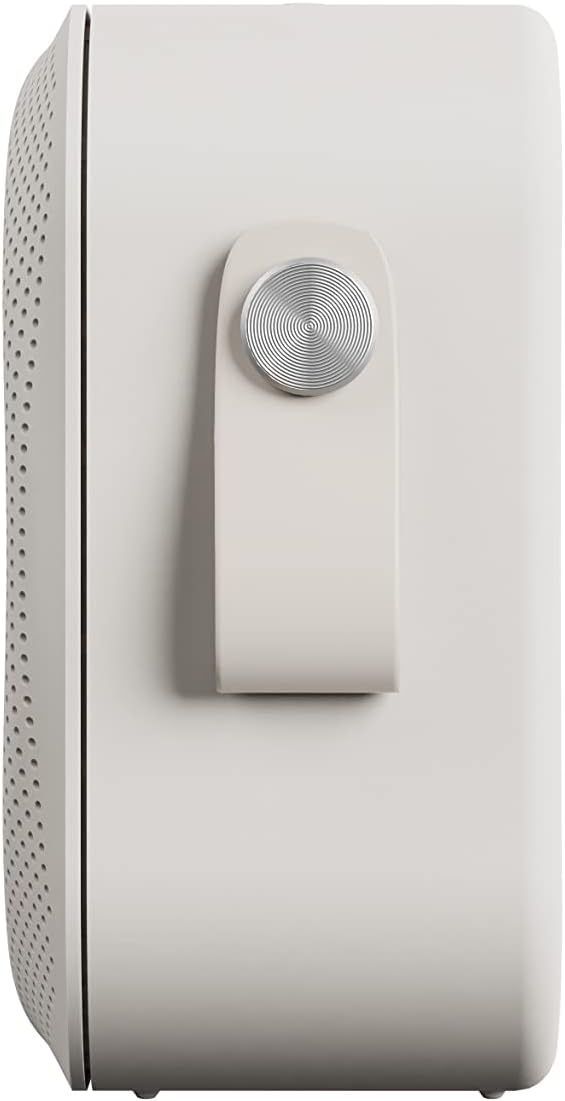
sebelah view of the Sudio F2 speaker, highlighting the integrated silicone strap for portability.
2. Kandungan Pakej
Pastikan semua item ada dalam pakej:
- Pembesar Suara Bluetooth Mudah Alih Sudio F2
- Type-C USB-cable for charging
- Manual Arahan (dokumen ini)
3. Persediaan dan Pengecasan
3.1 Caj Permulaan
Before first use, fully charge your Sudio F2 speaker. Connect the provided Type-C USB cable to the charging port on the speaker and to a compatible USB power adapter (not included). A full charge takes approximately 4 hours and provides up to 15 hours of playtime.
3.2 Hidupkan/Mati Kuasa
- Untuk menghidupkan: Tekan dan tahan butang kuasa sehingga lampu penunjuk menyala.
- Untuk mematikan: Tekan dan tahan butang kuasa sehingga lampu penunjuk dimatikan.

sebelah view of the Sudio F2 speaker, showing the power button location.
4. Arahan Operasi
4.1 Berpasangan Bluetooth
- Ensure the Sudio F2 speaker is powered on and in pairing mode (indicator light will flash).
- Pada peranti anda (telefon pintar, tablet, dll.), dayakan Bluetooth dan cari peranti yang tersedia.
- Select "Sudio F2" from the list.
- Once connected, the indicator light will become solid, and you will hear an audible confirmation.
The speaker uses Bluetooth 5.3 technology and has a connection range of up to 10 meters.
4.2 Input AUX
To connect a device via AUX, insert a 3.5mm audio cable (not included) into the AUX input port on the Sudio F2 speaker and the other end into your audio source. The speaker will automatically switch to AUX mode.

The Sudio F2 speaker featuring its AUX input port for wired connections.
4.3 Broadcast Function (Multi-Speaker Pairing)
The Sudio F2 allows you to link up to 100 speakers simultaneously for a larger sound experience. This feature is activated using the broadcast function button.
- Connect your primary Sudio F2 speaker to your device via Bluetooth.
- Power on all other Sudio F2 speakers you wish to connect.
- On the primary speaker, press the broadcast function button (refer to the speaker diagram for location).
- The primary speaker will begin searching for other F2 speakers.
- Once connected, all linked speakers will play audio synchronously.

Multiple Sudio F2 speakers demonstrating the broadcast function for synchronized audio playback.

The Sudio F2 speaker connected to a turntable via AUX, illustrating its compatibility with various audio sources.
4.4 Kawalan
The Sudio F2 features touch controls for playback and volume adjustments. Specific functions include:
- Main/Jeda: Single tap the main control button.
- Kelantangan Naik/Turun: Swipe or tap dedicated volume areas (refer to product diagram for exact locations).
- Trek Seterusnya / Sebelumnya: Double tap or triple tap the main control button (functionality may vary, refer to quick start guide for details).
5. Rintangan Air (IPX7)
The Sudio F2 speaker has an IPX7 waterproof rating, meaning it can be submerged in water up to 1 meter for 30 minutes. This makes it suitable for use in showers, by pools, or in rainy conditions. Ensure all ports are securely closed before exposing the speaker to water.

The Sudio F2 speaker, highlighting its IPX7 waterproof capability, suitable for wet environments.

A Sudio F2 speaker in a shower setting, demonstrating its waterproof design.
6. Penyelenggaraan
6.1 Pembersihan
To clean your Sudio F2 speaker, use a soft, damp cloth. Avoid using harsh chemicals or abrasive materials, as these can damage the speaker's finish or waterproof seals. Ensure the speaker is dry before charging.
6.2 Penyimpanan
Store the speaker in a cool, dry place away from direct sunlight and extreme temperatures. If storing for an extended period, charge the battery periodically to maintain its health.
7. Penyelesaian masalah
7.1 Tiada Kuasa
- Ensure the speaker is fully charged. Connect it to a power source using the provided Type-C USB cable.
- Verify the charging cable and adapter are working correctly.
7.2 Tidak Boleh Berpasangan melalui Bluetooth
- Make sure the speaker is in pairing mode (indicator light flashing).
- Pastikan Bluetooth peranti anda didayakan dan dalam jarak 10 meter dari pembesar suara.
- Try forgetting the "Sudio F2" device from your device's Bluetooth settings and re-pairing.
- Mulakan semula kedua-dua pembesar suara dan peranti anda.
7.3 Tiada Bunyi
- Semak tahap kelantangan pada kedua-dua pembesar suara dan peranti anda yang disambungkan.
- Ensure the speaker is correctly paired via Bluetooth or connected via AUX.
- If using AUX, verify the cable is fully inserted and functional.
7.4 Broadcast Function Not Working
- Ensure all speakers are Sudio F2 models.
- Verify that the primary speaker is successfully connected to your device via Bluetooth.
- Make sure all speakers are powered on and within close proximity to each other.
8. Spesifikasi
| Ciri | Spesifikasi |
|---|---|
| Nama Model | Sudio F2 |
| Nombor Model | SD-1802 |
| Teknologi Ketersambungan | Bluetooth 5.3 |
| Julat Tanpa Wayar | 10 Meter |
| Input Audio | AUX 3.5mm |
| Tahap Ketahanan Air | IPX7 (kalis air) |
| Masa bermain | Sehingga 15 jam |
| Masa Mengecas | 4 Jam |
| Kapasiti Bateri | 2200 mAh |
| Kuasa Output Maksimum Pembesar Suara | 20 Watt |
| Respons Kekerapan | 35Hz – 18KHz |
| Berat Barang | 410 Gram (14.5 auns) |
| Dimensi Produk | 2.16"D x 4.16"W x 4.17"H |
| Kaedah Kawalan | Sentuh |
| Komponen yang Disertakan | Type-C USB-cable for charging |
9. Waranti dan Sokongan
9.1 Maklumat Waranti
The Sudio F2 Portable Bluetooth Speaker comes with a limited warranty. Please refer to the official Sudio website or your purchase documentation for specific terms and conditions regarding warranty coverage.
9.2 Sokongan Pelanggan
For further assistance, technical support, or warranty claims, please contact Sudio customer service. You can find contact information and additional resources on the official Sudio webtapak: Visit the Sudio Store on Amazon
10. Video Produk
Official Sudio F2 product video, showcasing the speaker's design and features in various settings.


