pengenalan
This manual provides comprehensive instructions for the installation, operation, and maintenance of your Woibugee Android Car Radio for BMW 3 Series E46 (1999-2005 models). This advanced head unit features a 9-inch display, wireless Apple CarPlay and Android Auto, integrated GPS navigation, dual Bluetooth connectivity, AM/FM/RDS radio, Digital Sound Processor (DSP), and support for steering wheel controls. Please read this manual thoroughly before use to ensure proper installation and optimal performance.
Maklumat Keselamatan
- Sentiasa pastikan kenderaan dimatikan dan bateri diputuskan sambungannya sebelum melakukan sebarang pemasangan atau pendawaian.
- Pemasangan hendaklah dilakukan oleh profesional yang berkelayakan jika anda tidak pasti tentang sebarang langkah.
- Jangan kendalikan peranti dengan cara yang mengalih perhatian anda daripada memandu. Sentiasa mengutamakan keselamatan jalan raya.
- Elakkan daripada mendedahkan unit kepada suhu yang melampau, cahaya matahari langsung untuk tempoh yang lama, atau kelembapan yang berlebihan.
- Use only the provided cables and accessories to prevent damage and ensure compatibility.
Kandungan Pakej
Sahkan bahawa semua item yang disenaraikan di bawah disertakan dalam pakej anda:
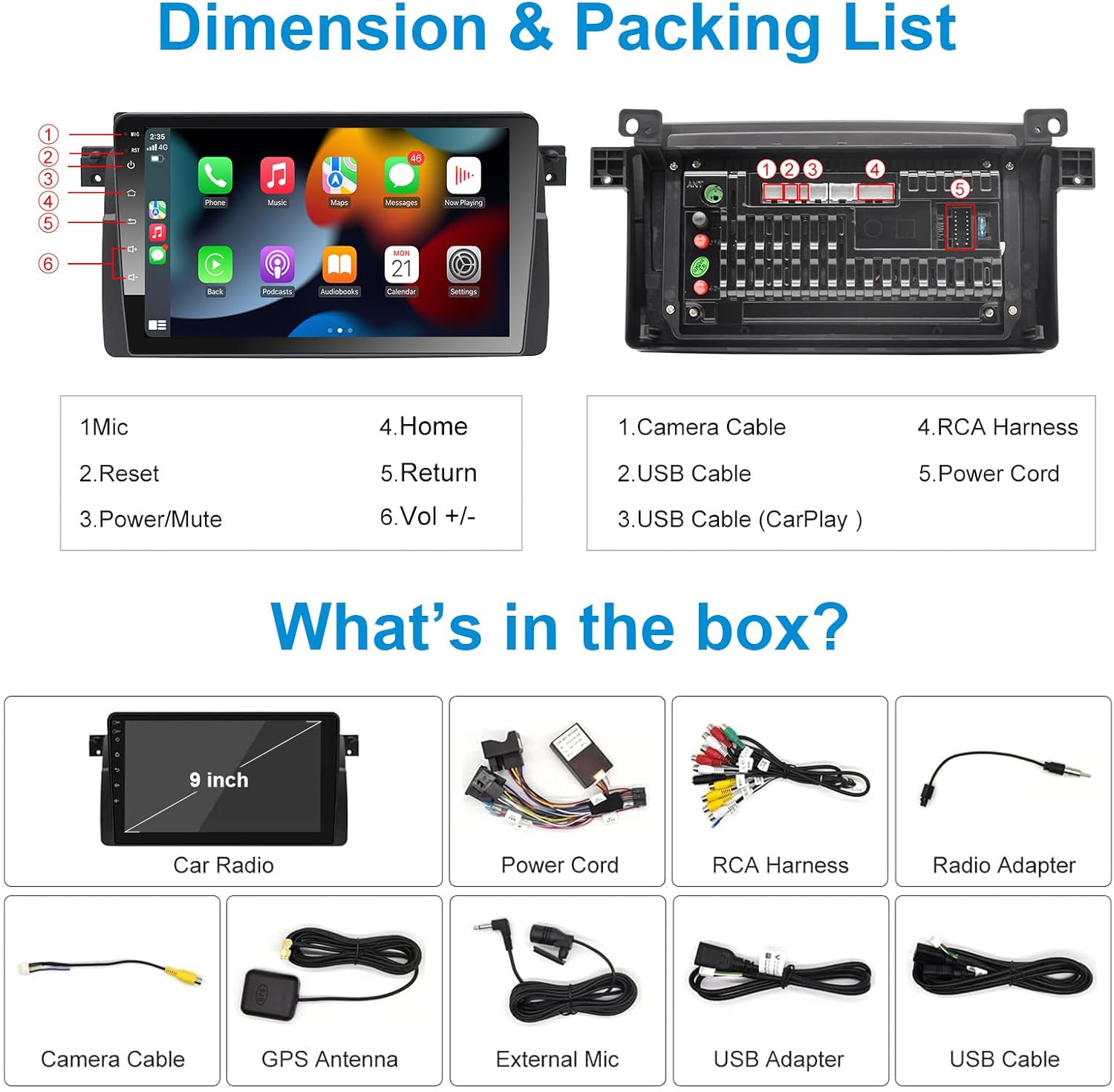
Imej: Diagram of the head unit and included accessories.
This image displays the main car radio unit from the front and back, highlighting key connection points. Below it, a grid of smaller images shows the individual components included in the box: the 9-inch car radio, power cord, RCA harness, radio adapter, camera cable, GPS antenna, external microphone, USB adapter, and USB cable. This visual guide helps confirm all parts are present.
- Woibugee 9-inch Android Car Radio Unit
- Kuasa Kuasa
- RCA Cable Harness
- Antena GPS
- Kabel USB (x2)
- Mikrofon Luaran
- Penyesuai Antena Radio
- Dekoder Canbus (jika berkenaan untuk model kenderaan anda)
- Manual Pengguna (dokumen ini)
Persediaan dan Pemasangan
1. Semakan Pra-Pemasangan
- Confirm vehicle compatibility: This unit is designed for BMW 3 Series E46 models (1999-2005).
- Putuskan sambungan bateri kenderaan sebelum memulakan pemasangan.
- Gather necessary tools (trim removal tools, screwdrivers, wire strippers, electrical tape).
2. Removing the Factory Radio
Carefully remove the existing factory radio and trim pieces from your BMW E46 dashboard. Refer to your vehicle's specific service manual for detailed instructions on trim removal.
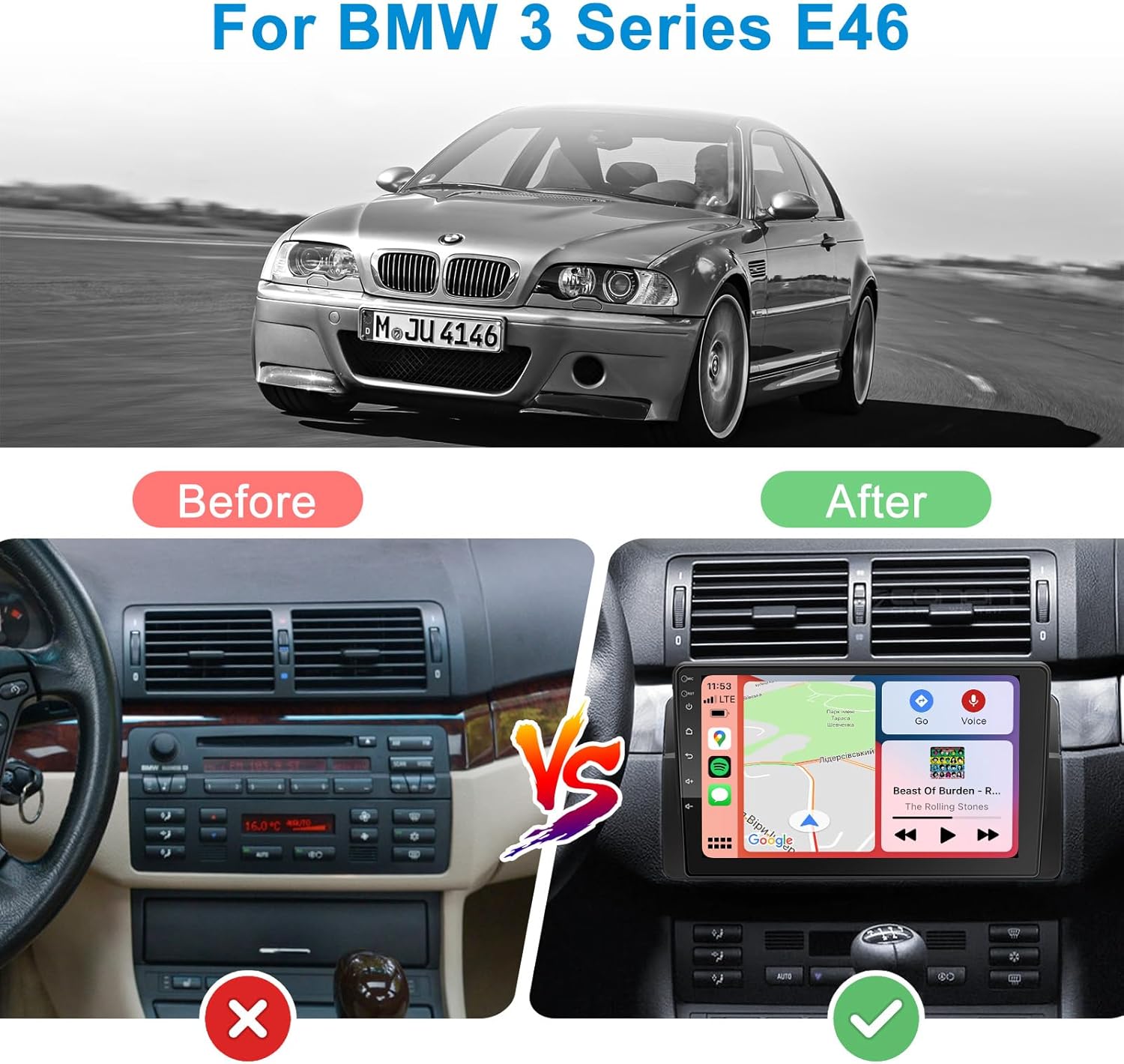
Imej: Comparison of the dashboard before and after installation.
This image visually demonstrates the transformation of a BMW E46 dashboard. The "Before" section shows the original factory radio and climate controls, while the "After" section displays the new Woibugee Android Car Radio seamlessly integrated into the dashboard, highlighting the modern upgrade.
3. Sambungan Pendawaian
Sambungkan abah-abah pendawaian yang disediakan ke port yang sepadan pada unit kepala baharu dan pendawaian kenderaan anda. Pastikan semua sambungan kukuh.
- Abah Kuasa: Connect the main power harness to the vehicle's power connector.
- Kabel RCA: Sambungkan kabel RCA untuk luaran amplifiers, subwoofers, or auxiliary inputs/outputs.
- Antena GPS: Pasang antena GPS di lokasi yang jelas view langit (cth, papan pemuka, tiang A).
- Kabel USB: Route the USB cables to a convenient location for connecting USB devices.
- Mikrofon Luaran: Sambungkan mikrofon luaran untuk kualiti panggilan yang lebih baik.
- Antena Radio: Connect the radio antenna adapter and then the vehicle's antenna.
- Penyahkod Canbus: Connect the Canbus decoder as per the diagram. This enables steering wheel controls and other vehicle data integration.
- Input Kamera Terbalik: If installing a reverse camera (not included), connect its video signal to the dedicated input.

Imej: Dual Bluetooth Chips.
This image illustrates the presence of dual Bluetooth chips (BT 4.1 and BT 5.0) within the head unit, highlighting their respective functionalities such as tethering internet, Bluetooth OBD device connection, Bluetooth mouse support, wireless CarPlay, Bluetooth music streaming, and phone calls.
4. Testing and Reassembly
Before fully reassembling the dashboard, reconnect the vehicle's battery and power on the unit to test all functions (radio, GPS, Bluetooth, touch screen, steering wheel controls). Once confirmed, carefully reassemble the dashboard trim.
Arahan Operasi
Operasi Asas
- Hidupkan/Mati Kuasa: Press and hold the power button (usually labeled with a power icon) to turn the unit on or off. A short press typically mutes/unmutes audio.
- Kawalan Kelantangan: Use the physical volume buttons or the on-screen controls to adjust the audio level.
- Butang rumah: Press the home button to return to the main Android interface.
- Butang Kembali: Press the return button to go back to the previous screen or menu.
Apple CarPlay & Android Auto Tanpa Wayar
The unit supports wireless Apple CarPlay and Android Auto for seamless smartphone integration. This allows you to access navigation, music, messages, and calls directly from the head unit's display.

Imej: Wireless CarPlay & Android Auto Interface.
This image showcases the user interface for both wireless Apple CarPlay and Android Auto. It highlights voice command capabilities with examples like "Hello Google," "Navigate Home," "Play Music," and "Call Jane." The display shows typical app icons for phone, music, maps, messages, and other compatible applications, demonstrating the integrated smartphone experience.
- Pastikan Bluetooth dan Wi-Fi didayakan pada telefon pintar anda.
- On the head unit, navigate to the CarPlay/Android Auto application.
- Follow the on-screen prompts to pair your phone via Bluetooth. Once paired, the system will automatically establish a Wi-Fi connection for wireless CarPlay/Android Auto.
- Use voice commands (Siri/Google Assistant) or the touchscreen to control functions.
GPS Navigation & WiFi Hotspot
The unit has a built-in GPS module and supports Wi-Fi connectivity for online navigation and app downloads.

Imej: GPS Navigation and WiFi Hotspot.
This image illustrates the GPS navigation capabilities of the unit, showing a detailed map with route guidance and speed limit information. It also highlights the Wi-Fi functionality, indicating that the device can connect to a Wi-Fi hotspot for online services, including real-time navigation updates and streaming content.
- Navigasi: Use the pre-installed navigation app or download your preferred app from the Google Play Store. The unit supports offline maps.
- WiFi: Connect to your phone's hotspot or a public Wi-Fi network to access online features, download apps, and stream content.
Fungsi Bluetooth
With dual Bluetooth (BT 5.0 and BT 4.1), the unit offers hands-free calling and audio streaming.
- Panggilan Bebas Tangan: Pair your phone via Bluetooth to make and receive calls directly from the head unit. Access your phonebook and call history.
- Penstriman Audio: Stream music from your smartphone or other Bluetooth-enabled devices to the car radio.
- BT 4.1: Supports tethering internet, Bluetooth OBD devices, and Bluetooth mouse.
- BT 5.0: Primarily for wireless CarPlay, Bluetooth music, and phone calls.
Radio (AM/FM/RDS)
Access local radio stations with AM/FM tuning and RDS support.
Imej: FM+AM+RDS Radio Interface.
This image displays the radio interface, showing FM and AM frequency bands. It highlights the RDS (Radio Data System) support, which allows for the display of station information and song titles where available. Users can customize radio station names for easier identification.
- Tune to your desired frequency using the on-screen controls.
- Save your favorite stations as presets for quick access.
- RDS (Radio Data System) provides additional information like station name, song title, and traffic announcements where available.
Ciri-ciri lain

Imej: Berakhirview of Key Features.
This composite image showcases several key functionalities of the car radio. It includes sections for AM/FM Radio, Built-in DSP (Digital Sound Processor) with an equalizer interface, Bluetooth connectivity, Reverse Camera Input (showing a rear view), Picture-in-Picture mode (displaying two applications simultaneously), and Steering Wheel Controls, illustrating how the unit integrates with vehicle functions.
- DSP (Digital Sound Processor) & 32-Band EQ: Adjust audio settings with the built-in DSP and 32-band equalizer for a customized sound experience.
- Skrin Pisah: Run two applications simultaneously on the 9-inch display (e.g., navigation and music player).
- Kawalan Roda Stereng: The unit supports your vehicle's original steering wheel controls for safe and convenient operation.
- Input Kamera Terbalik: Connect an aftermarket reverse camera (not included) for enhanced parking safety. The display automatically switches to the camera view apabila terbalik.
- Port USB: Two USB ports are available for media playback, charging devices, or connecting other USB accessories.
Penyelenggaraan
- Pembersihan: Gunakan kain lembut dan kering untuk membersihkan skrin dan unit. Untuk tanda degil, sedikit dampen kain dengan air. Elakkan pembersih atau pelarut yang melelas.
- Kemas Kini Perisian: Periksa pengeluar secara berkala website or the unit's settings for available software updates to ensure optimal performance and access to new features.
- Suhu: Do not expose the unit to extreme temperatures. If the car has been parked in very hot or cold conditions, allow the interior to normalize before operating the device.
Menyelesaikan masalah
| Masalah | Kemungkinan Punca | Penyelesaian |
|---|---|---|
| Unit tidak dihidupkan. | Tiada sambungan kuasa; Fius putus; Pendawaian salah. | Check power harness connection; Inspect vehicle's fuse box; Verify wiring according to diagram. |
| Tiada bunyi. | Volume too low; Mute activated; Speaker wires disconnected; Ampisu penguat. | Meningkatkan volum; Nyahaktifkan senyap; Semak sambungan pembesar suara; Sahkan luaran amppenguat (jika digunakan). |
| CarPlay/Android Auto tidak bersambung secara wayarles. | Bluetooth/Wi-Fi dimatikan pada telefon; Gandingan yang salah; Gangguan perisian. | Ensure phone's Bluetooth/Wi-Fi is on; Re-pair the device; Restart both phone and head unit. |
| Isyarat GPS hilang atau tidak tepat. | GPS antenna obstructed or disconnected; Poor satellite coverage. | Pastikan antena GPS jelas view of sky; Check antenna connection; Move vehicle to open area. |
| Kawalan stereng tidak berfungsi. | Canbus decoder not connected or faulty; Incorrect settings. | Verify Canbus decoder connection; Check steering wheel control settings in unit's menu. |
Spesifikasi

Imej: Display and Hardware Specifications.
This image highlights the technical specifications of the car radio, including its 1280x720 QLED display for better picture quality. It also details the internal hardware: an 8-core 8*A55 processor, 2GB RAM + 32GB ROM, 5GHz WiFi & 4G Network support, 28-nanometer process technology, and DSP with 32-band equalizer.
- Saiz Paparan: 9 inci
- Resolusi Paparan: 1280 x 720 QLED
- Sistem pengendalian: Android (Version not specified, but implied by "Android Car Radio")
- Pemproses: 8-Core (8*A55)
- RAM: 2GB
- Storan Dalaman (ROM): 32GB
- Ketersambungan:
- Apple CarPlay Tanpa Wayar
- Android Auto tanpa wayar
- Bluetooth 5.0 (for CarPlay, music, calls)
- Bluetooth 4.1 (for internet tethering, OBD, mouse)
- WiFi (2.4GHz/5GHz)
- Navigasi GPS
- USB (x2)
- Audio: DSP (Digital Sound Processor), 32-Band Equalizer
- Radio: AM/FM with RDS support
- Model Kenderaan Serasi:
- BMW E46 4-door Sedan (1998-2005)
- BMW E46 2-door Coupe (1999-2006)
- BMW E46 2-door Convertible (1999-2006)
- BMW E46 5-door Touring (1999-2005)
- BMW E46 3-door Hatchback (2000-2004)
- BMW E46 M3 (2000-2006)
- Rover 75 (1999-2005)
- MG ZT (2001-2005)
Waranti dan Sokongan
Woibugee products typically come with a standard manufacturer's warranty. Please refer to the warranty card included in your package or contact Woibugee customer support for specific warranty terms and conditions.
For technical assistance, troubleshooting, or any inquiries regarding your product, please contact Woibugee customer support. Contact information can usually be found on the product packaging or the official Woibugee webtapak.

Imej: 24H Customer Support.
This image depicts two customer support representatives with headsets, symbolizing the availability of 24-hour customer support via email or WhatsApp for any product-related queries or assistance.


