Arahan Keselamatan Penting
Sila baca dan fahami semua arahan keselamatan sebelum menggunakan produk ini. Simpan manual ini untuk rujukan masa hadapan.
- Keselamatan Elektrik: Pastikan bekalan kuasa voltage matches the rating label on the soundbar. Do not expose the unit to rain or moisture to prevent fire or electric shock.
- Pengudaraan: Jangan sekat sebarang bukaan pengudaraan. Pasang mengikut arahan pengilang.
- haba: Jangan pasang berhampiran mana-mana sumber haba seperti radiator, daftar haba, dapur, atau radas lain (termasuk amppenghidup) yang menghasilkan haba.
- Air dan Kelembapan: Jangan gunakan alat ini berhampiran air.
- Pembersihan: Bersihkan hanya dengan kain kering.
- Servis: Rujuk semua servis kepada kakitangan perkhidmatan yang berkelayakan. Servis diperlukan apabila radas telah rosak dalam apa jua cara, seperti kord bekalan kuasa atau palam rosak, cecair telah tertumpah atau objek jatuh ke dalam radas, radas telah terdedah kepada hujan atau lembapan, tidak beroperasi seperti biasa. , atau telah digugurkan.
Kandungan Pakej
Carefully unpack your soundbar system and ensure all items are present and in good condition. If any item is missing or damaged, contact your retailer.
- Bar bunyi
- Subwufer
- Alat Kawalan Jauh
- Kord Kuasa
- Kabel Aux
- Manual Pengguna (dokumen ini)
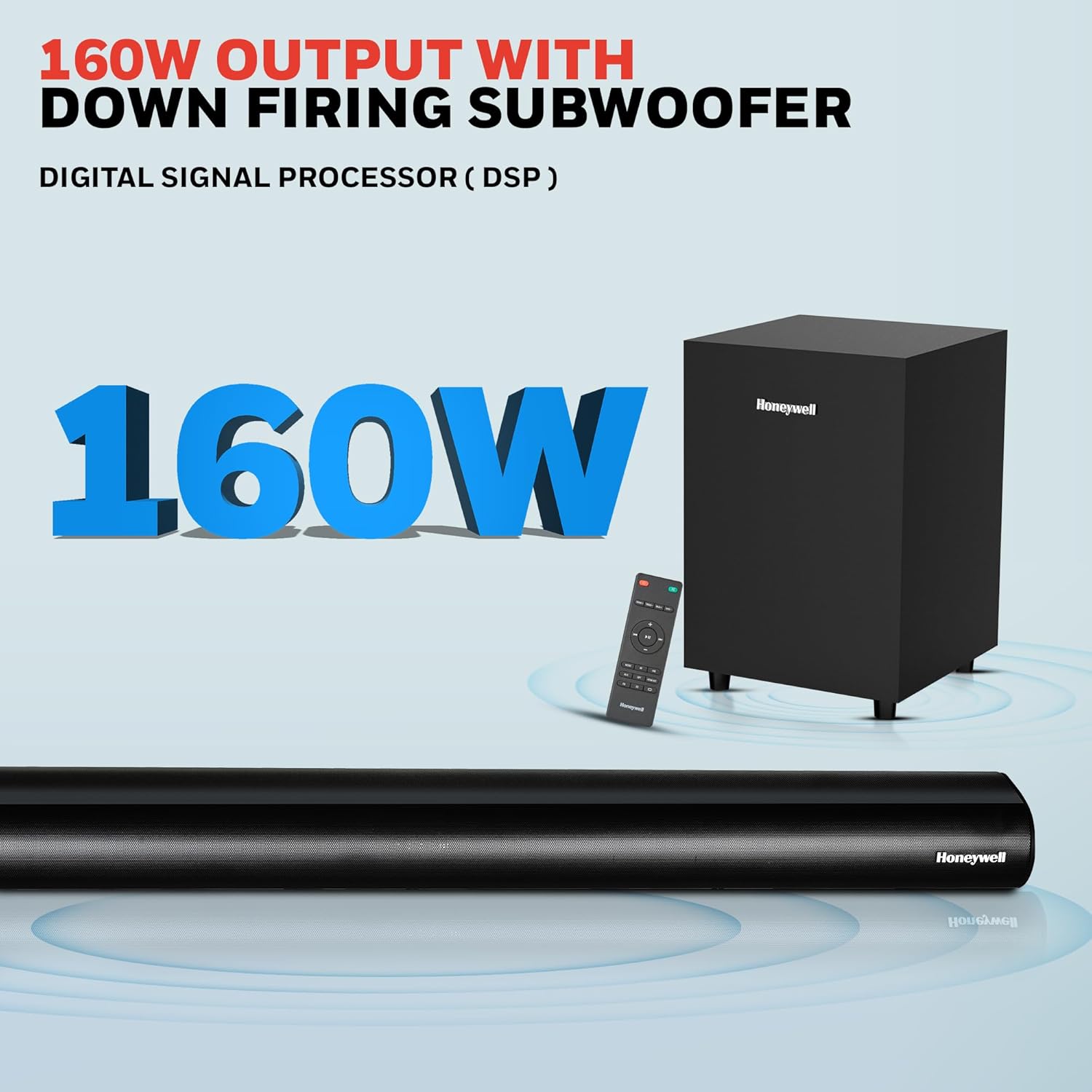
Image: Contents of the Honeywell Trueno U2000 package, including the soundbar, subwoofer, remote control, and cables.
Produk Selesaiview
The Honeywell Trueno U2000 is a 2.1 channel soundbar system designed to enhance your audio experience. It features a soundbar with four 57mm drivers and a wired subwoofer with a 165mm (6-inch) driver, delivering 160W of total output. Multiple connectivity options and EQ modes allow for versatile use.
Ciri-ciri Utama:
- Jumlah Kuasa Output 160W
- 2.1 Channel Configuration with Wired Subwoofer
- Kesambungan Bluetooth V5.3
- Multiple Input Options: HDMI ARC, Optical, AUX, USB
- 3 Equalizer (EQ) Modes: News, Movie, Music
- Paparan LED
- Reka Bentuk Boleh Dipasang di Dinding

Image: Visual representation of the soundbar's features, including its drivers, connectivity, and EQ modes.
Persediaan
1. penempatan
- Bar bunyi: Place the soundbar on a stable, flat surface directly in front of your television, or mount it on the wall below your TV. Ensure there are no obstructions in front of the soundbar.
- subwufer: Position the subwoofer on the floor near the soundbar. The wired connection requires it to be within cable reach of the soundbar.
2. Sambungan
Connect your audio sources to the soundbar using the appropriate cables. The soundbar supports HDMI ARC, Optical, AUX, and USB inputs.

Image: Rear panel of the soundbar displaying various input ports for connectivity.
- ARC HDMI: Connect an HDMI cable from the HDMI ARC port on the soundbar to the HDMI ARC port on your TV. This allows audio from your TV to play through the soundbar and enables TV remote control of the soundbar volume.
- Optik: Connect an optical cable from the OPTICAL port on the soundbar to the optical output port on your TV or other audio device.
- AUX: Use the provided 3.5mm AUX cable to connect the AUX IN port on the soundbar to the audio output (headphone jack) of your device.
- USB: Masukkan pemacu USB ke dalam port USB untuk main balik audio secara langsung.
- subwufer: Connect the wired subwoofer to the SW OUT port on the soundbar.
3. Sambungan Kuasa
Connect the power cord to the soundbar's power input and then plug it into a wall outlet. The soundbar will enter standby mode.
Arahan Operasi
1. Hidupkan/Mati Kuasa
Tekan butang Kuasa pada bar bunyi atau alat kawalan jauh untuk menghidupkan atau mematikan unit.
2. Fungsi Alat Kawalan Jauh
The included remote control provides full functionality for your soundbar.

Image: The remote control for the soundbar, showing its layout and buttons.
- Butang Kuasa: Menghidupkan atau mematikan bar bunyi.
- Butang Input/Sumber: Cycles through input modes (HDMI ARC, Optical, AUX, USB, Bluetooth).
- Kelantangan Naik/Turun: Melaraskan tahap kelantangan induk.
- Butang Bisukan: Membisukan atau menyahredamkan bunyi.
- EQ Mode Buttons: Selects between News, Movie, and Music sound modes.
- Play/Pause, Skip Tracks: For USB and Bluetooth playback.
3. Berpasangan Bluetooth
Untuk menyambungkan peranti Bluetooth:
- Turn on the soundbar and select Bluetooth mode using the Input/Source button on the remote or soundbar. The LED display will show "BT".
- Dayakan Bluetooth pada peranti mudah alih anda (telefon pintar, tablet, dll.).
- Cari untuk "Honeywell Trueno U2000" in your device's Bluetooth list and select it to pair.
- Setelah dipasangkan, bar bunyi akan menunjukkan sambungan yang berjaya, dan anda boleh memainkan audio daripada peranti anda.

Image: Illustrates the process of connecting a mobile device to the soundbar via Bluetooth.
4. Pemilihan Sumber Input
Press the Input/Source button on the remote or the soundbar to cycle through the available input modes: HDMI ARC, OPTICAL, AUX, USB, and Bluetooth. The selected mode will be displayed on the soundbar's LED screen.
5. Mod EQ
The soundbar offers three preset equalizer modes to optimize audio for different content types:
- Mod Berita: Enhances vocal clarity for spoken content.
- Mod Filem: Memberikan bunyi yang dinamiktage with enhanced bass for cinematic experiences.
- Mod Muzik: Offers balanced audio reproduction suitable for various music genres.
Press the corresponding EQ button on the remote control to switch between these modes.

Image: Demonstrates the three EQ modes (News, Movie, Music) and how they can be selected via the remote.
Penyelenggaraan
Pembersihan
- Sentiasa cabut palam bunyi daripada salur keluar kuasa sebelum membersihkan.
- Gunakan kain lembut dan kering untuk mengelap permukaan bar bunyi dan subwoofer.
- Do not use liquid cleaners, aerosol sprays, or solvents, as these may damage the finish or internal components.
Penyimpanan
Jika menyimpan unit untuk tempoh yang lama, cabut plagnya daripada sumber kuasa dan simpan di tempat yang sejuk dan kering, jauh daripada cahaya matahari langsung dan suhu yang melampau.
Menyelesaikan masalah
Jika anda menghadapi masalah dengan bar bunyi anda, rujuk jadual berikut untuk masalah dan penyelesaian biasa.
| Masalah | Kemungkinan Punca | Penyelesaian |
|---|---|---|
| Tiada kuasa | Kord kuasa tidak disambungkan; Salur keluar kuasa tidak aktif | Ensure power cord is securely connected. Check if the power outlet is working by plugging in another device. |
| Tiada bunyi | Incorrect input source; Volume too low; Mute function active; Incorrect cable connection | Pilih sumber input yang betul. Tingkatkan kelantangan. Nyahaktifkan senyap. Periksa semua sambungan kabel audio. |
| Penggandingan Bluetooth gagal | Bar bunyi tidak dalam mod berpasangan; Peranti terlalu jauh; Gangguan | Ensure soundbar is in Bluetooth mode and ready for pairing. Move device closer to soundbar. Avoid other wireless devices. |
| Alat kawalan jauh tidak berfungsi | Bateri berkurangan; Halangan antara alat kawalan jauh dan bar bunyi | Replace remote control batteries. Remove any obstructions. Ensure remote is pointed at the soundbar's sensor. |
| Bunyi herot | Source audio quality is poor; Volume too high; Incorrect EQ mode | Try a different audio source. Reduce volume. Experiment with different EQ modes. |
Jika masalah berterusan selepas mencuba penyelesaian ini, sila hubungi sokongan pelanggan.
Spesifikasi
Detailed technical specifications for the Honeywell Trueno U2000 Soundbar with Subwoofer.
| Ciri | Spesifikasi |
|---|---|
| Nama Model | Bar Bunyi Trueno U2000 |
| Nombor Model | HC000258/AUD/SB/U2000/BLK |
| Jenis Pembesar Suara | Bar bunyi dengan Subwufer |
| Konfigurasi Saluran | 2.1 |
| Jumlah Kuasa Keluaran | 160 Watt (Puncak) / 120 Watt (RMS) |
| Pemacu Bar Bunyi | 4 x 57mm Dynamic Drivers |
| Pemandu Subwoofer | 1 x 165mm (6 Inches) Woofer |
| Teknologi Ketersambungan | Bluetooth V5.3, HDMI ARC, Optical, AUX, USB |
| Julat Bluetooth | Sehingga 10 meter |
| Respons Kekerapan | 20 Hz (Minimum) |
| Nisbah Isyarat-ke-Bunyi | 82 dB |
| Kaedah Kawalan | Alat Kawalan Jauh |
| Jenis Pemasangan | Tabletop Mount, Wall Mountable |
| Dimensi Produk (Bar Bunyi) | 6.5D x 94W x 6H Sentimeter |
| Berat Barang | 1.6 Kilograms (Soundbar) |
| Input Voltage | 240 Volt (AC) |
| bahan | plastik |
| warna | Hitam |
Maklumat Waranti
The Honeywell Trueno U2000 Soundbar with Subwoofer comes with a Waranti Pengeluar 2 Tahun dari tarikh pembelian. Waranti ini meliputi kecacatan pembuatan dan kerosakan dalam keadaan penggunaan biasa.
Please retain your purchase receipt as proof of purchase for warranty claims. The warranty does not cover damage caused by misuse, accidents, unauthorized modifications, or normal wear and tear.
For detailed terms and conditions, please refer to the warranty card included in your package or contact Honeywell customer support.
Sokongan Pelanggan
For any assistance, technical support, or warranty claims, please contact Honeywell customer support.

Image: Honeywell customer support information, including phone number and email address, and a map indicating nationwide service centers.
- Sokongan Telefon: 022-238 535 35 (Isnin hingga Jumaat, 10 pagi hingga 7 petang)
- Sokongan E-mel: Support@honeywellconnection.com
- Sumber Dalam Talian: Lawati Honeywell rasmi webtapak untuk Soalan Lazim dan sokongan tambahan.
Video Produk
Watch this official product video for a visual guide on the Honeywell Trueno U2000 Soundbar.
Video: An official product video demonstrating the features and usage of the Honeywell Trueno U2000 Soundbar.
Maklumat Pelupusan
Do not dispose of this product with household waste. This product contains electronic components that should be recycled according to local regulations. Contact your local authorities or retailer for information on recycling and disposal.