1. Produk Lebihview
The Taiahiro Low Profile Mechanical Keyboard is an ultra-slim 87-key keyboard designed specifically for Mac users, offering a compact 80% layout. It features ultra-low profile brown switches for a tactile and responsive typing experience. This wired keyboard provides full support for Mac function keys and customizable white backlighting.
Ciri-ciri Utama
- Pro Rendahfile Brown Switches for tactile feedback.
- 87-key (TKL) compact design.
- Full Mac Function Keys Support.
- Detachable Type-C connection.
- 18-Modes LED White Backlighting with 4 adjustable brightness levels.
- Durable Aluminum Alloy Panel construction.
- Double Shot Injection Keycaps for comfortable typing.
- Ergonomic design for comfortable angle.
Kandungan Pakej
- Taiahiro Low Profile Papan Kekunci Mekanikal
- Kabel USB-C ke USB-A
- Manual Pengguna
Gambarajah Produk

Gambar 1: Lebihview of the Taiahiro Low Profile Mechanical Keyboard, highlighting its compact design and key layout.
2. Panduan Persediaan
Menyambung Papan Kekunci
- Cari port USB-C di bahagian belakang papan kekunci.
- Sambungkan satu hujung kabel USB-C yang disediakan ke port USB-C papan kekunci.
- Connect the other end of the USB-C cable to an available USB-A port on your computer (MacBook Pro/Air, iMac, Mac Mini, or PC).
- Papan kekunci ini boleh dipasang dan digunakan dan akan dikenali secara automatik oleh sistem pengendalian anda.
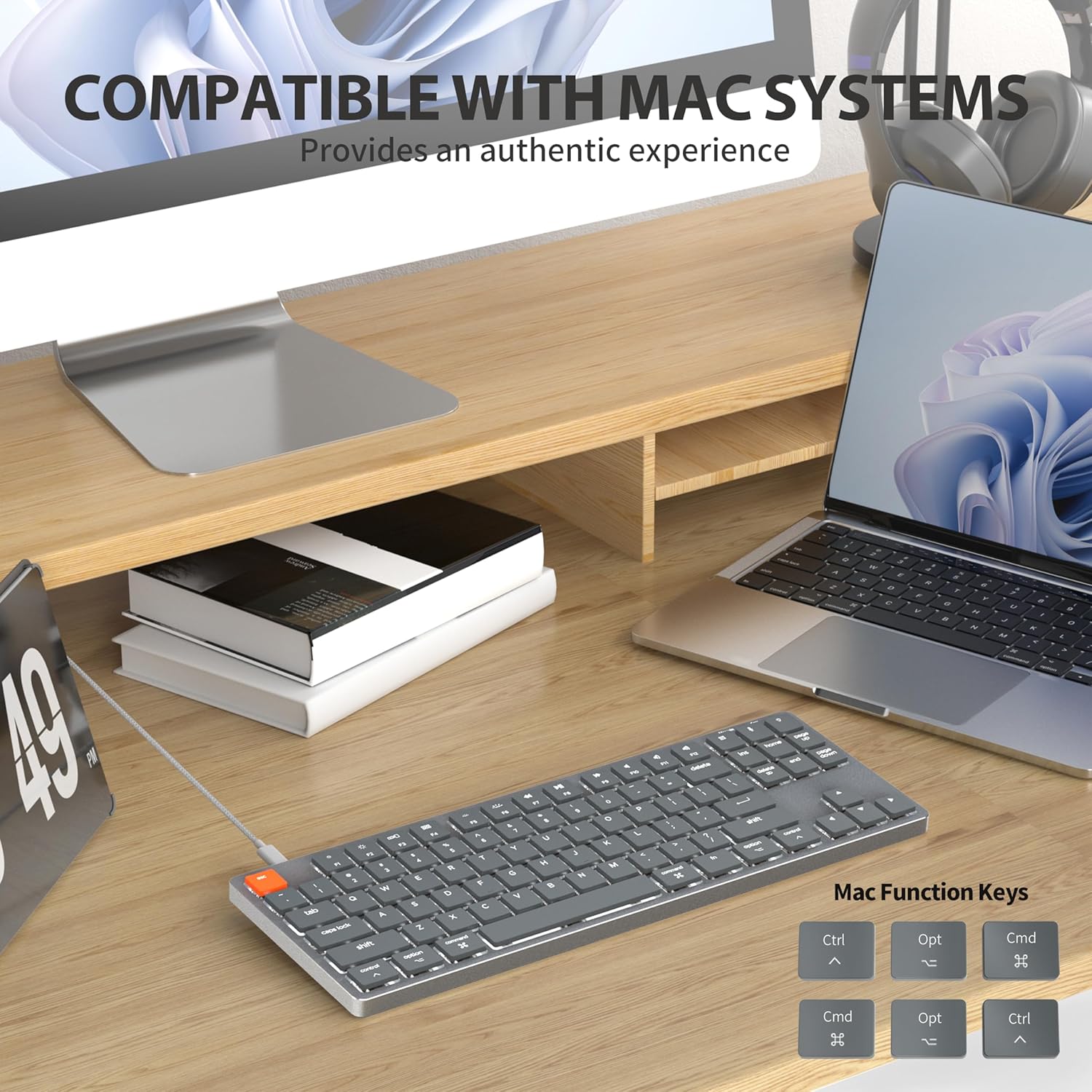
Figure 2: Connecting the detachable Type-C cable to the keyboard for convenience and efficiency.
Keserasian Sistem
This keyboard is designed for full compatibility with Mac OS and Windows operating systems. It supports Mac Mini, MacBook Air, MacBook Pro, PC, and iMac devices.

Figure 3: The keyboard seamlessly integrated with a Mac system, providing an authentic user experience.
3. Arahan Operasi
Menaip Asas
Yang rendah-profile brown switches provide a quiet yet responsive typing experience with satisfying tactile feedback. The ultra-thin design and high-quality keycaps enhance fingertip comfort during extended use.
Kawalan Lampu Belakang
The keyboard features 18 distinct LED white backlighting modes. You can cycle through these modes and adjust brightness levels using the dedicated function keys. Refer to the keyboard's layout for specific key combinations, typically involving the 'Fn' key combined with other keys (e.g., Fn + F1/F2 for brightness, Fn + arrow keys for modes).

Figure 4: The keyboard's 18-modes LED white backlighting, offering customizable illumination.
Mac Function Keys Support
The keyboard is specifically designed to support Mac function keys, allowing you to easily control system functions such as screen brightness, volume, and media playback directly from the keyboard. These functions are typically accessed by pressing the 'Fn' key in combination with the corresponding F-keys (F1-F12).
Kekunci Pintasan
The keyboard includes multifunctional shortcut keys for enhanced productivity. These keys provide quick access to various commands, including multimedia controls. Consult the keycap legends for specific shortcut functions.

Figure 5: The keyboard's multifunctional shortcut keys, providing 100% fully loaded functionality.
4. Penyelenggaraan dan Penjagaan
Membersihkan Papan Kekunci
- Putuskan sambungan papan kekunci daripada komputer anda sebelum membersihkan.
- Gunakan kain lembut dan tidak berbulu sedikit dampdisapu dengan air atau larutan pembersih lembut untuk mengelap penutup kekunci dan permukaan.
- Untuk habuk dan serpihan di antara kunci, gunakan udara termampat atau berus kecil.
- Elakkan menggunakan bahan kimia yang keras, pembersih yang melelas, atau kelembapan berlebihan.
Penyimpanan
When not in use for extended periods, store the keyboard in a cool, dry place away from direct sunlight and extreme temperatures to prevent damage.
5. Penyelesaian masalah
Papan Kekunci Tidak Membalas
- Semak Sambungan: Pastikan kabel USB-C disambungkan dengan selamat pada papan kekunci dan komputer anda.
- Cuba Port Berbeza: Plug the keyboard into a different USB port on your computer.
- Mulakan semula Komputer: Kadangkala permulaan semula sistem yang mudah boleh menyelesaikan masalah sambungan.
- Semak Kabel: If possible, try using a different USB-C cable to rule out a faulty cable.
Isu Lampu Latar
- Enable Backlight: Ensure the backlight is not turned off. Use the designated function keys (e.g., Fn + backlight key) to toggle it on/off.
- Laraskan Kecerahan: Cycle through brightness levels using the appropriate function keys (e.g., Fn + F1/F2) to ensure it's not set to the lowest level.
- Tukar Mod: Try cycling through different backlight modes to see if the issue persists across all modes.
Mac Compatibility Concerns
- Versi Sistem Operasi: Ensure your Mac OS is up to date or meets the minimum requirements for peripheral compatibility.
- Jenis Pemproses: While designed for Mac, some specific processor architectures (e.g., M2/ARM) might require updated drivers or system settings. Check Taiahiro's official support page for any specific driver downloads or compatibility notes.
- Mod Papan Kekunci: If your keyboard has a physical switch or key combination to toggle between Mac/Windows mode, ensure it is set to Mac mode.
6. Spesifikasi Teknikal
| Ciri | Perincian |
|---|---|
| Nombor Model | 201 |
| Jenama | Taiahiro |
| Jenis Papan Kekunci | Pro Rendahfile Papan Kekunci Mekanikal |
| Jenis Suis | Suis coklat |
| Bilangan Kunci | 87 |
| Ketersambungan | Berwayar (USB-C) |
| Pencahayaan latar | 18-Modes LED White Backlighting |
| bahan | Aluminum Alloy Panel |
| warna | Hitam-Kelabu |
| Dimensi Produk | 12.5 x 1.8 x 34.59 cm (4.92 x 0.71 x 13.62 inci) |
| Berat Barang | 971 g |
| OS yang serasi | Mac OS, Windows |
Dimensions and Profile

Figure 6: Detailed dimensions of the 87-key ultra-thin mechanical keyboard, illustrating its compact and slim profile.
Teknologi Suis

Figure 7: Comparison of Ultra Low Profile Brown Switch with standard mechanical switches, highlighting shorter actuation point for faster and more precise input.
Keycap Design

Figure 8: The ultra-thin double shot injection keycaps, designed for comfortable and durable typing.
Ergonomik
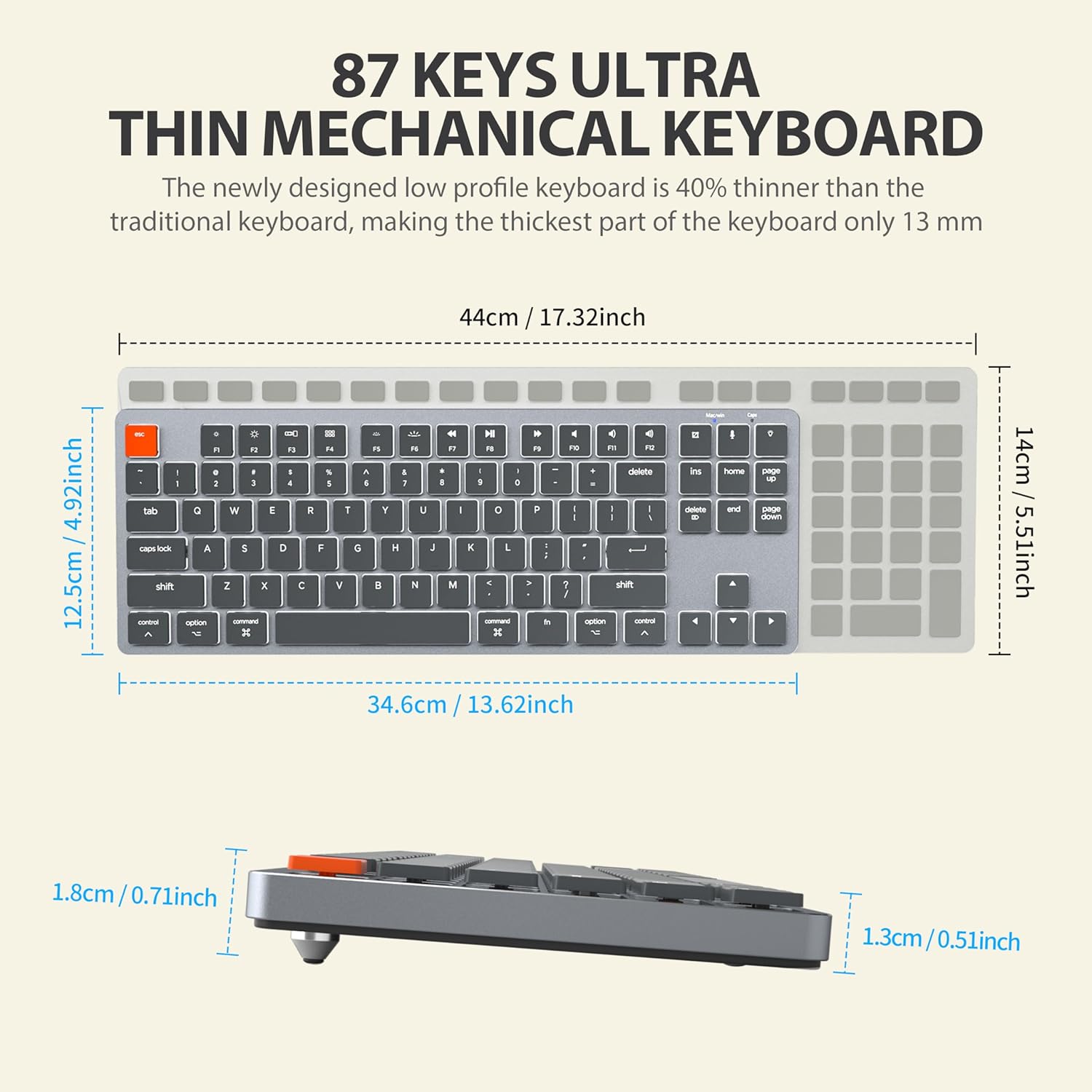
Figure 9: The ergonomic design of the keyboard, providing a comfortable angle for extended typing sessions.
7. Waranti dan Sokongan
Maklumat Waranti
This Taiahiro product comes with a standard manufacturer's warranty. Please refer to the product packaging or the official Taiahiro website for specific warranty terms and conditions, including coverage period and claim procedures.
Sokongan Pelanggan
For technical assistance, troubleshooting, or any product-related inquiries, please visit the official Taiahiro webtapak atau hubungi bahagian perkhidmatan pelanggan mereka. Maklumat hubungan biasanya boleh didapati pada pembungkusan produk atau kehadiran rasmi dalam talian jenama.