1. Pengenalan
Terima kasih kerana membeliasing the Acctim Pale Green Silicone Digital Alarm Clock. This manual provides detailed instructions for setting up, operating, and maintaining your new alarm clock. Please read this manual thoroughly before use and retain it for future reference.
2. Maklumat Keselamatan
- Jauhkan jam daripada air dan kelembapan yang tinggi.
- Elakkan mendedahkan jam kepada cahaya matahari langsung atau suhu yang melampau.
- Jangan cuba membuka atau membaiki jam sendiri. Hubungi kakitangan yang berkelayakan untuk servis.
- Buang bateri terpakai secara bertanggungjawab mengikut peraturan tempatan.
- Jauhkan bateri daripada kanak-kanak.
3. Kandungan Pakej
- Acctim Pale Green Silicone Digital Alarm Clock (1 unit)
- Manual Arahan (dokumen ini)
4. Produk Lebihview
The Acctim Digital Alarm Clock features an easy-to-read jumbo display, a soft silicone case, and Smartlite technology for automatic backlight adjustment.
Depan View
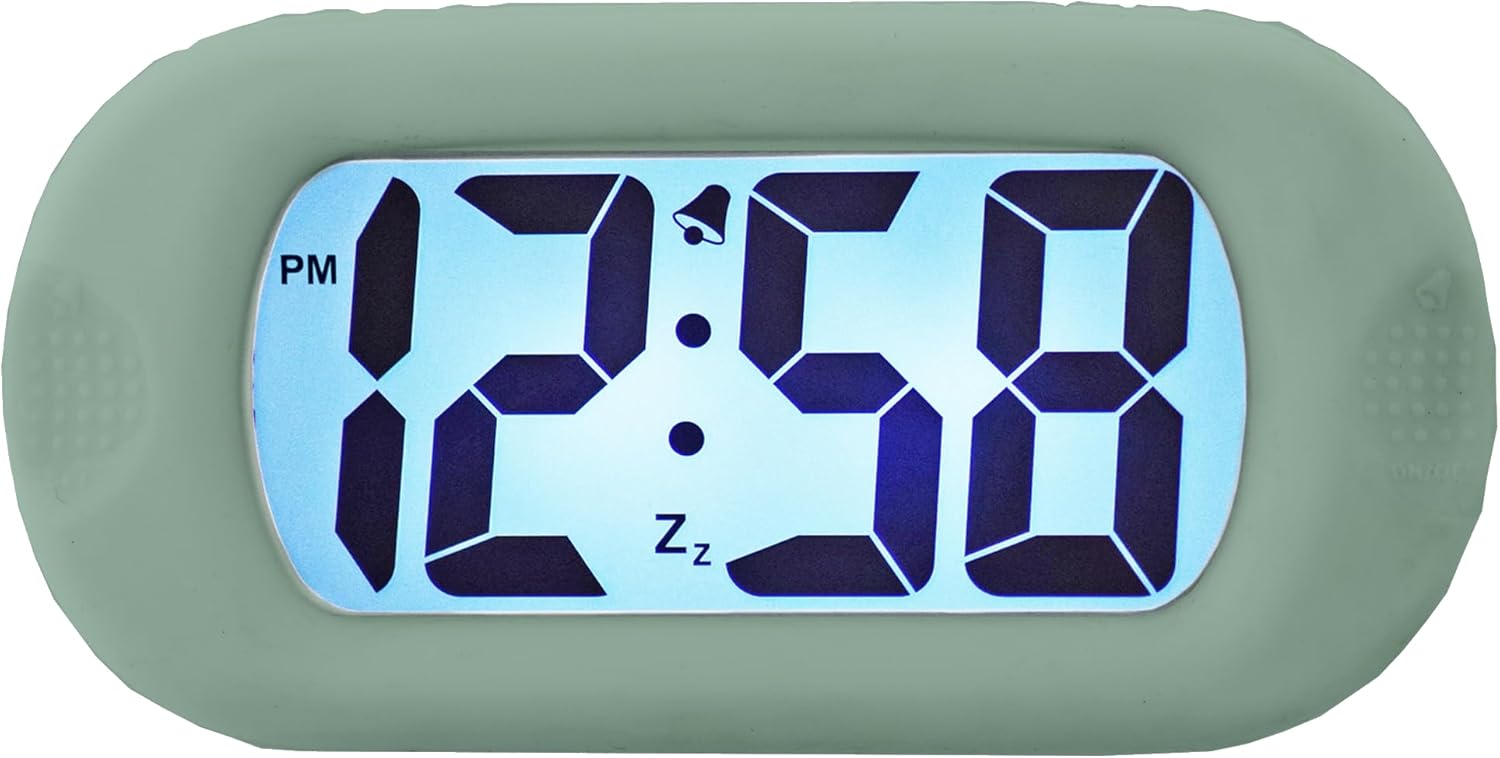
Rajah 4.1: Depan view of the clock display.
This image shows the main display of the clock, featuring large, clear digital numbers. It indicates the time (e.g., 12:58 PM), an alarm icon (bell), and a snooze icon (Zz).
Kawalan Sampingan

Rajah 4.2: Depan view with side controls.
This image illustrates the clock's front, showing the 'SET' button on the left side and the 'ON/OFF' button on the right side, used for various settings and alarm control.
belakang View dan Kompartmen Bateri

Rajah 4.3: Belakang view daripada jam.
The back of the clock features the 'TIME SET' button and the battery compartment, which is where batteries are inserted to power the device.
Smartlite Feature (Backlight)

Figure 4.4: Backlit display in darkness.
This image shows the clock's display illuminated in a dark setting, demonstrating the Smartlite feature which provides an automatic backlight for visibility in low light conditions.
Dimensi

Figure 4.5: Clock dimensions.
This image provides the physical dimensions of the clock, showing a height of 6.9 cm and a width of 14 cm.
5. Persediaan
5.1 Pemasangan Bateri
- Cari penutup petak bateri di bahagian belakang jam (rujuk Rajah 4.3).
- Luncurkan atau buka klip penutup untuk membuka petak.
- Insert the required batteries (not included) according to the polarity indicators (+ and -) inside the compartment.
- Gantikan penutup petak bateri dengan selamat.
5.2 Hidupkan Kuasa Awal
Once batteries are installed, the clock display should activate. If not, ensure batteries are correctly inserted and fully charged.
6. Arahan Operasi
6.1 Menetapkan Masa
- Tekan dan tahan butang SET button (left side) until the hour digits begin to flash.
- Gunakan MASA DITETAPKAN button (back) to adjust the hour. Press repeatedly to advance the hour. Pay attention to the AM/PM indicator.
- Tekan ke SET butang sekali lagi untuk beralih ke digit minit.
- Gunakan MASA DITETAPKAN butang untuk menyesuaikan minit.
- Tekan ke SET button one more time to confirm the time and exit setting mode.
6.2 Menetapkan Penggera
- Tekan ke SET button once (do not hold) to enter alarm setting mode. The alarm time will be displayed, and the alarm icon (bell) may flash.
- Tekan dan tahan butang SET butang sehingga digit jam penggera berkelip.
- Gunakan MASA DITETAPKAN button (back) to adjust the alarm hour.
- Tekan ke SET butang sekali lagi untuk beralih ke digit minit penggera.
- Gunakan MASA DITETAPKAN butang untuk melaraskan minit penggera.
- Tekan ke SET butang sekali lagi untuk mengesahkan masa penggera.
6.3 Mengaktifkan/Menyahaktifkan Penggera
To turn the alarm ON or OFF, press the HIDUP/MATI button (right side). The alarm bell icon on the display indicates if the alarm is active.
6.4 Fungsi Tunda
When the alarm sounds, press any button (except ON/OFF) to activate the snooze function. The alarm will temporarily stop and sound again after a few minutes (typical snooze duration is 5-9 minutes, specific duration may vary). The 'Zz' icon on the display indicates snooze is active.
6.5 Smartlite Automatic Backlight
The clock features a Smartlite sensor that automatically adjusts the backlight intensity based on ambient light conditions. In low light, the display will gently illuminate for easy viewing without manual intervention.
7. Penyelenggaraan
7.1 Pembersihan
Wipe the clock with a soft, dry cloth. Do not use abrasive cleaners or solvents, as they may damage the silicone case or display.
7.2 Penggantian Bateri
When the display becomes dim or the clock stops functioning, it is time to replace the batteries. Follow the battery installation steps in Section 5.1.
8. Penyelesaian masalah
| Masalah | Kemungkinan Punca | Penyelesaian |
|---|---|---|
| Paparan kosong atau malap. | Low or dead batteries. Incorrect battery installation. | Replace batteries with new ones. Ensure batteries are inserted with correct polarity. |
| Penggera tidak berbunyi. | Alarm is not activated. Alarm volume is too low (if adjustable). | Tekan ke HIDUP/MATI button to activate the alarm (bell icon should appear). Ensure alarm time is set correctly. |
| Masa tidak betul. | Masa tidak ditetapkan dengan betul. | Ikut arahan dalam Bahagian 6.1 untuk menetapkan semula masa. |
9. Spesifikasi
- Jenama: Acctim
- model: B0C2G496MT
- warna: Hijau pucat
- Jenis Paparan: digital
- Ciri Khas: Luminous (Smartlite automatic backlight)
- Sumber Kuasa: Dikuasakan Bateri
- Bahan: silikon
- Bateri Termasuk: Tidak
- Dimensi: Approximately 14 cm (Width) x 6.9 cm (Height)
10. Waranti dan Sokongan
For warranty information or technical support, please refer to the documentation provided with your purchase or contact Acctim customer service directly. Keep your proof of purchase for warranty claims.


