1. Pengenalan
This manual provides essential instructions for the safe and efficient operation of your Motorola Six-Pocket Multi-Unit Charger. This charger is designed to simultaneously charge up to six compatible Motorola radios or batteries, ensuring your communication devices are always ready for use. Please read this manual thoroughly before using the charger.
2. Maklumat Keselamatan
Always observe the following safety precautions to prevent injury or damage to the charger or connected devices:
- Use only the power supply provided with the charger.
- Jangan dedahkan pengecas kepada hujan atau lembapan.
- Jangan kendalikan pengecas jika ia telah rosak dalam apa jua cara.
- Pastikan pengudaraan yang betul di sekeliling pengecas semasa operasi.
- Jangan cuba membuka atau mengubah suai pengecas.
- Jauhkan daripada kanak-kanak.
3. Kandungan Pakej
Sahkan bahawa pakej anda mengandungi item berikut:
- Motorola Six-Pocket Multi-Unit Charger (PMLN7101A / PMLN7101 / PMLN8569)
- US/NA Power Supply
4. Persediaan
- Place the multi-unit charger on a flat, stable surface in a well-ventilated area.
- Connect the provided US/NA power supply to the charger's power input port.
- Plug the power supply into a standard electrical outlet. The charger is now ready for use.
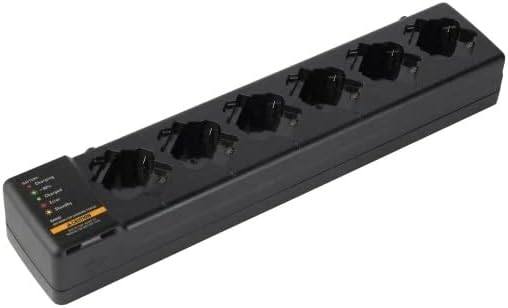
Rajah 4.1: Satu overhed view of the Motorola Six-Pocket Multi-Unit Charger, showing six charging pockets and an indicator panel on the left side.
5. Arahan Operasi
The charger is designed for use with compatible Motorola radios and batteries, including models SL300, TLK100, SL500, SL500E, and SLN1000.
5.1 Charging Radios or Batteries
- Pastikan pengecas dihidupkan.
- Insert a compatible radio or battery into one of the six charging pockets. Ensure it is seated correctly.
- Observe the LED indicator for the corresponding pocket to determine the charging status.
5.2 Status Penunjuk LED
Each charging pocket features an LED indicator to provide real-time status:
- Merah (Pepejal): Bateri sedang dicas.
- Hijau (Pepejal): Bateri dicas penuh.
- Amber (Solid): Battery is charging to 90% capacity.
- Merah (berkelip): Error condition (e.g., battery fault, temperature issue). Remove the battery and reinsert. If the error persists, refer to the Troubleshooting section.
- Tiada Cahaya: Standby mode or no battery/radio inserted.
The indicator panel on the left side of the charger provides a legend for these LED statuses.
6. Penyelenggaraan
Untuk memastikan prestasi optimum dan jangka hayat pengecas anda:
- Pastikan pengecas bersih dan bebas daripada habuk dan serpihan. Gunakan kain lembut dan kering untuk pembersihan.
- Jangan gunakan bahan kimia atau pembersih kasar.
- Simpan pengecas di tempat yang sejuk dan kering apabila tidak digunakan.
- Periksa kord kuasa secara kerap untuk sebarang tanda kerosakan.
7. Penyelesaian masalah
| Masalah | Kemungkinan Punca | Penyelesaian |
|---|---|---|
| Pengecas tidak dihidupkan. | No power to the outlet; power supply not connected; faulty power supply. | Check outlet with another device; ensure power supply is securely connected; try a different power supply if available. |
| Penunjuk LED berkelip merah. | Battery fault; incorrect battery type; temperature outside operating range. | Remove and reinsert the battery; ensure battery is compatible; move charger to a room temperature environment. |
| Bateri tidak dicas. | Battery not properly seated; dirty contacts; faulty battery. | Ensure battery is fully inserted; clean battery and charger contacts; try a different battery. |
8. Spesifikasi
| Ciri | Perincian |
|---|---|
| Nombor Model | PMLN7101A, PMLN7101, PMLN8569 |
| Jenama | Penyelesaian Motorola |
| Dimensi Produk | 3 x 4 x 15 inci (7.62 x 10.16 x 38.1 cm) |
| Berat Barang | 3.29 paun (1.49 kg) |
| warna | Hitam |
| Input Voltage | 240 Volt |
| Keluaran Voltage | 7.4 Volt |
| Radio Serasi | SL300, TLK100, SL500, SL500E, SLN1000 |
9. Waranti dan Sokongan
Specific warranty information for this product was not provided in the available data. For detailed warranty terms and conditions, please refer to the documentation included with your purchase or visit the official Motorola Solutions website. For technical support or service inquiries, please contact Motorola Solutions customer service.


