1. Maklumat Keselamatan Penting
Sila baca semua arahan dengan teliti sebelum pemasangan dan penggunaan. Simpan manual ini untuk rujukan masa hadapan.
- Jangan berdiri di atas kerusi.
- Jangan gunakan kerusi jika mana-mana bahagiannya rosak atau hilang.
- Pastikan semua bolt dan skru diketatkan dengan selamat sebelum digunakan. Periksa dan ketatkan semula secara berkala jika perlu.
- Jauhkan kanak-kanak dan haiwan peliharaan semasa pemasangan. Bahagian-bahagian kecil mungkin boleh menyebabkan tercekik.
- Jangan dedahkan kerusi kepada cahaya matahari langsung atau suhu yang melampau.
- The Bluetooth speakers contain a built-in battery. Do not use the speakers while charging.
- Maximum weight capacity: Information not explicitly provided, but general gaming chair limits are usually around 120-150kg. Users should refer to product packaging or official website for exact limits.
2. Kandungan Pakej
Sahkan bahawa semua komponen hadir sebelum memulakan pemasangan. Jika mana-mana bahagian yang hilang atau rosak, hubungi sokongan pelanggan.
- Backrest
- Kusyen Tempat Duduk
- Armrests (Left & Right)
- Legs/Base
- Perkakasan Pemasangan (Skru, Pencuci, Kunci Allen)
- Power Adapter for Bluetooth Speakers
- Lumbar Support Cushion (with vibration function)
- Kusyen Sandaran Kepala
3. Persediaan dan Pemasangan
Follow these steps to assemble your GTRACING Gaming Chair. It is recommended to have two people for assembly.
- Lampirkan Pangkalan: Secure the chair legs/base to the bottom of the seat cushion using the provided hardware.
- Pasang tempat letak tangan: Attach the armrests to the sides of the seat cushion.
- Sambung Sandaran: Align the backrest with the seat cushion and secure it using the bolts.
- Important Note for Lumbar Support: If your model includes integrated side speakers, ensure these are properly positioned and connected before fully securing the backrest, as this may affect the fit of the lumbar support cushion. Some users have reported difficulty fitting the lumbar support if the side speakers are not attached first.
- Attach Headrest and Lumbar Support: Place the headrest and lumbar support cushions as desired. The lumbar support cushion has a vibration function.
- Semakan Akhir: Ensure all connections are tight and the chair is stable before use.
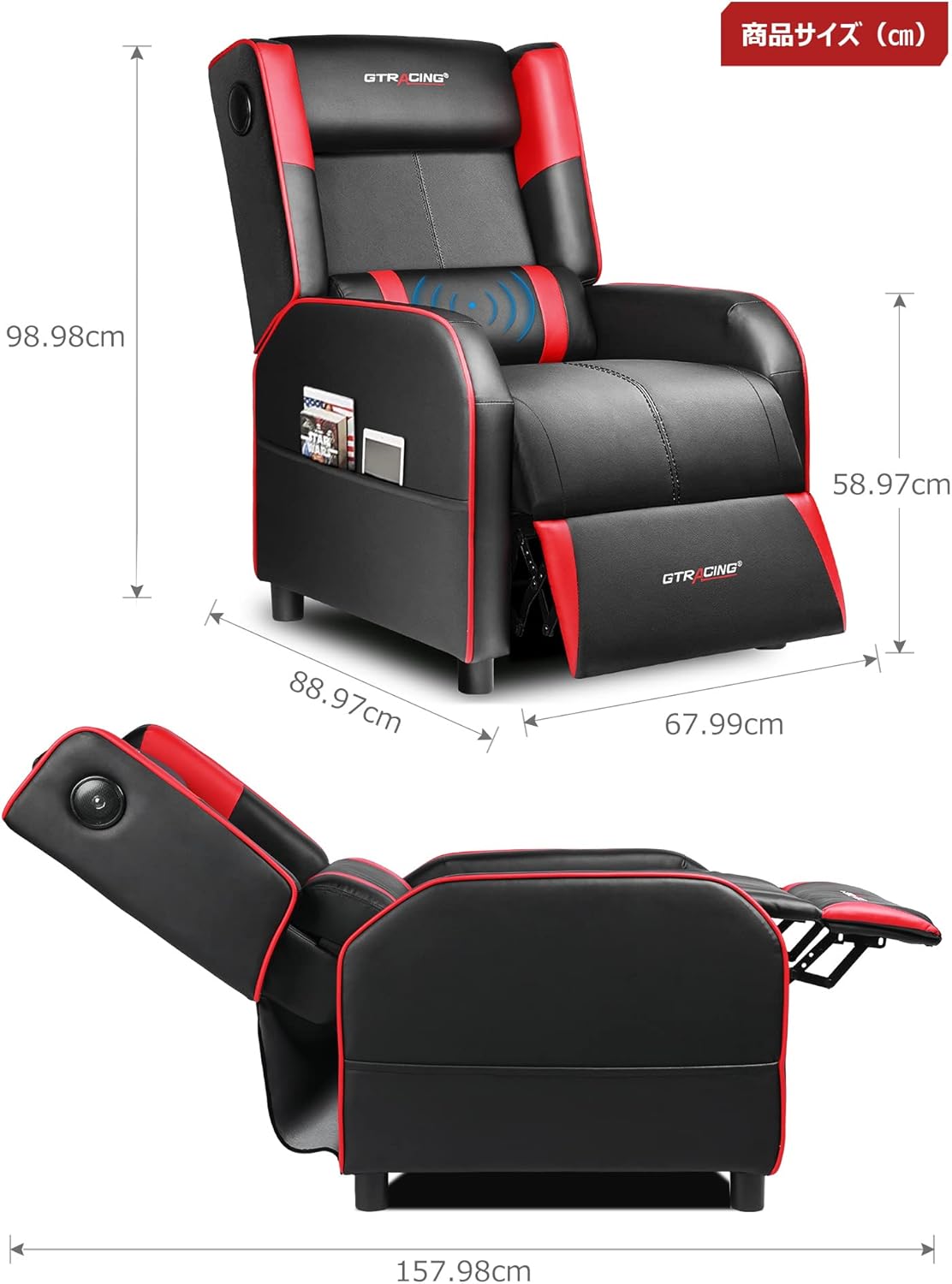
Image: Overall dimensions of the GTRACING Gaming Chair, showing height, width, and depth in both upright and reclined positions.
4. Arahan Operasi
4.1 Operasi Pembesar Suara Bluetooth
Your GTRACING Gaming Chair features integrated Bluetooth 5.1 speakers for an immersive audio experience.
- Hidupkan/Mati Kuasa: Locate the power button on the speaker control panel (usually on the side of the chair). Press and hold to power on or off.
- Berpasangan: Once powered on, the speakers will enter pairing mode. On your device (PC, smartphone, tablet), search for Bluetooth devices and select "GTRACING Speaker" (or similar name) to connect.
- Julat Sambungan: The speakers support a wireless connection range of approximately 15 meters (49 feet).
- Hayat Bateri: The built-in battery provides up to 15 hours of continuous playback on a full charge.
- mengecas: Connect the provided power adapter to the charging port on the speaker control panel. Note: The speakers cannot be used while charging.
- Keserasian Konsol: For PS4, PS5, XBOX, or SWITCH consoles, a dedicated USB adapter (sold separately) is required for low-latency connection (approx. 0.1 seconds delay).

Image: A user enjoying a game while seated in the GTRACING Gaming Chair, highlighting the integrated Bluetooth speakers located in the backrest for an immersive audio experience.
4.2 Fungsi Berbaring
Adjust the backrest to your preferred angle for various activities.
- Julat Pelarasan: The backrest can recline from 95° to 150°.
- Mekanisme Berbaring: To recline, push the lever (usually on the right side of the chair) and lean back. Release the lever to lock the position.
- Integrated Ottoman: The ottoman extends and retracts in synchronization with the backrest, providing continuous leg support as you recline.
- Recommended Modes:
- 90° Game/Work Mode: Upright position for focused tasks.
- 115° Entertainment Mode: Slightly reclined for watching movies or casual browsing.
- 150° Nap Mode: Fully reclined for short rests or naps.
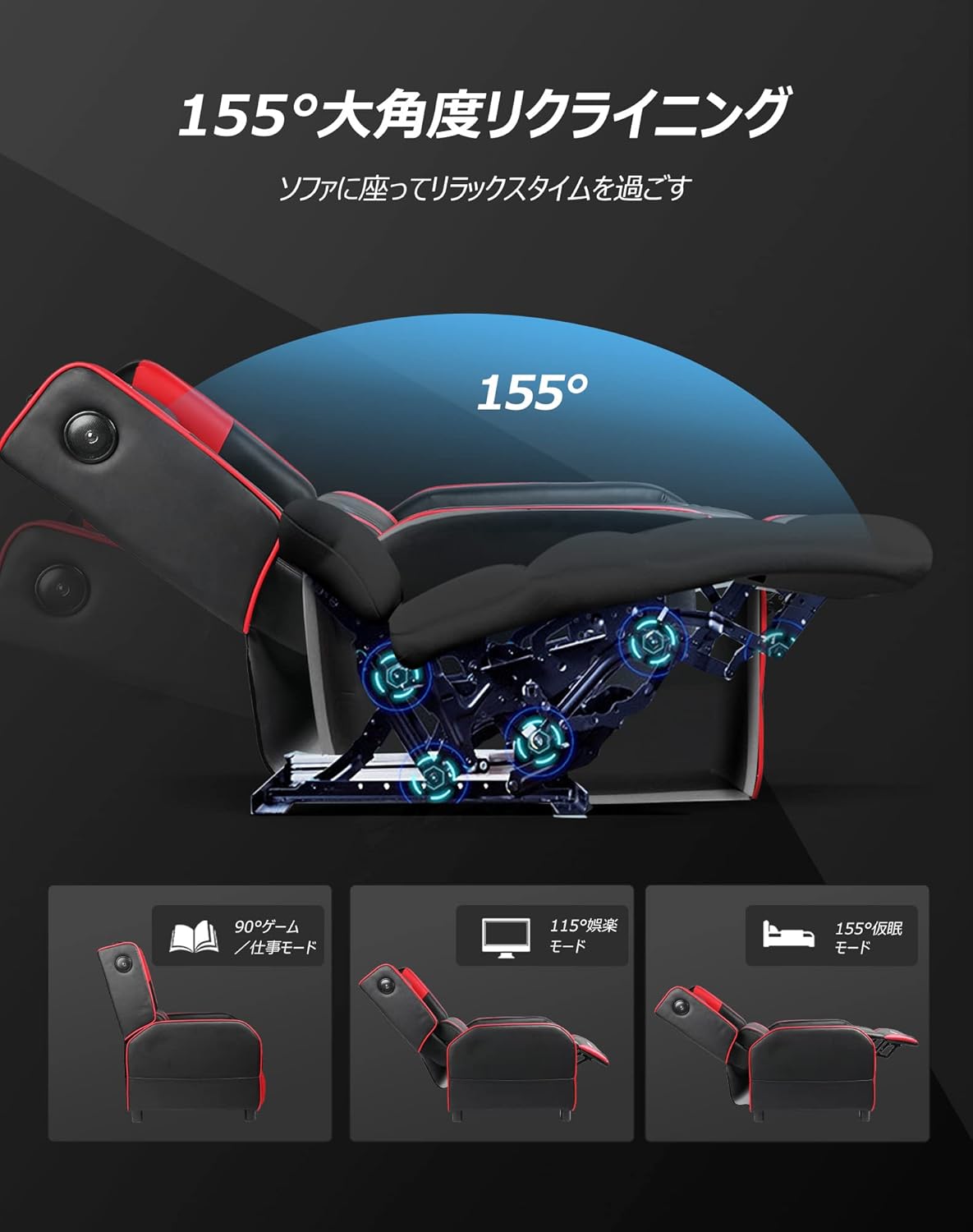
Image: Diagram illustrating the reclining function of the GTRACING Gaming Chair, showing the chair in upright (90°), entertainment (115°), and nap (155°) positions, with the ottoman extending accordingly.
4.3 Vibration Lumbar Support
The lumbar support cushion features a vibration function designed to alleviate lower back discomfort during prolonged sitting.
- Pengaktifan: Connect the lumbar support's USB cable to a power source (e.g., USB port on a computer, power bank, or wall adapter).
- Faedah: The vibration helps to distribute pressure, reducing stress on the pelvis, lumbar spine, and sacrum.
4.4 Seat Comfort Features
The seat cushion is engineered for superior comfort and support.
- Integrated Urethane Cushion: The seat uses a highly elastic, integrated molded urethane cushion.
- Internal Spring System: Springs are incorporated within the urethane for enhanced elasticity and durability.
- Thick Backrest and Seat: The generous padding of both the backrest and seat cradles the body, providing a sofa-like seating experience.

Imej: Keratan rentas view of the GTRACING Gaming Chair's seat cushion, detailing the layers of high-quality PU leather, high-rebound urethane, high-density urethane, internal pocket coils, and integrated molded urethane for optimal comfort and support.
5. Penyelenggaraan
Penjagaan yang betul akan memanjangkan hayat dan penampilan kerusi permainan anda.
- Pembersihan: Lap bersih dengan lembut, damp kain. Elakkan bahan kimia yang keras atau pembersih yang kasar.
- Tumpahan: Toskan tumpahan serta-merta dengan kain bersih dan kering.
- Pendedahan cahaya matahari: Elakkan pendedahan berpanjangan kepada cahaya matahari langsung untuk mengelakkan pudar dan degradasi bahan.
- Pemeriksaan perkakasan: Periksa dan ketatkan semua skru dan bolt secara berkala untuk memastikan kestabilan.
6. Penyelesaian masalah
If you encounter any issues, refer to the following common solutions.
- Pembesar Suara Bluetooth Tidak Bersambung:
- Ensure the speakers are powered on and in pairing mode.
- Semak sama ada Bluetooth didayakan pada peranti anda.
- Move your device closer to the chair (within 15m).
- Lupakan peranti daripada tetapan Bluetooth anda dan cuba pasangkan semula.
- Ensure the speakers are not currently charging.
- Lumbar Support Not Fitting During Assembly:
- As noted in the assembly section, ensure any integrated side speakers are attached before fully securing the backrest, as this can impact the fit of the lumbar support cushion.
- Reclining Mechanism Not Working Smoothly:
- Check for any obstructions around the reclining mechanism.
- Ensure the lever is fully engaged or disengaged.
- Verify that all assembly bolts related to the backrest are securely tightened.
7. Spesifikasi
| Nombor Model | GT208M |
| Jenama | MENARIK |
| bahan | Kulit Tiruan (Kulit PU) |
| warna | merah |
| Dimensi Produk (Tegak) | Approx. 80 cm (Depth) x 80 cm (Width) x 80 cm (Height) |
| Berat Produk | 30 kg |
| Dimensi Pakej | 77 cm x 69 cm x 52 cm |
| Berat Pakej | 28 kg |
| Sudut Berbaring | 95° hingga 150° |
| Versi Bluetooth | 5.1 |
| Hayat Bateri Pembesar Suara | Up to 15 hours (continuous playback) |
| Pengecasan Speaker | Not usable while charging |
| Arahan Penjagaan | Lap bersih |
8. Waranti dan Sokongan
For warranty information or technical support, please refer to the official GTRACING webtapak atau hubungi perkhidmatan pelanggan mereka secara langsung.
GTRACING offers after-sales support for their products. Please retain your proof of purchase for any warranty claims.
You can often find support contact details on the manufacturer's webtapak atau melalui peruncit tempat anda membeli produk tersebut.


