1. Produk Lebihview
The ATTACK SHARK K98 is a 96% layout (100-key) wireless mechanical keyboard designed for versatility and comfort. It features tri-mode connectivity (2.4Ghz, Bluetooth, USB-C), hot-swappable switches, dynamic RGB backlighting, and an ergonomic design with a cloud-shaped wrist rest.

Imej: Selesaiview of the K98 keyboard highlighting its 3000mAh battery, triple modes, dynamic RGB backlight, delicate adjusting satellite switch, hot-swappable design, all keys no conflict feature, yellow/red switch options, and ergonomic design.
2. Kandungan Pakej
Sebelum meneruskan persediaan, sila pastikan semua item ada di dalam pakej:
- ATTACK SHARK K98 Wireless Mechanical Keyboard
- Cloud Wrist Rest
- USB-C to USB-A Coiled Cable with Metal Aviator Connector
- Penarik Suis (untuk pertukaran panas)
- Manual Pengguna (dokumen ini)
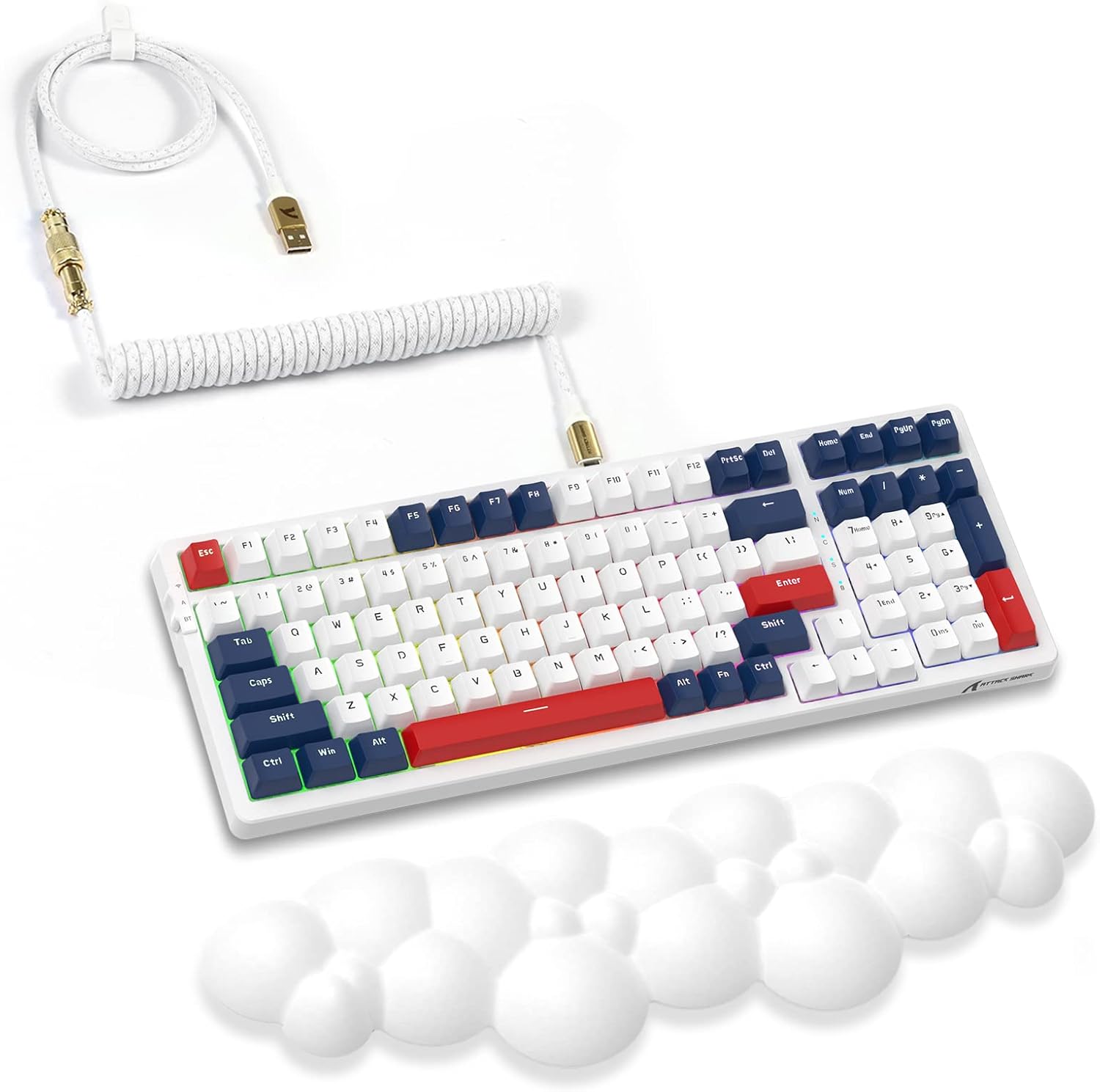
Image: The K98 mechanical keyboard shown with its included white coiled USB-C cable and the white cloud-shaped wrist rest.
3. Panduan Persediaan
3.1 Pengecasan Awal
The keyboard comes with a built-in 3000mAh rechargeable battery. For optimal performance, it is recommended to fully charge the keyboard before first use.
- Connect the USB-C end of the provided coiled cable to the keyboard's USB-C port.
- Sambungkan hujung kabel USB-A ke port USB berkuasa pada komputer anda atau penyesuai dinding USB.
- The keyboard's indicator light will show charging status (refer to keyboard's specific LED indicators for details, usually red for charging, green for full).

Image: Close-up of the high-quality coiled cable, showing its Type-C plug, metal aviator connector, and standard USB-A connector.
3.2 Menyambung Papan Kekunci
The K98 keyboard supports three connectivity modes:
3.2.1 Mod Tanpa Wayar 2.4G
- Cari penerima USB 2.4G (biasanya disimpan dalam petak pada papan kekunci).
- Pasangkan penerima USB 2.4G ke port USB yang tersedia pada komputer anda.
- Switch the keyboard's mode switch (typically on the back or side) to the 2.4G position.
- The keyboard should automatically connect. If not, press the designated pairing key combination (refer to specific keyboard instructions, often Fn + 4 for 2.4G).
3.2.2 Mod Bluetooth
The keyboard supports Bluetooth 5.0 and can connect to multiple devices.
- Switch the keyboard's mode switch to the Bluetooth position.
- Press and hold the Bluetooth pairing key combination (e.g., Fn + 1, Fn + 2, or Fn + 3) for 3-5 seconds until the indicator light flashes rapidly, indicating pairing mode.
- Pada peranti anda (komputer, tablet, telefon pintar), buka tetapan Bluetooth dan cari peranti baharu.
- Select "ATTACK SHARK K98" (or similar name) from the list of available devices to pair.
- Sebaik sahaja disambungkan, lampu penunjuk akan berhenti berkelip.
3.2.3 Mod Berwayar USB-C
- Connect the USB-C end of the provided coiled cable to the keyboard's USB-C port.
- Sambungkan hujung kabel USB-A ke port USB pada komputer anda.
- Switch the keyboard's mode switch to the Wired/USB position.
- The keyboard will be recognized as a standard USB keyboard and is ready for use.
3.3 Attaching the Cloud Wrist Rest
The included cloud-shaped wrist rest provides ergonomic support for comfortable long-term use.
- Letakkan papan kekunci pada permukaan rata.
- Position the cloud wrist rest directly in front of the keyboard, aligning its length with the keyboard's front edge.
- Ensure the non-slip base of the wrist rest is in contact with the desk surface for stability.

Image: Illustration showing the ergonomic benefits of the cloud wrist rest, demonstrating how it supports the wrist to relieve fatigue during typing. Also shows the memory foam material, ease of cleaning, cloud shape, and non-slip base.
4. Arahan Operasi
4.1 Kekunci Fungsi dan Kawalan Multimedia
The K98 keyboard utilizes a 96% layout, integrating function keys and multimedia controls via the Fn key. Specific combinations may vary slightly, but common functions include:
- Fn + F1-F12: Standard F-key functions or multimedia controls (e.g., volume, play/pause, mute).
- Fn + Menang: Kunci/Buka Kunci Windows.
- Fn + Ruang Belakang: Delete (if Backspace is dual-function).
- Fn + Kekunci Anak Panah: Backlight brightness/speed adjustment.
Refer to the keyboard's keycap legends or a dedicated function map for precise key combinations.
4.2 Kawalan Lampu Latar RGB
The keyboard features 18+ RGB backlighting effects and 16.8 million customizable colors.
- Fn + \|: Kitaran melalui mod pencahayaan RGB yang berbeza.
- Fn + Arrow Up/Down: Laraskan kecerahan lampu latar.
- Fn + Anak Panah Kiri/Kanan: Laraskan kelajuan/arah lampu latar.
- Fn + Ins/Laman Utama/PgUp/Padam/Tamat/PgDn: Specific lighting effect shortcuts (check keycaps).

Image: The K98 keyboard displaying its dynamic RGB backlight, illustrating various lighting effects and the ability to customize colors.
4.3 Suis Boleh Tukar Panas
The K98 features a hot-swappable PCB, allowing users to easily change mechanical switches without soldering. This enables customization of typing feel and sound.
- Mengeluarkan Suis: Use the provided switch puller. Gently grip the top and bottom clips of the switch and pull upwards with even pressure until the switch detaches from the PCB.
- Memasang Suis: Align the pins of the new switch with the holes on the PCB. Ensure the pins are straight. Gently push the switch down until it clicks into place. Do not force it; if resistance is met, check pin alignment.
The keyboard comes with red linear switches, known for their quiet operation and smooth keystroke.

Imej: A view of the K98 keyboard with several keycaps and switches removed, demonstrating the hot-swappable feature. A switch puller tool is also shown.

Image: Close-up of a red linear mechanical switch, detailing its quiet and linear feeling, operation force (45g±5g), actuation travel (4.00±0.4mm), and click lifespan (50M).
4.4 Programmable Software
The K98 keyboard supports programmable software for advanced customization of key assignments, macros, and RGB lighting effects. Please visit the official ATTACK SHARK website to download the latest software for your operating system.
5. Penyelenggaraan
5.1 Membersihkan Papan Kekunci
Pembersihan tetap membantu mengekalkan penampilan dan kefungsian papan kekunci.
- Penyingkiran habuk: Use a can of compressed air to blow away dust and debris from between keycaps.
- Pembersihan Permukaan: Lap penutup kekunci dan permukaan papan kekunci dengan kain lembut yang sedikitamp, kain bebas bulu. Elakkan kelembapan berlebihan.
- Pembersihan Dalam (Keycaps): For thorough cleaning, keycaps can be removed using a keycap puller (not included, but often comes with switch pullers) and washed with mild soap and water. Ensure they are completely dry before reattaching.
5.2 Penjagaan Bateri
To prolong the life of the keyboard's 3000mAh battery:
- Elakkan menyahcas sepenuhnya bateri dengan kerap.
- Jangan dedahkan papan kekunci kepada suhu yang melampau.
- If storing the keyboard for an extended period, charge it to about 50% before storage.
6. Penyelesaian masalah
| Masalah | Kemungkinan Punca | Penyelesaian |
|---|---|---|
| Papan kekunci tidak bertindak balas dalam mod wayarles. | Low battery, incorrect mode selected, receiver not plugged in (2.4G), not paired (Bluetooth), interference. | Charge the keyboard. Ensure the mode switch is set correctly. Re-plug the 2.4G receiver. Re-pair Bluetooth. Move closer to the receiver/device. |
| RGB backlight not working or stuck. | Backlight turned off, software glitch, low battery. | Press Fn + \| to cycle modes. Adjust brightness with Fn + Arrow Up. Restart the keyboard. Ensure sufficient battery. |
| Kekunci tertentu tidak bertindak balas. | Switch not properly seated, faulty switch, software issue. | Gently press down on the keycap to ensure the switch is fully seated. If hot-swappable, remove and re-insert the switch. Try a different switch if available. Check for software conflicts. |
| Papan kekunci kerap terputus. | Gangguan, jarak dari penerima/peranti, bateri lemah. | Reduce distance to receiver/device. Remove sources of interference (other wireless devices). Charge the keyboard. |
7. Spesifikasi
| Jenama | SERANGAN JEUNG |
| Model | K98 |
| Susun atur | 96% (100 Kunci) |
| Ketersambungan | Tri-Mode (2.4Ghz Wireless, Bluetooth 5.0, USB-C Wired) |
| Jenis Suis | Red Linear Mechanical Switches (Hot-swappable) |
| Pencahayaan latar | RGB (18+ effects, 16.8 million colors) |
| Kapasiti Bateri | 3000mAh |
| Peranti Serasi | Computers (Mac, Windows) |
| Berat Barang | 3.3 paun (lebih kurang 1.5 kg) |
| Dimensi Pakej | 17.13 x 6.46 x 2.48 inci (43.5 x 16.4 x 6.3 cm) |

Image: Detailed dimensions of the K98 keyboard (15.35 in length, 5.55 in width, 1.57 in height) and the coiled cable (39.37 in total length, 7.87 in coiled section, 0.79 in coil diameter, 1.97 in coil height).
8. Waranti dan Sokongan
8.1 Maklumat Waranti
For detailed warranty terms and conditions, please refer to the warranty card included with your product or visit the official ATTACK SHARK webtapak. Perlindungan jaminan biasanya terpakai untuk kecacatan pembuatan dan kecacatan bahan di bawah penggunaan biasa.
8.2 Sokongan Pelanggan
If you encounter any issues or have questions not covered in this manual, please contact ATTACK SHARK customer support through their official website or the retailer where the product was purchased. Provide your product model (K98) and a detailed description of the issue for faster assistance.
Kedai Rasmi ATTACK SHARK: Kedai ATTACK SHARK di Amazon


