pengenalan
This manual provides detailed instructions for the safe and efficient operation of your Fosmon 7 Day Digital Outlet Timer. This device is designed to automate the power supply to various indoor electrical appliances, offering programmable on/off cycles over a 7-day period, including a random function for enhanced security. Please read this manual thoroughly before use and retain it for future reference.

Image: Two Fosmon 7 Day Digital Outlet Timers, showcasing their compact design and digital interface.
Maklumat Keselamatan
- Untuk kegunaan dalaman sahaja. Jangan dedahkan kepada kelembapan atau suhu yang melampau.
- Jangan melebihi kapasiti beban maksimum 15A/1875W.
- Pastikan pemasa dipasang dengan kukuh ke soket yang dibumikan.
- Jangan buka atau cuba membaiki peranti. Hubungi khidmat pelanggan untuk mendapatkan bantuan.
- Jauhkan daripada kanak-kanak.
- Unplug the timer from the wall outlet before cleaning.
Produk Selesaiview
The Fosmon 7 Day Digital Outlet Timer features a clear digital display and intuitive buttons for programming. It includes two grounded outlets, allowing control of two devices simultaneously. A built-in battery backup retains settings during power outages.
Ciri-ciri Utama:
- 8 Individual Programs: Set up to 8 distinct ON/OFF cycles daily or weekly.
- Fungsi Rawak: Activates lights or devices at random intervals to simulate occupancy.
- Soket Berasaskan Dua: Control two devices from a single timer.
- Bateri tambahan: Retains programmed settings during power interruptions.
- Reka bentuk padat: Minimizes obstruction of adjacent outlets.

Image: The timer's compact design and key features such as automatic operation and battery backup.

Image: The timer in a kitchen setting, demonstrating its user-friendly interface and application with common appliances.
Persediaan
- Caj Permulaan: Plug the timer into a live electrical outlet for at least 30 minutes to charge the internal battery. The display will activate.
- Menetapkan semula Pemasa: If the display is erratic or unresponsive, use a pointed object (like a pen tip) to press the recessed Tetapkan semula button located on the front panel. This will clear all previous settings.
- Menetapkan Masa Semasa:
- Tekan dan tahan butang JAM butang.
- Sambil pegang JAM, tekan MINGGU untuk menetapkan hari semasa dalam minggu.
- Sambil pegang JAM, tekan JAM to set the current hour (AM/PM will adjust automatically).
- Sambil pegang JAM, tekan MIN untuk menetapkan minit semasa.
- Lepaskan JAM butang. Masa semasa kini ditetapkan.
Imej: A terperinci view of the timer's digital display and programming buttons.
Arahan Operasi
Programming ON/OFF Cycles (Up to 8 Programs):
- Tekan ke PROG button once. The display will show "1 ON". This is your first ON program.
- Tekan MINGGU untuk memilih hari bagi program ini. Pilihan termasuk hari individu, hari bekerja, hujung minggu atau semua 7 hari.
- Tekan JAM dan MIN untuk menetapkan masa ON yang diingini.
- Tekan PROG again. The display will show "1 OFF". This is your first OFF program.
- Tekan MINGGU to select the day(s) for this OFF program (usually matching the ON program).
- Tekan JAM dan MIN to set the desired OFF time.
- Repeat steps 1-6 for additional programs (2 ON/OFF through 8 ON/OFF). Press PROG to cycle through programs.
- Selepas menetapkan semua program yang dikehendaki, tekan butang JAM butang untuk kembali ke paparan masa semasa.

Imej: Cthamples of setting multiple ON/OFF programs for various days of the week.

Image: User interaction with the timer's buttons during programming.
Manual Override Modes:
Tekan ke MANUAL butang untuk kitaran melalui mod berikut:
- ON: The connected device will remain ON indefinitely.
- MATI: The connected device will remain OFF indefinitely.
- AUTO: The timer will operate according to the programmed ON/OFF cycles. This is the standard operating mode.
Fungsi Rawak:
The random function is designed to deter potential intruders by turning connected lights or devices ON and OFF at irregular intervals. This function only works when the timer is in AUTO mod.
- Untuk mengaktifkan fungsi rawak, tekan butang R button. An "R" will appear on the display.
- Untuk menyahaktifkan, tekan R button again. The "R" will disappear.
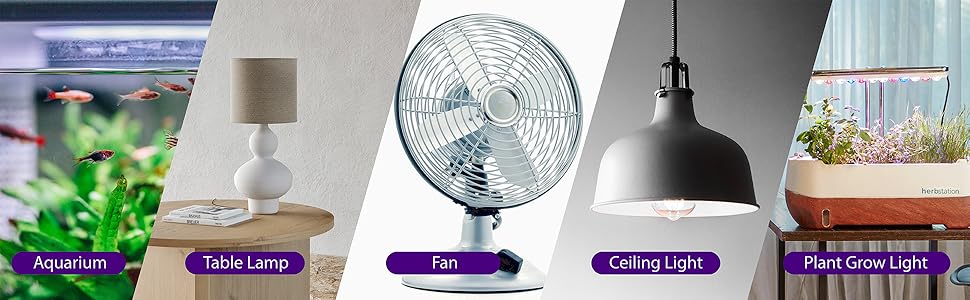
Image: The random function helps enhance home security by simulating occupancy.
Penyelenggaraan
- Clean the timer with a dry, soft cloth. Do not use liquid cleaners or aerosols.
- Ensure the timer is unplugged before cleaning.
- Simpan di tempat yang sejuk dan kering apabila tidak digunakan.
Menyelesaikan masalah
| Masalah | Kemungkinan Punca | Penyelesaian |
|---|---|---|
| Paparan kosong atau tidak menentu. | Internal battery is low or needs reset. | Plug the timer into a live outlet for 30 minutes to charge. Press the Tetapkan semula butang. |
| Peranti tidak HIDUP/MATI pada waktu yang diprogramkan. | Timer is not in AUTO mode, or program is incorrect. | Tekan MANUAL until "AUTO" is displayed. Verify program settings (ON/OFF times, days). |
| Random function is not working. | Timer is not in AUTO mode, or random function is not activated. | Pastikan pemasa berada dalam keadaan AUTO mod. Tekan ke R button to activate (an "R" should appear). |
| Peranti yang disambungkan tidak menerima kuasa. | Timer is OFF, or device is faulty. | Periksa sama ada pemasa berada dalam keadaan ON or AUTO mode with an active ON program. Test the connected device in a different outlet. |
Spesifikasi
- Nombor Model: C-10800FCUS
- Voltage: 125V AC
- semasa: 15A
- Wattage: 1875W
- Outlet: 2 Cawangan Berasaskan
- Program: 8 program HIDUP/MATI
- Bateri: Nonstandard Battery (included, non-replaceable)
- Dimensi: Kira-kira 3.5 x 3.5 x 1.7 inci (88.9 x 88.9 x 43.5 mm)
- Pensijilan: Tersenarai ETL

Image: Physical dimensions and ETL certification details of the timer.
Waranti dan Sokongan
Fosmon provides a Waranti Seumur Hidup Terhad for this product. This warranty covers defects in materials and workmanship under normal use. For warranty claims or technical support, please contact Fosmon customer service.
Sokongan Pelanggan: Refer to the official Fosmon website or product packaging for contact information.


