pengenalan
Thank you for choosing the TOPTECH Audio Angel-12 Bluetooth Speaker. This 12-inch LED rechargeable wireless portable speaker system is designed to deliver powerful and clear sound for various applications, including live performances, karaoke, and general audio playback. It features Bluetooth connectivity, a microphone input, and convenient portability with wheels and a handle. This manual provides detailed instructions for setup, operation, maintenance, and troubleshooting to ensure you get the most out of your device.
Maklumat Keselamatan
Please read and understand all safety instructions before using the speaker. Keep this manual for future reference.
- Jangan dedahkan pembesar suara kepada air atau kelembapan berlebihan.
- Elakkan meletakkan pembesar suara berhampiran sumber haba seperti radiator, daftar haba, dapur atau peralatan lain (termasuk amppenghidup) yang menghasilkan haba.
- Gunakan hanya lampiran/aksesori yang ditentukan oleh pengilang.
- Cabut palam pembesar suara semasa ribut petir atau apabila tidak digunakan untuk tempoh yang lama.
- Rujuk semua perkhidmatan kepada pegawai perkhidmatan yang berkelayakan. Servis diperlukan apabila alat telah rosak dengan cara apa pun.
- Jangan sekat sebarang bukaan pengudaraan. Pasang mengikut arahan pengilang.
- Lindungi kord kuasa daripada berjalan atau tersepit, terutamanya pada palam, bekas kemudahan dan tempat keluar dari radas.
Kandungan Pakej
Pastikan semua item yang disenaraikan di bawah terdapat dalam pakej anda:
- Audio Angel-12 Bluetooth Speaker
- Mikrofon Berwayar
- Penyesuai Kuasa/Kabel Pengecasan
- Manual Pengguna (dokumen ini)

Image: The Audio Angel-12 Bluetooth Speaker, showing its front view with colorful LED lights and the retractable handle extended. This image represents the main unit included in the package.
Produk Selesaiview
Familiarize yourself with the various components and controls of your Audio Angel-12 speaker.
Rajah 1: Depan View. Shows the main speaker grille, LED light panels, and the overall design.

Figure 2: Top Control Panel. Displays the various knobs, buttons, and ports for controlling the speaker's functions.

Rajah 3: Sisi View. Highlights the robust casing and design features.
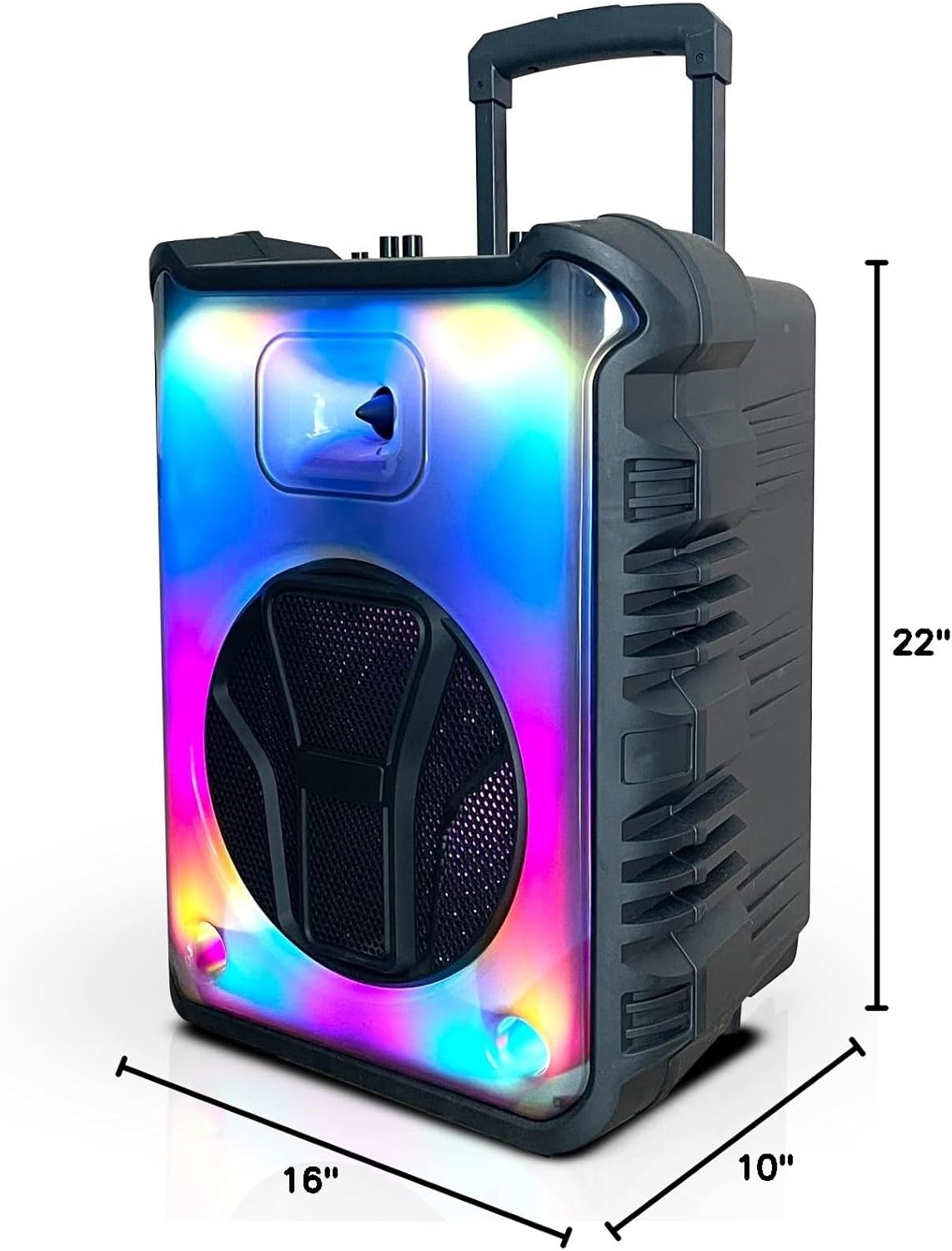
Figure 4: Dimensions. Illustrates the speaker's height (22"), width (16"), and depth (10").
Ciri Panel Kawalan:
- Butang Kuasa: Menghidupkan/mematikan pembesar suara.
- Tombol Kelantangan: Melaraskan kelantangan induk.
- Input Mikrofon (MIC IN): Connects the wired microphone.
- Port USB: Untuk main balik pemacu kilat USB.
- Slot Kad TF: Untuk main balik kad TF (MicroSD).
- Input Tambahan (AUX IN): Untuk menyambungkan peranti audio luaran melalui kabel 3.5mm.
- Butang Mod: Switches between Bluetooth, FM Radio, USB, and TF Card modes.
- Butang Main/Jeda: Mengawal main balik dalam mod media.
- Butang Trek Sebelumnya/Seterusnya: Navigates through tracks or FM radio stations.
- Butang Lampu LED: Mengawal kesan cahaya LED.
Persediaan
Mengecas Speaker:
Before first use, fully charge the speaker. Connect the provided power adapter to the speaker's charging port and plug it into a standard wall outlet. The charging indicator light will illuminate. Once fully charged, the light may change color or turn off. A full charge provides up to 6 hours of playtime.
Menghidupkan/Mematikan:
Tekan dan tahan butang Butang Kuasa on the control panel to turn the speaker on or off.
Menyambung Mikrofon:
Insert the plug of the wired microphone into the MIC DALAM port on the speaker's control panel. Adjust the microphone volume using the dedicated microphone volume knob (if available) or the main volume knob.
Beroperasi
Pairing Bluetooth:
- Turn on the Audio Angel-12 speaker. It will automatically enter Bluetooth pairing mode, indicated by a flashing Bluetooth indicator light or an audible prompt.
- Dayakan Bluetooth pada telefon pintar anda atau peranti lain yang serasi.
- Cari untuk "Angel-12" or "TOPTECH Speaker" in your device's Bluetooth list.
- Select the speaker to connect. Once paired, you will hear a confirmation sound, and the Bluetooth indicator light will become solid.
- Anda kini boleh menstrim audio secara wayarles dari peranti anda ke pembesar suara.
Main balik Kad USB/TF:
- Insert a USB flash drive or TF (MicroSD) card into the respective port on the control panel.
- Pembesar suara akan bertukar secara automatik ke mod USB atau kad TF dan mula memainkan audio files. Jika tidak, tekan Butang Mod to select the correct input.
- Gunakan Main/Jeda dan Trek Sebelumnya / Seterusnya butang untuk mengawal main balik.
Radio FM:
- Tekan ke Butang Mod berulang kali sehingga anda memasuki mod Radio FM.
- Tekan ke Butang Main/Jeda once to initiate an automatic scan for available FM stations. The speaker will save all found stations.
- Gunakan Trek Sebelumnya / Seterusnya butang untuk menavigasi antara stesen yang disimpan.
Penggunaan Mikrofon:
Once the microphone is connected, simply speak or sing into it. Adjust the microphone volume and echo effects (if available) using the corresponding knobs on the control panel for optimal sound.
Kesan Cahaya LED:
Tekan ke Butang Lampu LED to cycle through different light modes or to turn the LED lights off. The speaker features dynamic light displays that can enhance your audio experience.
Penyelenggaraan
Pembersihan:
- Sentiasa matikan dan cabut plag pembesar suara sebelum membersihkan.
- Use a soft, dry cloth to wipe the exterior of the speaker.
- Jangan gunakan pembersih cecair, aerosol atau bahan kimia yang kasar, kerana ia boleh merosakkan kemasan atau komponen dalaman.
Storan:
- Simpan pembesar suara di tempat yang sejuk dan kering jauh dari cahaya matahari langsung dan suhu yang melampau.
- Jika menyimpan untuk tempoh yang lama, cas bateri secara berkala (cth., setiap 3 bulan) untuk mengekalkan kesihatan bateri.
Penjagaan Bateri:
- Elakkan menyahcas sepenuhnya bateri dengan kerap.
- Do not leave the speaker plugged in for excessively long periods after it is fully charged.
Menyelesaikan masalah
If you encounter issues with your speaker, refer to the following table for common problems and solutions.
| Masalah | Penyelesaian yang Mungkin |
|---|---|
| Speaker tidak dihidupkan. | Ensure the battery is charged. Connect the power adapter and try again. |
| Tiada bunyi dari pembesar suara. | Check the volume level on both the speaker and the connected device. Ensure the correct input mode (Bluetooth, USB, AUX) is selected. |
| Peranti Bluetooth tidak boleh berpasangan. | Ensure the speaker is in Bluetooth pairing mode. Move the speaker closer to the device. Turn off and on Bluetooth on your device. Forget the speaker from your device's Bluetooth list and try pairing again. |
| Mikrofon tidak berfungsi. | Ensure the microphone is securely plugged into the MIC IN port. Check microphone volume settings. Test with another microphone if possible. |
| Penerimaan radio FM yang lemah. | Extend the antenna fully (if applicable). Try repositioning the speaker to improve signal. |
Spesifikasi
| Nama Model | Angel-112 |
| Jenama | TOPTECH |
| Saiz Pembesar Suara | 12 Inci |
| Dimensi Produk | 10"D x 16"W x 22"H |
| Sumber Kuasa | Dikuasakan Bateri |
| Teknologi Komunikasi Tanpa Wayar | Bluetooth, FM |
| Teknologi Ketersambungan | Tambahan, Bluetooth, USB |
| Ciri Khas | Bluetooth, Built In Microphone Input, Display, Radio, USB Port |
| Komponen yang Disertakan | Mikrofon Berwayar |
| UPC | 752574407241 |
Sokongan Pelanggan
For further assistance, technical support, or warranty inquiries, please contact TOPTECH customer service. Refer to the product packaging or the official TOPTECH webtapak untuk maklumat hubungan yang paling terkini.
Anda juga boleh melawat TOPTECH Store on Amazon untuk mendapatkan lebih banyak maklumat produk dan sumber sokongan.


