1. Pengenalan
Thank you for choosing the OQIMAX GH8013 Digital Projection Alarm Clock. This manual provides detailed instructions for the proper setup, operation, and maintenance of your device. Please read this manual thoroughly before use and retain it for future reference.
Maklumat Keselamatan
- Jangan dedahkan peranti kepada suhu yang melampau, cahaya matahari langsung atau kelembapan yang tinggi.
- Elakkan daripada menjatuhkan atau meletakkan peranti kepada kesan yang kuat.
- Use only the provided power adapter or a compatible 5V USB power source.
- Jauhkan daripada kanak-kanak.
- Jangan cuba membuka atau membaiki peranti sendiri. Hubungi sokongan pelanggan jika timbul masalah.
2. Kandungan Pakej
Sila semak pakej untuk item berikut:
- OQIMAX GH8013 Digital Projection Alarm Clock
- Kabel Kuasa USB
- Bateri Sel Butang CR2032 (untuk sandaran memori)
- Manual Pengguna

Image: Contents of the OQIMAX GH8013 package, including the alarm clock, USB cable, CR2032 battery, and user manual.
3. Produk Lebihview
Biasakan diri anda dengan komponen dan kawalan utama jam loceng anda.

Imej: Atas dan bawah view of the alarm clock with labels for SNOOZE/LIGHT, PROJECT, ALARM, SET, DOWN, UP buttons, Speaker, Projection lamp, Power port, and CR2032 battery compartment.
Ciri-ciri Utama:
- Large LED display for time and alarm.
- Adjustable display brightness (4 levels).
- Projection function with 3 brightness levels and 180° flip.
- Fungsi tunda (1-60 minit).
- Three alarm modes (Monday-Friday, Monday-Saturday, Everyday).
- 12/24 hour time format selection.
- Paparan suhu.
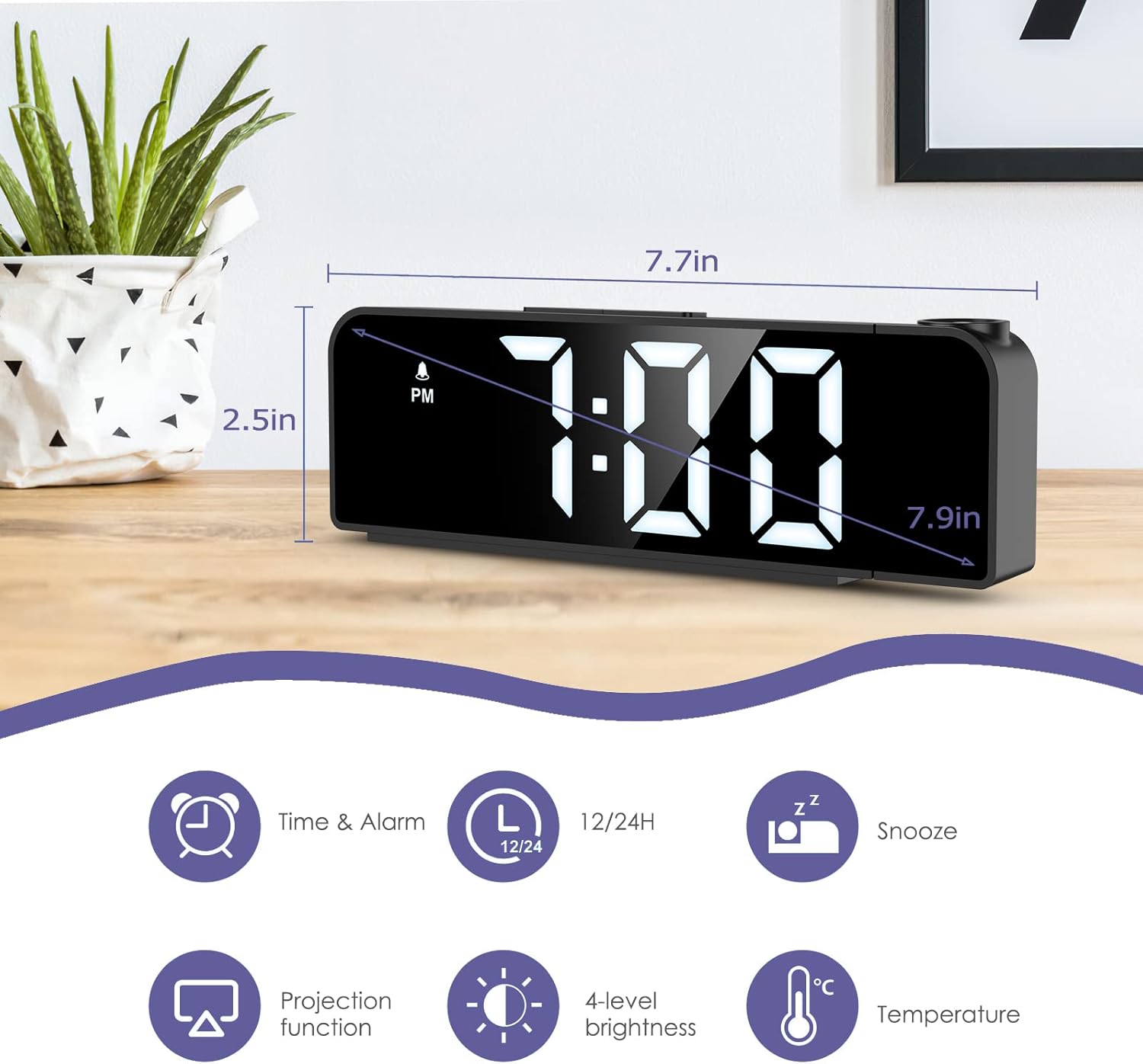
Image: The alarm clock displaying time, with icons indicating Time & Alarm, 12/24H, Snooze, Projection function, 4-level brightness, and Temperature features. Dimensions are shown as 7.7 inches length and 2.5 inches height.
4. Persediaan
4.1 Menghidupkan
- Insert the CR2032 button cell battery into the battery compartment on the bottom of the clock. This battery provides memory backup for time and alarm settings during power outages.
- Connect the USB power cable to the power port on the back of the alarm clock.
- Plug the other end of the USB cable into a 5V USB power adapter (not included) or a USB port. The display will light up.
4.2 Penetapan Masa Awal
- Tekan dan tahan butang SET butang selama 3 saat untuk memasuki mod tetapan masa. Digit jam akan berkelip.
- Gunakan UP or TURUN butang untuk melaraskan jam.
- Tekan SET sekali lagi untuk mengesahkan jam dan beralih ke tetapan minit. Digit minit akan berkelip.
- Gunakan UP or TURUN butang untuk melaraskan minit.
- Tekan SET again to confirm the minute and exit time setting mode.
4.3 Pemilihan Format 12/24 Jam
Semasa dalam mod paparan masa biasa, tekan butang UP button to switch between 12-hour and 24-hour time formats. In 12-hour format, "PM" will be displayed for afternoon hours.
5. Arahan Operasi
5.1 Menetapkan Penggera
- Tekan dan tahan butang PENGGERA butang selama 3 saat untuk memasuki mod tetapan penggera. Digit jam penggera akan berkelip.
- Gunakan UP or TURUN butang untuk melaraskan jam penggera.
- Tekan PENGGERA again to confirm the alarm hour and move to alarm minute setting. The alarm minute digits will flash.
- Gunakan UP or TURUN butang untuk melaraskan minit penggera.
- Tekan PENGGERA again to confirm the alarm minute and select the alarm mode.
- Gunakan UP or TURUN buttons to cycle through the three alarm modes:
- 1-5: Isnin hingga Jumaat
- 1-6: Isnin hingga Sabtu
- 1-7: Setiap hari
- Tekan PENGGERA again to confirm the alarm mode and exit alarm setting. The alarm icon will appear on the display, indicating the alarm is active.
To turn the alarm ON/OFF, short press the PENGGERA button in normal time display mode. The alarm icon will appear or disappear.

Image: The alarm clock display showing the three alarm modes: 1-5 (Monday to Friday), 1-6 (Monday to Saturday), and 1-7 (Everyday).
5.2 Fungsi Tunda
Apabila penggera berbunyi, tekan besar SNOOZE / CAHAYA button on top of the clock to activate the snooze function. The alarm will pause for a set duration (default is 9 minutes, adjustable from 1-60 minutes) and sound again later.
Untuk menyesuaikan tempoh tunda:
- While the alarm is sounding, press and hold the SNOOZE / CAHAYA button for 3 seconds. The snooze time will flash.
- Gunakan UP or TURUN buttons to set the desired snooze duration (1-60 minutes).
- Tekan SNOOZE / CAHAYA sekali lagi untuk mengesahkan dan keluar.
To stop the alarm completely, press any other button (e.g., PENGGERA, SET, UP, TURUN) when it is sounding.
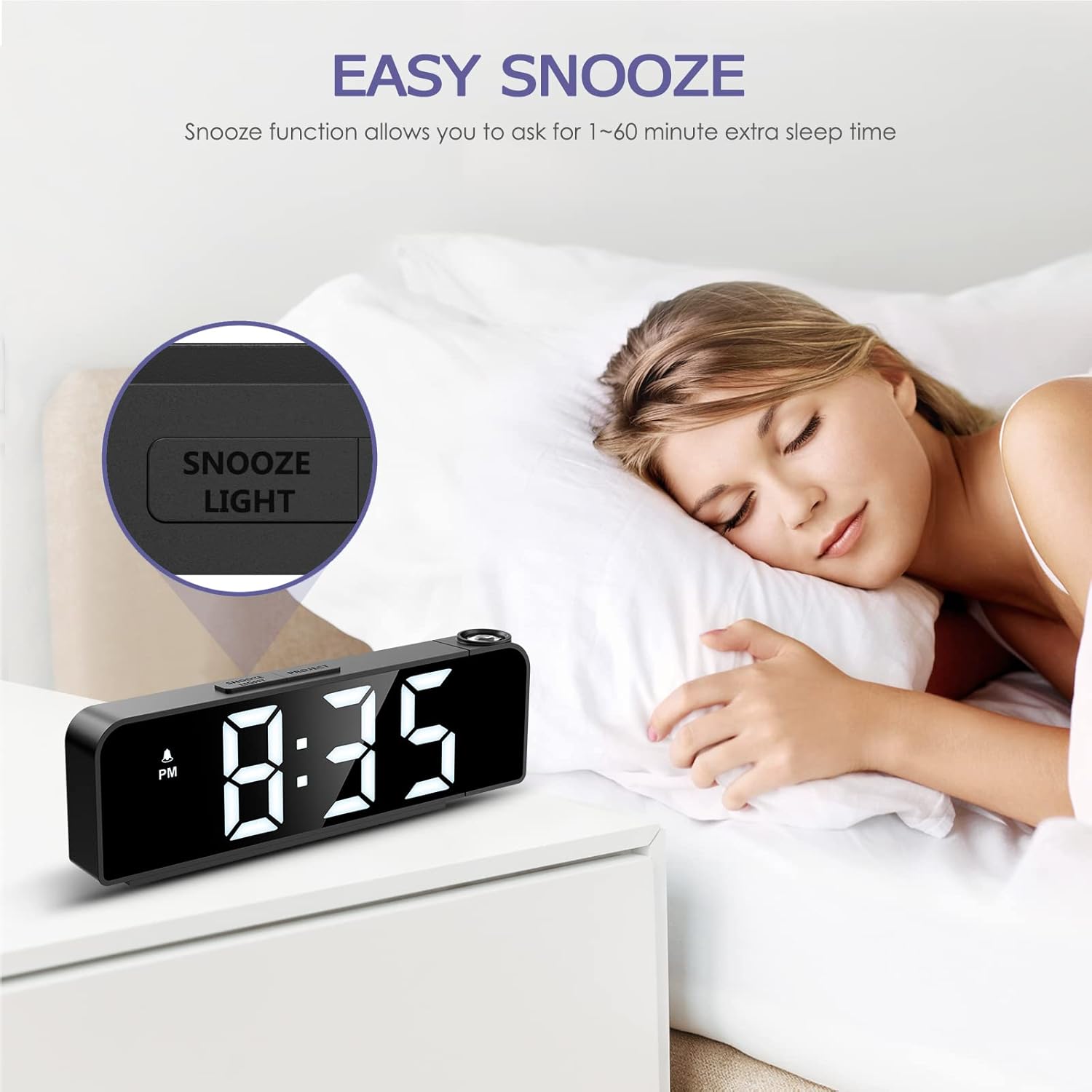
Image: A person sleeping next to the alarm clock, with the "SNOOZE/LIGHT" button highlighted, illustrating the snooze function.
5.3 Pelarasan Kecerahan Paparan
The main display has 4 adjustable brightness levels (Bright Light, Medium Light, Low Light, OFF).
Dalam mod paparan masa biasa, tekan sebentar butang SNOOZE / CAHAYA button to cycle through the brightness levels.

Image: The alarm clock display shown at Bright Light, Medium Light, Low Light, and OFF brightness settings.
5.4 Fungsi Unjuran
The alarm clock can project the time onto a wall or ceiling.
- Tekan ke PROJEK button to turn the projection ON/OFF.
- To adjust the projection brightness (3 levels), press the PROJEK button repeatedly while the projection is active.
- The projection can be rotated 180 degrees for optimal viewing. Manually adjust the projection lens on the side of the clock to change the angle.
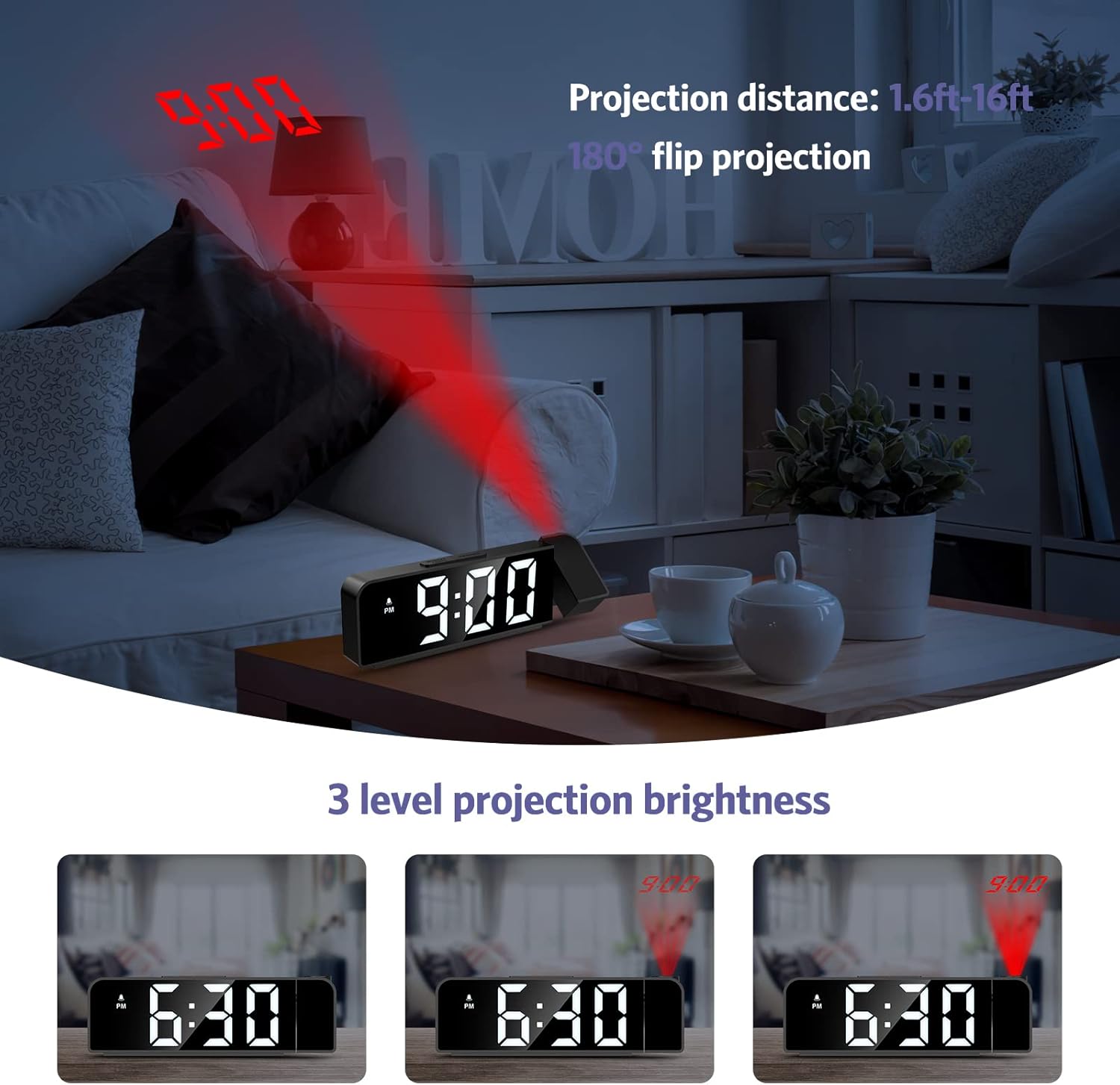
Image: The alarm clock projecting the time "9:00" onto a wall, demonstrating the projection distance (1.6ft-16ft) and 180° flip projection feature. Three levels of projection brightness are also shown.

Image: Four different scenarios showing the alarm clock projecting time onto various surfaces like a wall above a desk, a bedroom wall, and a ceiling while a person is in bed.
5.5 Paparan Suhu
The alarm clock displays the ambient temperature. This feature is automatic and does not require manual setting.
6. Penyelenggaraan
- Bersihkan peranti dengan kain lembut dan kering. Jangan gunakan pembersih atau pelarut yang melelas.
- Pastikan peranti dicabut plag sebelum dibersihkan.
- If the backup battery (CR2032) needs replacement, ensure the clock is powered on via USB to retain settings during the battery change.
7. Penyelesaian masalah
| Masalah | Kemungkinan Punca | Penyelesaian |
|---|---|---|
| Paparan dimatikan atau malap. | No power or display brightness set to OFF. | Ensure the USB power cable is securely connected. Press the SNOOZE / CAHAYA button to adjust display brightness. |
| Penggera tidak berbunyi. | Penggera tidak diaktifkan atau ditetapkan dengan tidak betul. | Check if the alarm icon is displayed. If not, short press the PENGGERA button to activate. Verify alarm time and mode settings. |
| Projection is blurry or upside down. | Projection focus or orientation needs adjustment. | Manually rotate the projection lens to adjust the angle. The device supports 180° flip projection. |
| Time resets after power loss. | CR2032 backup battery is dead or missing. | Replace the CR2032 button cell battery. Ensure it is inserted correctly. |
8. Spesifikasi
- model: GH8013
- Jenama: OQIMAX
- Bahan: Akrilonitril Butadiena Stirena (ABS)
- Jenis Paparan: LED digital
- Sumber Kuasa: USB Cable (DC 5V)
- Bateri Sandaran: CR2032 Button Cell (included)
- Dimensi: 20.9 x 8.4 x 4.7 cm (lebih kurang 7.7 x 3.3 x 1.85 inci)
- Berat: 200 gram (lebih kurang 0.44 paun)
- Ciri Khas: Adjustable Brightness, Snooze, Projection Function, 12/24H Format, Temperature Display, Multiple Alarm Modes
9. Waranti dan Sokongan
OQIMAX products are designed for reliability and performance. For any questions, technical support, or warranty claims, please contact OQIMAX customer service through the retailer where the product was purchased or visit the official OQIMAX webtapak untuk maklumat hubungan.
Please have your product model (GH8013) and purchase details ready when contacting support.
