Arahan Keselamatan Penting
To reduce the risk of fire, electric shock, or injury, please read and follow all instructions and warnings before using this appliance.
- Sentiasa letakkan kipas di atas permukaan yang stabil dan rata.
- Jangan kendalikan kipas dengan kord atau palam yang rosak.
- Jauhkan kipas daripada air atau damp kawasan.
- Jangan masukkan jari atau objek asing ke dalam sebarang bukaan.
- Cabut plag kipas sebelum membersihkan atau melakukan sebarang penyelenggaraan.
- Produk ini mengandungi bahan kimia yang diketahui oleh Negeri California untuk menyebabkan kanser dan kecacatan kelahiran atau bahaya pembiakan lain.
Produk Selesaiview
The LEVOIT Classic 42-inch Tower Fan (Model: LTF-F422-WUS) is designed to provide powerful and quiet air circulation for your home. It features a DC motor for energy efficiency and a user-friendly design.

Imej: Depan view of the LEVOIT Classic 42-inch Tower Fan in white, showing its sleek design, digital display, and the included remote control. Blue arrows indicate airflow and oscillation.
Ciri-ciri Utama:
- Aliran Udara Kuat: Experience 1252 CFM airflow with speeds up to 25ft/s.
- Operasi senyap: Operates as low as 25dB, ideal for bedrooms and quiet environments.
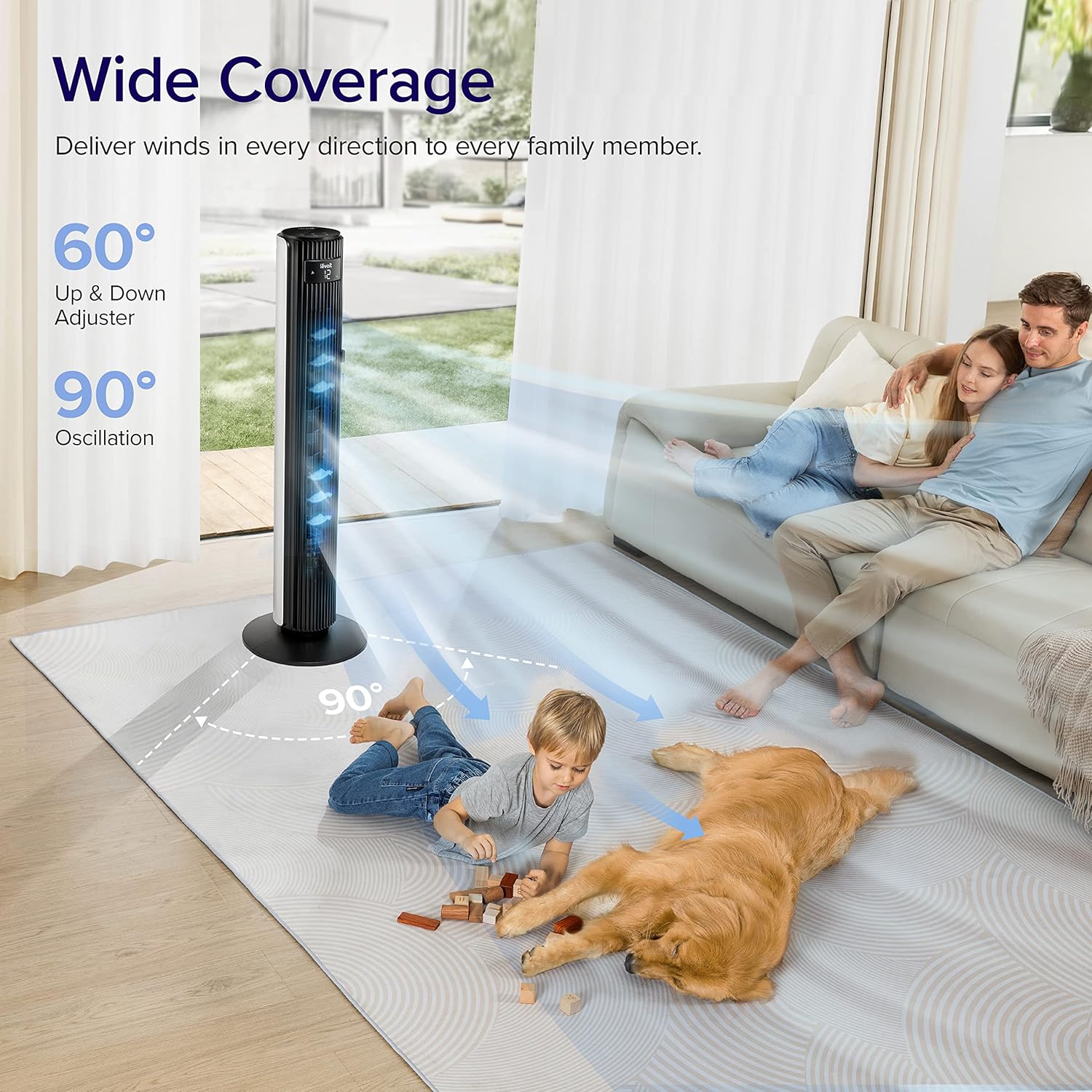
- Ayunan Lebar: Features 90° horizontal and 60° vertical oscillation for comprehensive air distribution.
- Keselesaan Boleh Disesuaikan: Offers 12 speed settings and 4 modes (Normal, Auto, Turbo, Advanced Sleep).
- Temperature-Responsive: Built-in sensor adjusts fan speed based on room temperature in Auto mode.
- Penyelenggaraan mudah: Detachable back cover and filter for thorough cleaning.
- Reka Bentuk Mesra Pengguna: Includes a hidden handle and built-in remote storage.
Panduan Persediaan
1. Menyahkotak dan Semakan Komponen
Carefully open the box from the indicated side and remove all components. Ensure all parts are present before proceeding with assembly.
Video: This video demonstrates the unboxing process, base assembly, remote control storage, and fan blade removal for cleaning.
2. Perhimpunan Pangkalan
The fan base comes in two halves. Align the two pieces and attach them together securely. Unscrew the nut from the bottom of the tower fan, then attach the assembled base to the fan and fasten the nut to secure it.

Image: Diagram illustrating the assembly of the fan base, showing how the two halves connect and attach to the main fan unit.
3. Persediaan Alat Kawalan Jauh
The remote control comes with an insulating tab to preserve battery life. Pull out this tab before first use. The remote can be stored neatly in a dedicated slot on the back of the fan.
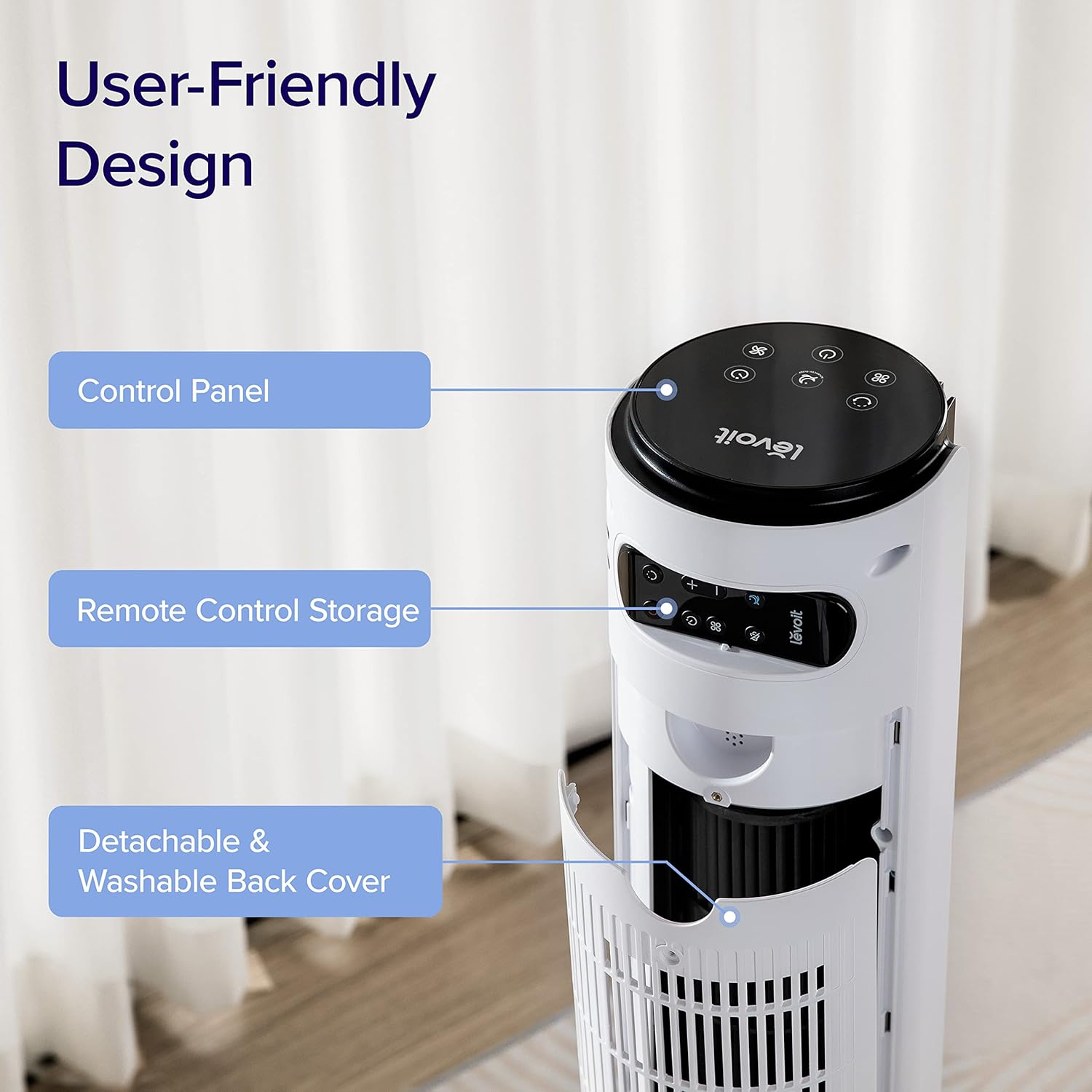
Imej: Jarak dekat view of the top rear of the LEVOIT Tower Fan, highlighting the integrated storage compartment for the remote control.
Operating Your Tower Fan
Your LEVOIT tower fan offers various settings for personalized comfort.
1. Panel Kawalan dan Paparan
The fan features a touch-sensitive control panel on top and an LED display on the front. The display shows current settings such as speed, mode, and timer.
Imej: Atas ke bawah view of the LEVOIT Tower Fan's control panel with various touch buttons for power, mode, speed, oscillation, and timer. The front LED display shows the current fan speed.
2. Mod Operasi
- Mod Biasa: Default mode allowing manual speed adjustment.
- Mod Auto: Fan speed adjusts automatically based on room temperature detected by the built-in sensor.
- Mod Turbo: Provides quick cooling and air circulation, starting at the highest speed with oscillation. Speed decreases as room temperature drops.
- Advanced Sleep Mode: Display and sound automatically turn off after 5 seconds. Fan does not oscillate for the first hour, then oscillates and decreases speeds to maintain comfort. Speed then changes by temperature.
3. Speed and Oscillation
- Tetapan 12-Kelajuan: Choose from gentle breezes (1-3) to storm-strength winds (10-12).
- 90° Horizontal Oscillation: Mengedarkan udara merentasi kawasan yang luas.
- 60° Vertical Oscillation: Adjusts airflow up to 30° up or down for targeted cooling.

Image: A family and a dog enjoying the wide coverage of the LEVOIT Tower Fan's 90-degree horizontal and 60-degree vertical oscillation, illustrating effective air distribution.
4. Fungsi Pemasa
Set the fan to automatically turn off after a specified period, up to 12 hours, for energy saving and convenience.
Penyelenggaraan dan Pembersihan
Regular cleaning ensures optimal performance and longevity of your fan.
1. Detachable Back Cover and Filter
Unlike traditional tower fans, the LEVOIT Classic features a detachable back cover and filter for easy and thorough cleaning. This allows access to the wind wheel for maintenance.

Image: Illustration of the LEVOIT Tower Fan's detachable back cover and internal fan blade, submerged in water to demonstrate its washable components for hassle-free cleaning.
2. Arahan Pembersihan
- Cabut kipas sebelum membersihkan.
- Use a soft cloth or brush to clean the exterior surfaces.
- To clean the internal wind wheel, remove the screw under the remote storage slot, then remove the back cover. Locate and remove the screw at the bottom of the fan blade, then carefully pull out the fan blade. Clean with a soft cloth or water.
- Pastikan semua bahagian kering sepenuhnya sebelum dipasang semula.
Panduan Penyelesaian Masalah
| Masalah | Penyelesaian |
|---|---|
| Fan suddenly starts to oscillate. | This is normal in Advanced Sleep Mode. It automatically starts oscillating after one hour of operation. |
| Air output decreased after cleaning the wind wheel. | Ensure screws are aligned with the flat surface of the motor shaft during installation, not the arc surface. Incorrect alignment will reduce air output. |
| Fan suddenly stops. | Check if the timer was accidentally set. Kindly check and try again. |
| Top control panel is not responsive. | Check if the fan is in Advanced Sleep Mode or if the screen is manually turned off. In screen-off state, the operation panel enters a semi-sleep state to prevent accidental touch. Press twice to wake up the panel and then adjust settings. |
Spesifikasi Produk
- Jenama: LEVOIT
- Nama Model: Classic 42-inch
- Nombor Model: LTF-F422-WUS
- warna: putih
- Dimensi Produk: 6.3"D x 6.7"W x 42.4"H
- Berat Barang: 11 paun
- Sumber Kuasa: DC
- Wattage: 26 watt
- Tahap Bunyi: 25 dB
- Kapasiti Aliran Udara: 1252 Kaki Kubik Seminit (CFM)
- Bilangan Tahap Kuasa: 12
- Pengayun: 90° Mendatar, 60° Menegak
- Pemasa: 12 Jam
- Kaedah Kawalan: Jauh, Sentuh
- Komponen yang Disertakan: Jauh
- Bahan: plastik
- Pensijilan: CA65, FCC, TSCA
Waranti dan Sokongan
LEVOIT products come with a limited warranty. For detailed warranty information and customer support, please refer to the official LEVOIT webtapak atau hubungi perkhidmatan pelanggan mereka.
LEVOIT Customer Support:
- Visit the official LEVOIT Store: Kedai LEVOIT di Amazon
- For further assistance, refer to the contact information provided in your product packaging or on the LEVOIT webtapak.


