1. Pengenalan
Thank you for choosing the SOLIOM S40 3G/4G LTE Cellular Solar Security Camera. This manual provides detailed instructions for the proper installation, operation, and maintenance of your camera. Please read this manual thoroughly before using the product to ensure correct usage and to prevent damage.
Maklumat Keselamatan Penting:
- Pastikan kamera dipasang di lokasi yang stabil untuk mengelakkan terjatuh.
- Do not expose the camera to extreme temperatures or corrosive environments.
- Use only the recommended power accessories.
- Jauhkan daripada kanak-kanak.
2. Produk Lebihview
2.1 Komponen Produk
The SOLIOM S40 camera package typically includes the following items:
- SOLIOM S40 3G/4G LTE Cellular Solar Security Camera
- Panel Suria
- Pendakap dan Skru Pemasangan
- Kabel Pengecas USB
- Nano SIM Card (pre-installed or included separately)
- Micro SD Card (pre-installed or included separately)
- Manual Pengguna (dokumen ini)
2.2 Ciri-ciri Utama
- 3G/4G LTE Connectivity: Operates without Wi-Fi, ideal for remote locations.
- Berkuasa Suria: Equipped with a solar panel for continuous power, reducing the need for manual recharging.
- Video HD Penuh 1080p: Menyediakan foo video yang jelas dan terperincitage.
- Fungsi Pan & Condongkan: Offers 355° horizontal pan and 90° vertical tilt for wide area coverage.
- Pengesanan Gerakan PIR: Advanced passive infrared sensor detects human and animal movement, minimizing false alarms.
- Penglihatan Malam Warna: Enhanced night vision capabilities with spotlight for full-color viewdalam keadaan cahaya malap.
- Audio Dua hala: Mikrofon dan pembesar suara terbina dalam untuk komunikasi masa nyata.
- IP66 Tahan Cuaca: Reka bentuk tahan lama untuk kegunaan luaran dalam pelbagai keadaan cuaca.
- Tempatan & Storan Awan: Supports Micro SD card storage and optional cloud storage.

Figure 2.1: SOLIOM S40 Camera with Solar Panel

Figure 2.2: Camera operating in a remote location without Wi-Fi or power outlet.
3. Persediaan
3.1 Sebelum Anda Bermula
- Cas Bateri: Before initial use, fully charge the camera's internal battery using the provided USB cable. Connect the USB cable to the camera's charging port and a 5V/2A USB power adapter (not included).
- Masukkan Kad SIM: Ensure the Nano SIM card is active and has a data plan. Open the rubber cover on the camera body to access the SIM card slot. Insert the Nano SIM card with the gold contacts facing down, following the diagram.
- Masukkan Kad SD Mikro: If not pre-installed, insert a Micro SD card (up to 128GB, Class 10 or higher recommended) into the designated slot for local video storage.

Figure 3.1: SIM and SD Card Installation
3.2 Muat Turun Apl dan Pendaftaran Akaun
Download the 'SOLIOM+' app from the App Store (iOS) or Google Play Store (Android). Follow the on-screen instructions to register a new account and log in.
3.3 Berpasangan Kamera
- Open the SOLIOM+ app and tap 'Add Device' or the '+' icon.
- Select '4G Camera' from the device list.
- Follow the in-app prompts to scan the QR code on the camera or manually enter the device ID.
- Setelah disambungkan, anda boleh menamakan kamera anda dan mula secara langsung viewing.
3.4 Pemasangan Fizikal
Choose a suitable location for installation, ensuring good 4G signal reception and sufficient sunlight exposure for the solar panel. The camera is IP66 weather-resistant, suitable for outdoor environments.
- Memasang Kamera: Use the provided mounting bracket and screws to securely attach the camera to a wall or pole. Ensure the camera has a clear line of sight to the area you wish to monitor.
- Meletakkan Panel Suria: Mount the solar panel in a location that receives direct sunlight for several hours a day. Connect the solar panel cable to the camera's charging port.

Figure 3.2: Wire-Free Installation with Solar Power

Figure 3.3: IP66 Weather-resistant Design
4. Beroperasi
4.1 Antara Muka Aplikasi Lebihview
Upon opening the SOLIOM+ app, you will see a list of your connected cameras. Tap on a camera to access its live view dan pilihan kawalan.
4.2 Langsung View dan Main semula
- Langsung View: Tap on the camera feed to see real-time video.
- Main balik: Akses foo yang dirakamtage from the Micro SD card or cloud storage via the playback option in the app. You can filter by date and time.
4.3 Kawalan Pan/Condong
Dalam siaran langsung view interface, use the on-screen joystick or directional arrows to remotely control the camera's pan (355° horizontal) and tilt (90° vertical) movements to adjust the viewsudut ing.

Rajah 4.1: Fungsi Pan dan Tilt
4.4 Pengesanan Gerakan dan Makluman
The camera uses PIR (Passive Infrared) technology for accurate motion detection. When motion is detected, the camera can:
- Send push notifications to your smartphone.
- Record video clips to the SD card or cloud.
- Activate the built-in spotlight and/or siren alarm.
Adjust motion detection sensitivity and alert settings within the app to suit your needs.
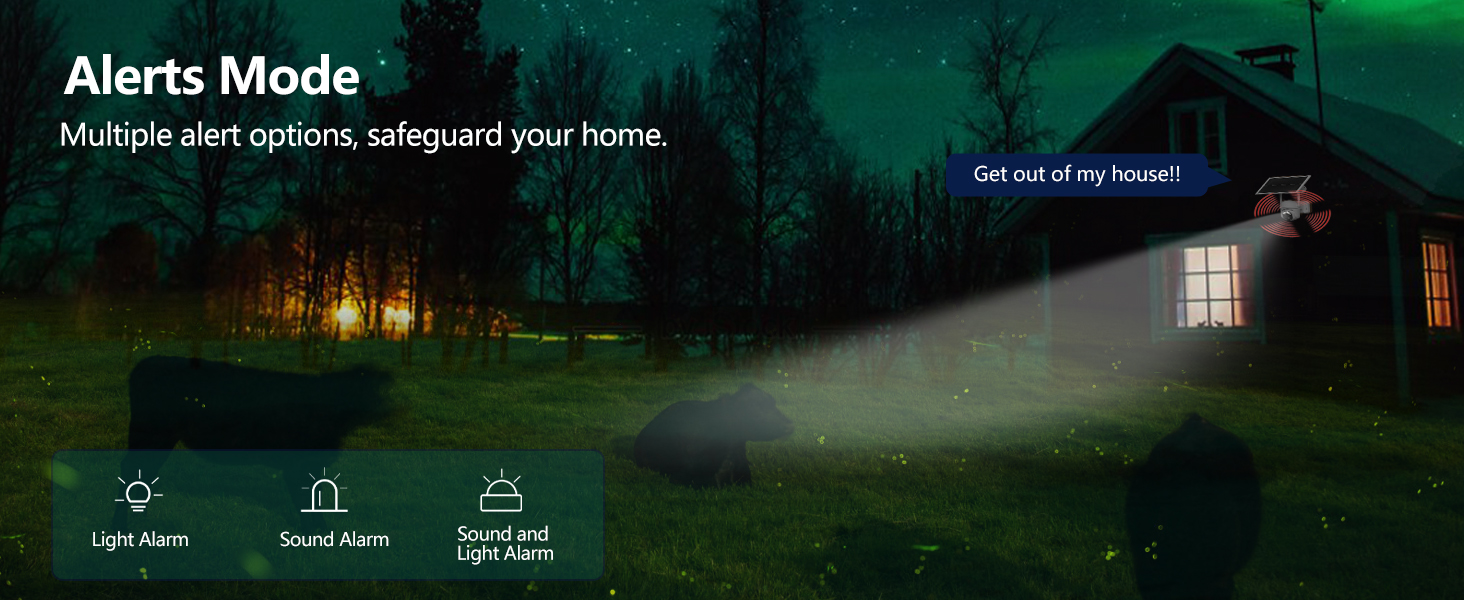
Figure 4.2: Alerts Mode (Light and Sound Alarm)
4.5 Penglihatan Malam
The SOLIOM S40 features advanced night vision modes:
- Penglihatan Malam Inframerah: Provides clear black and white video in complete darkness.
- Penglihatan Malam Warna: When motion is detected or manually activated, the built-in spotlight illuminates the area, allowing for full-color video recording at night.

Figure 4.3: Day and Night Vision Comparison
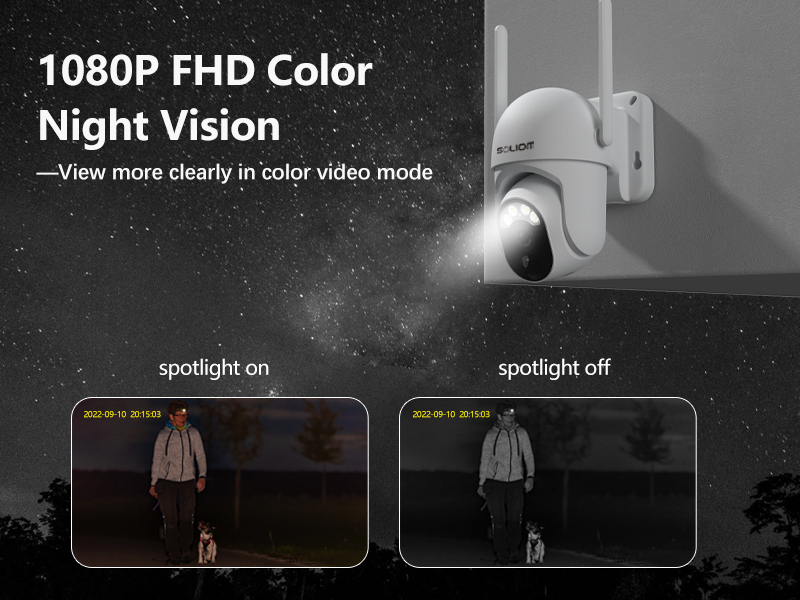
Figure 4.4: Color Night Vision with Spotlight
4.6 Audio Dua Hala
Use the microphone and speaker icons in the app's live view to enable two-way communication. This allows you to speak to visitors or deter intruders remotely.
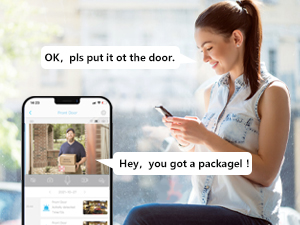
Rajah 4.5: Komunikasi Audio Dua Hala
5. Penyelenggaraan
- Pembersihan: Bersihkan kanta kamera dan panel solar secara berkala dengan kain lembutamp cloth to ensure optimal performance. Do not use harsh chemicals.
- Kesihatan Bateri: While the solar panel provides continuous charging, ensure the solar panel is free from obstructions and receives adequate sunlight. If the camera's battery level drops significantly, manually charge it via USB.
- Kemas kini Firmware: Check the SOLIOM+ app regularly for firmware updates. Keeping your camera's firmware up-to-date ensures optimal performance and security.
- Pengurusan Kad SD: If using an SD card, periodically check its storage capacity and format it through the app if necessary to maintain recording efficiency.
6. Penyelesaian masalah
- Kamera Luar Talian:
- Check 4G signal strength at the camera's location.
- Ensure the SIM card is properly inserted and has an active data plan.
- Verify the camera battery is charged.
- Restart the camera by pressing the reset button (if applicable) or power cycling.
- Kualiti Video Lemah:
- Bersihkan lensa kamera.
- Ensure adequate lighting, especially at night.
- Check 4G signal stability.
- Pengesanan Pergerakan Tidak Berfungsi:
- Adjust PIR sensitivity settings in the app.
- Pastikan kamera view is clear of obstructions.
- Check the motion detection schedule in the app.
- Battery Not Charging via Solar:
- Pastikan panel solar bersih dan bebas daripada serpihan.
- Verify the solar panel is positioned to receive direct sunlight for several hours daily.
- Check the connection cable between the solar panel and the camera.
- Tidak Dapat Bersambung ke Apl:
- Pastikan telefon pintar anda mempunyai sambungan internet yang stabil.
- Verify the camera is powered on and has a working SIM card.
- Try resetting the camera (refer to the reset button location near the SIM/SD card slots).
7. Spesifikasi
| Ciri | Spesifikasi |
|---|---|
| Nombor Model | S40-4G |
| Ketersambungan | 3G/4G LTE (SIM Card required) |
| Sumber Kuasa | Dikuasakan Bateri, Dikuasakan Suria |
| Resolusi Video | 1080 Pixels (Full HD) |
| Sudut Pan | 355 Darjah |
| Sudut Kecondongan | 90 Darjah |
| Bidang View | 360 Degrees (Pan/Tilt combined) |
| Penglihatan Malam | Infrared, Color Night Vision (with Spotlight) |
| Pengesanan Pergerakan | Penderia Gerakan PIR |
| Audio | Audio Dua Hala |
| Penyimpanan | Micro SD Card (up to 128GB), Cloud Storage (subscription required) |
| Rintangan Cuaca | IP66 |
| Dimensi (L x W x H) | 3 x 3 x 5 inci |
| Berat Barang | 2.48 paun |
8. Waranti dan Sokongan
8.1 Maklumat Waranti
SOLIOM products typically come with a limited warranty. Please refer to the warranty card included with your product or visit the official SOLIOM webtapak untuk terma dan syarat jaminan terperinci.
8.2 Sokongan Pelanggan
If you encounter any issues or have questions not covered in this manual, please contact SOLIOM customer support. Contact information can usually be found on the SOLIOM official webtapak atau pada pembungkusan produk.
Untuk maklumat terkini dan sumber sokongan, sila lawati: SOLIOM Official Store on Amazon


