pengenalan
Thank you for choosing the Mount-It! Standing Desk Converter. This product is designed to transform your traditional desk into a dynamic sit-stand workstation, promoting better posture and productivity throughout your day. This manual provides essential information for the proper assembly, operation, maintenance, and troubleshooting of your new desk converter. Please read it thoroughly before use.
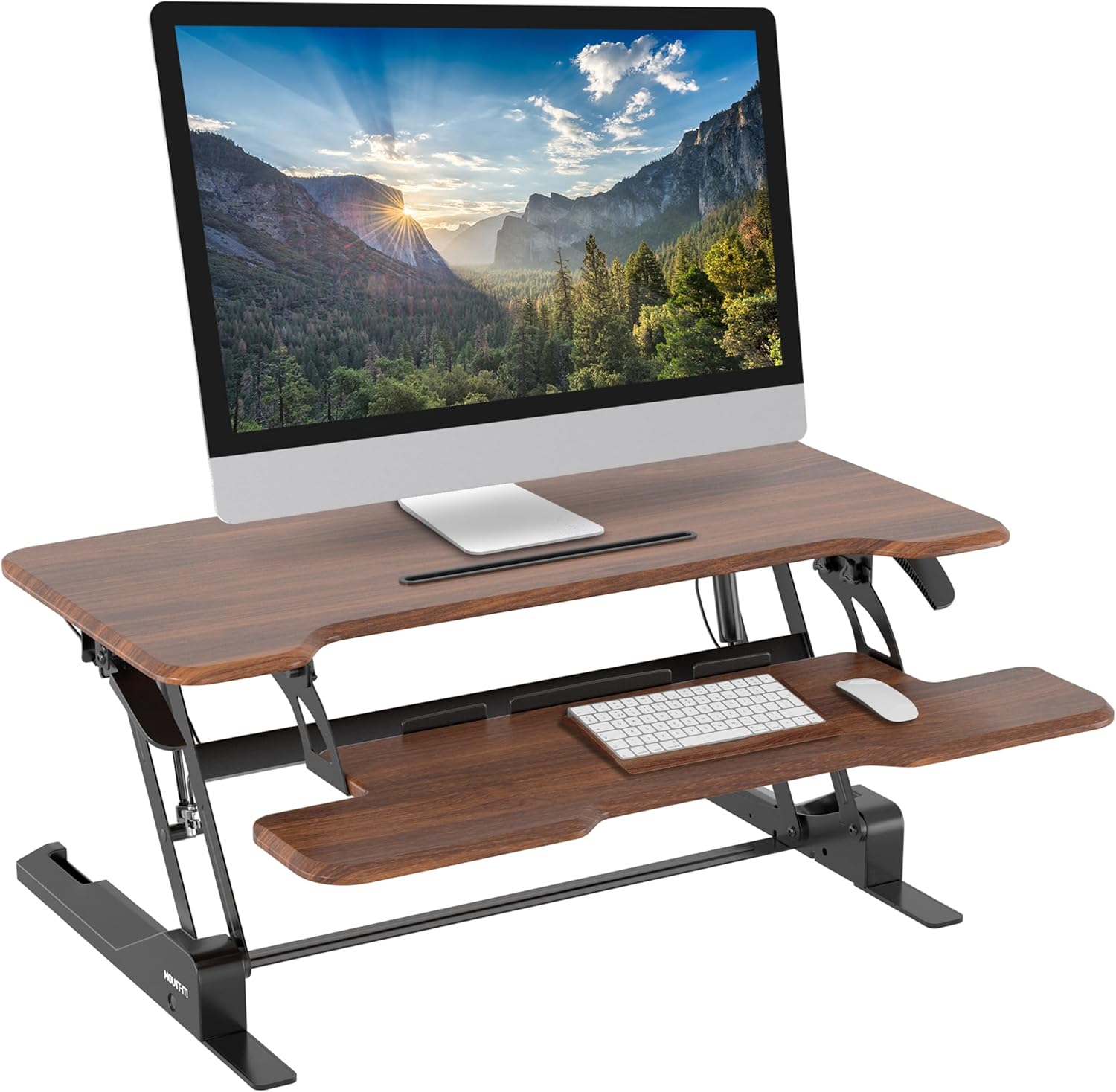
The Mount-It! Standing Desk Converter, featuring a spacious 38-inch wide desktop in Dark Walnut finish.
Ciri-ciri Produk
- 38" Wide with Easy Height Adjustment: Effortlessly raise or lower this sit-stand desk converter throughout the day for a more active workspace. This tabletop standing desk can be adjusted smoothly in height by using the single gas spring handle.
- Transform Your Workspace: Instantly convert your traditional desk into a sit-stand workstation. Ideal for home or office use, it helps you alternate between sitting and standing for improved health and productivity.
- Spacious and Versatile Design: The large 38" platform accommodates dual monitors or a monitor and laptop, while the wide keyboard tray offers ample space for a full-size keyboard and mouse. Perfect for creating an ergonomic, clutter-free setup.
- Pelarasan Ketinggian Lancar: Effortlessly adjust the height from 5.9" to 16.9" using the gas spring mechanism. Achieve your preferred position for maximum comfort and reduce strain during long working hours.
- Integrated Features for Convenience: Keep your smartphone or tablet within easy reach using the built-in device channel, complete with cable slots for seamless charging. Plus, the platform includes a grommet hole for optional monitor mount installation.
- Durable and Stylish Construction: Crafted from high-quality MDF and steel, this standing desk converter supports up to 33 lbs and features rounded edges for a modern, polished look that complements any home or office décor.
Spesifikasi
| Ciri | Perincian |
|---|---|
| Jenama | Pasang! |
| Nombor Model | MI15006 |
| Dimensi Produk (D x W x H) | 16.5"D x 38"W x 19.2"H |
| warna | Walnut Gelap |
| Gaya | moden |
| Bahan Asas | Rangka keluli |
| Jenis Bahan Atas | kayu |
| Jenis Selesai | Lakuer |
| Ciri Khas | Tanpa wayar |
| Jenis Pemasangan | Atas meja |
| Ketinggian Maksimum | 19.2 Inci |
| Ketinggian Minimum | 5.9 Inci |
| Cadangan Berat Maksimum | 33 paun |
| Perhimpunan yang Diperlukan | ya |

Detailed dimensions and 33 lb capacity of the desk converter.
Persediaan dan Perhimpunan
The Mount-It! Standing Desk Converter requires minimal assembly. Follow these simple steps to get your workstation ready:
- Buka bungkusan dan Periksa: Carefully remove all components from the packaging. Ensure all parts are present and undamaged. Refer to the packing list for a complete inventory.
- Pasangkan Dulang Papan Kekunci: Align the keyboard tray with the designated slots on the main unit. Gently slide the tray into place until it clicks or is securely seated.

Step 1: Attaching the keyboard tray to the main unit.
- Tighten the Bolts: Once the keyboard tray is in position, secure it by tightening any pre-installed bolts or screws as indicated in the included hardware pack. Ensure the tray is firm and stable.

Step 2: Tightening the bolts to secure the keyboard tray.
Your Mount-It! Standing Desk Converter is now ready for use. Place it on a stable, flat desk surface.
Arahan Operasi
The Mount-It! Standing Desk Converter features a smooth gas spring mechanism for easy height adjustment. Follow these steps to operate your converter:
- Menyelaraskan Tinggi: To raise or lower the desk converter, locate the gas spring handle (typically on the side of the main desktop). Squeeze the handle and gently guide the desktop to your desired height. Release the handle to lock it in place.
- Sit-Stand Transition: Alternate between sitting and standing positions throughout your workday to improve comfort and reduce strain. The smooth adjustment allows for frequent transitions.
- Using the Device Slot: The built-in device channel on the desktop securely holds your smartphone or tablet, keeping it within easy reach. Cable slots allow for convenient charging.
Official product video demonstrating the height adjustment and features of the Mount-It! Standing Desk Converter.

Visual representation of the sit-stand functionality, highlighting ergonomic benefits.

The integrated device slot for holding smartphones or tablets, with cable management.
Penyelenggaraan
To ensure the longevity and optimal performance of your Mount-It! Standing Desk Converter, follow these general maintenance guidelines:
- Pembersihan: Lap permukaan dengan lembut, damp kain. Elakkan bahan kimia yang keras atau pembersih kasar yang boleh merosakkan kemasan.
- Semak Sambungan: Periksa semua skru dan bolt secara berkala untuk memastikan ia ketat. Ketatkan semula jika perlu untuk mengekalkan kestabilan.
- Spring Gas: The gas spring mechanism is designed for maintenance-free operation. Do not attempt to lubricate or disassemble it.
- Kapasiti Berat: Do not exceed the maximum weight recommendation of 33 lbs to prevent damage and ensure safe operation.
Specific product care instructions are not available from the manufacturer. Please adhere to these general guidelines.

Rubber pads on the base protect your desk surface from scratches.
Menyelesaikan masalah
If you encounter any issues with your Mount-It! Standing Desk Converter, refer to the common problems and solutions below:
| Masalah | Kemungkinan Punca / Penyelesaian |
|---|---|
| Monitor shaking/unit unstable when standing | Ensure all assembly bolts, especially those for the keyboard tray, are securely tightened. Verify the desk converter is placed on a flat, stable surface. Avoid excessive force when typing. |
| Keyboard tray not going all the way down | Check for any obstructions beneath the keyboard tray or within the mechanism. Ensure the tray is correctly aligned and fully engaged in its tracks. |
| Difficulty raising or lowering the unit | Ensure the gas spring handle is fully squeezed during adjustment. If the unit is new, the mechanism may require a few uses to loosen up. Do not exceed the maximum weight capacity. |
| Limited mouse area on keyboard tray | This is a design characteristic. Consider using a compact mouse or adjusting your mouse usage habits. Ensure no cables are obstructing mouse movement. |
If the problem persists after attempting these solutions, please contact Mount-It! customer support.
Waranti dan Sokongan
Mount-It! stands behind the quality of its products. Your Standing Desk Converter is covered by a Waranti Seumur Hidup.
- Perlindungan Waranti: The lifetime warranty covers manufacturing defects in materials and workmanship. Please retain your proof of purchase.
- Sokongan Pelanggan: For technical assistance, warranty claims, or any other inquiries, please visit the official Mount-It! webtapak atau hubungi bahagian perkhidmatan pelanggan mereka.
Anda boleh mendapatkan maklumat lanjut dan butiran hubungan di Mount-It! Brand Store on Amazon.


