pengenalan
This manual provides essential information for the safe and efficient operation, installation, and maintenance of your Café™ Professional Series 30" Smart Built-In Convection Double Wall Oven. Please read this manual thoroughly before using the appliance and retain it for future reference.

Rajah 1: Depan view of the Café Professional Series 30" Smart Built-In Convection Double Wall Oven.
Maklumat Keselamatan
Always adhere to local codes and ordinances. Ensure proper grounding and ventilation. Disconnect power before servicing. Refer to the installation instructions for detailed electrical requirements.
- Jangan simpan bahan mudah terbakar di dalam atau berhampiran ketuhar.
- Use oven mitts when handling hot items.
- Awasi kanak-kanak berhampiran perkakas.
- Do not use water on grease fires; smother the fire or use a dry chemical/foam extinguisher.
Persediaan dan Pemasangan
This oven is designed for built-in installation. Ensure your cabinet cutout meets the specified dimensions for a proper fit. The oven is electric and requires appropriate electrical supply as per local codes.
Pemeriksaan Pra-Pemasangan
- Verify electrical supply matches oven requirements.
- Ensure cabinet opening dimensions are accurate.
- Confirm all packing materials are removed from the oven cavity.
SmartHQ App Connection
To utilize smart features, download the SmartHQ App on your smartphone. Follow the in-app instructions to connect your oven to your home Wi-Fi network. This enables remote control, software updates, and access to personalized features.

Figure 2: Oven installed in a kitchen cabinet, demonstrating its built-in design.
Arahan Operasi
Your Café™ Double Wall Oven offers advanced cooking technologies for versatile meal preparation.
Panel Kawalan dan Paparan
The oven features a full-color display for easy navigation of settings and cooking modes. Use the touch interface to select desired functions.

Figure 3: Oven control panel display showing menu options.
Kaedah Memasak
- Perolakan Eropah Benar dengan Udara Terus: Utilizes a third heating element and a reversing fan for even heat distribution and superior cooking results.
- Tanpa Panaskan Air Goreng: Cook crispy foods without preheating, a basket, or a special tray.
- Mod Memasak Ketepatan: Automatically track progress and adjust time/temperature for optimal results.
- Food Dehydrator: A dedicated setting for dehydrating fruits, vegetables, and making jerky.
- In-Oven Broiling: A flexible broiling element covers the full width of the drawer for even broiling.
Menggunakan Probe Suhu
Insert the precision temperature probe into the thickest part of the food. Connect the probe to the designated port inside the oven. The oven will monitor the internal temperature and alert you when the desired doneness is reached.
Kamera Dalam Ketuhar
Monitor your food's progress from your smartphone using the built-in in-oven camera. Access the live stream via the SmartHQ App without opening the oven door.
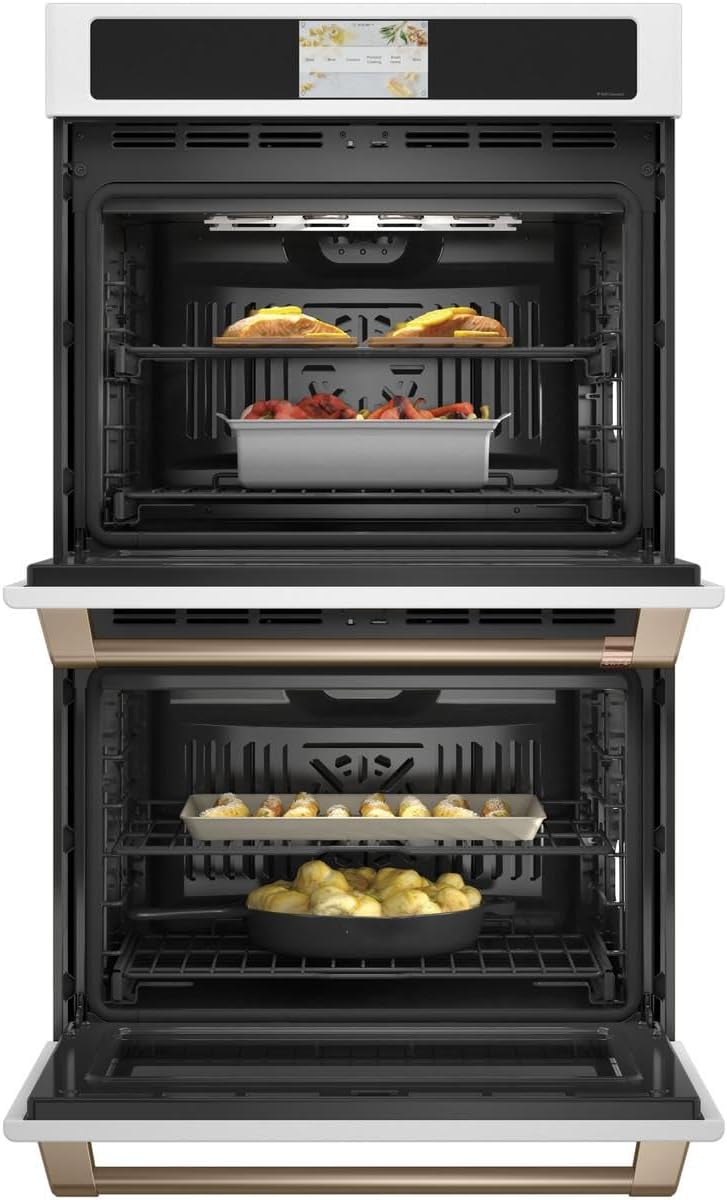
Figure 4: Oven interior with food, demonstrating cooking space.
Penyelenggaraan dan Pembersihan
Pembersihan dan penyelenggaraan yang kerap akan memastikan jangka hayat dan prestasi optimum ketuhar anda.
Kitaran Bersih Diri
The oven features a self-clean cycle that uses high temperatures to burn off food soils. Ensure all racks are removed unless they are specifically designed to remain during self-clean. The easy-glide, never-scrub racks can be left in during this cycle.

Figure 5: Empty oven interior, showing racks ready for cleaning or use.
Pilihan Pembersih Stim
For light soils, the steam clean option provides a quick and low-odor cleaning method. Follow the instructions on the display for initiating a steam clean cycle.
Pembersihan Luaran
Clean the exterior surfaces with a soft cloth and mild soap. Avoid abrasive cleaners that can damage the finish. For Matte White finish, use non-abrasive cleaners specifically designed for matte surfaces.
Menyelesaikan masalah
Sebelum menghubungi perkhidmatan, semulaview isu dan penyelesaian biasa berikut.
| Masalah | Kemungkinan Punca | Penyelesaian |
|---|---|---|
| Ketuhar tidak dipanaskan | Tiada bekalan kuasa; pemutus litar tersandung. | Periksa sambungan kord kuasa; tetapkan semula pemutus litar. |
| Masakan tidak sekata | Improper rack position; overloaded oven; dirty convection fan. | Refer to cooking guide for rack positions; avoid overcrowding; clean oven interior. |
| Paparan tidak bertindak balas | Gangguan perisian sementara; gangguan bekalan elektrik. | Turn off power at the circuit breaker for 5 minutes, then restore. |
| Isu sambungan Wi-Fi | Incorrect Wi-Fi password; router too far; network interference. | Verify password; move router closer or use extender; check for other devices on network. |
Spesifikasi
Key specifications for the Café™ Professional Series 30" Smart Built-In Convection Double Wall Oven.
| Ciri | Perincian |
|---|---|
| Jenama | Kafe™ |
| Nombor Model | CTD90DP4NW2 |
| Kapasiti | 10 Kaki Kubik (Jumlah) |
| Jenis Pemasangan | Built-In, Wall Mount |
| Jenis Bahan Api | Elektrik |
| Mod Memasak Ketuhar | Konvensyen |
| warna | Putih Matte |
| Berat Barang | 260 paun |
| Ciri Khas | Double Wall, Wi-Fi, In-Oven Camera, No Preheat Air Fry, Precision Cooking Modes, Food Dehydrator, Self-Clean, Steam Clean, Temperature Probe, Soft-Close Door |
Waranti dan Sokongan
For warranty information, please refer to the warranty card included with your appliance or visit the official Café Appliances website. For technical support or service, contact Café customer service.
No official product videos are available for this model at this time.


